By Sean Dorsett - Thursday, March 31, 2016
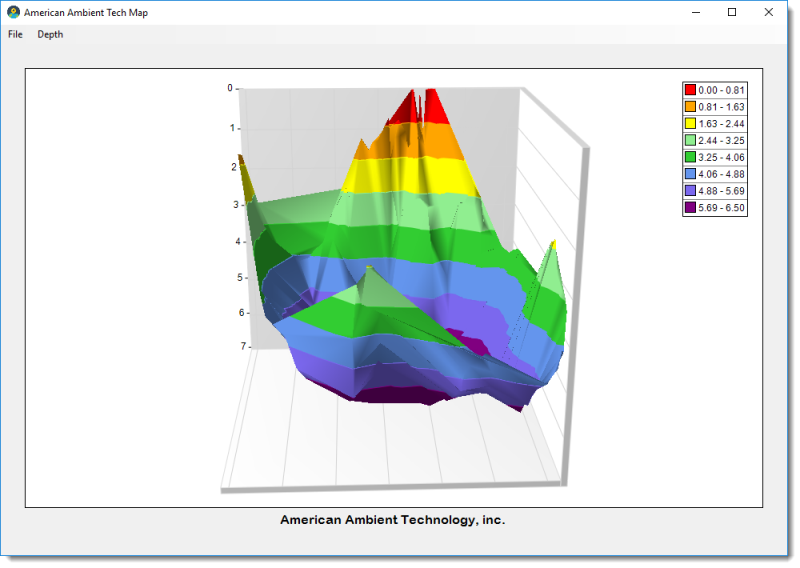
I am currently using triangulation to render a contour map and trying to determine if there is a property that I can set or a technique that I can use to smooth out the rough edges of my map. I have a data file with 800 data point over a small area and the fillowing map is rendered.
Here is the logic that I am currently using...
public void PlotChart()
{
var chart = nChartControl1.Charts[0];
chart.Series.Clear();
var triangulatedSurface = new NTriangulatedSurfaceSeries
{
Name = "Surface Map",
Legend = {Mode = SeriesLegendMode.SeriesLogic},
FillMode = SurfaceFillMode.ZoneTexture,
ShadingMode = ShadingMode.Smooth,
FrameMode = SurfaceFrameMode.Contour,
FrameColorMode = SurfaceFrameColorMode.Zone,
DrawFlat = false,
PositionValue = 0.5,
SyncPaletteWithAxisScale = false,
PaletteSteps = 8,
UsePreciseGeometry = true,
ValueFormatter = {FormatSpecifier = "0.00"},
FillStyle = new NColorFillStyle(Color.YellowGreen)
};
chart.Series.Add(triangulatedSurface);
var modGeospatialPoints = _geospatialPoints.ToList();
SetMapProperties();
// Remove unwanted depth.
var maxDepth = Convert.ToDouble(MaxDepth.SelectedIndex);
modGeospatialPoints.RemoveAll(item => item.Y > maxDepth);
foreach (var point in modGeospatialPoints)
{
triangulatedSurface.XValues.Add(point.X);
triangulatedSurface.ZValues.Add(point.Z);
triangulatedSurface.Values.Add(point.Y);
Debug.WriteLine("{0}, {1}, {2}", point.X, point.Z, point.Y);
}
chart.Refresh();
}
|
By Nevron Support - Friday, April 1, 2016
Hi Sean,
Unfortunately there is no build in way to create a smooth surface series.
|
|