By shweta jain - Friday, December 20, 2019
Hi,
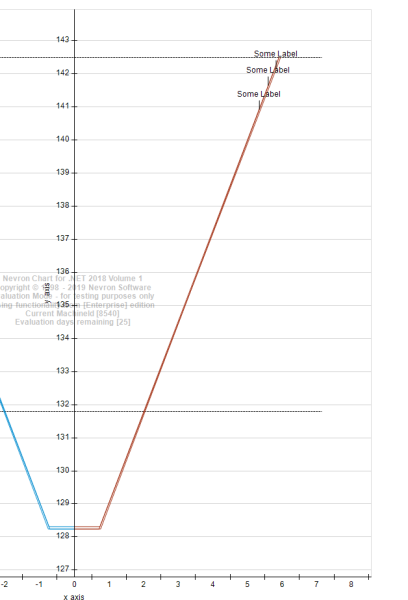
I want to change label arrow alignment to left horizontally. you can see it in attached snapshot that arrow of label pointing to upward vertically. How can I change arrow direction to horizontally left.
For showing arrow I have used this code.-
NPointSeries point = new NPointSeries();
point.Size = new NLength(0);
_cartesianChart.Series.Add(point);
point.DataLabelStyle.Visible = true;
point.DataLabelStyle.TextStyle.StringFormatStyle.VertAlign = VertAlign.Center;
point.DataLabelStyle.Visible = true;
point.UseXValues = true;
point.Values.Add(142);
point.XValues.Add(6);
point.Labels.Add("Some Label");
point.DataLabelStyle.TextStyle.BackplaneStyle.FillStyle.SetTransparencyPercent(100);
point.DataLabelStyle.TextStyle.BackplaneStyle.StandardFrameStyle.Visible = false;
point.DataLabelStyle.TextStyle.TextFormat = TextFormat.XML;
point.DataLabelStyle.Format = "<label>";
|
By Nevron Support - Monday, December 23, 2019
Hi Shweta,
You can change the text alignment using the following code:
point.DataLabelStyle.TextStyle.StringFormatStyle.HorzAlign = HorzAlign.Left;
point.DataLabelStyle.VertAlign = VertAlign.Center;
Note that the second line specifies the vertical origin of the text relative to the data point. We hope this helps – let us know if you have any questions.
|
By shweta jain - Thursday, December 26, 2019
Hello sir,
Thanks for reply, but I don't want to change text alignment. I want to change arrow direction of label from top to left/right side of data point with text. Is there any way to rotate/move arrow of label to left side. I have attached snapshot in which I have edited and added label in horizontal direction of line (label with red color arrow and highlighted text). How can I make label like this in horizontal direction of line.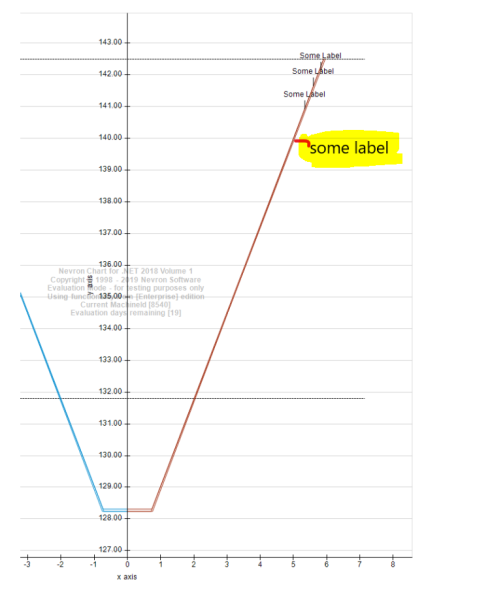
|
By Nevron Support - Friday, December 27, 2019
Hi Shweta,
Currently, you cannot control the distance from the point in the case of the horizontally aligned text. You can, however, achieve this result using a callout annotation - for example:
NChart chart = nChartControl1.Charts[0];
NLineSeries line = new NLineSeries();
line.Values.Add(10);
line.Values.Add(20);
line.Values.Add(30);
line.DataLabelStyle.Visible = false;
chart.Series.Add(line);
NRectangularCallout callout = new NRectangularCallout();
callout.Text = "Some Label";
callout.UseAutomaticSize = true;
callout.Anchor = new NDataPointAnchor(line, 1, System.Drawing.ContentAlignment.MiddleCenter, System.Drawing.StringAlignment.Center);
callout.ArrowLength = new NLength(40);
callout.ArrowBasePercent = 0;
chart.ChildPanels.Add(callout);
It creates a callout that is on the right side of the point. The problem with this approach is that you'll also need to measure the text correctly in order to dynamically produce meaningful value for the arrow length property. Let us know if you meet any problems.
|
By shweta jain - Sunday, December 29, 2019
hello sir,
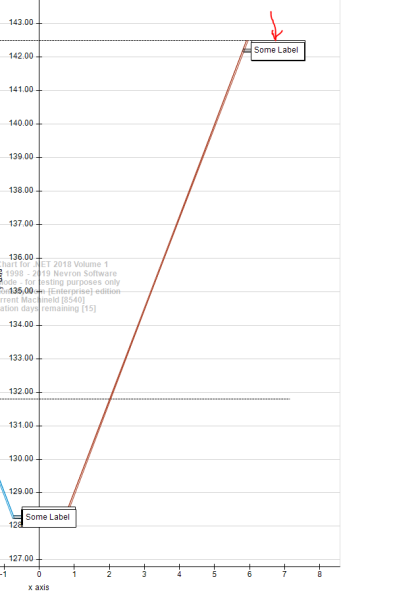
Thank you for providing solution. Now I achieved the result but I also want to not show border on the text, you can see that in attached snapshot there is border outside the text. I tried to remove border from the text using this code but it does not work. can u please provide some solution how can i do this.
NRectangularCallout callout = new NRectangularCallout();
callout.Text = "Some Label";
callout.UseAutomaticSize = true;
callout.Anchor = new NDataPointAnchor(curve, 1, System.Drawing.ContentAlignment.MiddleCenter, System.Drawing.StringAlignment.Center);
callout.ArrowLength = new NLength(40);
callout.ArrowBasePercent = 0;
callout.TextStyle.BackplaneStyle.FillStyle.SetTransparencyPercent(100);
callout.TextStyle.BackplaneStyle.StandardFrameStyle.Visible = false;
callout.TextStyle.TextFormat = TextFormat.XML;
_cartesianChart.ChildPanels.Add(callout);
|
By Nevron Support - Monday, January 6, 2020
Hi Shweta,
In order to achieve this you need to set the stroke style width to zero and configure the ArrowStrokeStyle - the following code shows how to achieve this:
NRectangularCallout callout = new NRectangularCallout();
callout.Text = "Some Label";
callout.UseAutomaticSize = true;
callout.Anchor = new NDataPointAnchor(bar, 1, System.Drawing.ContentAlignment.MiddleCenter, System.Drawing.StringAlignment.Center);
callout.ArrowLength = new NLength(40);
callout.ArrowBasePercent = 0;
callout.TextStyle.TextFormat = TextFormat.XML;
callout.FillStyle.SetTransparencyPercent(100);
callout.StrokeStyle.Width = new NLength(0);
callout.ArrowStrokeStyle = new NStrokeStyle(1, Color.Black);
Let us know if you have any questions.
|
|