By Brian Kennedy - Tuesday, November 17, 2015
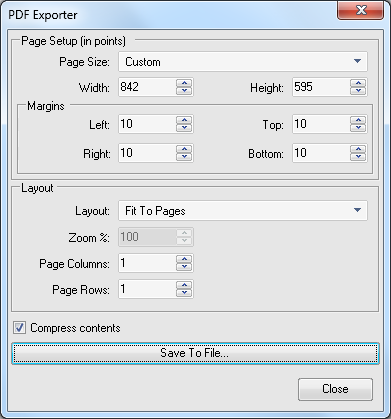
The PDF export dialog allows me to select page size, however is does not appear to allow me to select landscape mode.
Is there a way to do this or is PDF export always locked into portrait mode?
Thanks in advance,
Jason
|
By Nevron Support - Wednesday, November 18, 2015
Hi,
In order to export a diagram to a PDF document with landscape oriented pages, you should select Custom for paper size and revert the width and height of the paper size you are interested in. You can also select the Fit To Pages layout option if you want the whole diagram to fit to 1 page. Take a look at the following screenshot for a landscape oriented A4 sized pages:
|
|