Hi,
I need to remove all the context menu items for the selected diagram shape except the "Delete" and "update bounds" item. I have tried to remove all the command from the CommandBarManager contexts. It has removed most of the items from the context menu for the selected shape but I want it to display only two elements:
Update model bounds
DeleteHow can i remove another element the context menu. Specially the "Properties" menu item.
NControlHelper.BeginUpdate(nDiagramCommandBarsManager1.ParentControl);
// replace the toolbar builder with a custom one
nDiagramCommandBarsManager1.ToolbarsBuilder = new
NCustomDiagramToolbarsBuilder(toolBarsItemCount,
nDiagramCommandBarsManager1);
// recreate the command bars. Since we have replaced the toolbars builder,
// this will add the new commands in the toolbars.
// without this statement toolbar will not be refreshed with newly added
// tools. In addition to newly added tools even predefined tools will be available
// which are removed below.
nDiagramCommandBarsManager1.Recreate();
List<int[]> removingContexts = new List<int[]>(){{nDiagramCommandBarsManager1.
ToolbarsBuilder.
StandardCommandIds},
{nDiagramCommandBarsManager1.ToolbarsBuilder.LibraryCommandIds},
{nDiagramCommandBarsManager1.ToolbarsBuilder.ViewCommandIds},
{nDiagramCommandBarsManager1.ToolbarsBuilder.FormatCommandIds},
{nDiagramCommandBarsManager1.ToolbarsBuilder.ActionCommandIds},
{nDiagramCommandBarsManager1.ToolbarsBuilder.LayoutCommandIds},
{nDiagramCommandBarsManager1.ToolbarsBuilder.ToolsCommandIds}};
for (int iList = 0; iList < removingContexts.Count; iList++)
{
for (int iContext = 0; iContext < removingContexts[iList].Length;
iContext++)
{
NCommandContext commandContext = nDiagramCommandBarsManager1.Contexts.ContextFromID(removingContexts[iList][iContext]);
if (commandContext != null && commandContext.ToString() == "Delete")
{
continue;
}
nDiagramCommandBarsManager1.Contexts.Remove(commandContext);
}
}
nDiagramCommandBarsManager1.CommandContextExecuted += new
CommandContextEventHandler(nDiagramCommandBarsManager1_CommandContextExecuted);
NControlHelper.EndUpdate(nDiagramCommandBarsManager1.ParentControl,
true);
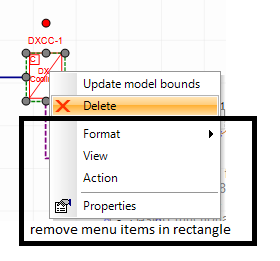
Hope there is some way to customize the auto generated context menu. I am not able to get the context menu on
on mouse down event. It found null always.
// Make sure the right mouse button was clicked
if (e.Button != MouseButtons.Right)
return;
// Hit test the drawing document
NPointF location = new NPointF(e.Location);
NNodeList shapes = nDrawingView1.document.HitTest(location, -1, Nevron.Diagram.Filters.NFilters.TypeNCompositeShape, nDrawingView1.ProvideDocumentHitTestContext());
if (shapes.Count != 0 && nDrawingView1.ContextMenu != null)
{
Please suggest me the correct way to implement this..
Thanks,
Niranjan