Multiple charts with linked X-Axis: How to force same Axis-Label-Size for all Charts


Multiple charts with linked X-Axis: How to force same Axis-Label-Size...
Author
Message
joern kunze
joern kunze
Junior Member (13 reputation)Junior Member (13 reputation)Junior Member (13 reputation)Junior Member (13 reputation)Junior Member (13 reputation)Junior Member (13 reputation)Junior Member (13 reputation)Junior Member (13 reputation)Junior Member (13 reputation)
Group: Forum Members
Posts: 86, Visits: 221
Hello Experts,

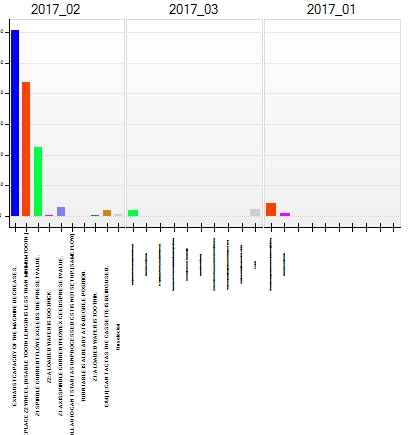
Problem: X-Axis Labels have different font size for multiple charts with linked X-Axis (Chart.Fit2DAxisContent = true)

I have alligned 3 charts next to each other:
https://www.nevron.com/forum/uploads/images/5c944cdf-1d00-45d8-8151-b731.jpg
 
=> I would like to have X Axis Label font size for middle and left Chart same as for the first Chart ("2017_02")
Due to some automatic size setting the middle and left Chart X Axis Label size is much smaller.


I use the following settings for the charts:

for (i = 0; i < iChartCount; i++) {
          _oChart[i].Fit2DAxisContent = true;
...
          _oChart[i].Axis(StandardAxis.PrimaryX).ScaleConfigurator.LabelFitModes = new LabelFitMode[]{ LabelFitMode.Rotate90};
}
....

//----- link axes
for (i = 0; i < iChartCount; i++) {
for (int iSlave = 0; iSlave < iChartCount; iSlave++) {
      if (iSlave != i) {
          _oChart[i].Chart.Axis(StandardAxis.PrimaryX).Slaves.Add(_oChart[iSlave].Chart.Axis(StandardAxis.PrimaryX));
          _oChart[i].Chart.Axis(StandardAxis.PrimaryY).Slaves.Add(_oChart[iSlave].Chart.Axis(StandardAxis.PrimaryY));
      }
}
}     

// Refresh
   _NevronChart.document.Calculate();
    _NevronChart.document.RecalcLayout(_NevronChart.View.Context);
    _NevronChart.Refresh();


// test
    NLinearScaleConfigurator oXScale = (NLinearScaleConfigurator)_NevronChart.Charts[0].Axis(StandardAxis.PrimaryX).ScaleConfigurator;
    NTextStyle hTextStyle = oXScale.LabelStyle.TextStyle;
    string sFontSize = hTextStyle.FontStyle.EmSize.ToString(); // always 9pt for all charts
==> sFontSize  is the same for all 3 Charts - but obviously the displayed size is not the same

So how do I force the middle and left Chart to have the same X Axis Label size like the first left hand Chart ?

Thanks for help,
Joern

Reply
Nevron Support
Nevron Support
Supreme Being (4.5K reputation)Supreme Being (4.5K reputation)Supreme Being (4.5K reputation)Supreme Being (4.5K reputation)Supreme Being (4.5K reputation)Supreme Being (4.5K reputation)Supreme Being (4.5K reputation)Supreme Being (4.5K reputation)Supreme Being (4.5K reputation)
Group: Administrators
Posts: 3.1K, Visits: 4.2K
Hi Joern,

You cannot easily achieve three charts with the same size and at the same time equal x size. However a simple workaround is to use a single chart with many x axes - check out the following code:

   NCartesianChart chart1 = (NCartesianChart)nChartControl1.Charts[0];
   chart1.BoundsMode = BoundsMode.Stretch;

   NAxis axisX1 = chart1.Axis(StandardAxis.PrimaryX);
   NAxis axisX2 = chart1.Axis(StandardAxis.SecondaryX);
   NAxis axisX3 = ((NCartesianAxisCollection)chart1.Axes).AddCustomAxis(AxisOrientation.Horizontal, AxisDockZone.FrontBottom);

   axisX1.Anchor = new NDockAxisAnchor(AxisDockZone.FrontBottom, true, 0, 32);
   axisX1.Visible = true;

   axisX2.Anchor = new NDockAxisAnchor(AxisDockZone.FrontBottom, false, 34, 66);
   axisX2.Visible = true;

   axisX3.Anchor = new NDockAxisAnchor(AxisDockZone.FrontBottom, false, 68, 100);
   axisX3.ScaleConfigurator = new NOrdinalScaleConfigurator();
   axisX3.Visible = true;

   NBarSeries bar1 = new NBarSeries();
   bar1.Values.Add(10);
   bar1.Values.Add(20);
   chart1.Series.Add(bar1);

   NBarSeries bar2 = new NBarSeries();
   bar2.Values.Add(10);
   bar2.Values.Add(20);
   chart1.Series.Add(bar2);
   bar2.DisplayOnAxis(StandardAxis.PrimaryX, false);
   bar2.DisplayOnAxis(StandardAxis.SecondaryX, true);

   NBarSeries bar3 = new NBarSeries();
   bar3.Values.Add(10);
   bar3.Values.Add(20);
   chart1.Series.Add(bar3);
   bar3.DisplayOnAxis(StandardAxis.PrimaryX, false);
   bar3.DisplayOnAxis(axisX3.AxisId, true);

It shows how to have three horizontal axes that share the same plot side. Let us know if you meet any problems.


Best Regards,
Nevron Support Team


GO

Merge Selected

Merge into selected topic...


Merge into merge target...


Merge into a specific topic ID...


Similar Topics

Reading This Topic

Login

Explore
Messages
Mentions
Search