Nevron Forum
Back
Login
Register
Login
Register
Home
»
Nevron Vision for SharePoint
»
Nevron Chart for SharePoint
»
Date Formatting
Date Formatting
Post Reply
Date Formatting
View
Flat Ascending
Flat Descending
Threaded
Options
Subscribe to topic
Print This Topic
Goto Topics Forum
Author
Message
Greg Corliss
Greg Corliss
posted 10 Years Ago
ANSWER
Topic Details
Group: Forum Members
Posts: 9,
Visits: 17
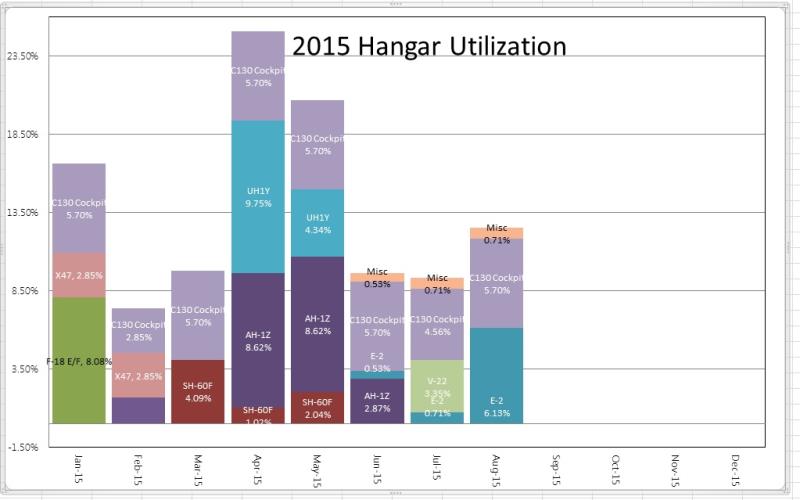
I have created a stacked bar chart from a SharePoint List View.
My dates show up as 1/1/1900 12:00 AM. I just want the month to show as JAN.
I've gone into Chart Areas > Axes > Primary X > Scale and set the sub Type to Date Time and Formatting to Fixed and set the Label format to MMM and nothing changes.
I've also tried setting the Label Angle and step mode set to a custom one month step to no avail.
Below is how I have it set up:
Reply
Like
0
Reply
Greg Corliss
Greg Corliss
posted 10 Years Ago
ANSWER
Post Details
Group: Forum Members
Posts: 9,
Visits: 17
I figured it out. Reading through the documentation for numerical Formatting. All I had to do was put a P (without any quotes) in The Label format and it converted it to a percentage.
Thanks for all the help.
Reply
Like
0
GO
Merge Selected
Merge into selected topic...
Merge into merge target...
Merge into a specific topic ID...
Open Merge
Threaded View
Threaded View
Date Formatting
Greg Corliss
-
10 Years Ago
Hi Greg, You are probably using a Bar chart with Stacked sub type and...
Nevron Support
-
10 Years Ago
You were correct. I was using a Bar Chart, Stacked Sub Type with a...
Greg Corliss
-
10 Years Ago
Hi Greg, There was no DOC file with your post. Can you send us a...
Nevron Support
-
10 Years Ago
RE: Date Formatting
Greg Corliss
-
10 Years Ago
Hello Greg, All expressions should start with the equal sign "=" You...
Nevron Support
-
10 Years Ago
That seemed to fix it. Thanks. One last question, How do you convert a...
Greg Corliss
-
10 Years Ago
Hi Greg, You can review the following example: Stacked Bar Chart...
Nevron Support
-
10 Years Ago
I've already looked at that. It shows how to change the chart type...
Greg Corliss
-
10 Years Ago
I figured it out. Reading through the documentation for numerical...
Greg Corliss
-
10 Years Ago
Post Reply
Similar Topics
Post Quoted Reply
Reading This Topic
Login
Login
Remember Me
Reset Password
Resend Validation Email
Login
Explore
Messages
Mentions
Search