Category "Labels" not displaying on Pie Chart


Author
Message
Nevron Support
Nevron Support
Supreme Being (4.5K reputation)Supreme Being (4.5K reputation)Supreme Being (4.5K reputation)Supreme Being (4.5K reputation)Supreme Being (4.5K reputation)Supreme Being (4.5K reputation)Supreme Being (4.5K reputation)Supreme Being (4.5K reputation)Supreme Being (4.5K reputation)
Group: Administrators
Posts: 3.1K, Visits: 4.2K
This is because the expression returns an array. Can you send a snapshot of your data - the field of interest is the "Total_Current_Charges".

Since you have category grouping, you may need to update your expression with FIRST for the Total_Current_Charges e.g.:

=IF(FIRST(Fields!Total_Current_Charges)<20, "Less than 20 OMR",
IF(FIRST(Fields!Total_Current_Charges)>35, "Greater than 35 OMR", "Between 20 and 35 OMR")) + " - " +
FORMAT(SUM(Fields!GrossProfit.Value), "N0", "en-us") + " - " +
FORMAT((SUM(Fields!GrossProfit.Value)/SUM(Parent.Fields!GrossProfit.Value)), "P0", "en-us")

Best Regards,
Nevron Support Team


Steve Murray
Steve Murray
Forum Newbie (9 reputation)Forum Newbie (9 reputation)Forum Newbie (9 reputation)Forum Newbie (9 reputation)Forum Newbie (9 reputation)Forum Newbie (9 reputation)Forum Newbie (9 reputation)Forum Newbie (9 reputation)Forum Newbie (9 reputation)
Group: Forum Members
Posts: 17, Visits: 79
https://www.nevron.com/forum/uploads/images/2f8fa153-2f6d-460a-9f2a-2f0b.pngThanks for your prompt reply.  I made the recommended changes (screenshot of two Format statements); but now giveshttps://www.nevron.com/forum/uploads/images/91222ba0-a7d1-4172-84c4-5645.png me an error.


Nevron Support
Nevron Support
Supreme Being (4.5K reputation)Supreme Being (4.5K reputation)Supreme Being (4.5K reputation)Supreme Being (4.5K reputation)Supreme Being (4.5K reputation)Supreme Being (4.5K reputation)Supreme Being (4.5K reputation)Supreme Being (4.5K reputation)Supreme Being (4.5K reputation)
Group: Administrators
Posts: 3.1K, Visits: 4.2K
You can’t pass category labels to the pie chart data labels like that. Also, you should not use the FORMAT function in the Data -> Value field.

You should consider using only <label> in the Data Groupings -> Values -> Data Labels -> Format field:
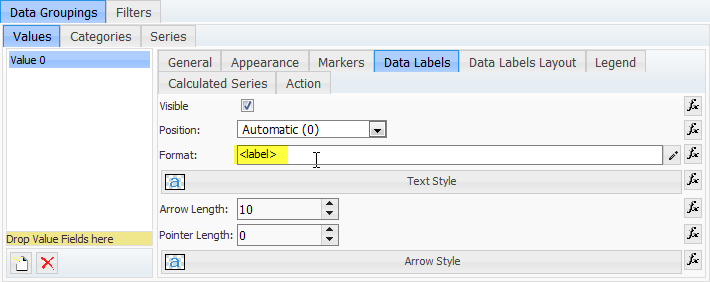
https://www.nevron.com/forum/uploads/images/50c2b1b8-5a29-4729-a2aa-8ca7.png

Then, in the Data Groupings -> Values -> General -> Data -> Label field, use an expression like this:
=IF(Fields!Total_Current_Charges<20, "Less than 20 OMR",
IF(Fields!Total_Current_Charges>35, "Greater than 35 OMR", "Between 20 and 35 OMR")) + " - " +
FORMAT(SUM(Fields!GrossProfit.Value), "N0", "en-us") + " - " +
FORMAT((SUM(Fields!GrossProfit.Value)/SUM(Parent.Fields!GrossProfit.Value)), "P0", "en-us")
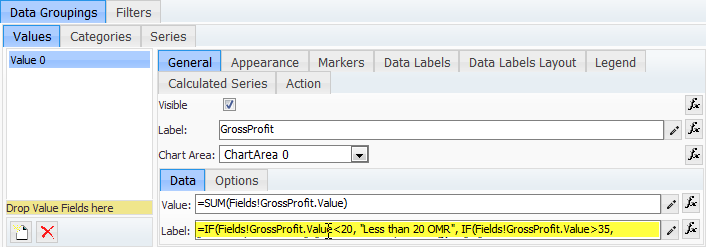
https://www.nevron.com/forum/uploads/images/872ad22b-5009-49e6-b3eb-62b5.png


Best Regards,
Nevron Support Team


Steve Murray
Steve Murray
Forum Newbie (9 reputation)Forum Newbie (9 reputation)Forum Newbie (9 reputation)Forum Newbie (9 reputation)Forum Newbie (9 reputation)Forum Newbie (9 reputation)Forum Newbie (9 reputation)Forum Newbie (9 reputation)Forum Newbie (9 reputation)
Group: Forum Members
Posts: 17, Visits: 79

I am unable to pass the "Label" from a Category Data Grouping.  I am grouping by Category to distinguish costs:
Labels are "Less than 20 OMR", "Between 20 and 35 OMR" and "Greater than 35 OMR".  The logic for each of the Category groupings is working fine e.g. (=Fields!Total_Current_Charges<20) and displays the <value> and <percent>, but the Label I assign to each Category grouping does not get passed back to the chart.  Below is a screenshot of my configuration.
Thanks in advance!
https://www.nevron.com/forum/uploads/images/9a1ef547-9751-418d-867a-0309.png


GO

Merge Selected

Merge into selected topic...


Merge into merge target...


Merge into a specific topic ID...


Similar Topics

Reading This Topic

Login

Explore
Messages
Mentions
Search