NRichTextView not saving inserted hyperlinks to RTF string


Author
Message
Nevron Support
Nevron Support
Supreme Being (4.5K reputation)Supreme Being (4.5K reputation)Supreme Being (4.5K reputation)Supreme Being (4.5K reputation)Supreme Being (4.5K reputation)Supreme Being (4.5K reputation)Supreme Being (4.5K reputation)Supreme Being (4.5K reputation)Supreme Being (4.5K reputation)
Group: Administrators
Posts: 3.1K, Visits: 4.2K
Hello,

Maybe the email clients have some non-standard default CSS values and they change the way the generated HTML looks. Please try applying a CSS reset. A simple CSS reset file is attached to this message. You can include it in a "<style></style>" element in the "<head>" element of the generated HTML. Please try this and let us know if it fixes the issue.


Best Regards,
Nevron Support Team


Attachments
reset.css (211 views, 1.00 KB)
Tom Galczynski
Tom Galczynski
Forum Newbie (0 reputation)Forum Newbie (0 reputation)Forum Newbie (0 reputation)Forum Newbie (0 reputation)Forum Newbie (0 reputation)Forum Newbie (0 reputation)Forum Newbie (0 reputation)Forum Newbie (0 reputation)Forum Newbie (0 reputation)
Group: Forum Members
Posts: 29, Visits: 87
Hello, no when I save the html to a file it looks fine in any browser, just like it does in the control. I am guessing there is some aspect of the body, section or paragraph style that the email readers can't handle?
Thanks!

Nevron Support
Nevron Support
Supreme Being (4.5K reputation)Supreme Being (4.5K reputation)Supreme Being (4.5K reputation)Supreme Being (4.5K reputation)Supreme Being (4.5K reputation)Supreme Being (4.5K reputation)Supreme Being (4.5K reputation)Supreme Being (4.5K reputation)Supreme Being (4.5K reputation)
Group: Administrators
Posts: 3.1K, Visits: 4.2K
Hello,

Does it look like this (i.e. with a lot of empty lines) on your computer in a desktop browser? If yes, please save the text document to NTX and send it to us for evaluation. Please also send us the HTML that you send as an email.

Thank you!


Best Regards,
Nevron Support Team


Tom Galczynski
Tom Galczynski
Forum Newbie (0 reputation)Forum Newbie (0 reputation)Forum Newbie (0 reputation)Forum Newbie (0 reputation)Forum Newbie (0 reputation)Forum Newbie (0 reputation)Forum Newbie (0 reputation)Forum Newbie (0 reputation)Forum Newbie (0 reputation)
Group: Forum Members
Posts: 29, Visits: 87
Hi.  I sent the message to my gmail account, opened it on my phone, here is the screenshot:

https://www.nevron.com/forum/uploads/images/0e98e882-e795-417b-938b-58c7.png

Nevron Support
Nevron Support
Supreme Being (4.5K reputation)Supreme Being (4.5K reputation)Supreme Being (4.5K reputation)Supreme Being (4.5K reputation)Supreme Being (4.5K reputation)Supreme Being (4.5K reputation)Supreme Being (4.5K reputation)Supreme Being (4.5K reputation)Supreme Being (4.5K reputation)
Group: Administrators
Posts: 3.1K, Visits: 4.2K
Hello,

Maybe the email clients you are testing with just center the content of the message vertically. Can you please try to send the email to an email address in GMAIL and see how it looks there?


Best Regards,
Nevron Support Team


Tom Galczynski
Tom Galczynski
Forum Newbie (0 reputation)Forum Newbie (0 reputation)Forum Newbie (0 reputation)Forum Newbie (0 reputation)Forum Newbie (0 reputation)Forum Newbie (0 reputation)Forum Newbie (0 reputation)Forum Newbie (0 reputation)Forum Newbie (0 reputation)
Group: Forum Members
Posts: 29, Visits: 87
Hi.  I tried your suggestion and the email message displays the same way, with a border around the text.  And it's not just Outlook. Thunderbird also shows the text the same way, with several blank lines first.  Very strange.

Thanks for your help!
Nevron Support
Nevron Support
Supreme Being (4.5K reputation)Supreme Being (4.5K reputation)Supreme Being (4.5K reputation)Supreme Being (4.5K reputation)Supreme Being (4.5K reputation)Supreme Being (4.5K reputation)Supreme Being (4.5K reputation)Supreme Being (4.5K reputation)Supreme Being (4.5K reputation)
Group: Administrators
Posts: 3.1K, Visits: 4.2K
Hello,

We created an HTML file with your HTML code and it works fine in all browsers, including Internet Explorer 11 as shown below:
https://www.nevron.com/forum/uploads/images/c4e8d12c-94ad-4675-98ef-8fb7.png
Maybe Outlook centers the content vertically and that is why it looks like on your screenshot. You can test this by adding a border to the paragraph element. You can do this either in the original document or in the style attribute of the p tag by replacing "border: none " with "border:2px solid red;".


Best Regards,
Nevron Support Team


Tom Galczynski
Tom Galczynski
Forum Newbie (0 reputation)Forum Newbie (0 reputation)Forum Newbie (0 reputation)Forum Newbie (0 reputation)Forum Newbie (0 reputation)Forum Newbie (0 reputation)Forum Newbie (0 reputation)Forum Newbie (0 reputation)Forum Newbie (0 reputation)
Group: Forum Members
Posts: 29, Visits: 87
Thanks for the inline CSS tip.  We are getting closer!  However there seems to be persistent blank lines at the top of the message and I am not sure what is causing it.  Here is a picture of what it looks like now followed by the html string:
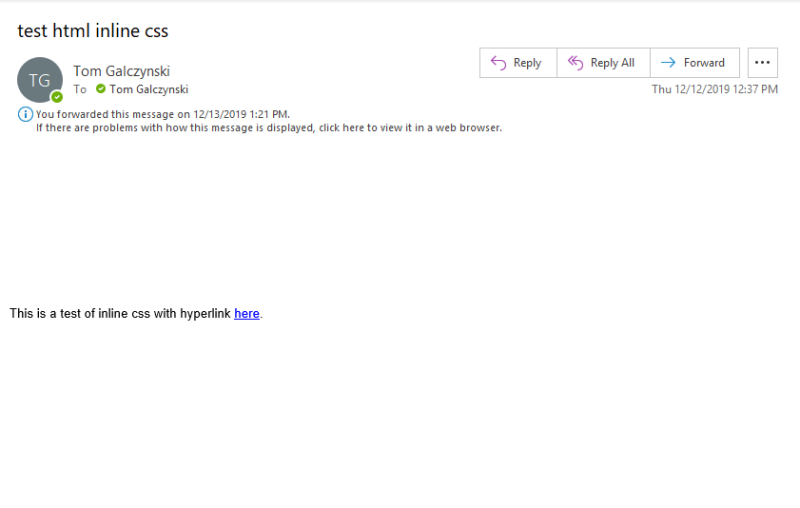
https://www.nevron.com/forum/uploads/images/365b32d3-91ce-4bbf-9769-67ea.png
<!DOCTYPE html>
<html>
<head>
<meta charset="utf-8" />
</head>
<body style="text-align:left;direction:ltr;vertical-align:top;color:#000000;visibility:visible;border-collapse:separate;border-spacing:0 0;border:none;font:normal normal 10pt/1 'Arial',sans-serif;text-decoration:none;margin:0;padding:0;clear:none;float:none;text-indent:0;page-break-before:auto;page-break-after:auto;position:static;">
<section style="text-align:left;direction:ltr;vertical-align:top;color:#000000;visibility:visible;border-collapse:separate;border-spacing:0 0;border:none;font:normal normal 10pt/1 'Arial',sans-serif;text-decoration:none;margin:0;padding:0;clear:none;float:none;text-indent:0;page-break-before:auto;page-break-after:auto;position:static;">
<p style="text-align:left;direction:ltr;vertical-align:top;color:#000000;visibility:visible;border-collapse:separate;border-spacing:0 0;border:none;font:normal normal 10pt/1 'Arial',sans-serif;text-decoration:none;padding:0;clear:none;float:none;text-indent:0;page-break-before:auto;page-break-after:auto;position:static;margin:8px 0;">
<span style="color:#000000;visibility:visible;border:none;text-decoration:none;font:normal normal 10pt/normal 'Arial',sans-serif;">This is a test of hyperlink </span><a href="http://www.asdsoftware.com" target="_self" style="visibility:visible;border:none;font:normal normal 10pt/normal 'Arial',sans-serif;color:#0000ff;text-decoration:underline;">here</a><span style="color:#000000;visibility:visible;border:none;text-decoration:none;font:normal normal 10pt/normal 'Arial',sans-serif;">.</span>
</p>
</section>
</body>
</html>

Is there some other save setting perhaps I can try to eliminate those blank lines?  The html code opened up in a browser and also in the Nevron control doesn't show those blank lines at all so I'm thinking it is due to some auto-formatting aspect perhaps???

Thanks so much for your help!

Nevron Support
Nevron Support
Supreme Being (4.5K reputation)Supreme Being (4.5K reputation)Supreme Being (4.5K reputation)Supreme Being (4.5K reputation)Supreme Being (4.5K reputation)Supreme Being (4.5K reputation)Supreme Being (4.5K reputation)Supreme Being (4.5K reputation)Supreme Being (4.5K reputation)
Group: Administrators
Posts: 3.1K, Visits: 4.2K
Hello,

We would like to inform you that Nevron Open Vision 2019.1 is now live. For more information about the new features and improvements in this release, please visit:
https://www.nevron.com/company-news-and-events.aspx

Regarding the issue with the HTML in Outlook, maybe Outlook does not support CSS classes properly. Please instruct the NOV rich text control to inline the CSS styles into the HTML tags. For an example, check out the following documentation topic (see the last code example):
NOV Rich Text - HTML Import and Export


Best Regards,
Nevron Support Team


Tom Galczynski
Tom Galczynski
Forum Newbie (0 reputation)Forum Newbie (0 reputation)Forum Newbie (0 reputation)Forum Newbie (0 reputation)Forum Newbie (0 reputation)Forum Newbie (0 reputation)Forum Newbie (0 reputation)Forum Newbie (0 reputation)Forum Newbie (0 reputation)
Group: Forum Members
Posts: 29, Visits: 87
Thanks.  Do you have an ETA for the release that fixes the rtf/link issue?
Also, I am having a problem using html format to send an email message.  Using the control, I am adding a line of text with a hyperlink and saving it to the Body of a MailMessage object.  The html code generated by the control is this:
<!DOCTYPE html><meta http-equiv="Content-Type" content="text/html; charset=us-ascii"><br><html><br><head><br><br><style type="text/css"><br>.n1 {text-align:left;direction:ltr;vertical-align:top;border-collapse:separate;border-spacing:0 0;font:normal normal 10pt/1 'Arial',sans-serif;padding:0;clear:none;float:none;text-indent:0;page-break-before:auto;page-break-after:auto;position:static;}<br>.n4 {color:#000000;text-decoration:none;}<br>.n5 {visibility:visible;border:none;}<br>.n11 {margin:0;}<br>.n19 {margin:8px 0;}<br>.n20 {font:normal normal 10pt/normal 'Arial',sans-serif;}<br>.n21 {color:#0000ff;text-decoration:underline;}<br><br></style><br></head><br><body class="n1 n4 n5 n11"><br><section class="n1 n4 n5 n11"><br><p class="n1 n4 n5 n19"><br><span class="n4 n5 n20">This message has a hyperlink </span><a href="http://www.asdsoftware.com" target="_self" class="n5 n20 n21">here</a><span class="n4 n5 n20">.</span><br></p><br></section><br></body><br></html><br>

When I receive the message in Outlook, it looks like this:
https://www.nevron.com/forum/uploads/images/1acbffaa-41b2-4a94-ad1c-172a.png
If I save the html source to a file and open in a browser it shows the text and hyperlink ok but with a number of blank lines beforehand.  Can you see anything in the html code that may be causing this? Maybe there is some control setting I need to use so that those formatting lines don't appear???  Thanks for all your help!


GO

Merge Selected

Merge into selected topic...


Merge into merge target...


Merge into a specific topic ID...


Similar Topics

Reading This Topic

Login

Explore
Messages
Mentions
Search