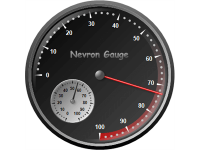
Avoid Clutter
Ensure the gauge is not overcrowded with too many elements, which can distract or confuse the user.
Clear Labels
Use clear, concise labels for the scale and important values.
Logical Range
Set the scale to cover the range of values relevant to the application. Avoid overly large or small ranges that can make the gauge hard to read.
Consistent Increments
Use consistent intervals for tick marks to ensure readability and ease of interpretation.
Intuitive Colors
Utilize colors that are intuitively understood (e.g., green for safe, red for danger).
Contrast
Ensure there is enough contrast between different color zones for clear distinction.
Needle and Arc Design
The needle should be clearly visible and distinct from the background and arc.
Radial Gauge Subtypes:
Radial, Quarter North East, Quarter North West, Quarter South West, Quarter South East, Half North, Half South, Half West, Half East, and Custom. When using the Custom subtype, the user can specify a custom begin angle, sweep angle, border style, etc.

Avoid Clutter
Ensure the gauge is not overcrowded with too many elements, which can distract or confuse the user.
Clear Labels
Use clear, concise labels for the scale and important values.
Logical Range
Set the scale to cover the range of values relevant to the application. Avoid overly large or small ranges that can make the gauge hard to read.
Consistent Increments
Use consistent intervals for tick marks to ensure readability and ease of interpretation.
Intuitive Colors
Utilize colors that are intuitively understood (e.g., green for safe, red for danger).
Contrast
Ensure there is enough contrast between different color zones for clear distinction.
Range and Value Indicator Design
The value markers and range indicators should be clearly visible and distinct from the background and the scale.
Linear Gauge Subtypes:
Horizontal and Vertical.
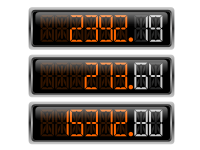
The Numeric LED Display is a type of gauge that displays a numeric value with an emulated LED display. Various LED display styles are available such as Seven Segment, Fourteen Segment, and Matrix with additional modifications for the style of those displays (like rounded or rectangular LED cells). These customization options allow users to choose the display style that best suits their project and visual preferences.
Numeric LED Displays are commonly combined with other gauge elements such as Radial and Linear Gauges and state indicators and are an integral part of digital dashboards, digital control panels, and scorecards.
| ||||||||||||||||
|
Use High Contrast
Ensure there is a high contrast between the digits and the background for maximum readability.
Uniform Format
Maintain a consistent format for displaying numbers across all numeric LED displays, including decimal places and separators.
Appropriate Digit Size
Choose a digit size that is large enough to be read from the intended viewing distance.
Dynamic Color Coding
Use different colors to indicate different states, such as normal, warning, or critical values.
Numeric Display Styles:
Seven Segment Normal, Seven Segment Rounded, Seven Segment Rectangular, Fourteen Segment Normal, Fourteen Segment Rectangular, Fourteen SegmentInset, Matrix Rectangle, and Matrix Circle.
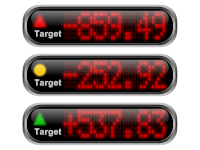
Avoid Clutter
Ensure the gauge is not overcrowded with too many elements, which can distract or confuse the user.
Clear Labels
Use clear, concise labels for the scale and important values.
Logical Range
Set the state indicator ranges to cover the values relevant to the application.
Intuitive Colors
Utilize colors that are intuitively understood (e.g., green for safety, red for danger).
Contrast
Ensure there is enough contrast between different color zones for clear distinction as well as sufficient contrast between the state indicator and its background.