using Nevron.Nov;
using Nevron.Nov.Data;
using Nevron.Nov.DataStructures;
using Nevron.Nov.Dom;
using Nevron.Nov.Editors;
using Nevron.Nov.Graphics;
using Nevron.Nov.Grid;
using Nevron.Nov.Layout;
using Nevron.Nov.Presentation;
using Nevron.Nov.UI;
using Nevron.Nov.Windows.Forms;
using System;
using System.Windows.Forms;

namespace NovWinFormsProject
{
	public partial class Form1 : Form
	{
		#region Constructors

		public Form1()
		{
			InitializeComponent();

			// Set form title
			Text = "NOV WinForms - NScrollingExample";

			// Create the NOV example and its controls
			NWidget exampleContent = CreateExampleContent();
			NWidget exampleControls = CreateExampleControls();
			if (exampleControls != null)
			{
				exampleControls.PreferredWidth = 300;
			}

			// Place the example and its controls in a pair box
			NPairBox pairBox = new NPairBox(exampleContent, exampleControls);
			pairBox.FillMode = ENStackFillMode.First;
			pairBox.FitMode = ENStackFitMode.First;
			pairBox.Margins = new NMargins(NDesign.HorizontalSpacing, NDesign.VerticalSpacing);

			// Host the example in the form
			NNovWidgetHost host = new NNovWidgetHost(pairBox);
			host.Dock = DockStyle.Fill;
			Controls.Add(host);
		}

		#endregion

        #region Example

        public NWidget CreateExampleContent()
        {
            m_TableView = new NTableGridView();

            // create a dummy data source with many columns to demonstrate horizontal scrolling
            NMemoryDataTable dataTable = new NMemoryDataTable(new NFieldInfo[] {
                // person info
                new NFieldInfo("Name-0", typeof(String)),
                new NFieldInfo("Gender-1", typeof(ENGender)),
                new NFieldInfo("Birthday-2", typeof(DateTime)),
                new NFieldInfo("Phone-3", typeof(String)),
                new NFieldInfo("Email-4", typeof(String)),
                // address info
                new NFieldInfo("Country-5", typeof(ENCountry)),
                new NFieldInfo("City-6", typeof(String)),
                new NFieldInfo("Address-7", typeof(String)),
                // product info
                new NFieldInfo("Product Name-8", typeof(String)),
                new NFieldInfo("Product Price-9", typeof(Double)),
                new NFieldInfo("Product Quantity-10", typeof(Int32)),
            });

            for (int i = 0; i < 1000; i++)
            {
                NDummyDataSource.NPersonInfo personInfo = NDummyDataSource.RandomPersonInfo();
                NDummyDataSource.NAddressInfo addressInfo = NDummyDataSource.RandomAddressInfo();
                NDummyDataSource.NProductInfo productInfo = NDummyDataSource.RandomProductInfo();

                dataTable.AddRow(
                    // person info
                    personInfo.Name,
                    personInfo.Gender,
                    personInfo.Birthday,
                    personInfo.Phone,
                    personInfo.Email,
                    // address
                    addressInfo.Country,
                    addressInfo.City,
                    addressInfo.Address,
                    // product
                    productInfo.Name,
                    productInfo.Price,
                    NDummyDataSource.RandomInt32(1, 100)
                    );
            }

            m_TableView.Grid.DataSource = new NDataSource(dataTable);
            return m_TableView;
        }
        public NWidget CreateExampleControls()
        {
            NStackPanel stack = new NStackPanel();

            // create the horizontal scrolling properties
            {
                NStackPanel hstack = new NStackPanel();

                NDesigner designer = NDesigner.GetDesigner(NTableGrid.NTableGridSchema);
                NList editors = designer.CreateMemberEditors(
                    m_TableView.Grid,
                    NTableGrid.HScrollModeProperty,
                    NTableGrid.IntegralHScrollProperty,
                    NTableGrid.SmallHScrollChangeProperty);

                for (int i = 0; i < editors.Count; i++)
                {
                    hstack.Add(editors[i]);
                }

                NGroupBox hgroup = new NGroupBox("Horizontal Scrolling", hstack);
                stack.Add(new NUniSizeBoxGroup(hgroup));
            }

            // create the vertical scrolling properties
            {
                NStackPanel vstack = new NStackPanel();

                NDesigner designer = NDesigner.GetDesigner(NTableGrid.NTableGridSchema);
                NList editors = designer.CreateMemberEditors(
                    m_TableView.Grid,
                    NTableGrid.VScrollModeProperty,
                    NTableGrid.IntegralVScrollProperty,
                    NTableGrid.SmallVScrollChangeProperty);

                for (int i = 0; i < editors.Count; i++)
                {
                    vstack.Add(editors[i]);
                }

                NGroupBox vgroup = new NGroupBox("Vertical Scrolling", vstack);
                stack.Add(new NUniSizeBoxGroup(vgroup));
            }

            return stack;
        }
        public string GetExampleDescription()
        {
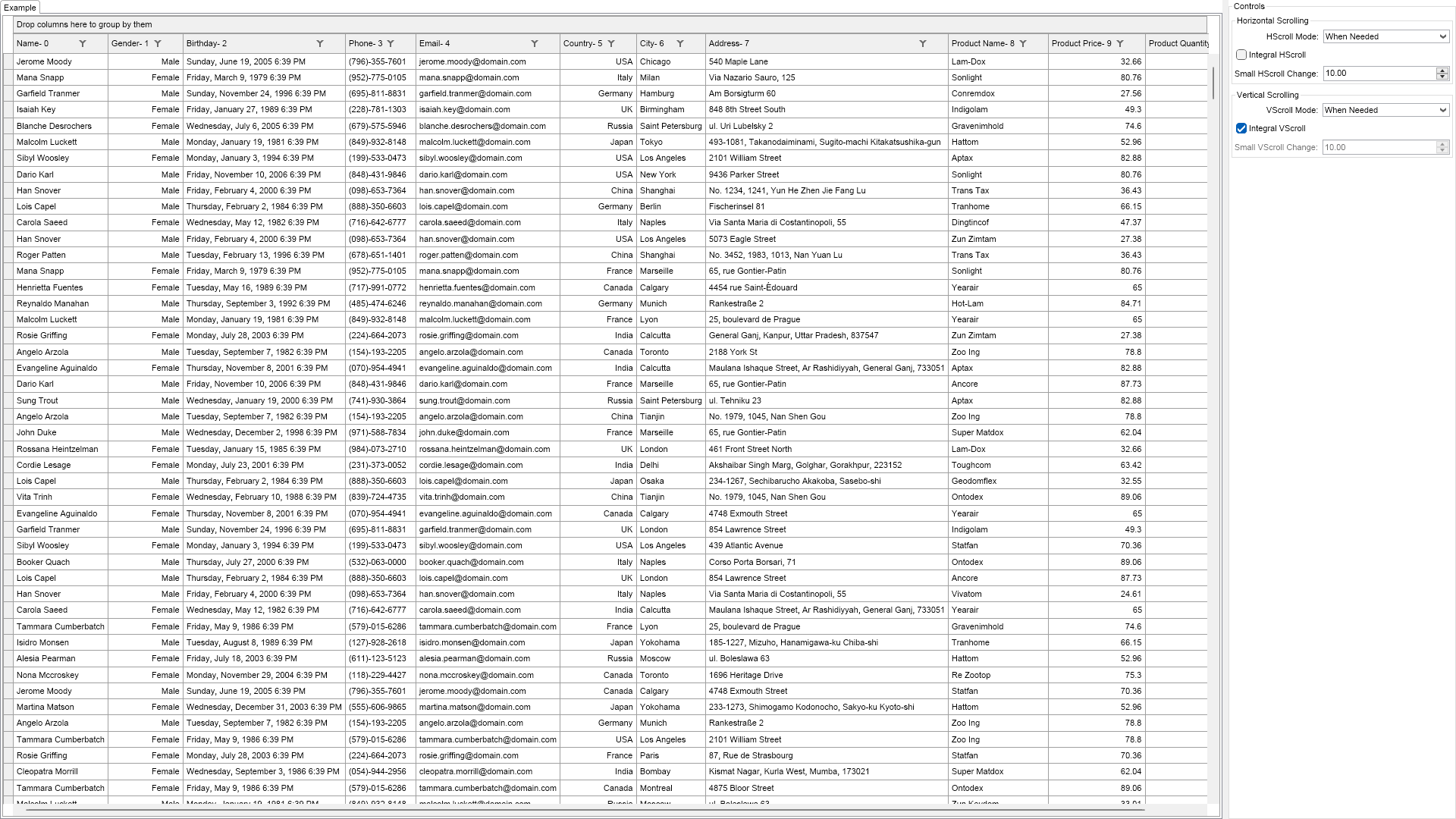
            return @"

    Demonstrates the properties that control the grid horizontal and vertical scrolling behavior.


    Note that the grid supports integral and pixel-wise scrolling in both the horizontal and vertical dimensions.

";
        }

        ///
        /// Gets the relevant documentation links for the example
        ///
        ///
        public (string Name, string Url)[] GetDocumentationUrls()
        {
            return new[]
            {
                ("Grid Fundamentals", "https://www.nevron.com/docs/openvision/grid-fundamentals.html"),
                ("Grid Selection", "https://www.nevron.com/docs/openvision/grid-selection.html"),
            };
        }

        #endregion

		#region Implementation
		#endregion

		#region Event Handlers
		#endregion

        #region Fields

        NTableGridView m_TableView;

        #endregion

		#region Static Methods
		#endregion

		#region Constants
		#endregion

		#region Nested Types
		#endregion
	}
}

 Chart for .NET
 Diagram for .NET
 User Interface for .NET
 Vision for SSRS
 Chart for SSRS
 Gauge for SSRS
 Map for SSRS
 Barcode for SSRS
 Vision for SharePoint
 Chart for SharePoint
 Gauge for SharePoint
 Map for SharePoint
 Barcode for SharePoint
 Open Vision for .NET


 Vision for .NET