Imports Nevron.Nov
Imports Nevron.Nov.Chart
Imports Nevron.Nov.Dom
Imports Nevron.Nov.Graphics
Imports Nevron.Nov.Layout
Imports Nevron.Nov.UI
Imports Nevron.Nov.Windows.Wpf
Class MainWindow
#Region "Constructors"
Public Sub New()
' This call is required by the designer.
InitializeComponent()
' Add any initialization after the InitializeComponent() call.
' Set form title
Title = "NOV WPF - NAxisSizeExample"
' Create the NOV example and its controls
Dim exampleContent As NWidget = CreateExampleContent()
Dim exampleControls As NWidget = CreateExampleControls()
If Not exampleControls Is Nothing Then
exampleControls.PreferredWidth = 300
End If
' Place the example and its controls in a pair box
Dim pairBox As NPairBox = New NPairBox(exampleContent, exampleControls)
pairBox.FillMode = ENStackFillMode.First
pairBox.FitMode = ENStackFitMode.First
pairBox.Margins = New NMargins(NDesign.HorizontalSpacing, NDesign.VerticalSpacing)
' Host the example in the form
Dim host As NNovWidgetHost(Of NWidget) = New NNovWidgetHost(Of NWidget)(pairBox)
Content = host
End Sub
#End Region
#Region "Example"
Public Function CreateExampleContent() As NWidget
Dim stack As NStackPanel = New NStackPanel()
Dim controlStack As NStackPanel = New NStackPanel()
stack.Add(controlStack)
' create the radial gauge
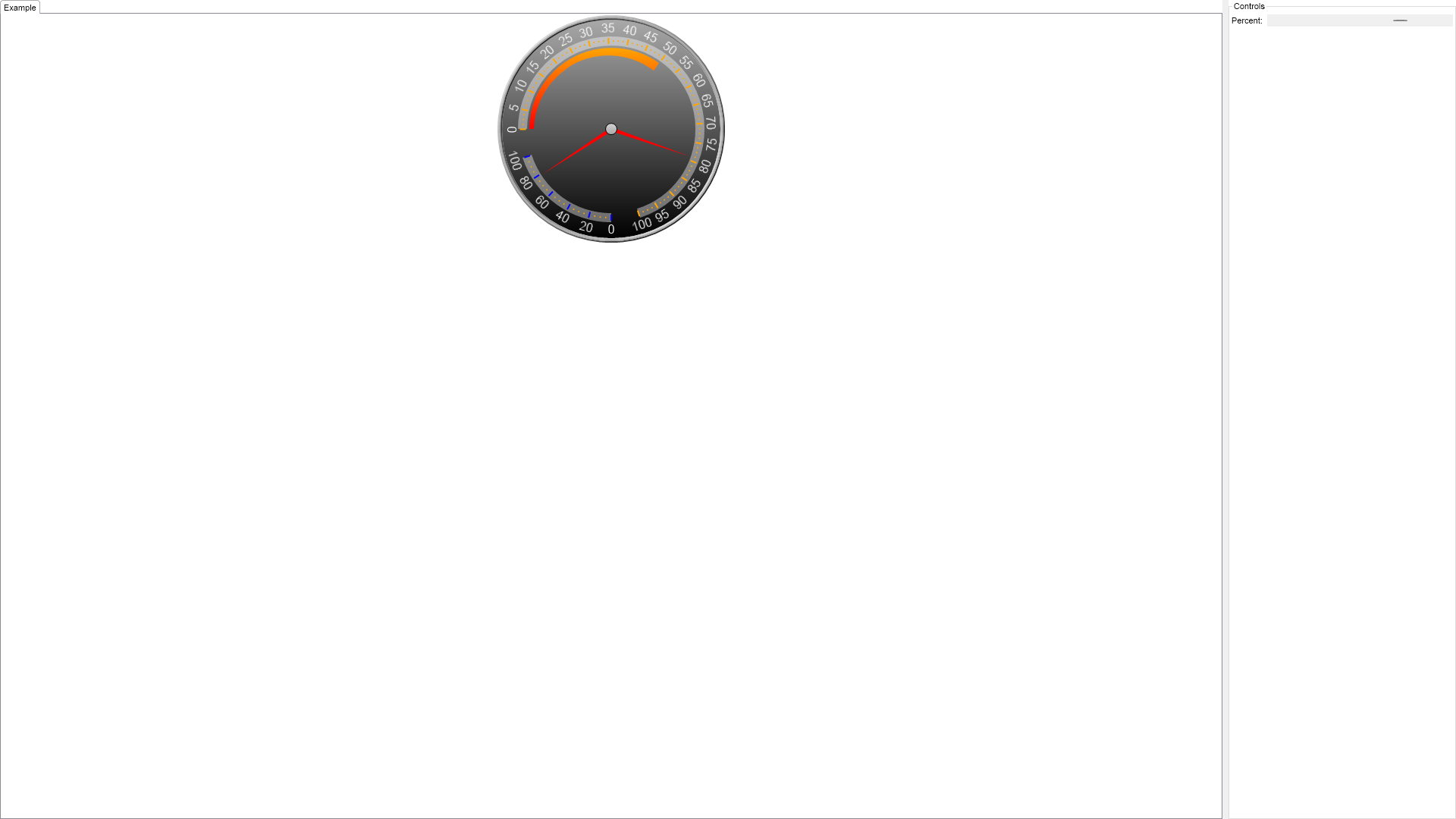
m_RadialGauge = New NRadialGauge()
m_RadialGauge.PreferredSize = defaultRadialGaugeSize
controlStack.Add(m_RadialGauge)
m_RadialGauge.Dial = New NDial(ENDialShape.CutCircle, New NEdgeDialRim())
m_RadialGauge.Dial.BackgroundFill = New NStockGradientFill(NColor.DarkGray, NColor.Black)
m_RadialGauge.SweepAngle = New NAngle(360, NUnit.Degree)
Dim gelEffect As NGelCapEffect = New NGelCapEffect(ENCapEffectShape.Ellipse)
gelEffect.Margins = New NMargins(0, 0, 0, 0.5)
m_RadialGauge.Axes.Clear()
' create the first axis
Dim axis1 As NGaugeAxis = New NGaugeAxis()
axis1.Anchor = New NDockGaugeAxisAnchor(ENGaugeAxisDockZone.Top, True, 0, 70)
Dim scale1 = CType(axis1.Scale, NStandardScale)
scale1.SetPredefinedScale(ENPredefinedScaleStyle.PresentationNoStroke)
scale1.MinorTickCount = 3
scale1.Ruler.Fill = New NColorFill(NColor.FromColor(NColor.White, 0.4F))
scale1.OuterMajorTicks.Fill = New NColorFill(NColor.Orange)
scale1.Labels.Style.TextStyle.Font = New NFont("Arimo", 12, ENFontStyle.Bold)
scale1.Labels.Style.TextStyle.Fill = New NColorFill(NColor.White)
scale1.Labels.Style.Angle = New NScaleLabelAngle(ENScaleLabelAngleMode.Scale, 0)
m_RadialGauge.Axes.Add(axis1)
' create the second axis
Dim axis2 As NGaugeAxis = New NGaugeAxis()
axis2.Anchor = New NDockGaugeAxisAnchor(ENGaugeAxisDockZone.Top, False, 75, 95)
Dim scale2 = CType(axis2.Scale, NStandardScale)
scale2.SetPredefinedScale(ENPredefinedScaleStyle.PresentationNoStroke)
scale2.MinorTickCount = 3
scale2.Ruler.Fill = New NColorFill(NColor.FromColor(NColor.White, 0.4F))
scale2.OuterMajorTicks.Fill = New NColorFill(NColor.Blue)
scale2.Labels.Style.TextStyle.Font = New NFont("Arimo", 12, ENFontStyle.Bold)
scale2.Labels.Style.TextStyle.Fill = New NColorFill(NColor.White)
scale2.Labels.Style.Angle = New NScaleLabelAngle(ENScaleLabelAngleMode.Scale, 0)
m_RadialGauge.Axes.Add(axis2)
' add indicators
Dim rangeIndicator As NRangeIndicator = New NRangeIndicator()
rangeIndicator.Value = 50
rangeIndicator.Fill = New NStockGradientFill(NColor.Orange, NColor.Red)
rangeIndicator.Stroke.Width = 0
rangeIndicator.OffsetFromScale = 3
rangeIndicator.BeginWidth = 6
rangeIndicator.EndWidth = 12
m_RadialGauge.Indicators.Add(rangeIndicator)
Dim needleValueIndicator1 As NNeedleValueIndicator = New NNeedleValueIndicator()
needleValueIndicator1.Value = 79
' needleValueIndicator1.Shape.FillStyle = new NGradientFillStyle(GradientStyle.Vertical, GradientVariant.Variant2, Color.White, Color.Red);
' needleValueIndicator1.Shape.StrokeStyle.Color = Color.Red;
needleValueIndicator1.ScaleAxis = axis1
needleValueIndicator1.OffsetFromScale = 2
m_RadialGauge.Indicators.Add(needleValueIndicator1)
Dim needleValueIndicator2 As NNeedleValueIndicator = New NNeedleValueIndicator()
needleValueIndicator2.Value = 79
' needleValueIndicator2.Shape.FillStyle = new NGradientFillStyle(GradientStyle.Vertical, GradientVariant.Variant2, Color.White, Color.Blue);
' needleValueIndicator2.Shape.StrokeStyle.Color = Color.Blue;
needleValueIndicator2.ScaleAxis = axis2
needleValueIndicator2.OffsetFromScale = 2
m_RadialGauge.Indicators.Add(needleValueIndicator2)
Return stack
End Function
Public Function CreateExampleControls() As NWidget
Dim stack As NStackPanel = New NStackPanel()
Dim propertyStack As NStackPanel = New NStackPanel()
stack.Add(New NUniSizeBoxGroup(propertyStack))
m_ScrollBar = New NHScrollBar()
m_ScrollBar.Value = 70.0
Me.m_ScrollBar.ValueChanged += AddressOf OnScrollBarValueChanged
propertyStack.Add(New NPairBox("Percent:", m_ScrollBar, True))
Return stack
End Function
Public Function GetExampleDescription() As String
Return "The example demonstrates how use the begin and end percent properties of the anchor in order to change the gauge axis size.
"
End Function
'''
''' Gets the relevant documentation links for the example
'''
'''
Public Function GetDocumentationUrls() As (String, String)()
Return {("Gauges Axes", "https://www.nevron.com/docs/openvision/gauges-axes.html"), ("Scales Overview", "https://www.nevron.com/docs/openvision/scales-overview.html"), ("Gauges Overview", "https://www.nevron.com/docs/openvision/gauges-overview.html")}
End Function
#End Region
#Region "Implementation"
#End Region
#Region "Event Handlers"
Private Sub OnScrollBarValueChanged(arg As NValueChangeEventArgs)
Dim axis1 = m_RadialGauge.Axes(0)
Dim axis2 = m_RadialGauge.Axes(1)
axis1.Anchor = New NDockGaugeAxisAnchor(ENGaugeAxisDockZone.Top, True, 0, m_ScrollBar.Value - 5)
axis2.Anchor = New NDockGaugeAxisAnchor(ENGaugeAxisDockZone.Top, False, m_ScrollBar.Value, 95)
' RedAxisTextBox.Text = m_ScrollBar.Value.ToString();
End Sub
#End Region
#Region "Fields"
Private m_RadialGauge As NRadialGauge
Private m_ScrollBar As NHScrollBar
#End Region
#Region "Static Methods"
#End Region
#Region "Constants"
Private Shared ReadOnly defaultRadialGaugeSize As NSize = New NSize(300, 300)
#End Region
#Region "Nested Types"
#End Region
End Class

 Chart for .NET
 Diagram for .NET
 User Interface for .NET
 Vision for SSRS
 Chart for SSRS
 Gauge for SSRS
 Map for SSRS
 Barcode for SSRS
 Vision for SharePoint
 Chart for SharePoint
 Gauge for SharePoint
 Map for SharePoint
 Barcode for SharePoint
 Open Vision for .NET


 Vision for .NET