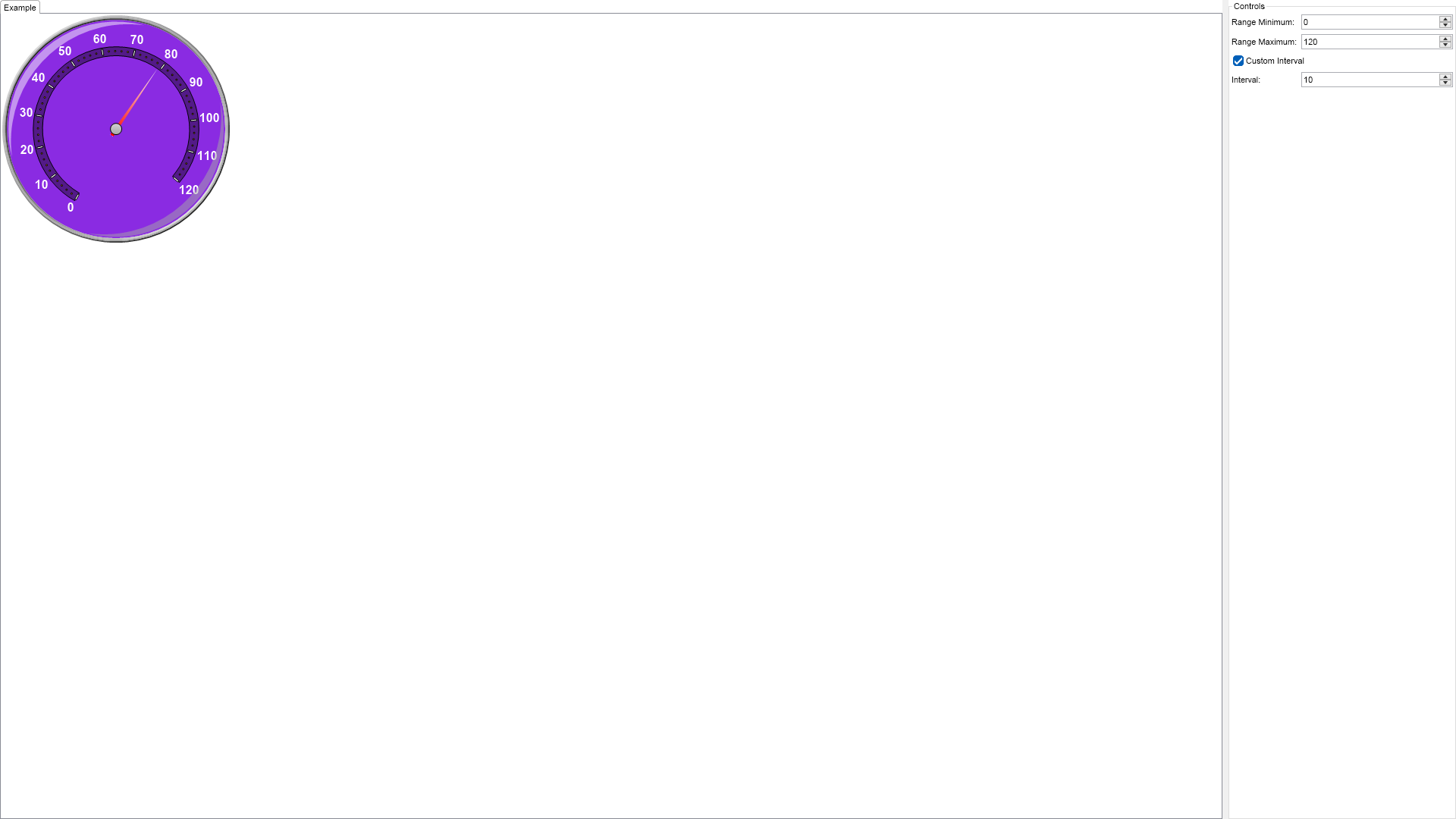
Imports Nevron.Nov
Imports Nevron.Nov.Chart
Imports Nevron.Nov.Dom
Imports Nevron.Nov.Graphics
Imports Nevron.Nov.Layout
Imports Nevron.Nov.UI
Imports Nevron.Nov.Windows.Wpf
Imports System

Class MainWindow

#Region "Constructors"

	Public Sub New()
		' This call is required by the designer.
		InitializeComponent()

		' Add any initialization after the InitializeComponent() call.

		' Set form title
		Title = "NOV WPF - NScalesMinMaxExample"

		' Create the NOV example and its controls
		Dim exampleContent As NWidget = CreateExampleContent()
		Dim exampleControls As NWidget = CreateExampleControls()
		If Not exampleControls Is Nothing Then
			exampleControls.PreferredWidth = 300
		End If

		' Place the example and its controls in a pair box
		Dim pairBox As NPairBox = New NPairBox(exampleContent, exampleControls)
		pairBox.FillMode = ENStackFillMode.First
		pairBox.FitMode = ENStackFitMode.First
		pairBox.Margins = New NMargins(NDesign.HorizontalSpacing, NDesign.VerticalSpacing)

		' Host the example in the form
		Dim host As NNovWidgetHost(Of NWidget) = New NNovWidgetHost(Of NWidget)(pairBox)
		Content = host
	End Sub


#End Region

#Region "Example"
        Public Function CreateExampleContent() As NWidget
            Dim stack As NStackPanel = New NStackPanel()
            stack.HorizontalPlacement = ENHorizontalPlacement.Left

            Dim controlStack As NStackPanel = New NStackPanel()
            stack.Add(controlStack)

            ' create the radial gauge
            m_RadialGauge = New NRadialGauge()

            m_RadialGauge.PreferredSize = defaultRadialGaugeSize
            m_RadialGauge.CapEffect = New NGlassCapEffect()
            m_RadialGauge.Dial = New NDial(ENDialShape.Circle, New NEdgeDialRim())

            Dim advancedGradient As NAdvancedGradientFill = New NAdvancedGradientFill()
            advancedGradient.BackgroundColor = NColor.BlueViolet
            advancedGradient.Points.Add(New NAdvancedGradientPoint(NColor.MediumPurple, New NAngle(180, NUnit.Degree), 0.2F, 4, 0.7F, ENAdvancedGradientPointShape.Circle))
            m_RadialGauge.Dial.BackgroundFill = advancedGradient
            m_RadialGauge.CapEffect = New NGlassCapEffect(ENCapEffectShape.Ellipse)

            m_RadialGauge.SweepAngle = New NAngle(280, NUnit.Degree)
            m_RadialGauge.BeginAngle = New NAngle(120, NUnit.Degree)

            ' configure scale
            Dim axis As NGaugeAxis = New NGaugeAxis()
            m_RadialGauge.Axes.Clear()
            m_RadialGauge.Axes.Add(axis)

            m_Scale = CType(axis.Scale, NNumericScale)
            m_Scale.SetPredefinedScale(ENPredefinedScaleStyle.Presentation)

            m_Scale.Ruler.Fill = New NColorFill(NColor.FromColor(NColor.Transparent, 0.4F))
            m_Scale.OuterMajorTicks.Fill = New NColorFill(NColor.White)
            m_Scale.Labels.Style.TextStyle.Font = New NFont("Arial", 12, ENFontStyle.Bold)
            m_Scale.Labels.Style.TextStyle.Fill = New NColorFill(NColor.White)
            m_Scale.MajorTickMode = ENMajorTickMode.CustomStep
            m_Scale.CustomStep = 10
            m_Scale.MinorTickCount = 4
            m_Scale.ViewRangeInflateMode = ENScaleViewRangeInflateMode.None
            'TODO: interval offset

            ' needle value indicator
            m_ValueIndicator = New NNeedleValueIndicator()
            m_ValueIndicator.Value = 79
            m_ValueIndicator.Fill = New NStockGradientFill(ENGradientStyle.Horizontal, ENGradientVariant.Variant1, NColor.White, NColor.Red)
            m_ValueIndicator.Stroke.Color = NColor.White
            m_ValueIndicator.EnableDampening = True
            m_ValueIndicator.OffsetFromCenter = -10
            m_RadialGauge.Indicators.Add(m_ValueIndicator)

            ' adds radial gauge
            controlStack.Add(m_RadialGauge)

            Return stack
        End Function
        Public Function CreateExampleControls() As NWidget
            Dim stack As NStackPanel = New NStackPanel()

            Dim propertyStack As NStackPanel = New NStackPanel()
            stack.Add(New NUniSizeBoxGroup(propertyStack))

            ' Range minimum
            m_RangeMinimumUpDown = New NNumericUpDown()
            Me.m_RangeMinimumUpDown.ValueChanged += AddressOf OnUpDownRangeMinimumChanged
            m_RangeMinimumUpDown.Value = 0
            propertyStack.Add(New NPairBox("Range Minimum:", m_RangeMinimumUpDown, True))

            ' Range max
            m_RangeMaximumUpDown = New NNumericUpDown()
            Me.m_RangeMaximumUpDown.ValueChanged += AddressOf OnUpDownRangeMaximumChanged
            m_RangeMaximumUpDown.Value = 120
            propertyStack.Add(New NPairBox("Range Maximum:", m_RangeMaximumUpDown, True))

            ' reversed scale check box
            m_CustomInterval = New NCheckBox("Custom Interval")
            m_CustomInterval.Checked = True
            Me.m_CustomInterval.CheckedChanged += AddressOf OnCustomIntervalCheckBoxValueChanged
            propertyStack.Add(m_CustomInterval)

            ' Interval - scale custom step
            m_IntervalUpDown = New NNumericUpDown()
            m_IntervalUpDown.Value = m_Scale.CustomStep
            Me.m_IntervalUpDown.ValueChanged += AddressOf OnUpDownIntervalChanged
            m_IntervalUpDown.Value = Math.Min(Math.Max(m_IntervalUpDown.Value, 10), 50)
            propertyStack.Add(New NPairBox("Interval: ", m_IntervalUpDown, True))


            Return stack
        End Function
        Public Function GetExampleDescription() As String
            Return " This sample demonstrates how to set a scale's minimum, maximum, and interval values.Scale range is specified using minimum and maximum values,
                        and the Minimum value can't be equal to or more than the maximum.
                        The scale interval defines the distance between the major tick marks and the labels. "
        End Function

        '''
        ''' Gets the relevant documentation links for the example
        '''
        '''
        Public Function GetDocumentationUrls() As (String, String)()
            Return {("Gauges Axes", "https://www.nevron.com/docs/openvision/gauges-axes.html"), ("Scales Overview", "https://www.nevron.com/docs/openvision/scales-overview.html"), ("Gauges Overview", "https://www.nevron.com/docs/openvision/gauges-overview.html")}
        End Function

#End Region

#Region "Implementation"
#End Region

#Region "Event Handlers"

        '''
        '''
        '''
        '''
        Private Sub OnUpDownRangeMinimumChanged(arg As NValueChangeEventArgs)
            Dim newMinimum As Integer = m_RangeMinimumUpDown.Value

            If newMinimum > 100 Then
                newMinimum = 100
            ElseIf newMinimum <= 0 Then
                newMinimum = 0
            End If
            Me.UpdateAxisRange(newMinimum, CInt(m_RadialGauge.Axes(CInt(0)).Range.End))
        End Sub

        '''
        '''
        '''
        '''
        Private Sub OnUpDownRangeMaximumChanged(arg As NValueChangeEventArgs)
            Dim newMaximum As Integer = m_RangeMaximumUpDown.Value

            If newMaximum > 300 Then
                newMaximum = 300
            ElseIf newMaximum <= 120 Then
                newMaximum = 120
            End If

            ChangeFontSize(newMaximum)
            Me.UpdateAxisRange(CInt(m_RadialGauge.Axes(CInt(0)).Range.Begin), newMaximum)
        End Sub

        '''
        '''
        '''
        '''
        '''
        Private Sub OnCustomIntervalCheckBoxValueChanged(arg As NValueChangeEventArgs)
            Dim checkbox = CType(arg.TargetNode, NCheckBox)
            If Not checkbox.Checked Then m_Scale.CustomStep = 10

            m_IntervalUpDown.Enabled = checkbox.Checked
        End Sub

        '''
        '''  Get the new interval value. The value should be between 10 and 50
        '''
        '''
        Private Sub OnUpDownIntervalChanged(arg As NValueChangeEventArgs)
            Dim newInterval As Integer = m_IntervalUpDown.Value

            If newInterval > 50 OrElse newInterval <= 10 Then Return

            m_Scale.CustomStep = newInterval
        End Sub

        '''
        ''' Updates axis range of the radial gauge
        '''
        '''  The new minimum value for the axis range
        '''  The new maximum value for the axis range
        Private Sub UpdateAxisRange(newMinimum As Integer, newMaximum As Integer)
            ' Check if the new minimum is greater than or equal to the new maximum
            If newMinimum >= newMaximum Then Return

            m_RadialGauge.Axes(0).Range = New NRange(newMinimum, newMaximum)
        End Sub

        '''
        ''' Changes the font size of the scale labels based on the new maximum value
        '''
        '''
        Private Sub ChangeFontSize(newMaximum As Integer)

            If newMaximum < 150 Then
                m_Scale.Labels.Style.TextStyle.Font = New NFont("Arial", 12, ENFontStyle.Bold)
            ElseIf newMaximum >= 150 AndAlso newMaximum <= 200 Then
                m_Scale.Labels.Style.TextStyle.Font = New NFont("Arial", 8, ENFontStyle.Bold)
            ElseIf newMaximum >= 201 AndAlso newMaximum <= 300 Then
                m_Scale.Labels.Style.TextStyle.Font = New NFont("Arial", 6, ENFontStyle.Bold)
            End If
        End Sub


#End Region

#Region "Fields"

        Private m_RadialGauge As NRadialGauge
        Private m_ValueIndicator As NNeedleValueIndicator
        Private m_Scale As NNumericScale

        Private m_RangeMinimumUpDown As NNumericUpDown
        Private m_RangeMaximumUpDown As NNumericUpDown
        Private m_IntervalUpDown As NNumericUpDown
        Private m_CustomInterval As NCheckBox

#End Region

#Region "Static Methods"
#End Region

#Region "Constants"

        Private Shared ReadOnly defaultRadialGaugeSize As NSize = New NSize(300, 300)

#End Region

#Region "Nested Types"
#End Region

End Class

 Chart for .NET
 Diagram for .NET
 User Interface for .NET
 Vision for SSRS
 Chart for SSRS
 Gauge for SSRS
 Map for SSRS
 Barcode for SSRS
 Vision for SharePoint
 Chart for SharePoint
 Gauge for SharePoint
 Map for SharePoint
 Barcode for SharePoint
 Open Vision for .NET


 Vision for .NET