Imports Nevron.Nov
Imports Nevron.Nov.Chart
Imports Nevron.Nov.Dom
Imports Nevron.Nov.Graphics
Imports Nevron.Nov.Layout
Imports Nevron.Nov.UI
Imports Nevron.Nov.Windows.Forms
Public Class Form1
#Region "Constructors"
Public Sub New()
' This call is required by the designer.
InitializeComponent()
' Add any initialization after the InitializeComponent() call.
' Set form title
Text = "NOV WinForms - NGaugeCustomRangeLabelsExample"
' Create the NOV example and its controls
Dim exampleContent As NWidget = CreateExampleContent()
Dim exampleControls As NWidget = CreateExampleControls()
If Not exampleControls Is Nothing Then
exampleControls.PreferredWidth = 300
End If
' Place the example and its controls in a pair box
Dim pairBox As NPairBox = New NPairBox(exampleContent, exampleControls)
pairBox.FillMode = ENStackFillMode.First
pairBox.FitMode = ENStackFitMode.First
pairBox.Margins = New NMargins(NDesign.HorizontalSpacing, NDesign.VerticalSpacing)
' Host the example in the form
Dim host As NNovWidgetHost(Of NWidget) = New NNovWidgetHost(Of NWidget)(pairBox)
host.Dock = DockStyle.Fill
Controls.Add(host)
End Sub
#End Region
#Region "Example"
Public Function CreateExampleContent() As NWidget
Dim stack As NStackPanel = New NStackPanel()
Dim controlStack As NStackPanel = New NStackPanel()
controlStack.Direction = ENHVDirection.LeftToRight
stack.Add(controlStack)
m_LinearGauge = New NLinearGauge()
m_LinearGauge.Orientation = ENLinearGaugeOrientation.Vertical
m_LinearGauge.PreferredSize = defaultLinearVerticalGaugeSize
m_LinearGauge.CapEffect = New NGelCapEffect()
m_LinearGauge.Border = CreateBorder()
m_LinearGauge.Padding = New NMargins(20)
m_LinearGauge.BorderThickness = New NMargins(6)
controlStack.Add(m_LinearGauge)
' create the background panel
Dim advGradient As NAdvancedGradientFill = New NAdvancedGradientFill()
advGradient.BackgroundColor = NColor.Black
advGradient.Points.Add(New NAdvancedGradientPoint(NColor.LightGray, New NAngle(10, NUnit.Degree), 0.1F, 0, 1.0F, ENAdvancedGradientPointShape.Circle))
m_LinearGauge.BackgroundFill = advGradient
m_LinearGauge.Axes.Clear()
Dim axis As NGaugeAxis = New NGaugeAxis()
m_LinearGauge.Axes.Add(axis)
axis.Anchor = New NModelGaugeAxisAnchor(24.0, ENVerticalAlignment.Center, ENScaleOrientation.Left)
ConfigureScale(CType(axis.Scale, NLinearScale))
' add some indicators
m_LinearGauge.Indicators.Add(New NMarkerValueIndicator(60))
' create the radial gauge
m_RadialGauge = New NRadialGauge()
controlStack.Add(m_RadialGauge)
m_RadialGauge.CapEffect = New NGlassCapEffect()
m_RadialGauge.Dial = New NDial(ENDialShape.Circle, New NEdgeDialRim())
' set some background
advGradient = New NAdvancedGradientFill()
advGradient.BackgroundColor = NColor.Black
advGradient.Points.Add(New NAdvancedGradientPoint(NColor.LightGray, New NAngle(10, NUnit.Degree), 0.1F, 0, 1.0F, ENAdvancedGradientPointShape.Circle))
m_RadialGauge.Dial.BackgroundFill = advGradient
m_RadialGauge.CapEffect = New NGlassCapEffect(ENCapEffectShape.Ellipse)
' create the radial gauge
m_RadialGauge.SweepAngle = New NAngle(270, NUnit.Degree)
m_RadialGauge.BeginAngle = New NAngle(-90, NUnit.Degree)
Dim scale As NStandardScale = TryCast(axis.Scale, NStandardScale)
scale.MajorTickMode = ENMajorTickMode.AutoMinDistance
scale.MinTickDistance = 50
' configure the axis
m_RadialGauge.Axes.Clear()
axis = New NGaugeAxis()
axis.Range = New NRange(0, 100)
axis.Anchor.ScaleOrientation = ENScaleOrientation.Right
axis.Anchor = New NDockGaugeAxisAnchor(ENGaugeAxisDockZone.Top, True, ENScaleOrientation.Right, 0, 100)
m_RadialGauge.Axes.Add(axis)
ConfigureScale(CType(axis.Scale, NLinearScale))
' add some indicators
Dim needle As NNeedleValueIndicator = New NNeedleValueIndicator(60)
needle.OffsetOriginMode = ENIndicatorOffsetOriginMode.ScaleMiddle
needle.OffsetFromScale = 15
m_RadialGauge.Indicators.Add(needle)
Return stack
End Function
Public Function CreateExampleControls() As NWidget
Dim stack As NStackPanel = New NStackPanel()
Dim propertyStack As NStackPanel = New NStackPanel()
stack.Add(New NUniSizeBoxGroup(propertyStack))
' begin angle scroll
m_BeginAngleScrollBar = New NHScrollBar()
m_BeginAngleScrollBar.Minimum = -360
m_BeginAngleScrollBar.Maximum = 360
m_BeginAngleScrollBar.Value = m_RadialGauge.BeginAngle.ToDegrees()
propertyStack.Add(New NPairBox("Begin Angle:", m_BeginAngleScrollBar))
' sweep angle scroll
m_SweepAngleScrollBar = New NHScrollBar()
m_SweepAngleScrollBar.Minimum = -360
m_SweepAngleScrollBar.Maximum = 360
m_SweepAngleScrollBar.Value = m_RadialGauge.SweepAngle.ToDegrees()
propertyStack.Add(New NPairBox("Sweep Angle:", m_SweepAngleScrollBar))
' show max check box
m_ShowMinRangeCheckBox = New NCheckBox("Show Min Range")
m_ShowMinRangeCheckBox.Checked = True
propertyStack.Add(m_ShowMinRangeCheckBox)
' show min check box
m_ShowMaxRangeCheckBox = New NCheckBox("Show Max Range")
m_ShowMaxRangeCheckBox.Checked = True
propertyStack.Add(m_ShowMaxRangeCheckBox)
Me.m_BeginAngleScrollBar.ValueChanged += AddressOf OnBeginAngleScrollBarValueChanged
Me.m_SweepAngleScrollBar.ValueChanged += AddressOf OnSweepAngleScrollBarValueChanged
Me.m_ShowMinRangeCheckBox.CheckedChanged += AddressOf OnShowMinRangeCheckBoxCheckedChanged
Me.m_ShowMaxRangeCheckBox.CheckedChanged += AddressOf OnShowMaxRangeCheckBoxCheckedChanged
UpdateAxisRanges()
Return stack
End Function
Public Function GetExampleDescription() As String
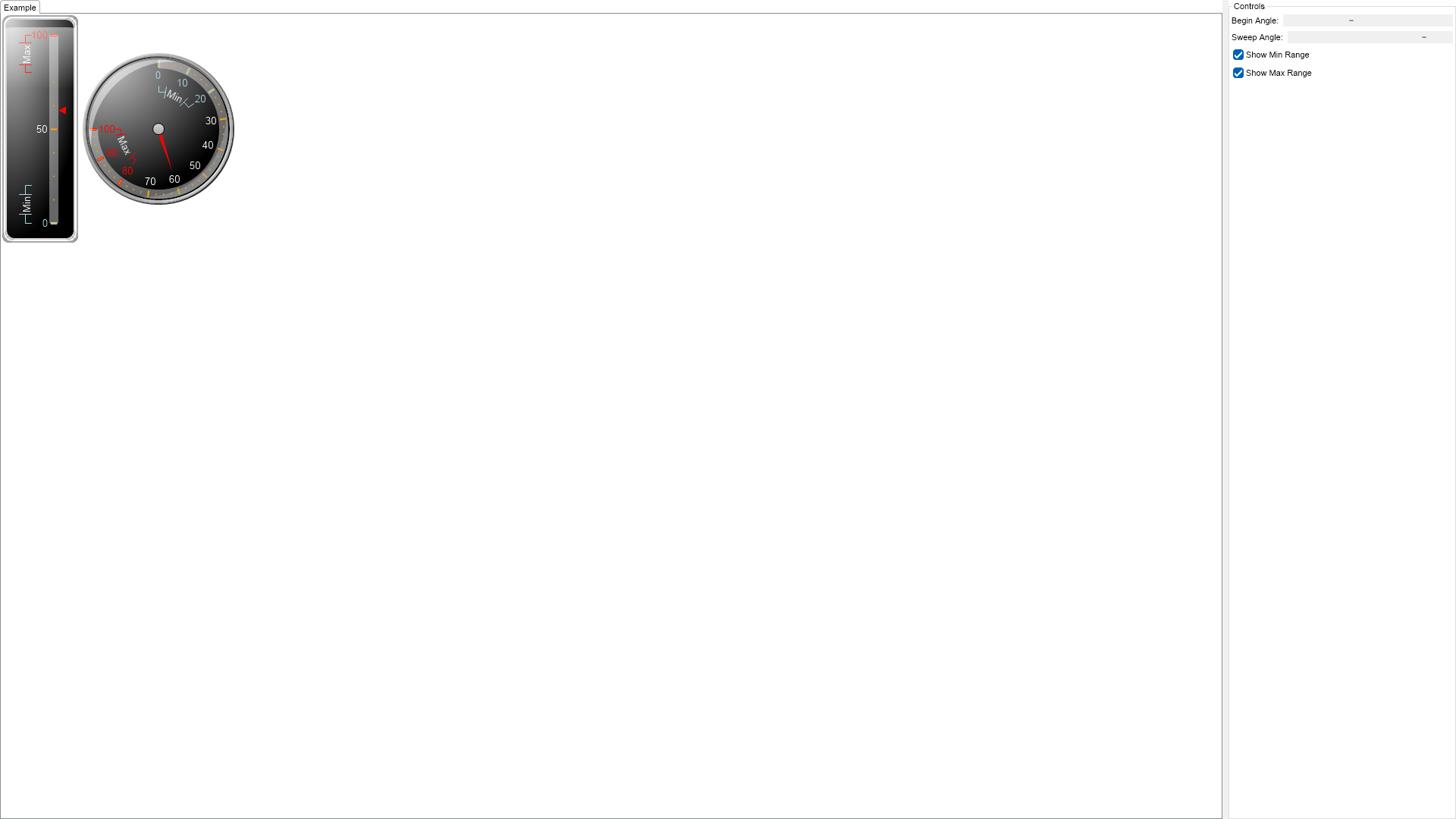
Return "The example demonstrates how to create range labels on the gauge scale.
"
End Function
'''
''' Gets the relevant documentation links for the example
'''
'''
Public Function GetDocumentationUrls() As (String, String)()
Return {("Scale Range Label Settings", "https://www.nevron.com/docs/openvision/scale-range-label-settings.html"), ("Gauges Axes", "https://www.nevron.com/docs/openvision/gauges-axes.html")}
End Function
#End Region
#Region "Implementation"
Private Sub ConfigureScale(scale As NLinearScale)
scale.SetPredefinedScale(ENPredefinedScaleStyle.PresentationNoStroke)
scale.Labels.OverlapResolveLayouts = New NDomArray(Of ENLevelLabelsLayout)()
scale.MinorTickCount = 3
scale.Ruler.Fill = New NColorFill(NColor.FromColor(NColor.White, 0.4F))
scale.OuterMajorTicks.Fill = New NColorFill(NColor.Orange)
scale.Labels.Style.TextStyle.Font = New NFont("Arimo", 10.0, ENFontStyle.Bold)
scale.Labels.Style.TextStyle.Fill = New NColorFill(NColor.White)
End Sub
Private Sub UpdateAxisRanges()
Dim linearGaugeScale As NLinearScale = TryCast(m_LinearGauge.Axes(0).Scale, NLinearScale)
Dim radialGaugeScale As NLinearScale = TryCast(m_RadialGauge.Axes(0).Scale, NLinearScale)
linearGaugeScale.CustomLabels.Clear()
linearGaugeScale.Sections.Clear()
radialGaugeScale.CustomLabels.Clear()
radialGaugeScale.Sections.Clear()
If m_ShowMinRangeCheckBox.Checked Then
ApplyScaleSectionToAxis(linearGaugeScale, "Min", New NRange(0, 20), NColor.LightBlue)
ApplyScaleSectionToAxis(radialGaugeScale, "Min", New NRange(0, 20), NColor.LightBlue)
End If
If m_ShowMaxRangeCheckBox.Checked Then
ApplyScaleSectionToAxis(linearGaugeScale, "Max", New NRange(80, 100), NColor.Red)
ApplyScaleSectionToAxis(radialGaugeScale, "Max", New NRange(80, 100), NColor.Red)
End If
End Sub
Private Sub ApplyScaleSectionToAxis(scale As NLinearScale, text As String, range As NRange, color As NColor)
Dim scaleSection As NScaleSection = New NScaleSection()
scaleSection.Range = range
scaleSection.LabelTextStyle = New NTextStyle()
scaleSection.LabelTextStyle.Fill = New NColorFill(color)
scaleSection.LabelTextStyle.Font = New NFont("Arimo", 10, ENFontStyle.Bold Or ENFontStyle.Italic)
scaleSection.MajorTickStroke = New NStroke(color)
scale.Sections.Add(scaleSection)
Dim rangeLabel As NCustomRangeLabel = New NCustomRangeLabel(range, text)
rangeLabel.LabelStyle.AlwaysInsideScale = False
rangeLabel.LabelStyle.VisibilityMode = ENScaleLabelVisibilityMode.TextInRuler
rangeLabel.LabelStyle.Stroke.Color = color
rangeLabel.LabelStyle.TextStyle.Fill = New NColorFill(NColor.White)
rangeLabel.LabelStyle.Angle = New NScaleLabelAngle(ENScaleLabelAngleMode.Scale, 0)
rangeLabel.LabelStyle.TickMode = ENRangeLabelTickMode.Center
scale.CustomLabels.Add(rangeLabel)
End Sub
#End Region
#Region "Event Handlers"
Private Sub OnShowMaxRangeCheckBoxCheckedChanged(arg As NValueChangeEventArgs)
UpdateAxisRanges()
End Sub
Private Sub OnShowMinRangeCheckBoxCheckedChanged(arg As NValueChangeEventArgs)
UpdateAxisRanges()
End Sub
Private Sub OnSweepAngleScrollBarValueChanged(arg As NValueChangeEventArgs)
m_RadialGauge.SweepAngle = New NAngle(m_SweepAngleScrollBar.Value, NUnit.Degree)
End Sub
Private Sub OnBeginAngleScrollBarValueChanged(arg As NValueChangeEventArgs)
m_RadialGauge.BeginAngle = New NAngle(m_BeginAngleScrollBar.Value, NUnit.Degree)
End Sub
#End Region
#Region "Fields"
Private m_RadialGauge As NRadialGauge
Private m_LinearGauge As NLinearGauge
Private m_BeginAngleScrollBar As NHScrollBar
Private m_SweepAngleScrollBar As NHScrollBar
Private m_ShowMinRangeCheckBox As NCheckBox
Private m_ShowMaxRangeCheckBox As NCheckBox
#End Region
#Region "Static Methods"
Protected Function CreateBorder() As NBorder
Return NBorder.CreateThreeColorBorder(NColor.LightGray, NColor.White, NColor.DarkGray, 10, 10)
End Function
#End Region
#Region "Constants"
Private Shared ReadOnly defaultLinearVerticalGaugeSize As NSize = New NSize(100, 300)
#End Region
#Region "Nested Types"
#End Region
End Class

 Chart for .NET
 Diagram for .NET
 User Interface for .NET
 Vision for SSRS
 Chart for SSRS
 Gauge for SSRS
 Map for SSRS
 Barcode for SSRS
 Vision for SharePoint
 Chart for SharePoint
 Gauge for SharePoint
 Map for SharePoint
 Barcode for SharePoint
 Open Vision for .NET


 Vision for .NET