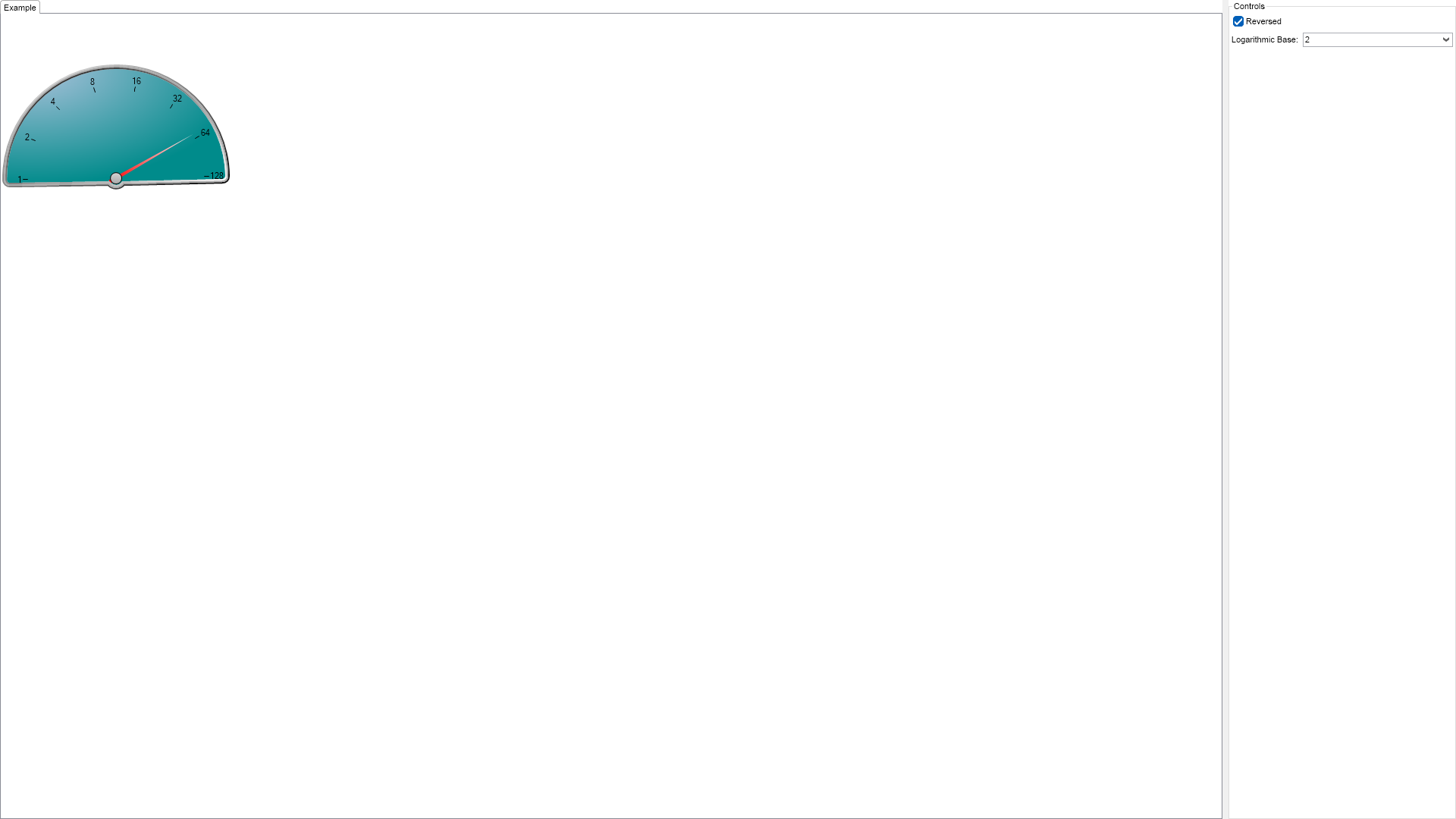
Logarithmic and Reversed Scales Example for WinForms

Logarithmic and Reversed Scales Example for WinForms

Nevron NOV Gauge for WinForms ships with hundreds of examples with full source code, as part of the Nevron Open Vision Suite. All WinForms Gauge examples are also available as a stand-alone Visual Studio solution in C# and VB.NET, which you can download from the links below.

Logarithmic and Reversed Scales Example for WinForms Description

In this example, the logarithm base is limited to a few predefined values, but it is possible to set the logarithm base to any integer value.


Scales Logarithmic Example

C# Logarithmic and Reversed Scales Example Code for Nevron Gauge for WinForms
Language: C#

using Nevron.Nov;
using Nevron.Nov.Chart;
using Nevron.Nov.Dom;
using Nevron.Nov.Graphics;
using Nevron.Nov.Layout;
using Nevron.Nov.UI;
using Nevron.Nov.Windows.Forms;
using System;
using System.Windows.Forms;

namespace NovWinFormsProject
{
	public partial class Form1 : Form
	{
		#region Constructors

		public Form1()
		{
			InitializeComponent();

			// Set form title
			Text = "NOV WinForms - NScalesLogarithmicExample";

			// Create the NOV example and its controls
			NWidget exampleContent = CreateExampleContent();
			NWidget exampleControls = CreateExampleControls();
			if (exampleControls != null)
			{
				exampleControls.PreferredWidth = 300;
			}

			// Place the example and its controls in a pair box
			NPairBox pairBox = new NPairBox(exampleContent, exampleControls);
			pairBox.FillMode = ENStackFillMode.First;
			pairBox.FitMode = ENStackFitMode.First;
			pairBox.Margins = new NMargins(NDesign.HorizontalSpacing, NDesign.VerticalSpacing);

			// Host the example in the form
			NNovWidgetHost host = new NNovWidgetHost(pairBox);
			host.Dock = DockStyle.Fill;
			Controls.Add(host);
		}

		#endregion

        #region Example
        public NWidget CreateExampleContent()
        {
            NStackPanel stack = new NStackPanel();
            stack.HorizontalPlacement = ENHorizontalPlacement.Left;

            NStackPanel controlStack = new NStackPanel();
            stack.Add(controlStack);

            // create the radial gauge
            m_RadialGauge = new NRadialGauge();

            m_RadialGauge.PreferredSize = defaultRadialGaugeSize;
            m_RadialGauge.Dial = new NDial(ENDialShape.CutCircle, new NEdgeDialRim());

            m_RadialGauge.SweepAngle = new NAngle(-180, NUnit.Degree);
            m_RadialGauge.BeginAngle = new NAngle(-1, NUnit.Degree);

            NAdvancedGradientFill advancedGradient = new NAdvancedGradientFill();
            advancedGradient.BackgroundColor = NColor.DarkCyan;
            advancedGradient.Points.Add(new NAdvancedGradientPoint(NColor.LightSteelBlue, new NAngle(10, NUnit.Degree), 0.1f, 0, 1.0f, ENAdvancedGradientPointShape.Circle));
            m_RadialGauge.Dial.BackgroundFill = advancedGradient;

            // configure scale
            NGaugeAxis axis = new NGaugeAxis();
            m_RadialGauge.Axes.Clear();
            m_RadialGauge.Axes.Add(axis);

            axis.Range = new NRange(1, 100);
            axis.Scale = new NLogarithmicScale();

            m_Scale = (NLogarithmicScale)axis.Scale;
            m_Scale.SetPredefinedScale(ENPredefinedScaleStyle.Standard);
            m_Scale.MajorTickMode = ENMajorTickMode.CustomStep;
            m_Scale.CustomStep = 1;
            m_Scale.MinTickDistance = 30;
            m_Scale.Ruler.Stroke.Width = 0;
            m_Scale.Labels.Style.TextStyle.Fill = new NColorFill(NColor.Black);
            m_Scale.Labels.Style.TextStyle.Font = new NFont("Microsoft Sans Serif", 8, ENFontStyle.Bold);
            m_Scale.OuterMajorTicks.Fill = new NColorFill(NColor.White);
          
            // needle value indicator
            m_ValueIndicator = new NNeedleValueIndicator();
            m_ValueIndicator.Value = 59;
            m_ValueIndicator.Fill = new NStockGradientFill(ENGradientStyle.Horizontal, ENGradientVariant.Variant1, NColor.White, NColor.Red);
            m_ValueIndicator.Stroke.Color = NColor.Red;
            m_ValueIndicator.EnableDampening = true;
            m_ValueIndicator.OffsetFromCenter = -10;
            m_RadialGauge.Indicators.Add(m_ValueIndicator);

            // add radial gauge
            controlStack.Add(m_RadialGauge);

            // Timer
            m_Timer = new NTimer();
            m_Timer.Interval = 200;
            m_Timer.Tick += OnTimerTick;
            m_Timer.Start();

            return stack;
        }

        public NWidget CreateExampleControls()
        {
            NStackPanel stack = new NStackPanel();

            NStackPanel propertyStack = new NStackPanel();
            stack.Add(new NUniSizeBoxGroup(propertyStack));

            // reversed scale check box
            m_ReverseScaleCheckBox = new NCheckBox("Reversed");
            m_ReverseScaleCheckBox.CheckedChanged += OnReverseCheckBoxCheckedChange;
            m_ReverseScaleCheckBox.Checked = true;
            propertyStack.Add(m_ReverseScaleCheckBox);

            // logarithmic base 
            m_LogarithmicBaseComboBox = new NComboBox();
            m_LogarithmicBaseComboBox.Items.Add(new NComboBoxItem("10"));
            m_LogarithmicBaseComboBox.Items.Add(new NComboBoxItem("5"));
            m_LogarithmicBaseComboBox.Items.Add(new NComboBoxItem("2"));
            m_LogarithmicBaseComboBox.SelectedIndexChanged += OnLogarithmicBaseComboBoxIndexChanged;
            m_LogarithmicBaseComboBox.SelectedIndex = 2;
			propertyStack.Add(new NPairBox("Logarithmic Base:", m_LogarithmicBaseComboBox, true));

            return stack;
        }

        public string GetExampleDescription()
        {
            return @"

In this example, the logarithm base is limited to a few predefined values, but it is possible to set the logarithm base to any integer value.

"; } /// /// Gets the relevant documentation links for the example /// /// public (string Name, string Url)[] GetDocumentationUrls() { return new[] { ("Logarithmic Scale", "https://www.nevron.com/docs/openvision/logarithmic-scale.html"), ("Gauges Axes", "https://www.nevron.com/docs/openvision/gauges-axes.html"), }; } #endregion #region Implementation #endregion #region Event Handlers private void OnTimerTick() { m_FirstIndicatorAngle += 0.02; double needleValue = 50.0 - Math.Cos(m_FirstIndicatorAngle) * 50.0; m_ValueIndicator.Value = needleValue; } private void OnReverseCheckBoxCheckedChange(NValueChangeEventArgs arg) { bool enableInvert = (bool)arg.NewValue; m_RadialGauge.Axes[0].Scale.Invert = enableInvert; } private void OnLogarithmicBaseComboBoxIndexChanged(NValueChangeEventArgs arg) { int logBase = (int)arg.NewValue; switch (logBase) { case 0: m_Scale.LogarithmBase = 10; break; case 1: m_Scale.LogarithmBase = 5; break; case 2: m_Scale.LogarithmBase = 2; break; } } #endregion #region Fields NRadialGauge m_RadialGauge; NNeedleValueIndicator m_ValueIndicator; NLogarithmicScale m_Scale; NTimer m_Timer; NCheckBox m_ReverseScaleCheckBox; NComboBox m_LogarithmicBaseComboBox; double m_FirstIndicatorAngle; #endregion #region Static Methods #endregion #region Constants private static readonly NSize defaultRadialGaugeSize = new NSize(300, 300); #endregion #region Nested Types #endregion } }

Download a fully functional C# (.cs) Logarithmic and Reversed Scales Example for WinForms Solution

VB.NET Logarithmic and Reversed Scales Example Code for Nevron Gauge for WinForms
Language: VB.NET

Imports Nevron.Nov
Imports Nevron.Nov.Chart
Imports Nevron.Nov.Dom
Imports Nevron.Nov.Graphics
Imports Nevron.Nov.Layout
Imports Nevron.Nov.UI
Imports Nevron.Nov.Windows.Forms
Imports System

Public Class Form1

#Region "Constructors"

    Public Sub New()
        ' This call is required by the designer.
        InitializeComponent()

        ' Add any initialization after the InitializeComponent() call.

        ' Set form title
        Text = "NOV WinForms - NScalesLogarithmicExample"

        ' Create the NOV example and its controls
        Dim exampleContent As NWidget = CreateExampleContent()
        Dim exampleControls As NWidget = CreateExampleControls()
        If Not exampleControls Is Nothing Then
            exampleControls.PreferredWidth = 300
        End If

        ' Place the example and its controls in a pair box
        Dim pairBox As NPairBox = New NPairBox(exampleContent, exampleControls)
        pairBox.FillMode = ENStackFillMode.First
        pairBox.FitMode = ENStackFitMode.First
        pairBox.Margins = New NMargins(NDesign.HorizontalSpacing, NDesign.VerticalSpacing)

        ' Host the example in the form
        Dim host As NNovWidgetHost(Of NWidget) = New NNovWidgetHost(Of NWidget)(pairBox)
        host.Dock = DockStyle.Fill
        Controls.Add(host)
    End Sub


#End Region

#Region "Example"
        Public Function CreateExampleContent() As NWidget
            Dim stack As NStackPanel = New NStackPanel()
            stack.HorizontalPlacement = ENHorizontalPlacement.Left

            Dim controlStack As NStackPanel = New NStackPanel()
            stack.Add(controlStack)

            ' create the radial gauge
            m_RadialGauge = New NRadialGauge()

            m_RadialGauge.PreferredSize = defaultRadialGaugeSize
            m_RadialGauge.Dial = New NDial(ENDialShape.CutCircle, New NEdgeDialRim())

            m_RadialGauge.SweepAngle = New NAngle(-180, NUnit.Degree)
            m_RadialGauge.BeginAngle = New NAngle(-1, NUnit.Degree)

            Dim advancedGradient As NAdvancedGradientFill = New NAdvancedGradientFill()
            advancedGradient.BackgroundColor = NColor.DarkCyan
            advancedGradient.Points.Add(New NAdvancedGradientPoint(NColor.LightSteelBlue, New NAngle(10, NUnit.Degree), 0.1F, 0, 1.0F, ENAdvancedGradientPointShape.Circle))
            m_RadialGauge.Dial.BackgroundFill = advancedGradient

            ' configure scale
            Dim axis As NGaugeAxis = New NGaugeAxis()
            m_RadialGauge.Axes.Clear()
            m_RadialGauge.Axes.Add(axis)

            axis.Range = New NRange(1, 100)
            axis.Scale = New NLogarithmicScale()

            m_Scale = CType(axis.Scale, NLogarithmicScale)
            m_Scale.SetPredefinedScale(ENPredefinedScaleStyle.Standard)
            m_Scale.MajorTickMode = ENMajorTickMode.CustomStep
            m_Scale.CustomStep = 1
            m_Scale.MinTickDistance = 30
            m_Scale.Ruler.Stroke.Width = 0
            m_Scale.Labels.Style.TextStyle.Fill = New NColorFill(NColor.Black)
            m_Scale.Labels.Style.TextStyle.Font = New NFont("Microsoft Sans Serif", 8, ENFontStyle.Bold)
            m_Scale.OuterMajorTicks.Fill = New NColorFill(NColor.White)

            ' needle value indicator
            m_ValueIndicator = New NNeedleValueIndicator()
            m_ValueIndicator.Value = 59
            m_ValueIndicator.Fill = New NStockGradientFill(ENGradientStyle.Horizontal, ENGradientVariant.Variant1, NColor.White, NColor.Red)
            m_ValueIndicator.Stroke.Color = NColor.Red
            m_ValueIndicator.EnableDampening = True
            m_ValueIndicator.OffsetFromCenter = -10
            m_RadialGauge.Indicators.Add(m_ValueIndicator)

            ' add radial gauge
            controlStack.Add(m_RadialGauge)

            ' Timer
            m_Timer = New NTimer()
            m_Timer.Interval = 200
            Me.m_Timer.Tick += AddressOf OnTimerTick
            m_Timer.Start()

            Return stack
        End Function

        Public Function CreateExampleControls() As NWidget
            Dim stack As NStackPanel = New NStackPanel()

            Dim propertyStack As NStackPanel = New NStackPanel()
            stack.Add(New NUniSizeBoxGroup(propertyStack))

            ' reversed scale check box
            m_ReverseScaleCheckBox = New NCheckBox("Reversed")
            Me.m_ReverseScaleCheckBox.CheckedChanged += AddressOf OnReverseCheckBoxCheckedChange
            m_ReverseScaleCheckBox.Checked = True
            propertyStack.Add(m_ReverseScaleCheckBox)

            ' logarithmic base 
            m_LogarithmicBaseComboBox = New NComboBox()
            m_LogarithmicBaseComboBox.Items.Add(New NComboBoxItem("10"))
            m_LogarithmicBaseComboBox.Items.Add(New NComboBoxItem("5"))
            m_LogarithmicBaseComboBox.Items.Add(New NComboBoxItem("2"))
            Me.m_LogarithmicBaseComboBox.SelectedIndexChanged += AddressOf OnLogarithmicBaseComboBoxIndexChanged
            m_LogarithmicBaseComboBox.SelectedIndex = 2
            propertyStack.Add(New NPairBox("Logarithmic Base:", m_LogarithmicBaseComboBox, True))

            Return stack
        End Function

        Public Function GetExampleDescription() As String
            Return "

In this example, the logarithm base is limited to a few predefined values, but it is possible to set the logarithm base to any integer value.

" End Function ''' ''' Gets the relevant documentation links for the example ''' ''' Public Function GetDocumentationUrls() As (String, String)() Return {("Logarithmic Scale", "https://www.nevron.com/docs/openvision/logarithmic-scale.html"), ("Gauges Axes", "https://www.nevron.com/docs/openvision/gauges-axes.html")} End Function #End Region #Region "Implementation" #End Region #Region "Event Handlers" Private Sub OnTimerTick() m_FirstIndicatorAngle += 0.02 Dim needleValue = 50.0 - Math.Cos(m_FirstIndicatorAngle) * 50.0 m_ValueIndicator.Value = needleValue End Sub Private Sub OnReverseCheckBoxCheckedChange(arg As NValueChangeEventArgs) Dim enableInvert As Boolean = arg.NewValue m_RadialGauge.Axes(0).Scale.Invert = enableInvert End Sub Private Sub OnLogarithmicBaseComboBoxIndexChanged(arg As NValueChangeEventArgs) Dim logBase As Integer = arg.NewValue Select Case logBase Case 0 m_Scale.LogarithmBase = 10 Case 1 m_Scale.LogarithmBase = 5 Case 2 m_Scale.LogarithmBase = 2 End Select End Sub #End Region #Region "Fields" Private m_RadialGauge As NRadialGauge Private m_ValueIndicator As NNeedleValueIndicator Private m_Scale As NLogarithmicScale Private m_Timer As NTimer Private m_ReverseScaleCheckBox As NCheckBox Private m_LogarithmicBaseComboBox As NComboBox Private m_FirstIndicatorAngle As Double #End Region #Region "Static Methods" #End Region #Region "Constants" Private Shared ReadOnly defaultRadialGaugeSize As NSize = New NSize(300, 300) #End Region #Region "Nested Types" #End Region End Class

Download a fully functional VB.NET (.vb) Logarithmic and Reversed Scales Example for WinForms Solution

Related Documentation Links