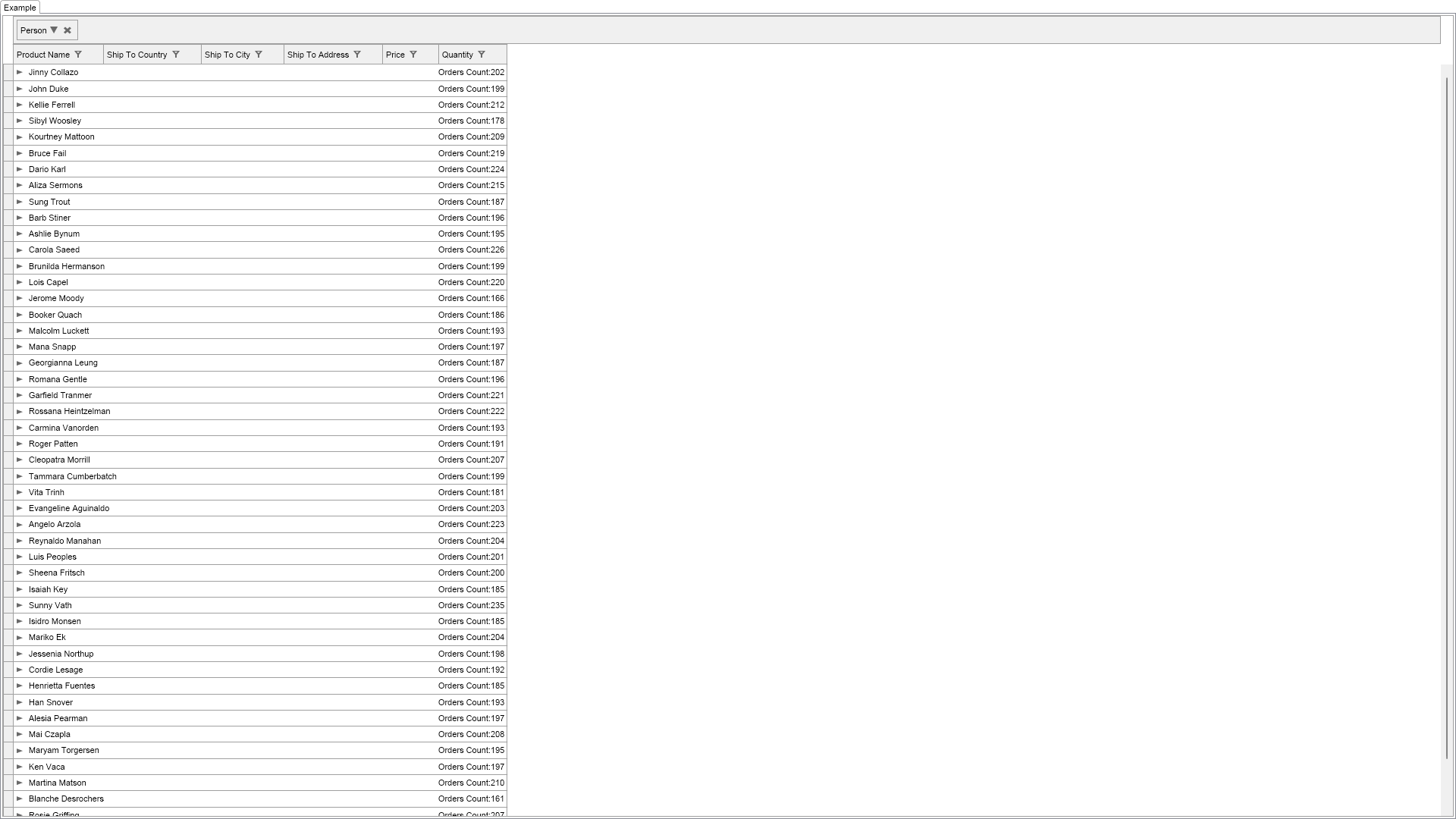
Demonstrates fields grouping, custom group header content and custom group row cells.
In this example we group the PersonSales data source by the PersonId field, which is intentionally hidden from display in the grid.
Because the PersonId field is not very informative for the user, we create custom GroupRow cells, that pull the person Name by Id from the Persons data source.

| Language: C# |
using Nevron.Nov;
using Nevron.Nov.Data;
using Nevron.Nov.Dom;
using Nevron.Nov.Graphics;
using Nevron.Nov.Grid;
using Nevron.Nov.Layout;
using Nevron.Nov.UI;
using Nevron.Nov.Windows.Forms;
using System;
using System.Windows.Forms;
namespace NovWinFormsProject
{
public partial class Form1 : Form
{
#region Constructors
public Form1()
{
InitializeComponent();
// Set form title
Text = "NOV WinForms - NFieldGroupingExample";
// Create the NOV example and its controls
NWidget exampleContent = CreateExampleContent();
NWidget exampleControls = CreateExampleControls();
if (exampleControls != null)
{
exampleControls.PreferredWidth = 300;
}
// Place the example and its controls in a pair box
NPairBox pairBox = new NPairBox(exampleContent, exampleControls);
pairBox.FillMode = ENStackFillMode.First;
pairBox.FitMode = ENStackFitMode.First;
pairBox.Margins = new NMargins(NDesign.HorizontalSpacing, NDesign.VerticalSpacing);
// Host the example in the form
NNovWidgetHost host = new NNovWidgetHost(pairBox);
host.Dock = DockStyle.Fill;
Controls.Add(host);
}
#endregion
#region Example
public NWidget CreateExampleContent()
{
// create a view and get its grid
NTableGridView view = new NTableGridView();
NTableGrid grid = view.Grid;
// customize the grid
grid.AllowEdit = false;
// create the dummy persons data source - we will use it to obtain person names from person ids from it.
m_PersonsDataSource = NDummyDataSource.CreatePersonsDataSource();
// bind to data source, but exclude the "PersonId" field from binding
grid.AutoCreateColumn += delegate(NAutoCreateColumnEventArgs arg)
{
if (arg.FieldInfo.Name == "PersonId")
{
arg.DataColumn = null;
}
};
grid.DataSource = NDummyDataSource.CreatePersonsOrdersDataSource();
// create a grouping rule that groups by the PersonId field
NGroupingRule groupingRule = new NGroupingRule();
groupingRule.RowValue = new NFieldRowValue("PersonId");
// create a custom grouping header named "Person"
groupingRule.CreateGroupingHeaderContentDelegate = delegate(NGroupingRule theGroupingRule)
{
return new NLabel("Person");
};
// create custom group row cells that display the person Name and number of orders
groupingRule.CreateGroupRowCellsDelegate = delegate(NGroupingRuleCreateGroupRowCellsArgs arg)
{
// get the person id from the row for which we create row cells.
int personId = (int)arg.GroupRow.GroupValue;
// get the person name that corresponds to that person id.
int idField = m_PersonsDataSource.GetFieldIndex("Id");
NRecordset rs = m_PersonsDataSource.GetOrCreateIndex(idField).GetRecordsForValue(personId);
string personName = (string)m_PersonsDataSource.GetValue(rs[0], "Name");
// create the group row cells
NGroupRowCell personNameCell = new NGroupRowCell(personName);
personNameCell.EndXPosition.Mode = ENSpanCellEndXPositionMode.NextCellBeginX;
NGroupRowCell ordersCountCell = new NGroupRowCell("Orders Count:" + arg.GroupRow.Recordset.Count);
ordersCountCell.EndXPosition.Mode = ENSpanCellEndXPositionMode.RowEndX;
ordersCountCell.BeginXPosition.Mode = ENSpanCellBeginXPositionMode.AnchorToEndX;
return new NGroupRowCell[] { personNameCell, ordersCountCell };
};
grid.GroupingRules.Add(groupingRule);
return view;
}
public NWidget CreateExampleControls()
{
return null;
}
public string GetExampleDescription()
{
return @"
Demonstrates fields grouping, custom group header content and custom group row cells.
In this example we group the PersonSales data source by the PersonId field, which is intentionally hidden from display in the grid.
Because the PersonId field is not very informative for the user, we create custom GroupRow cells, that pull the person Name by Id from the Persons data source.
";
}
///
/// Gets the relevant documentation links for the example
///
///
public (string Name, string Url)[] GetDocumentationUrls()
{
return new[]
{
("Grid Grouping", "https://www.nevron.com/docs/openvision/grid-grouping.html"),
("Grid Data Processing Overview", "https://www.nevron.com/docs/openvision/grid-data-processing-overview.html"),
};
}
#endregion
#region Implementation
#endregion
#region Event Handlers
#endregion
#region Fields
NDataSource m_PersonsDataSource;
#endregion
#region Static Methods
#endregion
#region Constants
#endregion
#region Nested Types
#endregion
}
} | Language: VB.NET |
Imports Nevron.Nov
Imports Nevron.Nov.Data
Imports Nevron.Nov.Dom
Imports Nevron.Nov.Graphics
Imports Nevron.Nov.Grid
Imports Nevron.Nov.Layout
Imports Nevron.Nov.UI
Imports Nevron.Nov.Windows.Forms
Imports System
Public Class Form1
#Region "Constructors"
Public Sub New()
' This call is required by the designer.
InitializeComponent()
' Add any initialization after the InitializeComponent() call.
' Set form title
Text = "NOV WinForms - NFieldGroupingExample"
' Create the NOV example and its controls
Dim exampleContent As NWidget = CreateExampleContent()
Dim exampleControls As NWidget = CreateExampleControls()
If Not exampleControls Is Nothing Then
exampleControls.PreferredWidth = 300
End If
' Place the example and its controls in a pair box
Dim pairBox As NPairBox = New NPairBox(exampleContent, exampleControls)
pairBox.FillMode = ENStackFillMode.First
pairBox.FitMode = ENStackFitMode.First
pairBox.Margins = New NMargins(NDesign.HorizontalSpacing, NDesign.VerticalSpacing)
' Host the example in the form
Dim host As NNovWidgetHost(Of NWidget) = New NNovWidgetHost(Of NWidget)(pairBox)
host.Dock = DockStyle.Fill
Controls.Add(host)
End Sub
#End Region
#Region "Example"
Public Function CreateExampleContent() As NWidget
' create a view and get its grid
Dim view As NTableGridView = New NTableGridView()
Dim grid = view.Grid
' customize the grid
grid.AllowEdit = False
' create the dummy persons data source - we will use it to obtain person names from person ids from it.
m_PersonsDataSource = NDummyDataSource.CreatePersonsDataSource()
' bind to data source, but exclude the "PersonId" field from binding
grid.AutoCreateColumn += Sub(arg As NAutoCreateColumnEventArgs)
If Equals(arg.FieldInfo.Name, "PersonId") Then
arg.DataColumn = Nothing
End If
End Sub
grid.DataSource = NDummyDataSource.CreatePersonsOrdersDataSource()
' create a grouping rule that groups by the PersonId field
Dim groupingRule As NGroupingRule = New NGroupingRule()
groupingRule.RowValue = New NFieldRowValue("PersonId")
' create a custom grouping header named "Person"
groupingRule.CreateGroupingHeaderContentDelegate = Function(theGroupingRule As NGroupingRule) New NLabel("Person")
' create custom group row cells that display the person Name and number of orders
groupingRule.CreateGroupRowCellsDelegate = Function(arg As NGroupingRuleCreateGroupRowCellsArgs)
' get the person id from the row for which we create row cells.
Dim personId As Integer = arg.GroupRow.GroupValue
' get the person name that corresponds to that person id.
Dim idField = m_PersonsDataSource.GetFieldIndex("Id")
Dim rs = m_PersonsDataSource.GetOrCreateIndex(idField).GetRecordsForValue(personId)
Dim personName = CStr(m_PersonsDataSource.GetValue(rs(0), "Name"))
' create the group row cells
Dim personNameCell As NGroupRowCell = New NGroupRowCell(personName)
personNameCell.EndXPosition.Mode = ENSpanCellEndXPositionMode.NextCellBeginX
Dim ordersCountCell As NGroupRowCell = New NGroupRowCell("Orders Count:" & arg.GroupRow.Recordset.Count.ToString())
ordersCountCell.EndXPosition.Mode = ENSpanCellEndXPositionMode.RowEndX
ordersCountCell.BeginXPosition.Mode = ENSpanCellBeginXPositionMode.AnchorToEndX
Return New NGroupRowCell() {personNameCell, ordersCountCell}
End Function
grid.GroupingRules.Add(groupingRule)
Return view
End Function
Public Function CreateExampleControls() As NWidget
Return Nothing
End Function
Public Function GetExampleDescription() As String
Return "
Demonstrates fields grouping, custom group header content and custom group row cells.
In this example we group the PersonSales data source by the PersonId field, which is intentionally hidden from display in the grid.
Because the PersonId field is not very informative for the user, we create custom GroupRow cells, that pull the person Name by Id from the Persons data source.
"
End Function
'''
''' Gets the relevant documentation links for the example
'''
'''
Public Function GetDocumentationUrls() As (String, String)()
Return {("Grid Grouping", "https://www.nevron.com/docs/openvision/grid-grouping.html"), ("Grid Data Processing Overview", "https://www.nevron.com/docs/openvision/grid-data-processing-overview.html")}
End Function
#End Region
#Region "Implementation"
#End Region
#Region "Event Handlers"
#End Region
#Region "Fields"
Private m_PersonsDataSource As NDataSource
#End Region
#Region "Static Methods"
#End Region
#Region "Constants"
#End Region
#Region "Nested Types"
#End Region
End Class