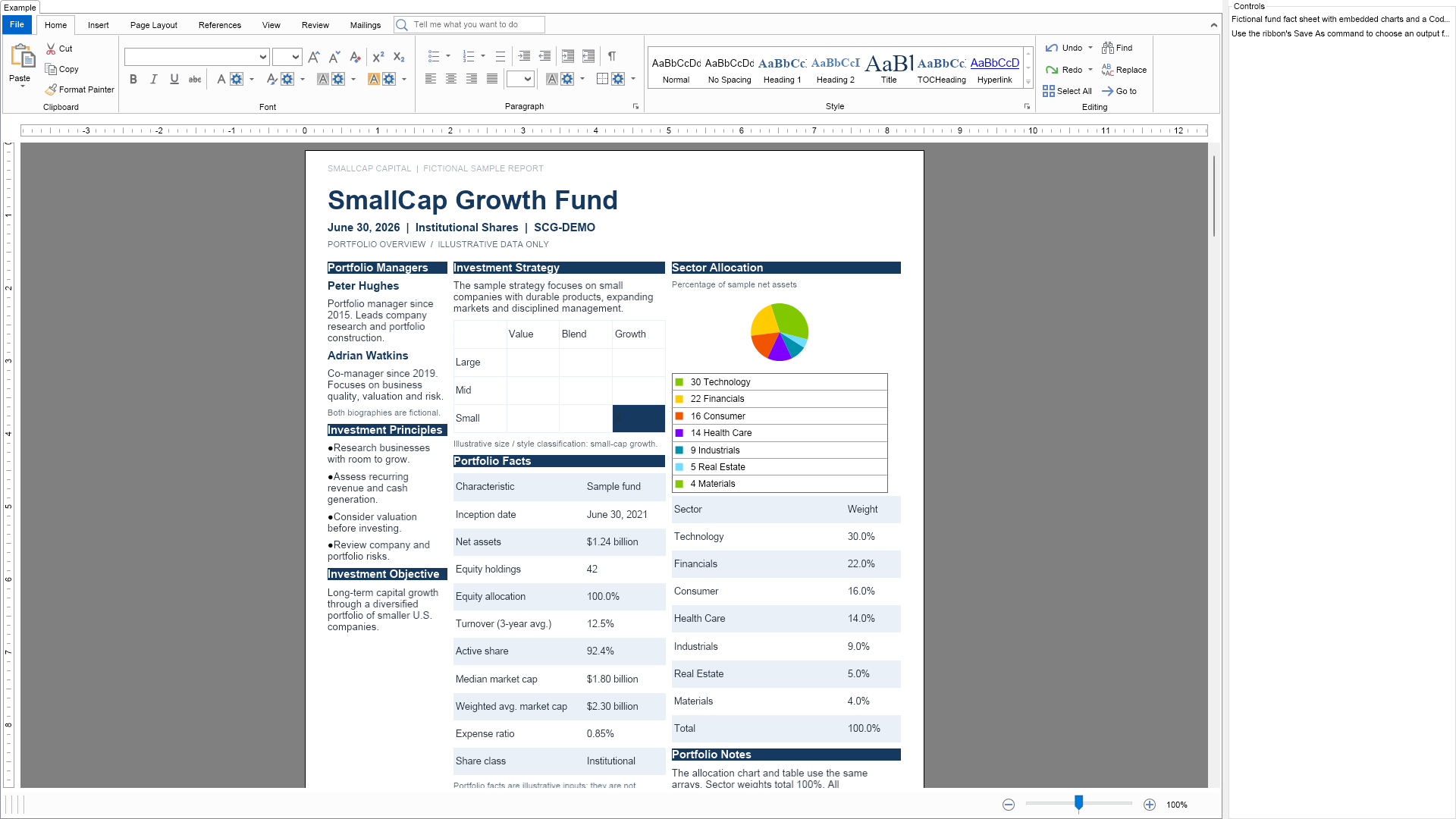
This example creates a fictional investment fund fact sheet using NOV Rich Text Editor for page layout, styles, tables, headers and footers. NOV Chart supplies six charts covering allocation, returns and risk. NOV Barcode supplies a Code 128 serial number. Charts and barcodes are embedded with NWidgetInline.
All names and financial figures are illustrative. Use PDF for a fixed-layout report, DOCX for document exchange, and NTB to retain the native NOV widgets.

| Language: C# |
using Nevron.Nov;
using Nevron.Nov.Barcode;
using Nevron.Nov.Chart;
using Nevron.Nov.Dom;
using Nevron.Nov.Graphics;
using Nevron.Nov.Layout;
using Nevron.Nov.Text;
using Nevron.Nov.UI;
using Nevron.Nov.Windows.Forms;
using System;
using System.Collections.Generic;
using System.Globalization;
using System.IO;
using System.Windows.Forms;
namespace NovWinFormsProject
{
public partial class Form1 : Form
{
#region Constructors
public Form1()
{
InitializeComponent();
// Set form title
Text = "NOV WinForms - NSampleFundFactSheetReportExample";
// Create the NOV example and its controls
NWidget exampleContent = CreateExampleContent();
NWidget exampleControls = CreateExampleControls();
if (exampleControls != null)
{
exampleControls.PreferredWidth = 300;
}
// Place the example and its controls in a pair box
NPairBox pairBox = new NPairBox(exampleContent, exampleControls);
pairBox.FillMode = ENStackFillMode.First;
pairBox.FitMode = ENStackFitMode.First;
pairBox.Margins = new NMargins(NDesign.HorizontalSpacing, NDesign.VerticalSpacing);
// Host the example in the form
NNovWidgetHost host = new NNovWidgetHost(pairBox);
host.Dock = DockStyle.Fill;
Controls.Add(host);
}
#endregion
#region Example
///
/// Creates the ribbon editor, report styles, and complete fictional report.
///
/// The ribbon widget containing the populated rich text view.
public NWidget CreateExampleContent()
{
NRichTextViewWithRibbon richTextWithRibbon = new NRichTextViewWithRibbon();
m_RichText = richTextWithRibbon.View;
m_RichText.AcceptsTab = true;
CreateReportStyles();
PopulateRichText();
return richTextWithRibbon;
}
///
/// Creates explanatory controls displayed alongside the report example.
///
/// A panel containing the example instructions.
public NWidget CreateExampleControls()
{
NStackPanel stack = new NStackPanel();
stack.Add(new NLabel("Fictional fund fact sheet with embedded charts and a Code 128 report ID."));
stack.Add(new NLabel("Use the ribbon's Save As command to choose an output format."));
return stack;
}
///
/// Describes the report, participating NOV components, and output formats.
///
/// The HTML description displayed by the NOV examples browser.
public string GetExampleDescription()
{
return @"This example creates a fictional investment fund fact sheet using
NOV Rich Text Editor for page layout, styles, tables, headers and footers.
NOV Chart supplies six charts covering allocation, returns and risk. NOV Barcode supplies
a Code 128 serial number. Charts and barcodes are embedded with NWidgetInline.
All names and financial figures are illustrative. Use PDF for a fixed-layout
report, DOCX for document exchange, and NTB to retain the native NOV widgets.
";
}
///
/// Gets the relevant documentation links for the example
///
///
public (string Name, string Url)[] GetDocumentationUrls()
{
return new[]
{
("Rich Text Tables", "https://www.nevron.com/docs/openvision/rich-text-tables.html"),
("Rich Text Image Inlines", "https://www.nevron.com/docs/openvision/rich-text-image-inlines.html"),
("Rich Text Sections", "https://www.nevron.com/docs/openvision/rich-text-sections.html"),
("Rich Text - PDF Export", "https://www.nevron.com/docs/openvision/rich-text-pdf-export.html"),
("Rich Text Paragraph Styles", "https://www.nevron.com/docs/openvision/rich-text-paragraph-styles.html"),
};
}
///
/// Saves the current report as PDF, DOCX, and NTB after the view is created. Call on its owning NOV UI thread; matching files are overwritten.
///
/// The destination directory, created if it does not exist.
public void ExportReport(string directory)
{
if (m_RichText == null)
throw new InvalidOperationException("Create the report before exporting it.");
if (String.IsNullOrEmpty(directory))
throw new ArgumentException("Specify an output directory.", "directory");
Directory.CreateDirectory(directory);
string basePath = Path.Combine(directory, Report.SerialNumber);
m_RichText.SaveToLocalFile(basePath + ".pdf");
m_RichText.SaveToLocalFile(basePath + ".docx");
m_RichText.SaveToLocalFile(basePath + ".ntb");
}
#endregion
#region Implementation
#endregion
#region Event Handlers
#endregion
#region Fields
#endregion
#region Static Methods
#endregion
#region Constants
#endregion
#region Nested Types
#endregion
}
} | Language: VB.NET |
Imports Nevron.Nov
Imports Nevron.Nov.Barcode
Imports Nevron.Nov.Chart
Imports Nevron.Nov.Dom
Imports Nevron.Nov.Graphics
Imports Nevron.Nov.Layout
Imports Nevron.Nov.Text
Imports Nevron.Nov.UI
Imports Nevron.Nov.Windows.Wpf
Imports System
Imports System.Collections.Generic
Imports System.Globalization
Imports System.IO
Class MainWindow
#Region "Constructors"
Public Sub New()
' This call is required by the designer.
InitializeComponent()
' Add any initialization after the InitializeComponent() call.
' Set form title
Title = "NOV WPF - NSampleFundFactSheetReportExample"
' Create the NOV example and its controls
Dim exampleContent As NWidget = CreateExampleContent()
Dim exampleControls As NWidget = CreateExampleControls()
If Not exampleControls Is Nothing Then
exampleControls.PreferredWidth = 300
End If
' Place the example and its controls in a pair box
Dim pairBox As NPairBox = New NPairBox(exampleContent, exampleControls)
pairBox.FillMode = ENStackFillMode.First
pairBox.FitMode = ENStackFitMode.First
pairBox.Margins = New NMargins(NDesign.HorizontalSpacing, NDesign.VerticalSpacing)
' Host the example in the form
Dim host As NNovWidgetHost(Of NWidget) = New NNovWidgetHost(Of NWidget)(pairBox)
Content = host
End Sub
#End Region
#Region "Example"
'''
''' Creates the ribbon editor, report styles, and complete fictional report.
'''
''' The ribbon widget containing the populated rich text view.
Public Function CreateExampleContent() As Nevron.Nov.UI.NWidget
Dim richTextWithRibbon As Nevron.Nov.Text.NRichTextViewWithRibbon = New Nevron.Nov.Text.NRichTextViewWithRibbon()
Me.m_RichText = richTextWithRibbon.View
Me.m_RichText.AcceptsTab = True
Me.CreateReportStyles()
Me.PopulateRichText()
Return richTextWithRibbon
End Function
'''
''' Creates explanatory controls displayed alongside the report example.
'''
''' A panel containing the example instructions.
Public Function CreateExampleControls() As Nevron.Nov.UI.NWidget
Dim stack As Nevron.Nov.UI.NStackPanel = New Nevron.Nov.UI.NStackPanel()
stack.Add(New Nevron.Nov.UI.NLabel("Fictional fund fact sheet with embedded charts and a Code 128 report ID."))
stack.Add(New Nevron.Nov.UI.NLabel("Use the ribbon's Save As command to choose an output format."))
Return stack
End Function
'''
''' Describes the report, participating NOV components, and output formats.
'''
''' The HTML description displayed by the NOV examples browser.
Public Function GetExampleDescription() As String
Return "This example creates a fictional investment fund fact sheet using
NOV Rich Text Editor for page layout, styles, tables, headers and footers.
NOV Chart supplies six charts covering allocation, returns and risk. NOV Barcode supplies
a Code 128 serial number. Charts and barcodes are embedded with NWidgetInline.
All names and financial figures are illustrative. Use PDF for a fixed-layout
report, DOCX for document exchange, and NTB to retain the native NOV widgets.
"
End Function
'''
''' Gets the relevant documentation links for the example
'''
'''
Public Function GetDocumentationUrls() As (String, String)()
Return {("Rich Text Tables", "https://www.nevron.com/docs/openvision/rich-text-tables.html"), ("Rich Text Image Inlines", "https://www.nevron.com/docs/openvision/rich-text-image-inlines.html"), ("Rich Text Sections", "https://www.nevron.com/docs/openvision/rich-text-sections.html"), ("Rich Text - PDF Export", "https://www.nevron.com/docs/openvision/rich-text-pdf-export.html"), ("Rich Text Paragraph Styles", "https://www.nevron.com/docs/openvision/rich-text-paragraph-styles.html")}
End Function
'''
''' Saves the current report as PDF, DOCX, and NTB after the view is created. Call on its owning NOV UI thread; matching files are overwritten.
'''
''' The destination directory, created if it does not exist.
Public Sub ExportReport(directory As String)
If Me.m_RichText Is Nothing Then Throw New System.InvalidOperationException("Create the report before exporting it.")
If System.[String].IsNullOrEmpty(directory) Then Throw New System.ArgumentException("Specify an output directory.", "directory")
Call System.IO.Directory.CreateDirectory(directory)
Dim basePath As String = System.IO.Path.Combine(directory, Nevron.Nov.Examples.Text.NSampleFundFactSheetReportExample.Report.SerialNumber)
Me.m_RichText.SaveToLocalFile(basePath & ".pdf")
Me.m_RichText.SaveToLocalFile(basePath & ".docx")
Me.m_RichText.SaveToLocalFile(basePath & ".ntb")
End Sub
#End Region
#Region "Implementation"
#End Region
#Region "Event Handlers"
#End Region
#Region "Fields"
#End Region
#Region "Static Methods"
#End Region
#Region "Constants"
#End Region
#Region "Nested Types"
#End Region
End Class