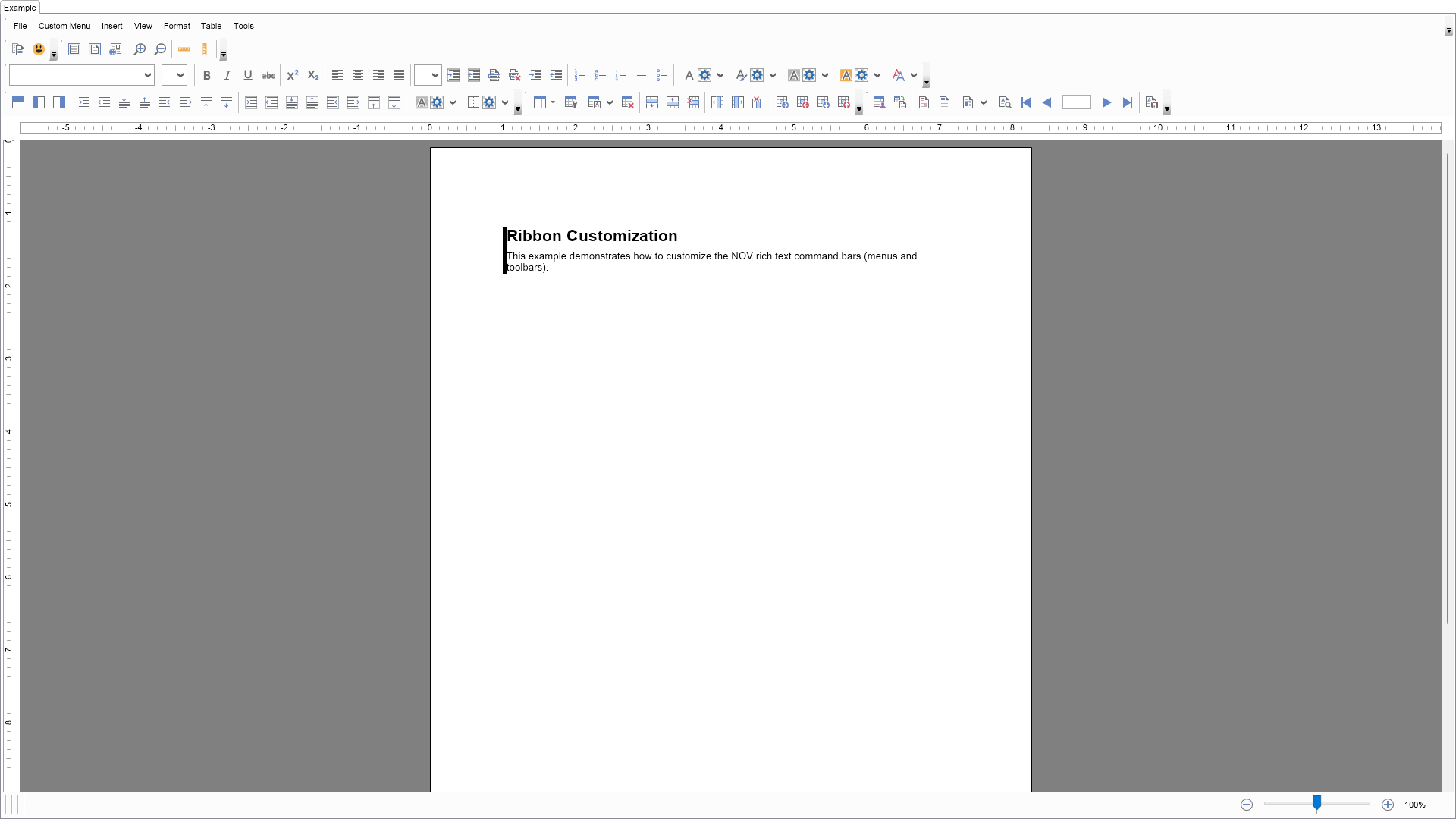
using Nevron.Nov;
using Nevron.Nov.Dom;
using Nevron.Nov.Graphics;
using Nevron.Nov.Layout;
using Nevron.Nov.Text;
using Nevron.Nov.Text.Commands;
using Nevron.Nov.Text.UI;
using Nevron.Nov.UI;
using Nevron.Nov.Windows.Forms;
using System.Windows.Forms;

namespace NovWinFormsProject
{
	public partial class Form1 : Form
	{
		#region Constructors

		public Form1()
		{
			InitializeComponent();

			// Set form title
			Text = "NOV WinForms - NCommandBarsCustomizationExample";

			// Create the NOV example and its controls
			NWidget exampleContent = CreateExampleContent();
			NWidget exampleControls = CreateExampleControls();
			if (exampleControls != null)
			{
				exampleControls.PreferredWidth = 300;
			}

			// Place the example and its controls in a pair box
			NPairBox pairBox = new NPairBox(exampleContent, exampleControls);
			pairBox.FillMode = ENStackFillMode.First;
			pairBox.FitMode = ENStackFitMode.First;
			pairBox.Margins = new NMargins(NDesign.HorizontalSpacing, NDesign.VerticalSpacing);

			// Host the example in the form
			NNovWidgetHost host = new NNovWidgetHost(pairBox);
			host.Dock = DockStyle.Fill;
			Controls.Add(host);
		}

		#endregion

		#region Example

		public NWidget CreateExampleContent()
		{
			m_RichText = new NRichTextView();
			m_RichText.AcceptsTab = true;
			m_RichText.Content.Sections.Clear();

			// Populate the rich text
			PopulateRichText();

			// Add the custom command action to the rich text view's commander
			m_RichText.Commander.Add(new CustomCommandAction());

			// Remove the "Edit" menu and insert a custom one
			m_CommandBarBuilder = new NRichTextCommandBarBuilder();
			m_CommandBarBuilder.MenuDropDownBuilders.Remove(NLoc.Get("Edit"));
			m_CommandBarBuilder.MenuDropDownBuilders.Insert(1, new CustomMenuBuilder());

			// Remove the "Standard" toolbar and insert a custom one
			m_CommandBarBuilder.ToolBarBuilders.Remove(NLoc.Get("Standard"));
			m_CommandBarBuilder.ToolBarBuilders.Insert(0, new CustomToolBarBuilder());

			// Create the commanding UI
			NCommandUIHolder richTextViewWithCommandBars = m_CommandBarBuilder.CreateUI(m_RichText);

			// Remove the Open command from the File menu and the page number command from the status bar
			richTextViewWithCommandBars.RemoveCommands(NRichTextView.OpenCommand, NRichTextView.PageNumberStatusBarCommand);

			return richTextViewWithCommandBars;
		}

		public NWidget CreateExampleControls()
		{
			return null;
		}
		public string GetExampleDescription()
		{
			return @"
This example demonstrates how to customize the NOV rich text command bars (menus and toolbars).
";
		}

		///
		/// Gets the relevant documentation links for the example
		///
		///
		public (string Name, string Url)[] GetDocumentationUrls()
		{
			return new[]
			{
				("Rich Text Command Bars via Code", "https://www.nevron.com/docs/openvision/rich-text-command-bars-via-code.html"),
				("Rich Text Commanding Overview", "https://www.nevron.com/docs/openvision/rich-text-commanding-overview.html"),
			};
		}

		private void PopulateRichText()
		{
			NSection section = new NSection();
			m_RichText.Content.Sections.Add(section);

			section.Blocks.Add(GetDescriptionBlock("Ribbon Customization",
				"This example demonstrates how to customize the NOV rich text command bars (menus and toolbars).", 1));
		}

		#endregion

		#region Implementation
		#endregion

		#region Event Handlers
		#endregion

		#region Fields

		private NRichTextView m_RichText;
		private NRichTextCommandBarBuilder m_CommandBarBuilder;

		#endregion

		#region Static Methods

		private static NParagraph GetDescriptionParagraph(string text)
		{
			return new NParagraph(text);
		}
		private static NParagraph GetTitleParagraphNoBorder(string text, int level)
		{
			double fontSize = 10;
			ENFontStyle fontStyle = ENFontStyle.Regular;

			switch (level)
			{
				case 1:
					fontSize = 16;
					fontStyle = ENFontStyle.Bold;
					break;
				case 2:
					fontSize = 10;
					fontStyle = ENFontStyle.Bold;
					break;
			}

			NParagraph paragraph = new NParagraph();

			paragraph.HorizontalAlignment = ENAlign.Left;
			paragraph.FontSize = fontSize;
			paragraph.FontStyle = fontStyle;

			NTextInline textInline = new NTextInline(text);

			textInline.FontStyle = fontStyle;
			textInline.FontSize = fontSize;

			paragraph.Inlines.Add(textInline);

			return paragraph;

		}
		///
		/// Gets a paragraph with title formatting
		///
		///
		///
		private static NParagraph GetTitleParagraph(string text, int level)
		{
			NColor color = NColor.Black;

			NParagraph paragraph = GetTitleParagraphNoBorder(text, level);
			paragraph.HorizontalAlignment = ENAlign.Left;

			paragraph.Border = CreateLeftTagBorder(color);
			paragraph.BorderThickness = defaultBorderThickness;

			return paragraph;
		}
		private static NGroupBlock GetNoteBlock(string text, int level)
		{
			NColor color = NColor.Red;
			NParagraph paragraph = GetTitleParagraphNoBorder("Note", level);

			NGroupBlock groupBlock = new NGroupBlock();

			groupBlock.ClearMode = ENClearMode.All;
			groupBlock.Blocks.Add(paragraph);
			groupBlock.Blocks.Add(GetDescriptionParagraph(text));

			groupBlock.Border = CreateLeftTagBorder(color);
			groupBlock.BorderThickness = defaultBorderThickness;

			return groupBlock;
		}
		private static NGroupBlock GetDescriptionBlock(string title, string description, int level)
		{
			NColor color = NColor.Black;

			NParagraph paragraph = GetTitleParagraphNoBorder(title, level);

			NGroupBlock groupBlock = new NGroupBlock();

			groupBlock.ClearMode = ENClearMode.All;
			groupBlock.Blocks.Add(paragraph);
			groupBlock.Blocks.Add(GetDescriptionParagraph(description));

			groupBlock.Border = CreateLeftTagBorder(color);
			groupBlock.BorderThickness = defaultBorderThickness;

			return groupBlock;
		}
		///
		/// Creates a left tag border with the specified border
		///
		///
		///
		private static NBorder CreateLeftTagBorder(NColor color)
		{
			NBorder border = new NBorder();

			border.LeftSide = new NBorderSide();
			border.LeftSide.Fill = new NColorFill(color);

			return border;
		}
		private static NParagraph GetLoremIpsumParagraph()
		{
			return new NParagraph("Lorem ipsum dolor sit amet, consectetur adipiscing elit. Vestibulum placerat in tortor nec tincidunt. Sed sagittis in sem ac auctor. Donec scelerisque molestie eros, a dictum leo fringilla eu. Vivamus porta urna non ullamcorper commodo. Nulla posuere sodales pellentesque. Donec a erat et tortor viverra euismod non et erat. Donec dictum ante eu mauris porta, eget suscipit mi ultrices. Nunc convallis adipiscing ligula, non pharetra dolor egestas at. Etiam in condimentum sapien. Praesent sagittis pulvinar metus, a posuere mauris aliquam eget.");
		}

		#endregion

		#region Constants

		public static readonly NCommand CustomCommand = NCommand.Create(typeof(Nevron.Nov.Examples.Text.NCommandBarsCustomizationExample),
			"CustomCommand", "Custom Command");

		#endregion

		#region Nested Types

		public class CustomMenuBuilder : NMenuDropDownBuilder
		{
			public CustomMenuBuilder()
				: base("Custom Menu")
			{
			}

			protected override void AddItems(NMenuItemCollection items)
			{
				// Add the "Copy" menu item
				items.Add(CreateMenuItem(Nevron.Nov.Presentation.NResources.Image_Edit_Copy_svg, NRichTextView.CopyCommand));

				// Add the custom command menu item
				items.Add(CreateMenuItem(Nevron.Nov.Graphics.NImage.FromBytes(Nevron.Nov.NConvert.FromBase64String("iVBORw0KGgoAAAANSUhEUgAAABAAAAAQCAYAAAAf8/9hAAABsElEQVR4AYWTQ7BjQRSGZz3cjM04Y9u2bdu2bdu29bx83jxzvI79z+munDiVW/Vd/Lf/g0aF0MvyeUJT4ipRTsDLb+ImoQ4zhJifEYjBp2jmfAJWAsmTYP/mN9m+SE08WfsVar7PZuPHcajfRI2M68NFEGn6+3wM6jZSovTRyMAgH9jcgDM5v0/E5+ODUbOBCgeX9oAnfiLccRNxf1c/qV3Z1Ed+B7SjFQHOsiAyplHmSjUUuLZZDoYMemKw1F4eHAjX96AAt7l3MIifIDOZP/k1D5kubuxDCcazxvwTAZyBoouyImUykDCJmMjISeTyA+EAbMbjvf1xaFlP7FrYHTvmS7B7UQ+cWNULj/f0o5bCA+Tyh8jSTKFGU4UGzZXBNCOtWm2FrCYgwB8R4DQL4ue2ud3QpLkGOp0uiGYUZM6YDkDipMAAN0WAOgQYN5XYv0crNGyqhoJMCpUGjZqp0am9HuaP42H9EtRCC94LN1m0EkiahDeHB2LNjC5YOaUzHu3uL6uzBZtfhe7G7KDV+M4rEHH2i0KPQlAlMXga60TW8U5sHuEkXEQBcYFoGDr+P5RkQoMvtntjAAAAAElFTkSuQmCC")), CustomCommand));
			}
		}

		public class CustomToolBarBuilder : NToolBarBuilder
		{
			public CustomToolBarBuilder()
				: base("Custom Toolbar")
			{
			}

			protected override void AddItems(NCommandBarItemCollection items)
			{
				// Add the "Copy" button
				items.Add(CreateButton(Nevron.Nov.Presentation.NResources.Image_Edit_Copy_svg, NRichTextView.CopyCommand));

				// Add the custom command button
				items.Add(CreateButton(Nevron.Nov.Graphics.NImage.FromBytes(Nevron.Nov.NConvert.FromBase64String("iVBORw0KGgoAAAANSUhEUgAAABAAAAAQCAYAAAAf8/9hAAABsElEQVR4AYWTQ7BjQRSGZz3cjM04Y9u2bdu2bdu29bx83jxzvI79z+munDiVW/Vd/Lf/g0aF0MvyeUJT4ipRTsDLb+ImoQ4zhJifEYjBp2jmfAJWAsmTYP/mN9m+SE08WfsVar7PZuPHcajfRI2M68NFEGn6+3wM6jZSovTRyMAgH9jcgDM5v0/E5+ODUbOBCgeX9oAnfiLccRNxf1c/qV3Z1Ed+B7SjFQHOsiAyplHmSjUUuLZZDoYMemKw1F4eHAjX96AAt7l3MIifIDOZP/k1D5kubuxDCcazxvwTAZyBoouyImUykDCJmMjISeTyA+EAbMbjvf1xaFlP7FrYHTvmS7B7UQ+cWNULj/f0o5bCA+Tyh8jSTKFGU4UGzZXBNCOtWm2FrCYgwB8R4DQL4ue2ud3QpLkGOp0uiGYUZM6YDkDipMAAN0WAOgQYN5XYv0crNGyqhoJMCpUGjZqp0am9HuaP42H9EtRCC94LN1m0EkiahDeHB2LNjC5YOaUzHu3uL6uzBZtfhe7G7KDV+M4rEHH2i0KPQlAlMXga60TW8U5sHuEkXEQBcYFoGDr+P5RkQoMvtntjAAAAAElFTkSuQmCC")), CustomCommand));
			}
		}

		public class CustomCommandAction : NTextCommandAction
		{
			#region Constructors

			///
			/// Default constructor.
			///
			public CustomCommandAction()
			{
			}

			///
			/// Static constructor.
			///
			static CustomCommandAction()
			{
				CustomCommandActionSchema = NSchema.Create(typeof(CustomCommandAction), NTextCommandAction.NTextCommandActionSchema);
			}

			#endregion

			#region Public Overrides

			///
			/// Gets the command associated with this command action.
			///
			///
			public override NCommand GetCommand()
			{
				return CustomCommand;
			}
			///
			/// Executes the command action.
			///
			///
			///
			public override void Execute(NNode target, object parameter)
			{
				INRichTextView richTextView = GetRichTextView(target);

				NMessageBox.Show("Rich Text Custom Command executed!", "Custom Command", ENMessageBoxButtons.OK,
					ENMessageBoxIcon.Information);
			}

			#endregion

			#region Schema

			///
			/// Schema associated with CustomCommandAction.
			///
			public static readonly NSchema CustomCommandActionSchema;

			#endregion
		}

		#endregion
	}
}

 Chart for .NET
 Diagram for .NET
 User Interface for .NET
 Vision for SSRS
 Chart for SSRS
 Gauge for SSRS
 Map for SSRS
 Barcode for SSRS
 Vision for SharePoint
 Chart for SharePoint
 Gauge for SharePoint
 Map for SharePoint
 Barcode for SharePoint
 Open Vision for .NET


 Vision for .NET