using Nevron.Nov;
using Nevron.Nov.Dom;
using Nevron.Nov.Graphics;
using Nevron.Nov.Layout;
using Nevron.Nov.Text;
using Nevron.Nov.UI;
using Nevron.Nov.Windows.Forms;
using System.Text;
using System.Windows.Forms;
namespace NovWinFormsProject
{
public partial class Form1 : Form
{
#region Constructors
public Form1()
{
InitializeComponent();
// Set form title
Text = "NOV WinForms - NBlockLayoutExample";
// Create the NOV example and its controls
NWidget exampleContent = CreateExampleContent();
NWidget exampleControls = CreateExampleControls();
if (exampleControls != null)
{
exampleControls.PreferredWidth = 300;
}
// Place the example and its controls in a pair box
NPairBox pairBox = new NPairBox(exampleContent, exampleControls);
pairBox.FillMode = ENStackFillMode.First;
pairBox.FitMode = ENStackFitMode.First;
pairBox.Margins = new NMargins(NDesign.HorizontalSpacing, NDesign.VerticalSpacing);
// Host the example in the form
NNovWidgetHost host = new NNovWidgetHost(pairBox);
host.Dock = DockStyle.Fill;
Controls.Add(host);
}
#endregion
#region Example
public NWidget CreateExampleContent()
{
// Create the rich text
NRichTextViewWithRibbon richTextWithRibbon = new NRichTextViewWithRibbon();
m_RichText = richTextWithRibbon.View;
m_RichText.AcceptsTab = true;
m_RichText.Content.Sections.Clear();
// Populate the rich text
PopulateRichText();
return richTextWithRibbon;
}
public NWidget CreateExampleControls()
{
return null;
}
public string GetExampleDescription()
{
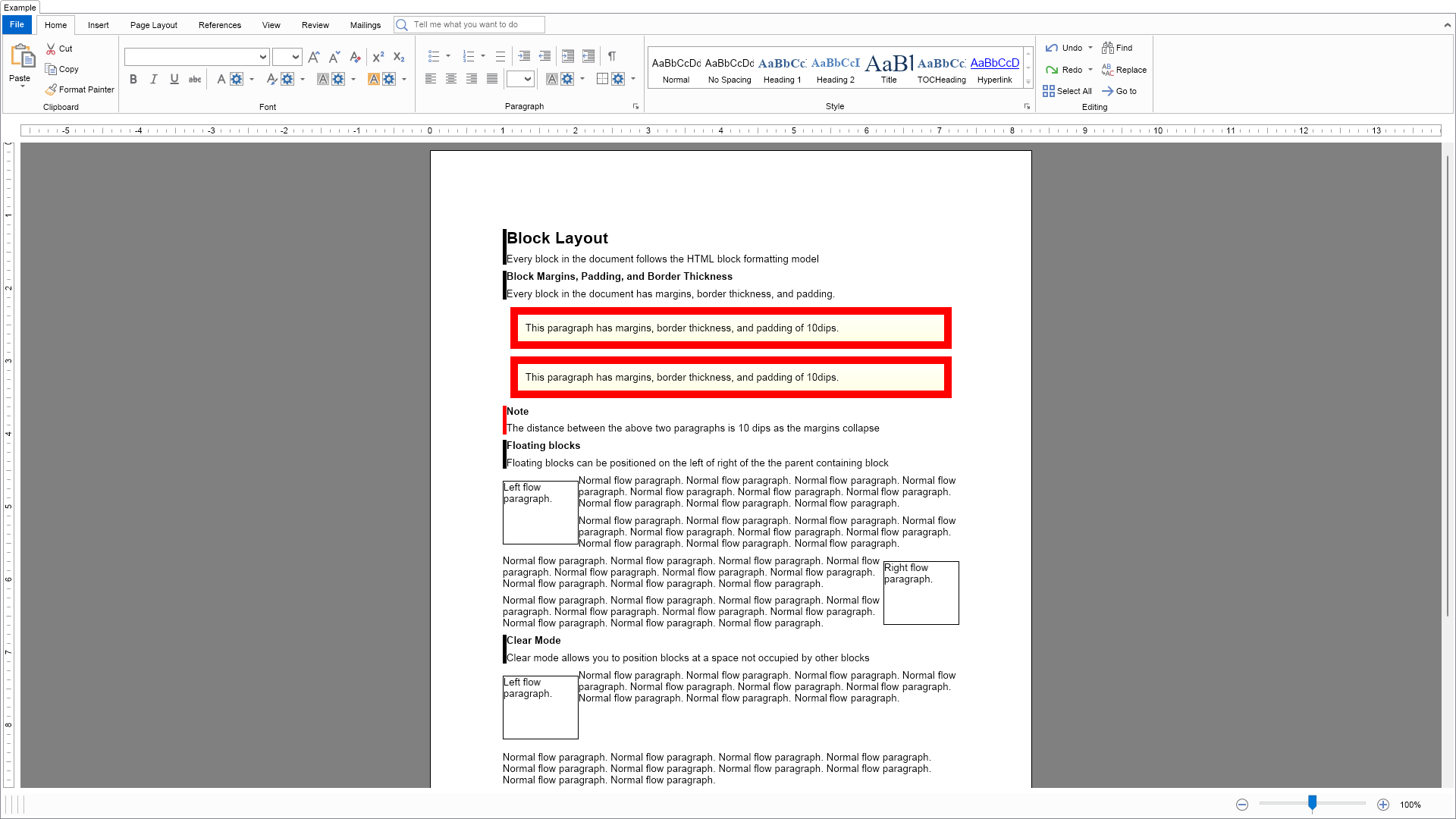
return @"This example demonstrates how to use margins, padding and borders as well as how to create floating blocks.
";
}
///
/// Gets the relevant documentation links for the example
///
///
public (string Name, string Url)[] GetDocumentationUrls()
{
return new[]
{
("Rich Text Block Layout", "https://www.nevron.com/docs/openvision/rich-text-block-layout.html"),
("Rich Text Advanced Block Layout", "https://www.nevron.com/docs/openvision/rich-text-advanced-block-layout.html"),
};
}
private void PopulateRichText()
{
NSection section = new NSection();
m_RichText.Content.Sections.Add(section);
section.Blocks.Add(GetDescriptionBlock("Block Layout", "Every block in the document follows the HTML block formatting model", 1));
section.Blocks.Add(GetDescriptionBlock("Block Margins, Padding, and Border Thickness", "Every block in the document has margins, border thickness, and padding.", 2));
section.Blocks.Add(CreateSampleParagraph1());
section.Blocks.Add(CreateSampleParagraph1());
section.Blocks.Add(GetNoteBlock("The distance between the above two paragraphs is 10 dips as the margins collapse", 2));
section.Blocks.Add(GetDescriptionBlock("Floating blocks", "Floating blocks can be positioned on the left of right of the the parent containing block", 2));
section.Blocks.Add(CreateFloatingParagraph(ENFloatMode.Left));
section.Blocks.Add(CreateNormalParagraph());
section.Blocks.Add(CreateNormalParagraph());
section.Blocks.Add(CreateFloatingParagraph(ENFloatMode.Right));
section.Blocks.Add(CreateNormalParagraph());
section.Blocks.Add(CreateNormalParagraph());
section.Blocks.Add(GetDescriptionBlock("Clear Mode", "Clear mode allows you to position blocks at a space not occupied by other blocks", 2));
section.Blocks.Add(CreateFloatingParagraph(ENFloatMode.Left));
section.Blocks.Add(CreateNormalParagraph());
NParagraph paragraph = CreateNormalParagraph();
paragraph.ClearMode = ENClearMode.Left;
section.Blocks.Add(paragraph);
section.Blocks.Add(GetNoteBlock("The second paragraph has ClearMode set to the left and is not obscured by the floating block.", 2));
}
#endregion
#region Implementation
#endregion
#region Event Handlers
#endregion
#region Fields
private NRichTextView m_RichText;
#endregion
#region Static Methods
private static NParagraph CreateFloatingParagraph(ENFloatMode floatMode)
{
NParagraph paragraph = new NParagraph(floatMode.ToString() + " flow paragraph.");
paragraph.FloatMode = floatMode;
paragraph.PreferredWidth = new NMultiLength(ENMultiLengthUnit.Dip, 100);
paragraph.PreferredHeight = new NMultiLength(ENMultiLengthUnit.Dip, 100);
paragraph.BorderThickness = new NMargins(1);
paragraph.Border = NBorder.CreateFilledBorder(NColor.Black);
return paragraph;
}
private static NParagraph CreateNormalParagraph()
{
return new NParagraph(GetRepeatingText("Normal flow paragraph.", 10));
}
private static NParagraph CreateSampleParagraph1()
{
NParagraph paragraph = new NParagraph("This paragraph has margins, border thickness, and padding of 10dips.");
paragraph.Margins = new NMargins(10);
paragraph.BorderThickness = new NMargins(10);
paragraph.Padding = new NMargins(10);
paragraph.Border = NBorder.CreateFilledBorder(NColor.Red);
paragraph.BackgroundFill = new NStockGradientFill(NColor.White, NColor.LightYellow);
return paragraph;
}
private static NParagraph GetDescriptionParagraph(string text)
{
return new NParagraph(text);
}
private static NParagraph GetTitleParagraphNoBorder(string text, int level)
{
double fontSize = 10;
ENFontStyle fontStyle = ENFontStyle.Regular;
switch (level)
{
case 1:
fontSize = 16;
fontStyle = ENFontStyle.Bold;
break;
case 2:
fontSize = 10;
fontStyle = ENFontStyle.Bold;
break;
}
NParagraph paragraph = new NParagraph();
paragraph.HorizontalAlignment = ENAlign.Left;
paragraph.FontSize = fontSize;
paragraph.FontStyle = fontStyle;
NTextInline textInline = new NTextInline(text);
textInline.FontStyle = fontStyle;
textInline.FontSize = fontSize;
paragraph.Inlines.Add(textInline);
return paragraph;
}
///
/// Gets a paragraph with title formatting
///
///
///
private static NParagraph GetTitleParagraph(string text, int level)
{
NColor color = NColor.Black;
NParagraph paragraph = GetTitleParagraphNoBorder(text, level);
paragraph.HorizontalAlignment = ENAlign.Left;
paragraph.Border = CreateLeftTagBorder(color);
paragraph.BorderThickness = defaultBorderThickness;
return paragraph;
}
private static NGroupBlock GetNoteBlock(string text, int level)
{
NColor color = NColor.Red;
NParagraph paragraph = GetTitleParagraphNoBorder("Note", level);
NGroupBlock groupBlock = new NGroupBlock();
groupBlock.ClearMode = ENClearMode.All;
groupBlock.Blocks.Add(paragraph);
groupBlock.Blocks.Add(GetDescriptionParagraph(text));
groupBlock.Border = CreateLeftTagBorder(color);
groupBlock.BorderThickness = defaultBorderThickness;
return groupBlock;
}
private static NGroupBlock GetDescriptionBlock(string title, string description, int level)
{
NColor color = NColor.Black;
NParagraph paragraph = GetTitleParagraphNoBorder(title, level);
NGroupBlock groupBlock = new NGroupBlock();
groupBlock.ClearMode = ENClearMode.All;
groupBlock.Blocks.Add(paragraph);
groupBlock.Blocks.Add(GetDescriptionParagraph(description));
groupBlock.Border = CreateLeftTagBorder(color);
groupBlock.BorderThickness = defaultBorderThickness;
return groupBlock;
}
///
/// Creates a left tag border with the specified border
///
///
///
private static NBorder CreateLeftTagBorder(NColor color)
{
NBorder border = new NBorder();
border.LeftSide = new NBorderSide();
border.LeftSide.Fill = new NColorFill(color);
return border;
}
private static NParagraph GetLoremIpsumParagraph()
{
return new NParagraph("Lorem ipsum dolor sit amet, consectetur adipiscing elit. Vestibulum placerat in tortor nec tincidunt. Sed sagittis in sem ac auctor. Donec scelerisque molestie eros, a dictum leo fringilla eu. Vivamus porta urna non ullamcorper commodo. Nulla posuere sodales pellentesque. Donec a erat et tortor viverra euismod non et erat. Donec dictum ante eu mauris porta, eget suscipit mi ultrices. Nunc convallis adipiscing ligula, non pharetra dolor egestas at. Etiam in condimentum sapien. Praesent sagittis pulvinar metus, a posuere mauris aliquam eget.");
}
///
/// Gets the specified text repeated
///
///
///
///
private static string GetRepeatingText(string text, int count)
{
StringBuilder builder = new StringBuilder();
for (int i = 0; i < count; i++)
{
if (builder.Length > 0)
{
builder.Append(" ");
}
builder.Append(text);
}
return builder.ToString();
}
#endregion
#region Constants
private static readonly NMargins defaultBorderThickness = new NMargins(5.0, 0.0, 0.0, 0.0);
#endregion
#region Nested Types
#endregion
}
}

 Chart for .NET
 Diagram for .NET
 User Interface for .NET
 Vision for SSRS
 Chart for SSRS
 Gauge for SSRS
 Map for SSRS
 Barcode for SSRS
 Vision for SharePoint
 Chart for SharePoint
 Gauge for SharePoint
 Map for SharePoint
 Barcode for SharePoint
 Open Vision for .NET


 Vision for .NET