using Nevron.Nov;
using Nevron.Nov.Dom;
using Nevron.Nov.Graphics;
using Nevron.Nov.Layout;
using Nevron.Nov.Text;
using Nevron.Nov.UI;
using Nevron.Nov.Windows.Forms;
using System.Windows.Forms;

namespace NovWinFormsProject
{
	public partial class Form1 : Form
	{
		#region Constructors

		public Form1()
		{
			InitializeComponent();

			// Set form title
			Text = "NOV WinForms - NInlineFormattingExample";

			// Create the NOV example and its controls
			NWidget exampleContent = CreateExampleContent();
			NWidget exampleControls = CreateExampleControls();
			if (exampleControls != null)
			{
				exampleControls.PreferredWidth = 300;
			}

			// Place the example and its controls in a pair box
			NPairBox pairBox = new NPairBox(exampleContent, exampleControls);
			pairBox.FillMode = ENStackFillMode.First;
			pairBox.FitMode = ENStackFitMode.First;
			pairBox.Margins = new NMargins(NDesign.HorizontalSpacing, NDesign.VerticalSpacing);

			// Host the example in the form
			NNovWidgetHost host = new NNovWidgetHost(pairBox);
			host.Dock = DockStyle.Fill;
			Controls.Add(host);
		}

		#endregion

		#region Example

		public NWidget CreateExampleContent()
		{
			// Create the rich text
			NRichTextViewWithRibbon richTextWithRibbon = new NRichTextViewWithRibbon();
			m_RichText = richTextWithRibbon.View;
			m_RichText.AcceptsTab = true;
			m_RichText.Content.Sections.Clear();

			// Populate the rich text
			PopulateRichText();

			return richTextWithRibbon;
		}
		public NWidget CreateExampleControls()
		{
			return null;
		}
		public string GetExampleDescription()
		{
			return @"

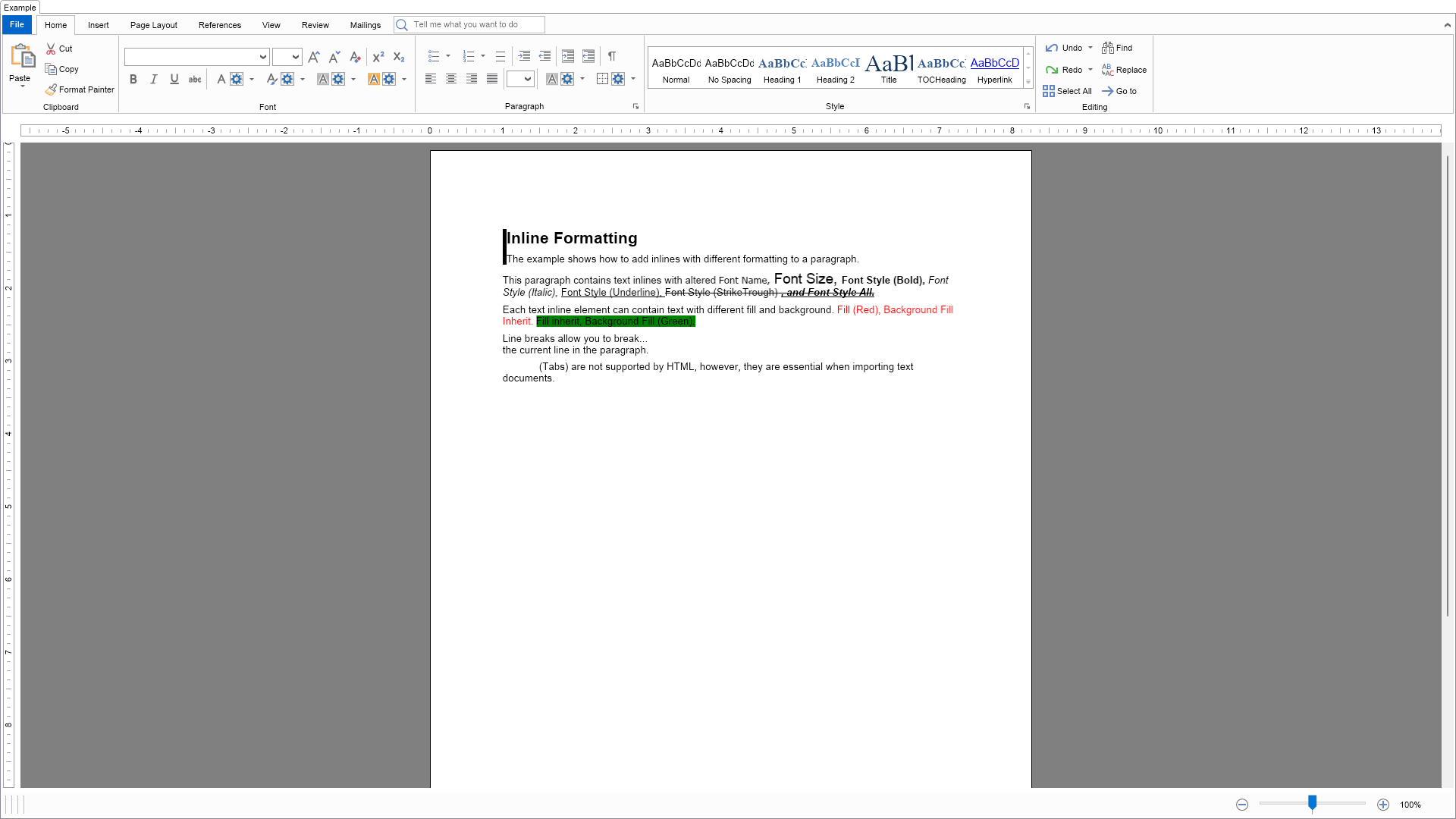
	This example demonstrates how to modify the text style and the appearance settings of inline elements as well as how to add line breaks and tabs to paragraphs.

";
		}

		///
		/// Gets the relevant documentation links for the example
		///
		///
		public (string Name, string Url)[] GetDocumentationUrls()
		{
			return new[]
			{
				("Rich Text Inline Elements", "https://www.nevron.com/docs/openvision/rich-text-inline-elements.html"),
				("Rich Text Inline Styles", "https://www.nevron.com/docs/openvision/rich-text-inline-styles.html"),
				("Font", "https://www.nevron.com/docs/openvision/graphics-font.html"),
			};
		}

		private void PopulateRichText()
		{
			NSection section = new NSection();
			m_RichText.Content.Sections.Add(section);

			section.Blocks.Add(GetDescriptionBlock("Inline Formatting", "The example shows how to add inlines with different formatting to a paragraph.", 1));

			{
				// font style control
				NParagraph paragraph = new NParagraph();

				NTextInline textInline1 = new NTextInline("This paragraph contains text inlines with altered ");
				paragraph.Inlines.Add(textInline1);

				NTextInline textInline2 = new NTextInline("Font Name, ");
				textInline2.FontName = "Tahoma";
				paragraph.Inlines.Add(textInline2);

				NTextInline textInline3 = new NTextInline("Font Size, ");
				textInline3.FontSize = 14;
				paragraph.Inlines.Add(textInline3);

				NTextInline textInline4 = new NTextInline("Font Style (Bold), ");
				textInline4.FontStyle |= ENFontStyle.Bold;
				paragraph.Inlines.Add(textInline4);

				NTextInline textInline5 = new NTextInline("Font Style (Italic), ");
				textInline5.FontStyle |= ENFontStyle.Italic;
				paragraph.Inlines.Add(textInline5);

				NTextInline textInline6 = new NTextInline("Font Style (Underline), ");
				textInline6.FontStyle |= ENFontStyle.Underline;
				paragraph.Inlines.Add(textInline6);

				NTextInline textInline7 = new NTextInline("Font Style (StrikeTrough) ");
                textInline7.FontStyle |= ENFontStyle.Strikethrough;
				paragraph.Inlines.Add(textInline7);

				NTextInline textInline8 = new NTextInline(", and Font Style All.");
                textInline8.FontStyle = ENFontStyle.Bold | ENFontStyle.Italic | ENFontStyle.Underline | ENFontStyle.Strikethrough;
				paragraph.Inlines.Add(textInline8);

				section.Blocks.Add(paragraph);
			}

			{
				// appearance control
				NParagraph paragraph = new NParagraph();

				NTextInline textInline1 = new NTextInline("Each text inline element can contain text with different fill and background. ");
				paragraph.Inlines.Add(textInline1);

				NTextInline textInline2 = new NTextInline("Fill (Red), Background Fill Inherit. ");
				textInline2.Fill = new NColorFill(ENNamedColor.Red);
				paragraph.Inlines.Add(textInline2);

				NTextInline textInline3 = new NTextInline("Fill inherit, Background Fill (Green).");
				textInline3.BackgroundFill = new NColorFill(ENNamedColor.Green);
				paragraph.Inlines.Add(textInline3);

				section.Blocks.Add(paragraph);
			}

			{
				// line breaks
				// appearance control
				NParagraph paragraph = new NParagraph();

				NTextInline textInline1 = new NTextInline("Line breaks allow you to break...");
				paragraph.Inlines.Add(textInline1);

				NLineBreakInline lineBreak = new NLineBreakInline();
				paragraph.Inlines.Add(lineBreak);

				NTextInline textInline2 = new NTextInline("the current line in the paragraph.");
				paragraph.Inlines.Add(textInline2);

				section.Blocks.Add(paragraph);
			}

			{
				// tabs
				NParagraph paragraph = new NParagraph();

				NTabInline tabInline = new NTabInline();
				paragraph.Inlines.Add(tabInline);

				NTextInline textInline1 = new NTextInline("(Tabs) are not supported by HTML, however, they are essential when importing text documents.");
				paragraph.Inlines.Add(textInline1);

				section.Blocks.Add(paragraph);
			}
		}

		#endregion

		#region Implementation
		#endregion

		#region Event Handlers
		#endregion

		#region Fields

		private NRichTextView m_RichText;

		#endregion

		#region Static Methods

		private static NParagraph GetDescriptionParagraph(string text)
		{
			return new NParagraph(text);
		}
		private static NParagraph GetTitleParagraphNoBorder(string text, int level)
		{
			double fontSize = 10;
			ENFontStyle fontStyle = ENFontStyle.Regular;

			switch (level)
			{
				case 1:
					fontSize = 16;
					fontStyle = ENFontStyle.Bold;
					break;
				case 2:
					fontSize = 10;
					fontStyle = ENFontStyle.Bold;
					break;
			}

			NParagraph paragraph = new NParagraph();

			paragraph.HorizontalAlignment = ENAlign.Left;
			paragraph.FontSize = fontSize;
			paragraph.FontStyle = fontStyle;

			NTextInline textInline = new NTextInline(text);

			textInline.FontStyle = fontStyle;
			textInline.FontSize = fontSize;

			paragraph.Inlines.Add(textInline);

			return paragraph;

		}
		private static NGroupBlock GetDescriptionBlock(string title, string description, int level)
		{
			NColor color = NColor.Black;

			NParagraph paragraph = GetTitleParagraphNoBorder(title, level);

			NGroupBlock groupBlock = new NGroupBlock();

			groupBlock.ClearMode = ENClearMode.All;
			groupBlock.Blocks.Add(paragraph);
			groupBlock.Blocks.Add(GetDescriptionParagraph(description));

			groupBlock.Border = CreateLeftTagBorder(color);
			groupBlock.BorderThickness = defaultBorderThickness;

			return groupBlock;
		}
		///
		/// Creates a left tag border with the specified border
		///
		///
		///
		private static NBorder CreateLeftTagBorder(NColor color)
		{
			NBorder border = new NBorder();

			border.LeftSide = new NBorderSide();
			border.LeftSide.Fill = new NColorFill(color);

			return border;
		}

		#endregion

		#region Constants

		private static readonly NMargins defaultBorderThickness = new NMargins(5.0, 0.0, 0.0, 0.0);

		#endregion

		#region Nested Types
		#endregion
	}
}

 Chart for .NET
 Diagram for .NET
 User Interface for .NET
 Vision for SSRS
 Chart for SSRS
 Gauge for SSRS
 Map for SSRS
 Barcode for SSRS
 Vision for SharePoint
 Chart for SharePoint
 Gauge for SharePoint
 Map for SharePoint
 Barcode for SharePoint
 Open Vision for .NET


 Vision for .NET