using Nevron.Nov;
using Nevron.Nov.Dom;
using Nevron.Nov.Graphics;
using Nevron.Nov.Layout;
using Nevron.Nov.Text;
using Nevron.Nov.UI;
using Nevron.Nov.Windows.Forms;
using System.Text;
using System.Windows.Forms;

namespace NovWinFormsProject
{
	public partial class Form1 : Form
	{
		#region Constructors

		public Form1()
		{
			InitializeComponent();

			// Set form title
			Text = "NOV WinForms - NBulletListsExample";

			// Create the NOV example and its controls
			NWidget exampleContent = CreateExampleContent();
			NWidget exampleControls = CreateExampleControls();
			if (exampleControls != null)
			{
				exampleControls.PreferredWidth = 300;
			}

			// Place the example and its controls in a pair box
			NPairBox pairBox = new NPairBox(exampleContent, exampleControls);
			pairBox.FillMode = ENStackFillMode.First;
			pairBox.FitMode = ENStackFitMode.First;
			pairBox.Margins = new NMargins(NDesign.HorizontalSpacing, NDesign.VerticalSpacing);

			// Host the example in the form
			NNovWidgetHost host = new NNovWidgetHost(pairBox);
			host.Dock = DockStyle.Fill;
			Controls.Add(host);
		}

		#endregion

		#region Example

		public NWidget CreateExampleContent()
		{
			// Create the rich text
			NRichTextViewWithRibbon richTextWithRibbon = new NRichTextViewWithRibbon();
			m_RichText = richTextWithRibbon.View;
			m_RichText.AcceptsTab = true;

			m_RichText.Content.Sections.Clear();

			// Populate the rich text
			PopulateRichText();

			return richTextWithRibbon;
		}
		public NWidget CreateExampleControls()
		{
			return null;
		}
		public string GetExampleDescription()
		{
			return @"

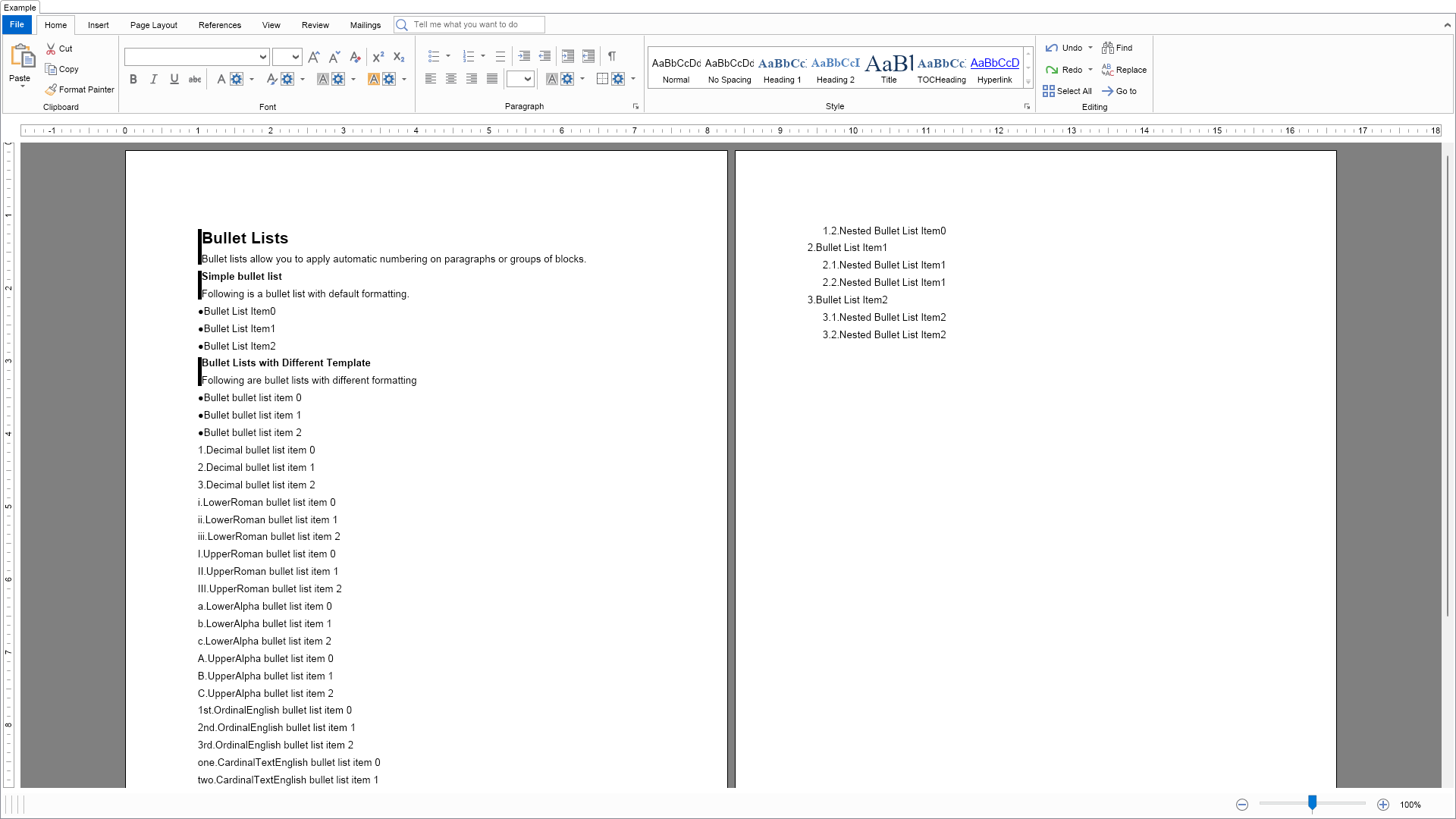
	This example demonstrates how to set different bullet list templates to bullet lists as well as how to create nested (multilevel) bullet lists.

";
		}

		///
		/// Gets the relevant documentation links for the example
		///
		///
		public (string Name, string Url)[] GetDocumentationUrls()
		{
			return new[]
			{
				("Rich Text Bullet Lists", "https://www.nevron.com/docs/openvision/rich-text-bullet-lists.html"),
				("Rich Text Paragraphs", "https://www.nevron.com/docs/openvision/rich-text-paragraphs.html"),
			};
		}

		private void PopulateRichText()
		{
			NSection section = new NSection();
			m_RichText.Content.Sections.Add(section);
			m_RichText.Content.BulletLists.Clear();

            section.Blocks.Add(GetDescriptionBlock("Bullet Lists", "Bullet lists allow you to apply automatic numbering on paragraphs or groups of blocks.", 1));

			section.Blocks.Add(GetDescriptionBlock("Simple bullet list", "Following is a bullet list with default formatting.", 2));

			CreateSampleBulletList(section, ENBulletListTemplateType.Bullet, 3, "Bullet List Item");

			// setting bullet list template type
			{
				section.Blocks.Add(GetDescriptionBlock("Bullet Lists with Different Template", "Following are bullet lists with different formatting", 2));

				ENBulletListTemplateType[] values = NEnum.GetValues();
				string[] names = NEnum.GetNames();

				for (int i = 0; i < values.Length - 1; i++)
				{
					CreateSampleBulletList(section, values[i], 3, names[i] + " bullet list item ");
				}
			}

			// nested bullet lists
			{
				section.Blocks.Add(GetDescriptionBlock("Bullet List Levels", "Following is an example of bullet list levels", 2));

				NBulletList bulletList = new NBulletList(ENBulletListTemplateType.Decimal);
				m_RichText.Content.BulletLists.Add(bulletList);

				for (int i = 0; i < 3; i++)
				{
					NParagraph par1 = new NParagraph("Bullet List Item" + i.ToString());
					par1.SetBulletList(bulletList, 0);
					section.Blocks.Add(par1);

					for (int j = 0; j < 2; j++)
					{
						NParagraph par2 = new NParagraph("Nested Bullet List Item" + i.ToString());
						par2.SetBulletList(bulletList, 1);
						par2.MarginLeft = 20;
						section.Blocks.Add(par2);
					}
				}
			}
		}

		#endregion

		#region Implementation

		private void CreateSampleBulletList(NSection section, ENBulletListTemplateType bulletListType, int items, string itemText)
		{
			NBulletList bulletList = new NBulletList(bulletListType);
			m_RichText.Content.BulletLists.Add(bulletList);

			for (int i = 0; i < items; i++)
			{
				NParagraph par = new NParagraph(itemText + i.ToString());
				par.SetBulletList(bulletList, 0);
				section.Blocks.Add(par);
			}
		}

		#endregion

		#region Event Handlers
		#endregion

		#region Fields

		private NRichTextView m_RichText;

		#endregion

		#region Static Methods

		private static NParagraph GetDescriptionParagraph(string text)
		{
			return new NParagraph(text);
		}
		private static NParagraph GetTitleParagraphNoBorder(string text, int level)
		{
			double fontSize = 10;
			ENFontStyle fontStyle = ENFontStyle.Regular;

			switch (level)
			{
				case 1:
					fontSize = 16;
					fontStyle = ENFontStyle.Bold;
					break;
				case 2:
					fontSize = 10;
					fontStyle = ENFontStyle.Bold;
					break;
			}

			NParagraph paragraph = new NParagraph();

			paragraph.HorizontalAlignment = ENAlign.Left;
			paragraph.FontSize = fontSize;
			paragraph.FontStyle = fontStyle;

			NTextInline textInline = new NTextInline(text);

			textInline.FontStyle = fontStyle;
			textInline.FontSize = fontSize;

			paragraph.Inlines.Add(textInline);

			return paragraph;
		}
		private static NGroupBlock GetDescriptionBlock(string title, string description, int level)
		{
			NColor color = NColor.Black;

			NParagraph paragraph = GetTitleParagraphNoBorder(title, level);

			NGroupBlock groupBlock = new NGroupBlock();

			groupBlock.ClearMode = ENClearMode.All;
			groupBlock.Blocks.Add(paragraph);
			groupBlock.Blocks.Add(GetDescriptionParagraph(description));

			groupBlock.Border = CreateLeftTagBorder(color);
			groupBlock.BorderThickness = defaultBorderThickness;

			return groupBlock;
		}
		///
		/// Creates a left tag border with the specified border
		///
		///
		///
		private static NBorder CreateLeftTagBorder(NColor color)
		{
			NBorder border = new NBorder();

			border.LeftSide = new NBorderSide();
			border.LeftSide.Fill = new NColorFill(color);

			return border;
		}

		#endregion

		#region Constants

		private static readonly NMargins defaultBorderThickness = new NMargins(5.0, 0.0, 0.0, 0.0);

		#endregion

		#region Nested Types
		#endregion
	}
}

 Chart for .NET
 Diagram for .NET
 User Interface for .NET
 Vision for SSRS
 Chart for SSRS
 Gauge for SSRS
 Map for SSRS
 Barcode for SSRS
 Vision for SharePoint
 Chart for SharePoint
 Gauge for SharePoint
 Map for SharePoint
 Barcode for SharePoint
 Open Vision for .NET


 Vision for .NET