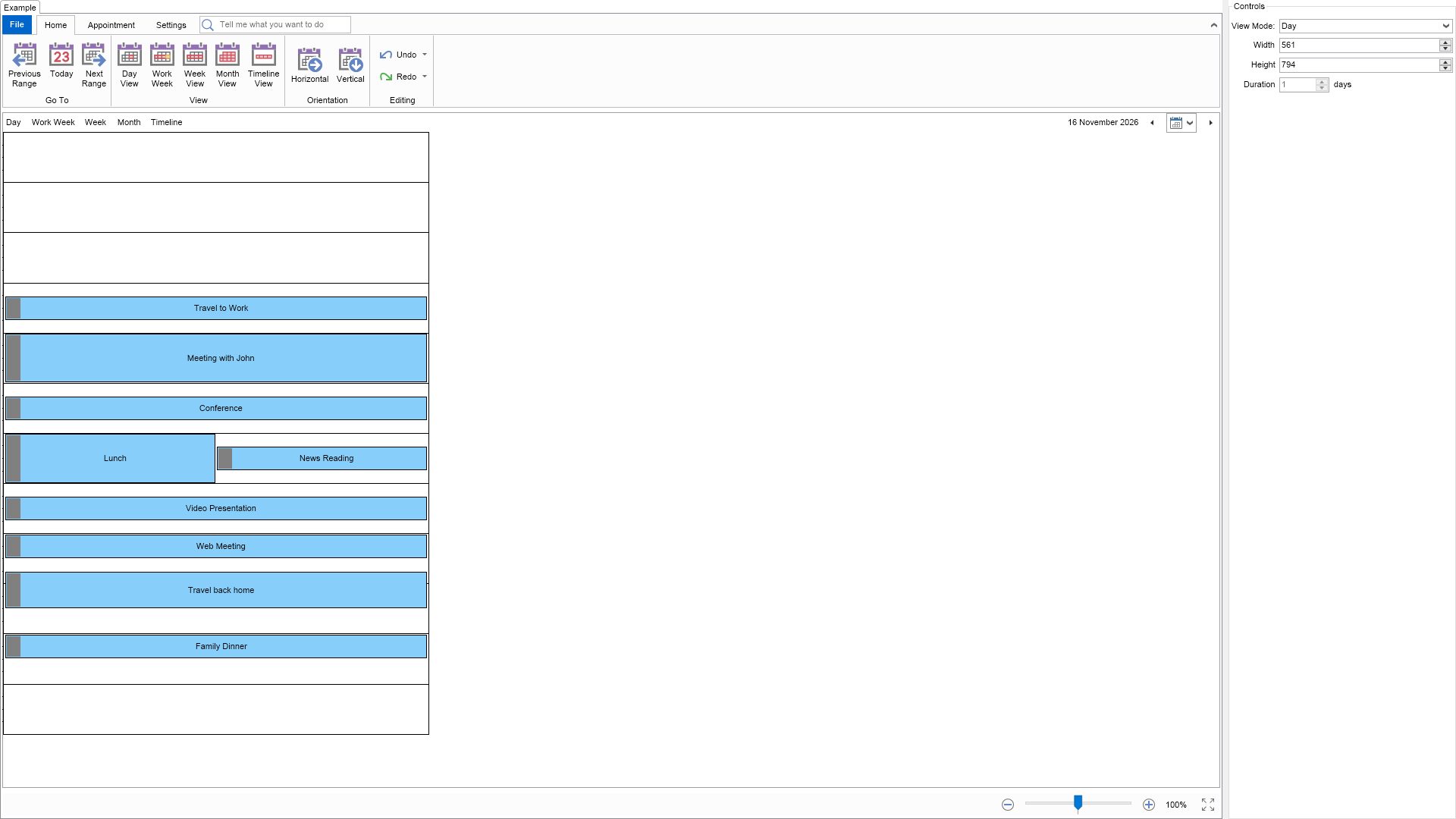
using Nevron.Nov;
using Nevron.Nov.Dom;
using Nevron.Nov.Editors;
using Nevron.Nov.Graphics;
using Nevron.Nov.Layout;
using Nevron.Nov.Schedule;
using Nevron.Nov.UI;
using Nevron.Nov.Windows.Forms;
using System;
using System.Windows.Forms;

namespace NovWinFormsProject
{
	public partial class Form1 : Form
	{
		#region Constructors

		public Form1()
		{
			InitializeComponent();

			// Set form title
			Text = "NOV WinForms - NViewModesExample";

			// Create the NOV example and its controls
			NWidget exampleContent = CreateExampleContent();
			NWidget exampleControls = CreateExampleControls();
			if (exampleControls != null)
			{
				exampleControls.PreferredWidth = 300;
			}

			// Place the example and its controls in a pair box
			NPairBox pairBox = new NPairBox(exampleContent, exampleControls);
			pairBox.FillMode = ENStackFillMode.First;
			pairBox.FitMode = ENStackFitMode.First;
			pairBox.Margins = new NMargins(NDesign.HorizontalSpacing, NDesign.VerticalSpacing);

			// Host the example in the form
			NNovWidgetHost host = new NNovWidgetHost(pairBox);
			host.Dock = DockStyle.Fill;
			Controls.Add(host);
		}

		#endregion

		#region Example

		public NWidget CreateExampleContent()
		{
			// Create a simple schedule
			NScheduleViewWithRibbon scheduleViewWithRibbon = new NScheduleViewWithRibbon();
			m_ScheduleView = scheduleViewWithRibbon.View;

			m_ScheduleView.Document.PauseHistoryService();
			try
			{
				InitSchedule(m_ScheduleView.Content);
			}
			finally
			{
				m_ScheduleView.Document.ResumeHistoryService();
			}

			// Return the commanding widget
			return scheduleViewWithRibbon;
		}
		public NWidget CreateExampleControls()
		{
			NStackPanel stack = new NStackPanel();
			NSchedule schedule = m_ScheduleView.Content;
			schedule.ViewModeChanged += OnScheduleViewModeChanged;

			// Add the view mode property editor, i.e. a combo box for selecting the schedule's active view mode
			NEditor propertyEditor = NDesigner.GetDesigner(schedule).CreateMemberEditor(schedule, NSchedule.ViewModeProperty);
			propertyEditor.Margins = new NMargins(0, NDesign.VerticalSpacing, 0, 0);
			stack.Add(propertyEditor);

			// Add a width numeric up down
			m_WidthUpDown = new NNumericUpDown();
			m_WidthUpDown.Value = schedule.Width;
			m_WidthUpDown.Minimum = 100;
			m_WidthUpDown.Step = 10;
			m_WidthUpDown.ValueChanged += OnWidthUpDownValueChanged;
			stack.Add(NPairBox.Create("Width", m_WidthUpDown));

			// Add a height numeric up down
			m_HeightUpDown = new NNumericUpDown();
			m_HeightUpDown.Value = schedule.Height;
			m_HeightUpDown.Minimum = 100;
			m_HeightUpDown.Step = 10;
			m_HeightUpDown.ValueChanged += OnHeightUpDownValueChanged;
			stack.Add(NPairBox.Create("Height", m_HeightUpDown));

			// Add a duration numeric up down
			m_DurationUpDown = new NNumericUpDown();
			m_DurationUpDown.Value = schedule.ActiveViewMode.Duration;
			m_DurationUpDown.Minimum = 1;
			m_DurationUpDown.Enabled = false;
			m_DurationUpDown.ValueChanged += OnDurationUpDownValueChanged;

			NPairBox pairBox = new NPairBox(m_DurationUpDown, "days");
			pairBox.Spacing = NDesign.HorizontalSpacing;
			stack.Add(NPairBox.Create("Duration", pairBox));

			return new NUniSizeBoxGroup(stack);
		}
		public string GetExampleDescription()
		{
			return @"

    This example demonstrates how to change the active view mode of a schedule and how to modify the size of any view mode.

";
		}

		///
		/// Gets the relevant documentation links for the example
		///
		///
		public (string Name, string Url)[] GetDocumentationUrls()
		{
			return new[]
			{
				("Schedule", "https://www.nevron.com/docs/openvision/schedule.html"),
				("Schedule View", "https://www.nevron.com/docs/openvision/schedule-view.html"),
			};
		}

		#endregion

		#region Implementation

		private void InitSchedule(NSchedule schedule)
		{
			DateTime today = DateTime.Today;
			schedule.ViewMode = ENScheduleViewMode.Day;

			schedule.Appointments.Add(new NAppointment("Travel to Work", today.AddHours(6.5), today.AddHours(7.5)));
			schedule.Appointments.Add(new NAppointment("Meeting with John", today.AddHours(8), today.AddHours(10)));
			schedule.Appointments.Add(new NAppointment("Conference", today.AddHours(10.5), today.AddHours(11.5)));
			schedule.Appointments.Add(new NAppointment("Lunch", today.AddHours(12), today.AddHours(14)));
			schedule.Appointments.Add(new NAppointment("News Reading", today.AddHours(12.5), today.AddHours(13.5)));
			schedule.Appointments.Add(new NAppointment("Video Presentation", today.AddHours(14.5), today.AddHours(15.5)));
			schedule.Appointments.Add(new NAppointment("Web Meeting", today.AddHours(16), today.AddHours(17)));
			schedule.Appointments.Add(new NAppointment("Travel back home", today.AddHours(17.5), today.AddHours(19)));
			schedule.Appointments.Add(new NAppointment("Family Dinner", today.AddHours(20), today.AddHours(21)));
		}

		#endregion

		#region Event Handlers

		private void OnScheduleViewModeChanged(NValueChangeEventArgs arg)
		{
			m_bViewModeChanging = true;

			NSchedule schedule = m_ScheduleView.Content;
			m_WidthUpDown.Value = schedule.Width;
			m_HeightUpDown.Value = schedule.Height;
			m_DurationUpDown.Value = schedule.ActiveViewMode.Duration;

			// Enable the duration numeric up down only when the timeline view mode is selected
			m_DurationUpDown.Enabled = (ENScheduleViewMode)arg.NewValue == ENScheduleViewMode.Timeline;

			m_bViewModeChanging = false;
		}
		private void OnWidthUpDownValueChanged(NValueChangeEventArgs arg)
		{
			if (!m_bViewModeChanging)
			{
				m_ScheduleView.Content.ActiveViewMode.Width = (double)arg.NewValue;
			}
		}
		private void OnHeightUpDownValueChanged(NValueChangeEventArgs arg)
		{
			if (!m_bViewModeChanging)
			{
				m_ScheduleView.Content.ActiveViewMode.Height = (double)arg.NewValue;
			}
		}
		private void OnDurationUpDownValueChanged(NValueChangeEventArgs arg)
		{
			if (!m_bViewModeChanging)
			{
				NTimelineViewMode timelineViewMode = (NTimelineViewMode)m_ScheduleView.Content.ActiveViewMode;
				int durationInDays = (int)(double)arg.NewValue;
				timelineViewMode.SetDuration(durationInDays);
			}
		}

		#endregion

		#region Fields

		private bool m_bViewModeChanging;
		private NScheduleView m_ScheduleView;
		private NNumericUpDown m_WidthUpDown;
		private NNumericUpDown m_HeightUpDown;
		private NNumericUpDown m_DurationUpDown;

		#endregion

		#region Static Methods
		#endregion

		#region Constants
		#endregion

		#region Nested Types
		#endregion
	}
}

 Chart for .NET
 Diagram for .NET
 User Interface for .NET
 Vision for SSRS
 Chart for SSRS
 Gauge for SSRS
 Map for SSRS
 Barcode for SSRS
 Vision for SharePoint
 Chart for SharePoint
 Gauge for SharePoint
 Map for SharePoint
 Barcode for SharePoint
 Open Vision for .NET


 Vision for .NET