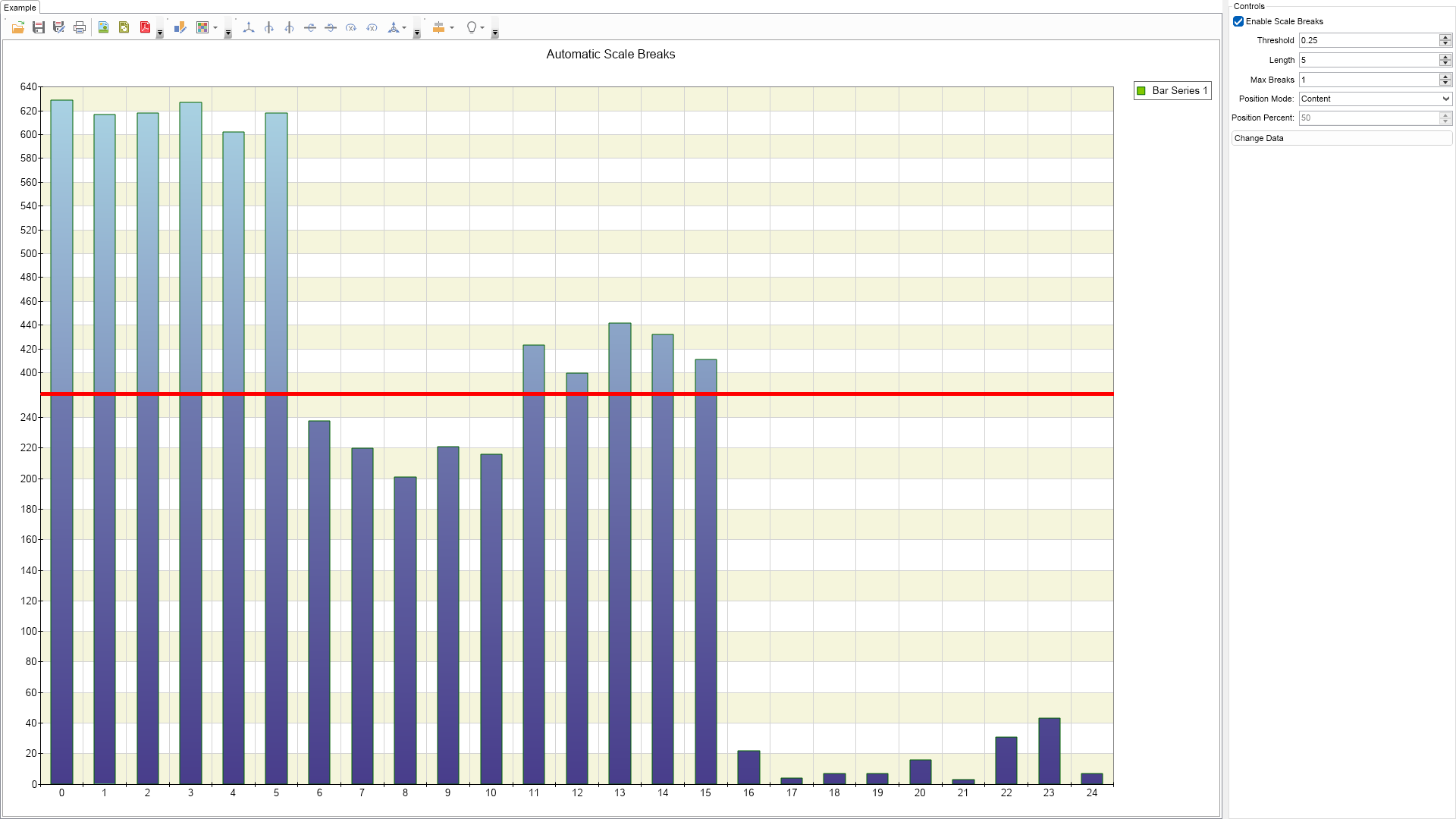
This example demonstrates how to add automatic scale breaks.

| Language: C# |
using Nevron.Nov;
using Nevron.Nov.Chart;
using Nevron.Nov.Dom;
using Nevron.Nov.Graphics;
using Nevron.Nov.Layout;
using Nevron.Nov.UI;
using Nevron.Nov.Windows.Forms;
using System;
using System.Windows.Forms;
namespace NovWinFormsProject
{
public partial class Form1 : Form
{
#region Constructors
public Form1()
{
InitializeComponent();
// Set form title
Text = "NOV WinForms - NAutomaticScaleBreaksExample";
// Create the NOV example and its controls
NWidget exampleContent = CreateExampleContent();
NWidget exampleControls = CreateExampleControls();
if (exampleControls != null)
{
exampleControls.PreferredWidth = 300;
}
// Place the example and its controls in a pair box
NPairBox pairBox = new NPairBox(exampleContent, exampleControls);
pairBox.FillMode = ENStackFillMode.First;
pairBox.FitMode = ENStackFitMode.First;
pairBox.Margins = new NMargins(NDesign.HorizontalSpacing, NDesign.VerticalSpacing);
// Host the example in the form
NNovWidgetHost host = new NNovWidgetHost(pairBox);
host.Dock = DockStyle.Fill;
Controls.Add(host);
}
#endregion
#region Example
public NWidget CreateExampleContent()
{
NChartViewWithCommandBars chartViewWithCommandBars = new NChartViewWithCommandBars();
NChartView chartView = chartViewWithCommandBars.View;
chartView.Surface.CreatePredefinedChart(ENPredefinedChartType.Cartesian);
// configure title
chartView.Surface.Titles[0].Text = "Automatic Scale Breaks";
// configure chart
m_Chart = (NCartesianChart)chartView.Surface.Charts[0];
// configure axes
m_Chart.SetPredefinedCartesianAxes(ENPredefinedCartesianAxis.XOrdinalYLinear);
// configure scale
NLinearScale yScale = (NLinearScale)m_Chart.Axes[ENCartesianAxis.PrimaryY].Scale;
yScale.ViewRangeInflateMode = ENScaleViewRangeInflateMode.MajorTick;
yScale.MinTickDistance = 30;
// add an interlaced strip to the Y axis
NScaleStrip interlacedStrip = new NScaleStrip();
interlacedStrip.Interlaced = true;
interlacedStrip.Fill= new NColorFill(NColor.Beige);
yScale.Strips.Add(interlacedStrip);
OnChangeDataButtonClick(null);
chartView.Document.StyleSheets.ApplyTheme(new NChartTheme(ENChartPalette.Bright, ENChartPaletteTarget.Series));
return chartViewWithCommandBars;
}
public NWidget CreateExampleControls()
{
NStackPanel stack = new NStackPanel();
NUniSizeBoxGroup boxGroup = new NUniSizeBoxGroup(stack);
m_EnableScaleBreaksCheckBox = new NCheckBox("Enable Scale Breaks");
m_EnableScaleBreaksCheckBox.CheckedChanged += OnEnableScaleBreaksCheckBoxCheckedChanged;
stack.Add(m_EnableScaleBreaksCheckBox);
m_ThresholdUpDown = new NNumericUpDown ();
m_ThresholdUpDown.Step = 0.05;
m_ThresholdUpDown.Maximum = 1;
m_ThresholdUpDown.DecimalPlaces = 2;
m_ThresholdUpDown.ValueChanged += OnThresholdUpDownValueChanged;
stack.Add(NPairBox.Create("Threshold", m_ThresholdUpDown));
m_LengthUpDown = new NNumericUpDown();
m_LengthUpDown.ValueChanged += OnLengthUpDownValueChanged;
stack.Add(NPairBox.Create("Length", m_LengthUpDown));
m_MaxBreaksUpDown = new NNumericUpDown();
m_MaxBreaksUpDown.ValueChanged += OnMaxBreaksUpDownValueChanged;
stack.Add(NPairBox.Create("Max Breaks", m_MaxBreaksUpDown));
m_PositionModeComboBox = new NComboBox();
m_PositionModeComboBox.Items.FillFromEnum();
m_PositionModeComboBox.SelectedIndexChanged += OnPositionModeComboBoxSelectedIndexChanged;
stack.Add(NPairBox.Create("Position Mode:", m_PositionModeComboBox));
m_PositionPercentUpDown = new NNumericUpDown();
m_PositionPercentUpDown.Minimum = 0;
m_PositionPercentUpDown.Maximum = 100;
m_PositionPercentUpDown.ValueChanged += OnPositionPercentUpDownValueChanged;
stack.Add(NPairBox.Create("Position Percent:", m_PositionPercentUpDown));
NButton changeDataButton = new NButton("Change Data");
changeDataButton.Click += OnChangeDataButtonClick;
stack.Add(changeDataButton);
// update initial state
m_EnableScaleBreaksCheckBox.Checked = true;
m_LengthUpDown.Value = 5;
m_ThresholdUpDown.Value = 0.25; // this is relatively low factor
m_MaxBreaksUpDown.Value = 1;
m_PositionPercentUpDown.Value = 50;
m_PositionModeComboBox.SelectedIndex = (int)ENScaleBreakPositionMode.Content; // use content mode by default
return boxGroup;
}
public string GetExampleDescription()
{
return @"This example demonstrates how to add automatic scale breaks.
";
}
///
/// Gets the relevant documentation links for the example
///
///
public (string Name, string Url)[] GetDocumentationUrls()
{
return new[]
{
("Scale Breaks", "https://www.nevron.com/docs/openvision/scale-breaks.html"),
("Scales Overview", "https://www.nevron.com/docs/openvision/scales-overview.html"),
("Common Axis Functionality", "https://www.nevron.com/docs/openvision/chart-common-axis-functionality.html"),
};
}
#endregion
#region Implementation
private void UpdateScaleBreak()
{
NLinearScale scale = (NLinearScale)m_Chart.Axes[ENCartesianAxis.PrimaryY].Scale;
scale.ScaleBreaks.Clear();
if (m_EnableScaleBreaksCheckBox.Checked)
{
NAutoScaleBreak scaleBreak = new NAutoScaleBreak((float)m_ThresholdUpDown.Value);
scaleBreak.Style = ENScaleBreakStyle.Line;
scaleBreak.Length = m_LengthUpDown.Value;
scaleBreak.MaxScaleBreakCount = (int)m_MaxBreaksUpDown.Value;
scaleBreak.PositionMode = (ENScaleBreakPositionMode)m_PositionModeComboBox.SelectedIndex;
scaleBreak.Percent = (float)m_PositionPercentUpDown.Value;
scale.ScaleBreaks.Add(scaleBreak);
}
}
private static NColor ColorFromValue(double value)
{
NColor beginColor = NColor.LightBlue;
NColor endColor = NColor.DarkSlateBlue;
float factor = (float)(value / 650.0f);
float oneMinusFactor = 1.0f - factor;
return NColor.FromRGB((byte)((float)beginColor.R * factor + (float)endColor.R * oneMinusFactor),
(byte)((float)beginColor.G * factor + (float)endColor.G * oneMinusFactor),
(byte)((float)beginColor.B * factor + (float)endColor.B * oneMinusFactor));
}
#endregion
#region Event Handlers
void OnChangeDataButtonClick(NEventArgs arg)
{
m_Chart.Series.Clear();
// setup bar series
NBarSeries bar = new NBarSeries();
m_Chart.Series.Add(bar);
bar.DataLabelStyle = new NDataLabelStyle(false);
bar.Stroke = new NStroke(1.5f, NColor.DarkGreen);
// fill in some data so that it contains several peaks of data
Random random = new Random();
double value = 0;
for (int i = 0; i < 25; i++)
{
if (i < 6)
{
value = 600 + random.Next(30);
}
else if (i < 11)
{
value = 200 + random.Next(50);
}
else if (i < 16)
{
value = 400 + random.Next(50);
}
else if (i < 21)
{
value = random.Next(30);
}
else
{
value = random.Next(50);
}
NBarDataPoint dataPoint = new NBarDataPoint(value);
dataPoint.Fill = new NStockGradientFill(ColorFromValue(value), NColor.DarkSlateBlue);
bar.DataPoints.Add(dataPoint);
}
}
void OnPositionPercentUpDownValueChanged(NValueChangeEventArgs arg)
{
UpdateScaleBreak();
}
void OnPositionModeComboBoxSelectedIndexChanged(NValueChangeEventArgs arg)
{
UpdateScaleBreak();
m_PositionPercentUpDown.Enabled = m_PositionModeComboBox.SelectedIndex == (int)ENScaleBreakPositionMode.Percent;
}
void OnMaxBreaksUpDownValueChanged(NValueChangeEventArgs arg)
{
UpdateScaleBreak();
}
void OnLengthUpDownValueChanged(NValueChangeEventArgs arg)
{
UpdateScaleBreak();
}
void OnThresholdUpDownValueChanged(NValueChangeEventArgs arg)
{
UpdateScaleBreak();
}
void OnEnableScaleBreaksCheckBoxCheckedChanged(NValueChangeEventArgs arg)
{
UpdateScaleBreak();
bool enableControls = m_EnableScaleBreaksCheckBox.Checked;
m_ThresholdUpDown.Enabled = enableControls;
m_LengthUpDown.Enabled = enableControls;
m_MaxBreaksUpDown.Enabled = enableControls;
m_PositionModeComboBox.Enabled = enableControls;
m_PositionPercentUpDown.Enabled = enableControls && m_PositionModeComboBox.SelectedIndex == (int)ENScaleBreakPositionMode.Percent;
}
#endregion
#region Fields
NCartesianChart m_Chart;
NCheckBox m_EnableScaleBreaksCheckBox;
NNumericUpDown m_ThresholdUpDown;
NNumericUpDown m_LengthUpDown;
NNumericUpDown m_MaxBreaksUpDown;
NComboBox m_PositionModeComboBox;
NNumericUpDown m_PositionPercentUpDown;
#endregion
#region Static Methods
#endregion
#region Constants
#endregion
#region Nested Types
#endregion
}
} | Language: VB.NET |
Imports Nevron.Nov
Imports Nevron.Nov.Chart
Imports Nevron.Nov.Dom
Imports Nevron.Nov.Graphics
Imports Nevron.Nov.Layout
Imports Nevron.Nov.UI
Imports Nevron.Nov.Windows.Wpf
Imports System
Class MainWindow
#Region "Constructors"
Public Sub New()
' This call is required by the designer.
InitializeComponent()
' Add any initialization after the InitializeComponent() call.
' Set form title
Title = "NOV WPF - NAutomaticScaleBreaksExample"
' Create the NOV example and its controls
Dim exampleContent As NWidget = CreateExampleContent()
Dim exampleControls As NWidget = CreateExampleControls()
If Not exampleControls Is Nothing Then
exampleControls.PreferredWidth = 300
End If
' Place the example and its controls in a pair box
Dim pairBox As NPairBox = New NPairBox(exampleContent, exampleControls)
pairBox.FillMode = ENStackFillMode.First
pairBox.FitMode = ENStackFitMode.First
pairBox.Margins = New NMargins(NDesign.HorizontalSpacing, NDesign.VerticalSpacing)
' Host the example in the form
Dim host As NNovWidgetHost(Of NWidget) = New NNovWidgetHost(Of NWidget)(pairBox)
Content = host
End Sub
#End Region
#Region "Example"
Public Function CreateExampleContent() As NWidget
Dim chartViewWithCommandBars As NChartViewWithCommandBars = New NChartViewWithCommandBars()
Dim chartView = chartViewWithCommandBars.View
chartView.Surface.CreatePredefinedChart(ENPredefinedChartType.Cartesian)
' configure title
chartView.Surface.Titles(0).Text = "Automatic Scale Breaks"
' configure chart
m_Chart = CType(chartView.Surface.Charts(0), NCartesianChart)
' configure axes
m_Chart.SetPredefinedCartesianAxes(ENPredefinedCartesianAxis.XOrdinalYLinear)
' configure scale
Dim yScale As NLinearScale = m_Chart.Axes(ENCartesianAxis.PrimaryY).Scale
yScale.ViewRangeInflateMode = ENScaleViewRangeInflateMode.MajorTick
yScale.MinTickDistance = 30
' add an interlaced strip to the Y axis
Dim interlacedStrip As NScaleStrip = New NScaleStrip()
interlacedStrip.Interlaced = True
interlacedStrip.Fill = New NColorFill(NColor.Beige)
yScale.Strips.Add(interlacedStrip)
OnChangeDataButtonClick(Nothing)
chartView.Document.StyleSheets.ApplyTheme(New NChartTheme(ENChartPalette.Bright, ENChartPaletteTarget.Series))
Return chartViewWithCommandBars
End Function
Public Function CreateExampleControls() As NWidget
Dim stack As NStackPanel = New NStackPanel()
Dim boxGroup As NUniSizeBoxGroup = New NUniSizeBoxGroup(stack)
m_EnableScaleBreaksCheckBox = New NCheckBox("Enable Scale Breaks")
Me.m_EnableScaleBreaksCheckBox.CheckedChanged += AddressOf OnEnableScaleBreaksCheckBoxCheckedChanged
stack.Add(m_EnableScaleBreaksCheckBox)
m_ThresholdUpDown = New NNumericUpDown()
m_ThresholdUpDown.Step = 0.05
m_ThresholdUpDown.Maximum = 1
m_ThresholdUpDown.DecimalPlaces = 2
Me.m_ThresholdUpDown.ValueChanged += AddressOf OnThresholdUpDownValueChanged
stack.Add(NPairBox.Create("Threshold", m_ThresholdUpDown))
m_LengthUpDown = New NNumericUpDown()
Me.m_LengthUpDown.ValueChanged += AddressOf OnLengthUpDownValueChanged
stack.Add(NPairBox.Create("Length", m_LengthUpDown))
m_MaxBreaksUpDown = New NNumericUpDown()
Me.m_MaxBreaksUpDown.ValueChanged += AddressOf OnMaxBreaksUpDownValueChanged
stack.Add(NPairBox.Create("Max Breaks", m_MaxBreaksUpDown))
m_PositionModeComboBox = New NComboBox()
m_PositionModeComboBox.Items.FillFromEnum(Of ENScaleBreakPositionMode)()
Me.m_PositionModeComboBox.SelectedIndexChanged += AddressOf OnPositionModeComboBoxSelectedIndexChanged
stack.Add(NPairBox.Create("Position Mode:", m_PositionModeComboBox))
m_PositionPercentUpDown = New NNumericUpDown()
m_PositionPercentUpDown.Minimum = 0
m_PositionPercentUpDown.Maximum = 100
Me.m_PositionPercentUpDown.ValueChanged += AddressOf OnPositionPercentUpDownValueChanged
stack.Add(NPairBox.Create("Position Percent:", m_PositionPercentUpDown))
Dim changeDataButton As NButton = New NButton("Change Data")
changeDataButton.Click += AddressOf OnChangeDataButtonClick
stack.Add(changeDataButton)
' update initial state
m_EnableScaleBreaksCheckBox.Checked = True
m_LengthUpDown.Value = 5
m_ThresholdUpDown.Value = 0.25 ' this is relatively low factor
m_MaxBreaksUpDown.Value = 1
m_PositionPercentUpDown.Value = 50
m_PositionModeComboBox.SelectedIndex = CInt(ENScaleBreakPositionMode.Content) ' use content mode by default
Return boxGroup
End Function
Public Function GetExampleDescription() As String
Return "This example demonstrates how to add automatic scale breaks.
"
End Function
'''
''' Gets the relevant documentation links for the example
'''
'''
Public Function GetDocumentationUrls() As (String, String)()
Return {("Scale Breaks", "https://www.nevron.com/docs/openvision/scale-breaks.html"), ("Scales Overview", "https://www.nevron.com/docs/openvision/scales-overview.html"), ("Common Axis Functionality", "https://www.nevron.com/docs/openvision/chart-common-axis-functionality.html")}
End Function
#End Region
#Region "Implementation"
Private Sub UpdateScaleBreak()
Dim scale As NLinearScale = m_Chart.Axes(ENCartesianAxis.PrimaryY).Scale
scale.ScaleBreaks.Clear()
If m_EnableScaleBreaksCheckBox.Checked Then
Dim scaleBreak As NAutoScaleBreak = New NAutoScaleBreak(m_ThresholdUpDown.Value)
scaleBreak.Style = ENScaleBreakStyle.Line
scaleBreak.Length = m_LengthUpDown.Value
scaleBreak.MaxScaleBreakCount = CInt(m_MaxBreaksUpDown.Value)
scaleBreak.PositionMode = CType(m_PositionModeComboBox.SelectedIndex, ENScaleBreakPositionMode)
scaleBreak.Percent = CSng(m_PositionPercentUpDown.Value)
scale.ScaleBreaks.Add(scaleBreak)
End If
End Sub
Private Shared Function ColorFromValue(value As Double) As NColor
Dim beginColor = NColor.LightBlue
Dim endColor = NColor.DarkSlateBlue
Dim factor As Single = value / 650.0F
Dim oneMinusFactor = 1.0F - factor
Return NColor.FromRGB(CByte(CSng(beginColor.R) * factor + CSng(endColor.R) * oneMinusFactor), CByte(CSng(beginColor.G) * factor + CSng(endColor.G) * oneMinusFactor), CByte(CSng(beginColor.B) * factor + CSng(endColor.B) * oneMinusFactor))
End Function
#End Region
#Region "Event Handlers"
Private Sub OnChangeDataButtonClick(arg As NEventArgs)
m_Chart.Series.Clear()
' setup bar series
Dim bar As NBarSeries = New NBarSeries()
m_Chart.Series.Add(bar)
bar.DataLabelStyle = New NDataLabelStyle(False)
bar.Stroke = New NStroke(1.5F, NColor.DarkGreen)
' fill in some data so that it contains several peaks of data
Dim random As Random = New Random()
Dim value As Double = 0
For i = 0 To 24
If i < 6 Then
value = 600 + random.Next(30)
ElseIf i < 11 Then
value = 200 + random.Next(50)
ElseIf i < 16 Then
value = 400 + random.Next(50)
ElseIf i < 21 Then
value = random.Next(30)
Else
value = random.Next(50)
End If
Dim dataPoint As NBarDataPoint = New NBarDataPoint(value)
dataPoint.Fill = New NStockGradientFill(ColorFromValue(value), NColor.DarkSlateBlue)
bar.DataPoints.Add(dataPoint)
Next
End Sub
Private Sub OnPositionPercentUpDownValueChanged(arg As NValueChangeEventArgs)
UpdateScaleBreak()
End Sub
Private Sub OnPositionModeComboBoxSelectedIndexChanged(arg As NValueChangeEventArgs)
UpdateScaleBreak()
m_PositionPercentUpDown.Enabled = m_PositionModeComboBox.SelectedIndex = CInt(ENScaleBreakPositionMode.Percent)
End Sub
Private Sub OnMaxBreaksUpDownValueChanged(arg As NValueChangeEventArgs)
UpdateScaleBreak()
End Sub
Private Sub OnLengthUpDownValueChanged(arg As NValueChangeEventArgs)
UpdateScaleBreak()
End Sub
Private Sub OnThresholdUpDownValueChanged(arg As NValueChangeEventArgs)
UpdateScaleBreak()
End Sub
Private Sub OnEnableScaleBreaksCheckBoxCheckedChanged(arg As NValueChangeEventArgs)
UpdateScaleBreak()
Dim enableControls = m_EnableScaleBreaksCheckBox.Checked
m_ThresholdUpDown.Enabled = enableControls
m_LengthUpDown.Enabled = enableControls
m_MaxBreaksUpDown.Enabled = enableControls
m_PositionModeComboBox.Enabled = enableControls
m_PositionPercentUpDown.Enabled = enableControls AndAlso m_PositionModeComboBox.SelectedIndex = CInt(ENScaleBreakPositionMode.Percent)
End Sub
#End Region
#Region "Fields"
Private m_Chart As NCartesianChart
Private m_EnableScaleBreaksCheckBox As NCheckBox
Private m_ThresholdUpDown As NNumericUpDown
Private m_LengthUpDown As NNumericUpDown
Private m_MaxBreaksUpDown As NNumericUpDown
Private m_PositionModeComboBox As NComboBox
Private m_PositionPercentUpDown As NNumericUpDown
#End Region
#Region "Static Methods"
#End Region
#Region "Constants"
#End Region
#Region "Nested Types"
#End Region
End Class