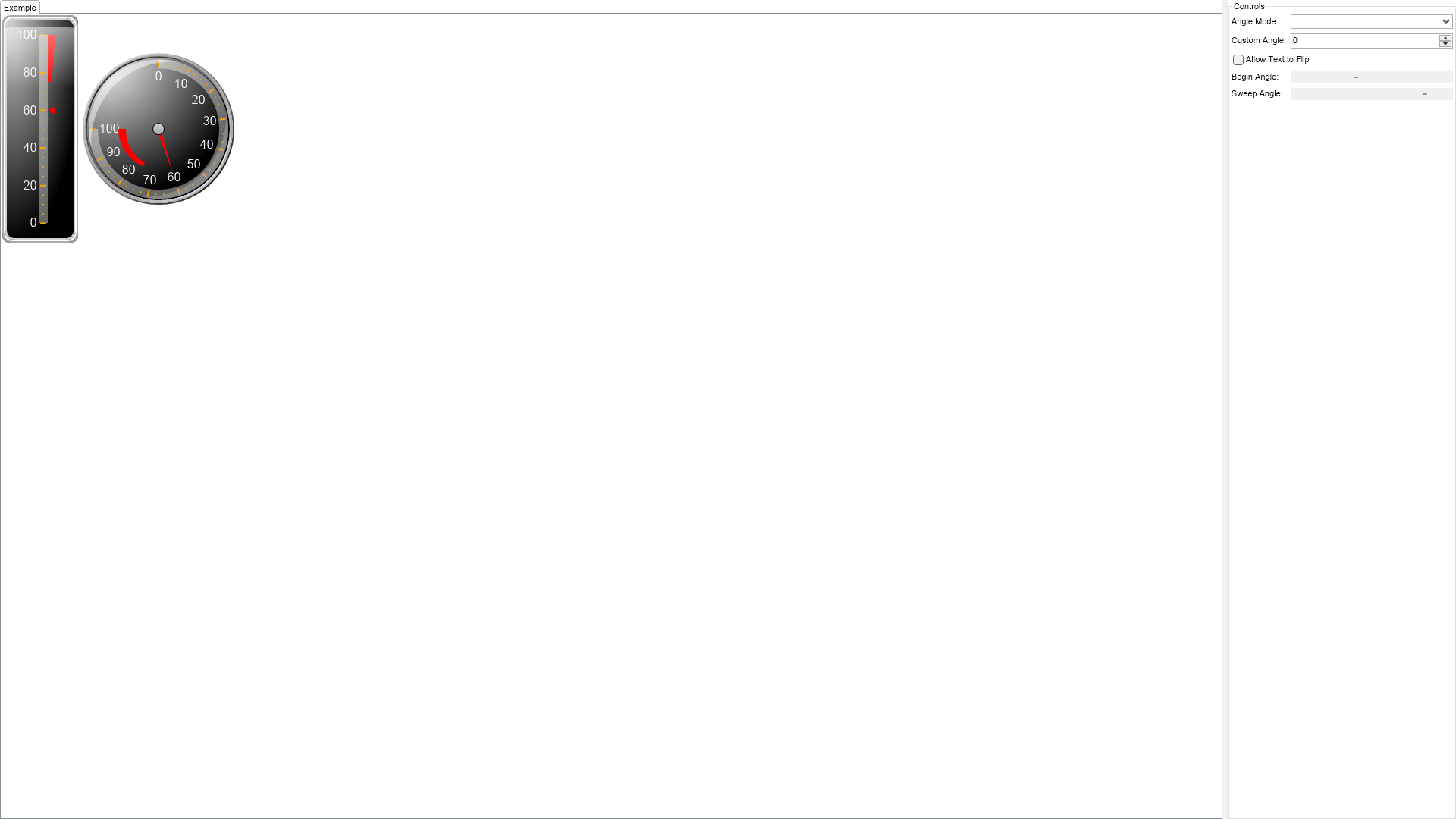
using Nevron.Nov;
using Nevron.Nov.Chart;
using Nevron.Nov.Dom;
using Nevron.Nov.Editors;
using Nevron.Nov.Graphics;
using Nevron.Nov.Layout;
using Nevron.Nov.UI;
using Nevron.Nov.Windows.Forms;
using System.Windows.Forms;
namespace NovWinFormsProject
{
public partial class Form1 : Form
{
#region Constructors
public Form1()
{
InitializeComponent();
// Set form title
Text = "NOV WinForms - NGaugeScaleLabelsOrientationExample";
// Create the NOV example and its controls
NWidget exampleContent = CreateExampleContent();
NWidget exampleControls = CreateExampleControls();
if (exampleControls != null)
{
exampleControls.PreferredWidth = 300;
}
// Place the example and its controls in a pair box
NPairBox pairBox = new NPairBox(exampleContent, exampleControls);
pairBox.FillMode = ENStackFillMode.First;
pairBox.FitMode = ENStackFitMode.First;
pairBox.Margins = new NMargins(NDesign.HorizontalSpacing, NDesign.VerticalSpacing);
// Host the example in the form
NNovWidgetHost host = new NNovWidgetHost(pairBox);
host.Dock = DockStyle.Fill;
Controls.Add(host);
}
#endregion
#region Example
public NWidget CreateExampleContent()
{
NStackPanel stack = new NStackPanel();
NStackPanel controlStack = new NStackPanel();
controlStack.Direction = ENHVDirection.LeftToRight;
stack.Add(controlStack);
m_LinearGauge = new NLinearGauge();
m_LinearGauge.Orientation = ENLinearGaugeOrientation.Vertical;
m_LinearGauge.PreferredSize = defaultLinearVerticalGaugeSize;
m_LinearGauge.CapEffect = new NGelCapEffect();
m_LinearGauge.Border = CreateBorder();
m_LinearGauge.Padding = new NMargins(20);
m_LinearGauge.BorderThickness = new NMargins(6);
controlStack.Add(m_LinearGauge);
// create the background panel
NAdvancedGradientFill advGradient = new NAdvancedGradientFill();
advGradient.BackgroundColor = NColor.Black;
advGradient.Points.Add(new NAdvancedGradientPoint(NColor.LightGray, new NAngle(10, NUnit.Degree), 0.1f, 0, 1.0f, ENAdvancedGradientPointShape.Circle));
m_LinearGauge.BackgroundFill = advGradient;
// FIX m_LinearGauge.BorderStyle = new NEdgeBorderStyle(BorderShape.RoundedRect);
NGaugeAxis axis = new NGaugeAxis();
m_LinearGauge.Axes.Add(axis);
axis.Anchor = new NModelGaugeAxisAnchor(10, ENVerticalAlignment.Center, ENScaleOrientation.Left);
ConfigureScale((NLinearScale)axis.Scale);
// add some indicators
AddRangeIndicatorToGauge(m_LinearGauge);
m_LinearGauge.Indicators.Add(new NMarkerValueIndicator(60));
// create the radial gauge
m_RadialGauge = new NRadialGauge();
m_RadialGauge.CapEffect = new NGlassCapEffect();
m_RadialGauge.Dial = new NDial(ENDialShape.Circle, new NEdgeDialRim());
controlStack.Add(m_RadialGauge);
// create the radial gauge
m_RadialGauge.SweepAngle = new NAngle(270, NUnit.Degree);
m_RadialGauge.BeginAngle = new NAngle(-90, NUnit.Degree);
// set some background
advGradient = new NAdvancedGradientFill();
advGradient.BackgroundColor = NColor.Black;
advGradient.Points.Add(new NAdvancedGradientPoint(NColor.White, new NAngle(10, NUnit.Degree), 0.1f, 0, 1.0f, ENAdvancedGradientPointShape.Circle));
m_RadialGauge.Dial = new NDial(ENDialShape.Circle, new NEdgeDialRim());
m_RadialGauge.Dial.BackgroundFill = advGradient;
// configure the axis
axis = new NGaugeAxis();
m_RadialGauge.Axes.Add(axis);
axis.Range = new NRange(0, 100);
axis.Anchor.ScaleOrientation = ENScaleOrientation.Right;
axis.Anchor = new NDockGaugeAxisAnchor(ENGaugeAxisDockZone.Top, true, ENScaleOrientation.Right, 0.0f, 100.0f);
ConfigureScale((NLinearScale)axis.Scale);
// add some indicators
AddRangeIndicatorToGauge(m_RadialGauge);
NNeedleValueIndicator needle = new NNeedleValueIndicator(60);
needle.OffsetOriginMode = ENIndicatorOffsetOriginMode.ScaleMiddle;
needle.OffsetFromScale = 15.0;
m_RadialGauge.Indicators.Add(needle);
return stack;
}
public NWidget CreateExampleControls()
{
NStackPanel stack = new NStackPanel();
NStackPanel propertyStack = new NStackPanel();
stack.Add(new NUniSizeBoxGroup(propertyStack));
m_AngleModeComboBox = new NComboBox();
m_AngleModeComboBox.Items.FillFromEnum();
m_AngleModeComboBox.SelectedIndexChanged += UpdateScaleLabelAngle;
propertyStack.Add(new NPairBox("Angle Mode:", m_AngleModeComboBox, true));
m_CustomAngleNumericUpDown = new NNumericUpDown();
m_CustomAngleNumericUpDown.Minimum = -360;
m_CustomAngleNumericUpDown.Maximum = 360;
m_CustomAngleNumericUpDown.ValueChanged += UpdateScaleLabelAngle;
propertyStack.Add(new NPairBox("Custom Angle:", m_CustomAngleNumericUpDown, true));
m_AllowTextFlipCheckBox = new NCheckBox("Allow Text to Flip");
m_AllowTextFlipCheckBox.CheckedChanged += UpdateScaleLabelAngle;
propertyStack.Add(m_AllowTextFlipCheckBox);
m_BeginAngleScrollBar = new NHScrollBar();
m_BeginAngleScrollBar.Minimum = -360;
m_BeginAngleScrollBar.Maximum = 360;
m_BeginAngleScrollBar.Value = m_RadialGauge.BeginAngle.ToDegrees();
m_BeginAngleScrollBar.ValueChanged += OnBeginAngleScrollBarValueChanged;
propertyStack.Add(new NPairBox("Begin Angle:", m_BeginAngleScrollBar, true));
m_SweepAngleScrollBar = new NHScrollBar();
m_SweepAngleScrollBar.Minimum = -360.0;
m_SweepAngleScrollBar.Maximum = 360.0;
m_SweepAngleScrollBar.Value = m_RadialGauge.SweepAngle.ToDegrees();
m_SweepAngleScrollBar.ValueChanged += OnSweepAngleScrollBarValueChanged;
propertyStack.Add(new NPairBox("Sweep Angle:", m_SweepAngleScrollBar, true));
return stack;
}
public string GetExampleDescription()
{
return @"The example demonstrates how to control the Gauge scale labels orientation.
";
}
///
/// Gets the relevant documentation links for the example
///
///
public (string Name, string Url)[] GetDocumentationUrls()
{
return new[]
{
("Scale Labels Layout", "https://www.nevron.com/docs/openvision/scale-labels-layout.html"),
("Gauges Axes", "https://www.nevron.com/docs/openvision/gauges-axes.html"),
};
}
#endregion
#region Implementation
///
///
///
///
private void ConfigureScale(NLinearScale scale)
{
scale.SetPredefinedScale(ENPredefinedScaleStyle.PresentationNoStroke);
scale.Labels.OverlapResolveLayouts = new NDomArray();
scale.MinorTickCount = 3;
scale.Ruler.Fill = new NColorFill(NColor.FromColor(NColor.White, 0.4f));
scale.OuterMajorTicks.Fill = new NColorFill(NColor.Orange);
scale.Labels.Style.TextStyle.Font = new NFont("Arimo", 12, ENFontStyle.Bold);
scale.Labels.Style.TextStyle.Fill = new NColorFill(NColor.White);
}
///
///
///
///
private void AddRangeIndicatorToGauge(NGauge gauge)
{
// add some indicators
NRangeIndicator rangeIndicator = new NRangeIndicator(new NRange(75, 100));
rangeIndicator.Fill = new NColorFill(NColor.Red);
rangeIndicator.Stroke.Width = 0.0;
rangeIndicator.BeginWidth = 5.0;
rangeIndicator.EndWidth = 10.0;
rangeIndicator.PaintOrder = ENIndicatorPaintOrder.BeforeScale;
gauge.Indicators.Add(rangeIndicator);
}
#endregion
#region Event Handlers
private void UpdateScaleLabelAngle(NValueChangeEventArgs arg)
{
NScaleLabelAngle angle = new NScaleLabelAngle((ENScaleLabelAngleMode)m_AngleModeComboBox.SelectedIndex,
(float)m_CustomAngleNumericUpDown.Value,
m_AllowTextFlipCheckBox.Checked);
// apply angle to radial gauge axis
NGaugeAxis axis = (NGaugeAxis)m_RadialGauge.Axes[0];
NLinearScale scale = (NLinearScale)axis.Scale;
scale.Labels.Style.Angle = angle;
// apply angle to linear gauge axis
axis = (NGaugeAxis)m_LinearGauge.Axes[0];
scale = (NLinearScale)axis.Scale;
scale.Labels.Style.Angle = angle;
}
void OnBeginAngleScrollBarValueChanged(NValueChangeEventArgs arg)
{
m_RadialGauge.BeginAngle = new NAngle(m_BeginAngleScrollBar.Value, NUnit.Degree);
}
void OnSweepAngleScrollBarValueChanged(NValueChangeEventArgs arg)
{
m_RadialGauge.SweepAngle = new NAngle(m_SweepAngleScrollBar.Value, NUnit.Degree);
}
void OnAngleModeComboBoxSelectedIndexChanged(NValueChangeEventArgs arg)
{
m_RadialGauge.SweepAngle = new NAngle(m_SweepAngleScrollBar.Value, NUnit.Degree);
}
#endregion
#region Fields
NRadialGauge m_RadialGauge;
NLinearGauge m_LinearGauge;
NComboBox m_AngleModeComboBox;
NNumericUpDown m_CustomAngleNumericUpDown;
NCheckBox m_AllowTextFlipCheckBox;
NHScrollBar m_BeginAngleScrollBar;
NHScrollBar m_SweepAngleScrollBar;
#endregion
#region Static Methods
private static NBorder CreateBorder()
{
return NBorder.CreateThreeColorBorder(NColor.LightGray, NColor.White, NColor.DarkGray, 10, 10);
}
#endregion
#region Constants
private static readonly NSize defaultLinearVerticalGaugeSize = new NSize(100, 300);
#endregion
#region Nested Types
#endregion
}
}

 Chart for .NET
 Diagram for .NET
 User Interface for .NET
 Vision for SSRS
 Chart for SSRS
 Gauge for SSRS
 Map for SSRS
 Barcode for SSRS
 Vision for SharePoint
 Chart for SharePoint
 Gauge for SharePoint
 Map for SharePoint
 Barcode for SharePoint
 Open Vision for .NET


 Vision for .NET