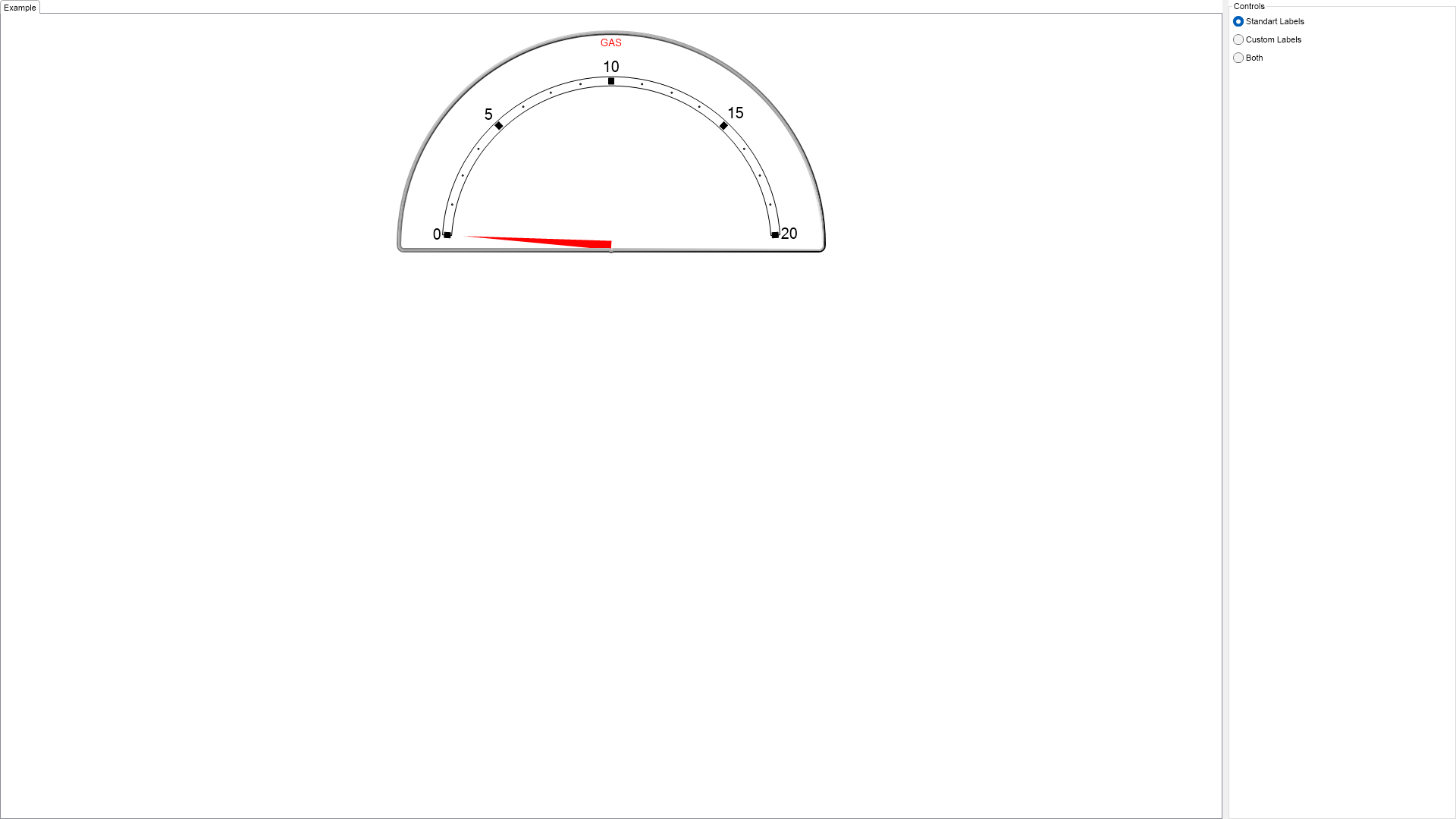
using Nevron.Nov;
using Nevron.Nov.Chart;
using Nevron.Nov.Dom;
using Nevron.Nov.Graphics;
using Nevron.Nov.Layout;
using Nevron.Nov.UI;
using Nevron.Nov.Windows.Forms;
using System;
using System.Windows.Forms;
namespace NovWinFormsProject
{
public partial class Form1 : Form
{
#region Constructors
public Form1()
{
InitializeComponent();
// Set form title
Text = "NOV WinForms - NScalesCustomLabelsExample";
// Create the NOV example and its controls
NWidget exampleContent = CreateExampleContent();
NWidget exampleControls = CreateExampleControls();
if (exampleControls != null)
{
exampleControls.PreferredWidth = 300;
}
// Place the example and its controls in a pair box
NPairBox pairBox = new NPairBox(exampleContent, exampleControls);
pairBox.FillMode = ENStackFillMode.First;
pairBox.FitMode = ENStackFitMode.First;
pairBox.Margins = new NMargins(NDesign.HorizontalSpacing, NDesign.VerticalSpacing);
// Host the example in the form
NNovWidgetHost host = new NNovWidgetHost(pairBox);
host.Dock = DockStyle.Fill;
Controls.Add(host);
}
#endregion
#region Example
///
///
///
///
public NWidget CreateExampleContent()
{
NStackPanel stack = new NStackPanel();
NStackPanel controlStack = new NStackPanel();
controlStack.Padding = new NMargins(20);
stack.Add(controlStack);
// create the radial gauge
m_RadialGauge = new NRadialGauge();
m_RadialGauge.PreferredSize = defaultRadialGaugeSize;
m_RadialGauge.Dial = new NDial(ENDialShape.CutCircle, new NEdgeDialRim());
m_RadialGauge.NeedleCap.Visible = false;
controlStack.Add(m_RadialGauge);
// add axis
NGaugeAxis axis = new NGaugeAxis();
m_RadialGauge.Axes.Clear();
m_RadialGauge.Axes.Add(axis);
axis.Range = new NRange(0, 20);
axis.Anchor = new NDockGaugeAxisAnchor(ENGaugeAxisDockZone.Top, true, ENScaleOrientation.Left, 2f, 98f);
// scale
m_RadialGauge.SweepAngle = new NAngle(180, NUnit.Degree);
m_RadialGauge.BeginAngle = new NAngle(-180, NUnit.Degree);
// needle value
m_NeedleIndicator = new NNeedleValueIndicator();
m_NeedleIndicator.ScaleAxis = axis;
m_NeedleIndicator.Width = 12;
m_NeedleIndicator.Fill = new NColorFill(NColor.Red);
m_NeedleIndicator.OffsetFromScale = 15;
m_RadialGauge.Indicators.Add(m_NeedleIndicator);
// Timer
m_Timer = new NTimer();
m_Timer.Interval = 800;
m_Timer.Tick += OnTimerTick;
m_Timer.Start();
return stack;
}
///
///
///
///
public NWidget CreateExampleControls()
{
NStackPanel stack = new NStackPanel();
NStackPanel propertyStack = new NStackPanel();
stack.Add(new NUniSizeBoxGroup(propertyStack));
m_LabelsTypeRadioGroup = new NRadioButtonGroup();
m_LabelsTypeRadioGroup.SelectedIndexChanged += OnLabelsTypeRadioGroupIndexChanged;
NStackPanel radioStack = new NStackPanel();
m_LabelsTypeRadioGroup.Content = radioStack;
radioStack.Add(new NRadioButton("Standart Labels"));
radioStack.Add(new NRadioButton("Custom Labels"));
radioStack.Add(new NRadioButton("Both"));
m_LabelsTypeRadioGroup.SelectedIndex = 0;
((NRadioButton)radioStack[0]).Checked = true;
stack.Add(m_LabelsTypeRadioGroup);
return stack;
}
public string GetExampleDescription()
{
return @"This example demonstrates how to use a minimum scale pin to define a pointer's off position.
";
}
///
/// Gets the relevant documentation links for the example
///
///
public (string Name, string Url)[] GetDocumentationUrls()
{
return new[]
{
("Scale Custom Labels", "https://www.nevron.com/docs/openvision/scale-custom-labels.html"),
("Gauges Axes", "https://www.nevron.com/docs/openvision/gauges-axes.html"),
};
}
#endregion
#region Implementation
///
/// Adds custom labels to the scle
///
///
private void AddCustomLabels(NLinearScale scale)
{
scale.CustomLabelOverlapResolveLayouts = new NDomArray(new ENLevelLabelsLayout[] { ENLevelLabelsLayout.RemoveOverlap, ENLevelLabelsLayout.AutoScale });
scale.CustomLabels.Add(CreateCustomLabel(0, "E"));
scale.CustomLabels.Add(CreateCustomLabel(10, "1/2"));
scale.CustomLabels.Add(CreateCustomLabel(20, "F"));
}
///
/// Creates a custom label give the specified value and text
///
///
///
///
private NCustomValueLabel CreateCustomLabel(double value, string text)
{
NCustomValueLabel label = new NCustomValueLabel(value, text);
label.LabelStyle.ZOrder = 1;
label.LabelStyle.TextStyle.Font = new NFont("Microsoft Sans Serif", 15, ENFontStyle.Bold);
label.LabelStyle.TextStyle.Fill = new NColorFill(NColor.Black);
return label;
}
#endregion
#region Event Handlers
private void OnLabelsTypeRadioGroupIndexChanged(NValueChangeEventArgs arg)
{
int selectedIndex = m_LabelsTypeRadioGroup.SelectedIndex;
// scale
NLinearScale scale = new NLinearScale();
m_RadialGauge.Axes[0].Scale = scale;
scale.SetPredefinedScale(ENPredefinedScaleStyle.Presentation);
scale.Labels.Style.TextStyle.Font = new NFont("Microsoft Sans Serif", 15, ENFontStyle.Bold);
scale.Labels.Style.TextStyle.Fill = new NColorFill(NColor.Black);
scale.MajorTickMode = ENMajorTickMode.AutoMaxCount;
scale.OuterMinorTicks.Visible = true;
scale.OuterMajorTicks.Width = 7;
scale.OuterMajorTicks.Fill = new NColorFill(NColor.Black);
scale.MinorTickCount = 3;
scale.OuterMinorTicks.Fill = new NColorFill(NColor.Gray);
scale.Title.Text = "GAS";
scale.Title.TextStyle = new NTextStyle(NColor.Red);
scale.Title.RulerAlignment = ENHorizontalAlignment.Center;
scale.Title.ContentAlignment = ENContentAlignment.BottomCenter;
switch (selectedIndex)
{
case 0: // Standard labels
break;
case 1: // Custom labels
scale.Labels.Visible = false;
scale.CreateNewLevelForCustomLabels = true;
AddCustomLabels(scale);
break;
case 2: // Both
// add custom labels
scale.CreateNewLevelForCustomLabels = false;
AddCustomLabels(scale);
break;
}
}
///
/// Timer tick event
///
private void OnTimerTick()
{
// update the indicator
m_FirstIndicatorAngle += 0.02;
double value = 50.0 - Math.Cos(m_FirstIndicatorAngle) * 50.0;
m_NeedleIndicator.Value = value;
}
#endregion
#region Fields
NRadialGauge m_RadialGauge;
NNeedleValueIndicator m_NeedleIndicator;
NRadioButtonGroup m_LabelsTypeRadioGroup;
NTimer m_Timer;
double m_FirstIndicatorAngle;
#endregion
#region Static Methods
#endregion
#region Constants
private static readonly NSize defaultRadialGaugeSize = new NSize(300, 300);
#endregion
#region Nested Types
#endregion
}
}

 Chart for .NET
 Diagram for .NET
 User Interface for .NET
 Vision for SSRS
 Chart for SSRS
 Gauge for SSRS
 Map for SSRS
 Barcode for SSRS
 Vision for SharePoint
 Chart for SharePoint
 Gauge for SharePoint
 Map for SharePoint
 Barcode for SharePoint
 Open Vision for .NET


 Vision for .NET