using Nevron.Nov;
using Nevron.Nov.Chart;
using Nevron.Nov.Dom;
using Nevron.Nov.Graphics;
using Nevron.Nov.Layout;
using Nevron.Nov.UI;
using Nevron.Nov.Windows.Forms;
using System;
using System.Windows.Forms;

namespace NovWinFormsProject
{
	public partial class Form1 : Form
	{
		#region Constructors

		public Form1()
		{
			InitializeComponent();

			// Set form title
			Text = "NOV WinForms - NPointerScaleAssociationExample";

			// Create the NOV example and its controls
			NWidget exampleContent = CreateExampleContent();
			NWidget exampleControls = CreateExampleControls();
			if (exampleControls != null)
			{
				exampleControls.PreferredWidth = 300;
			}

			// Place the example and its controls in a pair box
			NPairBox pairBox = new NPairBox(exampleContent, exampleControls);
			pairBox.FillMode = ENStackFillMode.First;
			pairBox.FitMode = ENStackFitMode.First;
			pairBox.Margins = new NMargins(NDesign.HorizontalSpacing, NDesign.VerticalSpacing);

			// Host the example in the form
			NNovWidgetHost host = new NNovWidgetHost(pairBox);
			host.Dock = DockStyle.Fill;
			Controls.Add(host);
		}

		#endregion

        #region Example

        public NWidget CreateExampleContent()
        {
            NStackPanel stack = new NStackPanel();

            NStackPanel controlStack = new NStackPanel();
            stack.Add(controlStack);

            // create the radial gauge
            m_RadialGauge = new NRadialGauge();
            m_RadialGauge.PreferredSize = defaultRadialGaugeSize;
            controlStack.Add(m_RadialGauge);

            m_RadialGauge.Dial = new NDial(ENDialShape.Circle, new NEdgeDialRim());
            m_RadialGauge.Dial.BackgroundFill = new NStockGradientFill(NColor.Silver, NColor.LightSteelBlue);

            NGelCapEffect gelEffect = new NGelCapEffect(ENCapEffectShape.Ellipse);
            gelEffect.Margins = new NMargins(0, 0, 0, 0.5);

            m_RadialGauge.Axes.Clear();

            // create the radial gauge
            m_RadialGauge.SweepAngle = new NAngle(360, NUnit.Degree);
            m_RadialGauge.BeginAngle = new NAngle(-90, NUnit.Degree);

            // needle cap size
            m_RadialGauge.NeedleCap.Size = new NSize(25,25);

            // create the first axis
            NGaugeAxis axis1 = new NGaugeAxis();
            axis1.Anchor = new NDockGaugeAxisAnchor(ENGaugeAxisDockZone.Top, true, 10, 40);

            m_RadialGauge.Axes.Add(axis1);

            // scale 1
            NStandardScale scale1 = (NStandardScale)axis1.Scale;
            scale1.SetPredefinedScale(ENPredefinedScaleStyle.PresentationNoStroke);
            scale1.MinorTickCount = 3;
            scale1.Ruler.Fill = new NColorFill(NColor.FromColor(NColor.Black, 0.4f));
            scale1.OuterMajorTicks.Fill = new NColorFill(NColor.Orange);
            scale1.Labels.Style.TextStyle.Font = new NFont("Arimo", 12, ENFontStyle.Bold);
            scale1.Labels.Style.TextStyle.Fill = new NColorFill(NColor.DarkSlateBlue);
            scale1.Labels.Style.Angle = new NScaleLabelAngle(ENScaleLabelAngleMode.Scale, 0);

            //  create the second axis
            NGaugeAxis axis2 = new NGaugeAxis();
            axis2.Anchor = new NDockGaugeAxisAnchor(ENGaugeAxisDockZone.Top, false, 60, 90);

            m_RadialGauge.Axes.Add(axis2);

            // scale 2
            NStandardScale scale2 = (NStandardScale)axis2.Scale;
            scale2.SetPredefinedScale(ENPredefinedScaleStyle.PresentationNoStroke);
            scale2.MinorTickCount = 3;
            scale2.Ruler.Fill = new NColorFill(NColor.FromColor(NColor.Black, 0.4f));
            scale2.OuterMajorTicks.Fill = new NColorFill(NColor.Blue);
            scale2.Labels.Style.TextStyle.Font = new NFont("Arimo", 12, ENFontStyle.Bold);
            scale2.Labels.Style.TextStyle.Fill = new NColorFill(NColor.DarkSlateBlue);
            scale2.Labels.Style.Angle = new NScaleLabelAngle(ENScaleLabelAngleMode.Scale, 0);

            // range indicator
            m_RangeIndicator = new NRangeIndicator();
            m_RangeIndicator.Value = 80;
            m_RangeIndicator.Palette = new NTwoColorPalette(NColor.Transparent, NColor.OrangeRed);
            m_RangeIndicator.OriginMode = ENRangeIndicatorOriginMode.ScaleMax;
            m_RangeIndicator.Stroke.Width = 0;
            m_RangeIndicator.OffsetFromScale = 3;
            m_RangeIndicator.BeginWidth = 15;
            m_RangeIndicator.EndWidth = 25;

            m_RadialGauge.Indicators.Add(m_RangeIndicator);

            // marker indicator
            m_MarkerIndicator = new NMarkerValueIndicator();
            m_MarkerIndicator.ScaleAxis = axis2;
            m_MarkerIndicator.AllowDragging = true;
            m_MarkerIndicator.Fill =  new NStockGradientFill(ENGradientStyle.Horizontal, ENGradientVariant.Variant1, NColor.Orange, NColor.Yellow);

            m_RadialGauge.Indicators.Add(m_MarkerIndicator);

            // needle value indicator1
            m_ValueIndicator = new NNeedleValueIndicator();
            m_ValueIndicator.Value = 79;
            m_ValueIndicator.Fill = new NStockGradientFill(ENGradientStyle.Horizontal, ENGradientVariant.Variant1, NColor.White, NColor.Red);
            m_ValueIndicator.Stroke.Color = NColor.Red;
            m_ValueIndicator.OffsetFromScale = 2;
            m_ValueIndicator.Shape = ENNeedleShape.Triangle;

            m_RadialGauge.Indicators.Add(m_ValueIndicator);

            // timer
            m_DataFeedTimer = new NTimer();
            m_DataFeedTimer.Tick += OnDataFeedTimerTick;
            m_DataFeedTimer.Start();

            return stack;
        }

        private void OnDataFeedTimerTick()
        {
            m_FirstIndicatorAngle += 0.02;
            double value = 50.0 - Math.Cos(m_FirstIndicatorAngle) * 50.0;

            m_ValueIndicator.Value = value;
            m_MarkerIndicator.Value = value;
        }

        public NWidget CreateExampleControls()
        {
            NStackPanel stack = new NStackPanel();

            NStackPanel propertyStack = new NStackPanel();
            stack.Add(new NUniSizeBoxGroup(propertyStack));

            // pointer properties group
            NGroupBox controlsGroupBox = new NGroupBox("Controls");
            propertyStack.Add(controlsGroupBox);
            NStackPanel controlsGroupBoxContent = new NStackPanel();
            controlsGroupBox.Content = new NUniSizeBoxGroup(controlsGroupBoxContent);

            m_NeedlePointerScaleComboBox = new NComboBox();
            m_NeedlePointerScaleComboBox.Items.Add(new NComboBoxItem("Left Scale"));
            m_NeedlePointerScaleComboBox.Items.Add(new NComboBoxItem("Right Scale"));
            m_NeedlePointerScaleComboBox.SelectedIndex = 0;
            m_NeedlePointerScaleComboBox.SelectedIndexChanged += OnNeedlePointerScaleComboBoxChanged;

            controlsGroupBoxContent.Add(new NPairBox("Needle Pointer Scale:", m_NeedlePointerScaleComboBox, true));

            m_MarkerPointerScaleComboBox = new NComboBox();
            m_MarkerPointerScaleComboBox.Items.Add(new NComboBoxItem("Left Scale"));
            m_MarkerPointerScaleComboBox.Items.Add(new NComboBoxItem("Right Scale"));
            m_MarkerPointerScaleComboBox.SelectedIndex = 1;
            m_MarkerPointerScaleComboBox.SelectedIndexChanged += OnMarkerPointerScaleComboBoxChanged;
            controlsGroupBoxContent.Add(new NPairBox("Marker Pointer Scale:", m_MarkerPointerScaleComboBox, true));

            m_RangeScaleComboBox = new NComboBox();
            m_RangeScaleComboBox.Items.Add(new NComboBoxItem("Left Scale"));
            m_RangeScaleComboBox.Items.Add(new NComboBoxItem("Right Scale"));
            m_RangeScaleComboBox.SelectedIndex = 0;
            m_RangeScaleComboBox.SelectedIndexChanged += OnRangeScaleComboBoxChanged;
            controlsGroupBoxContent.Add(new NPairBox("Range Scale:", m_RangeScaleComboBox, true));

            return stack;
        }


        public string GetExampleDescription()
        {
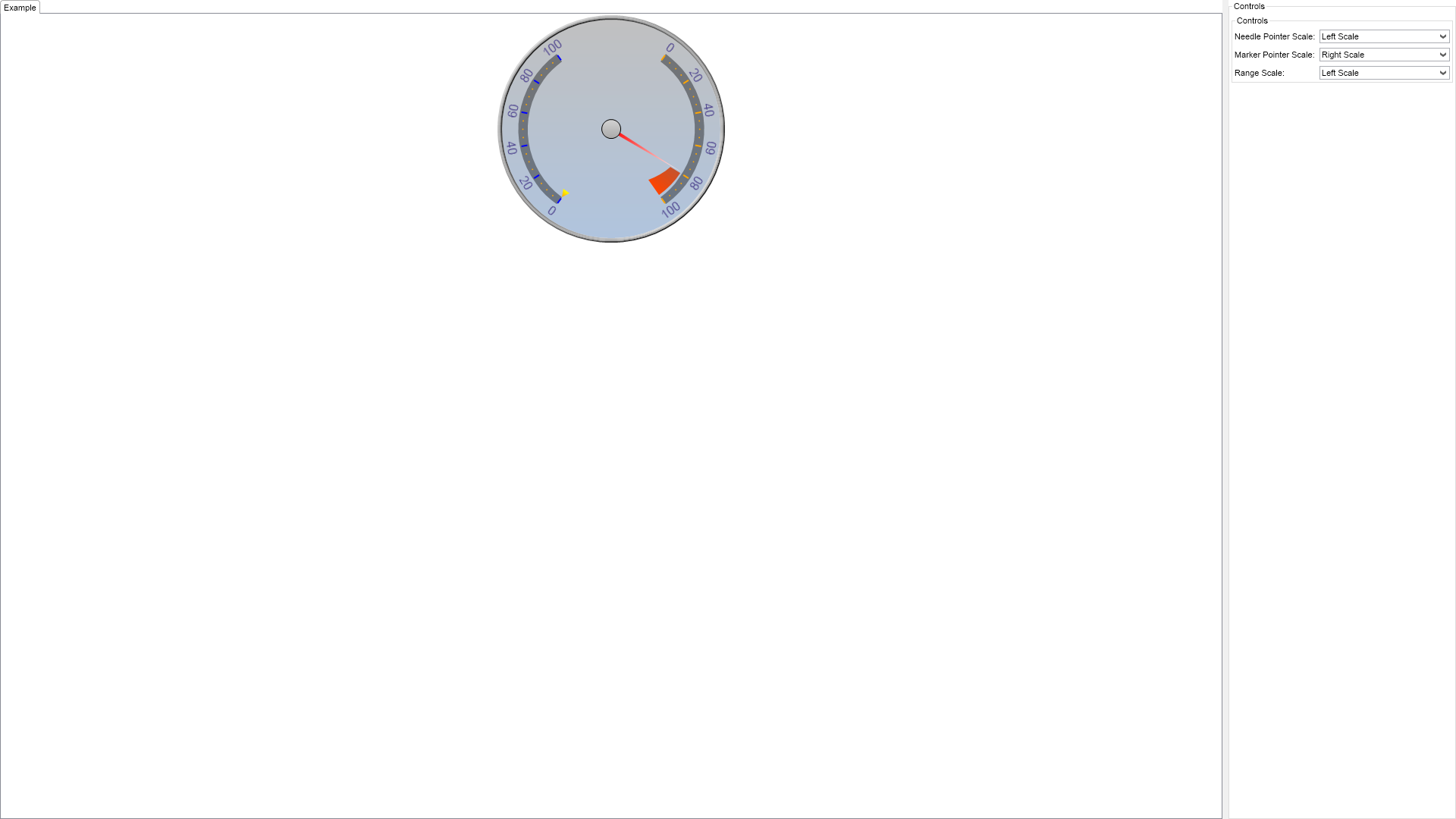
            return @" The example demonstrates how pointers and ranges can be associated with different scales. ";
        }

        ///
        /// Gets the relevant documentation links for the example
        ///
        ///
        public (string Name, string Url)[] GetDocumentationUrls()
        {
            return new[]
            {
                ("Gauges Axes", "https://www.nevron.com/docs/openvision/gauges-axes.html"),
                ("Scales Overview", "https://www.nevron.com/docs/openvision/scales-overview.html"),
                ("Gauges Overview", "https://www.nevron.com/docs/openvision/gauges-overview.html"),
            };
        }

        #endregion

		#region Implementation
		#endregion

		#region Event Handlers
		#endregion

        #region Fields

        NRadialGauge m_RadialGauge;
        NNeedleValueIndicator m_ValueIndicator;
        NRangeIndicator m_RangeIndicator;
        NMarkerValueIndicator m_MarkerIndicator;

        NComboBox m_NeedlePointerScaleComboBox;
        NComboBox m_MarkerPointerScaleComboBox;
        NComboBox m_RangeScaleComboBox;

        NTimer m_DataFeedTimer;
        double m_FirstIndicatorAngle;

        #endregion

		#region Static Methods
		#endregion

        #region Constants

        private static readonly NSize defaultRadialGaugeSize = new NSize(300, 300);

        #endregion

		#region Nested Types
		#endregion
	}
}

 Chart for .NET
 Diagram for .NET
 User Interface for .NET
 Vision for SSRS
 Chart for SSRS
 Gauge for SSRS
 Map for SSRS
 Barcode for SSRS
 Vision for SharePoint
 Chart for SharePoint
 Gauge for SharePoint
 Map for SharePoint
 Barcode for SharePoint
 Open Vision for .NET


 Vision for .NET