Imports Nevron.Nov
Imports Nevron.Nov.Barcode
Imports Nevron.Nov.Dom
Imports Nevron.Nov.Editors
Imports Nevron.Nov.Graphics
Imports Nevron.Nov.Layout
Imports Nevron.Nov.Schedule
Imports Nevron.Nov.Schedule.Formats
Imports Nevron.Nov.UI
Imports Nevron.Nov.Windows.Wpf
Imports System

Class MainWindow

#Region "Constructors"

	Public Sub New()
		' This call is required by the designer.
		InitializeComponent()

		' Add any initialization after the InitializeComponent() call.

		' Set form title
		Title = "NOV WPF - NCustomAppointmentsExample"

		' Create the NOV example and its controls
		Dim exampleContent As NWidget = CreateExampleContent()
		Dim exampleControls As NWidget = CreateExampleControls()
		If Not exampleControls Is Nothing Then
			exampleControls.PreferredWidth = 300
		End If

		' Place the example and its controls in a pair box
		Dim pairBox As NPairBox = New NPairBox(exampleContent, exampleControls)
		pairBox.FillMode = ENStackFillMode.First
		pairBox.FitMode = ENStackFitMode.First
		pairBox.Margins = New NMargins(NDesign.HorizontalSpacing, NDesign.VerticalSpacing)

		' Host the example in the form
		Dim host As NNovWidgetHost(Of NWidget) = New NNovWidgetHost(Of NWidget)(pairBox)
		Content = host
	End Sub


#End Region

#Region "Example"

        Public Function CreateExampleContent() As NWidget
            ' Create a simple schedule
            Dim scheduleViewWithRibbon As NScheduleViewWithRibbon = New NScheduleViewWithRibbon()
            scheduleViewWithRibbon.Registered += AddressOf OnScheduleViewWithRibbonRegistered
            m_ScheduleView = scheduleViewWithRibbon.View

            m_ScheduleView.Document.PauseHistoryService()
            Try
                InitSchedule(m_ScheduleView.Content)
            Finally
                m_ScheduleView.Document.ResumeHistoryService()
            End Try

            ' Return the commanding widget
            Return scheduleViewWithRibbon
        End Function
        Public Function CreateExampleControls() As NWidget
            Return Nothing
        End Function
        Public Function GetExampleDescription() As String
            Return "

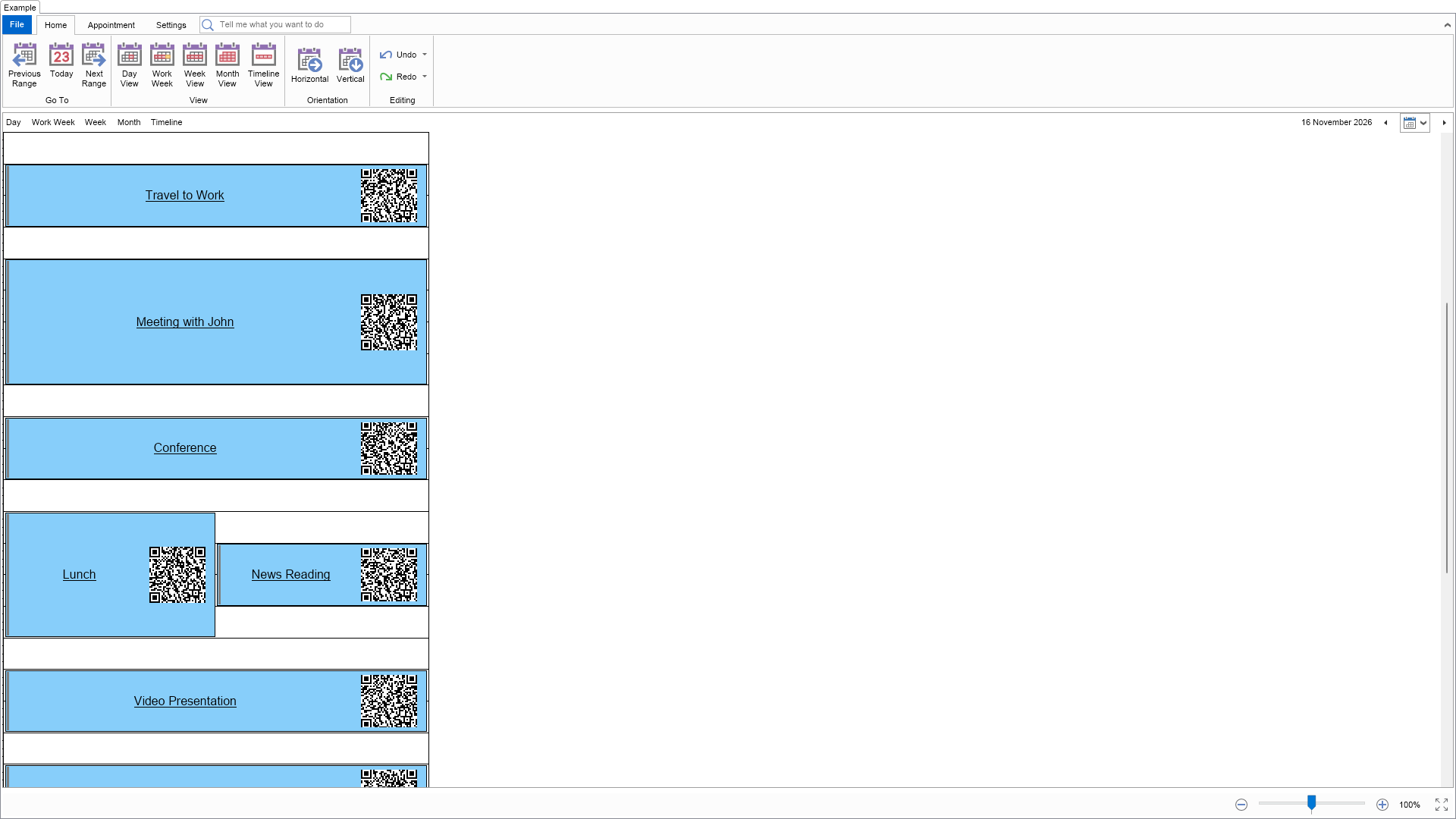
    This example demonstrates how to create a custom appointments class, which inherits from NAppointment and customizes
	the content of the generated appointment widget. If you scan the generated QR code with your smartphone you will be
	asked whether to add it to your smartphone's calendar.


	This example also shows how to add a custom property to the appointment and add it to the appointment designer, which
	opens when you double click the appointment.

"
        End Function

        '''
        ''' Gets the relevant documentation links for the example
        '''
        '''
        Public Function GetDocumentationUrls() As (String, String)()
            Return {("Schedule Appointments", "https://www.nevron.com/docs/openvision/schedule-appointments.html"), ("Schedule View", "https://www.nevron.com/docs/openvision/schedule-view.html"), ("Schedule Appointment Categorization", "https://www.nevron.com/docs/openvision/schedule-appointment-categorization.html")}
        End Function

#End Region

#Region "Implementation"

        Private Sub InitSchedule(schedule As NSchedule)
            Dim today = Date.Today
            schedule.ViewMode = ENScheduleViewMode.Day

            schedule.Appointments.Add(New CustomAppointment("Travel to Work", today.AddHours(6.5), today.AddHours(7.5)))
            schedule.Appointments.Add(New CustomAppointment("Meeting with John", today.AddHours(8), today.AddHours(10)))
            schedule.Appointments.Add(New CustomAppointment("Conference", today.AddHours(10.5), today.AddHours(11.5)))
            schedule.Appointments.Add(New CustomAppointment("Lunch", today.AddHours(12), today.AddHours(14)))
            schedule.Appointments.Add(New CustomAppointment("News Reading", today.AddHours(12.5), today.AddHours(13.5)))
            schedule.Appointments.Add(New CustomAppointment("Video Presentation", today.AddHours(14.5), today.AddHours(15.5)))
            schedule.Appointments.Add(New CustomAppointment("Web Meeting", today.AddHours(16), today.AddHours(17)))
            schedule.Appointments.Add(New CustomAppointment("Travel back home", today.AddHours(17.5), today.AddHours(19)))
            schedule.Appointments.Add(New CustomAppointment("Family Dinner", today.AddHours(20), today.AddHours(21)))

            ' Increase the height of the day view mode
            schedule.DayViewMode.Height = 2000
        End Sub

#End Region

#Region "Event Handlers"

        '''
        ''' Called when the schedule view with ribbon is added to a document.
        '''
        '''
        Private Sub OnScheduleViewWithRibbonRegistered(arg As NEventArgs)
            ' Evaluate the document
            CType(arg.TargetNode, NDocumentNode).OwnerDocument.Evaluate()

            ' Scroll the schedule to 6 AM
            m_ScheduleView.Content.ScrollToTime(TimeSpan.FromHours(6))
        End Sub

#End Region

#Region "Fields"

        Private m_ScheduleView As NScheduleView

#End Region

#Region "Static Methods"
#End Region

#Region "Constants"
#End Region

#Region "Nested Types"

        Public Class CustomAppointment
            Inherits NAppointment
#Region "Constructors"

            Public Sub New()
            End Sub
            Public Sub New(subject As String, start As Date, [end] As Date)
                MyBase.New(subject, start, [end])
            End Sub

            Shared Sub New()
                CustomAppointmentSchema = NSchema.Create(GetType(CustomAppointment), NAppointmentSchema)

                ' Properties
                CustomTextProperty = CustomAppointmentSchema.AddSlot("CustomText", NDomType.String, Nothing)

                ' Set designer
                Call CustomAppointmentSchema.SetMetaUnit(New NDesignerMetaUnit(GetType(CustomAppointmentDesigner)))
            End Sub

#End Region

#Region "Properties"

            '''
            ''' Gets/Sets the value of the CustomText property.
            '''
            Public Property CustomText As String
                Get
                    Return CStr(GetValue(CustomTextProperty))
                End Get
                Set(value As String)
                    SetValue(CustomTextProperty, value)
                End Set
            End Property

#End Region

#Region "Protected Overrides"

            Protected Overrides Function CreateWidget() As NAppointmentWidget
                Return New CustomAppointmentWidget()
            End Function

#End Region

#Region "Schema"

            Public Shared ReadOnly CustomAppointmentSchema As NSchema
            '''
            ''' Reference to the CustomText property.
            '''
            Public Shared ReadOnly CustomTextProperty As NProperty

#End Region

#Region "Nested Types - Designer"

            Public Class CustomAppointmentDesigner
                Inherits NAppointmentDesigner
                Public Sub New()
                    SetMemberBrowsable(CustomTextProperty, True)
                End Sub
            End Class

#End Region
        End Class

        Public Class CustomAppointmentWidget
            Inherits NAppointmentWidget
#Region "Constructors"

            Public Sub New()
            End Sub
            Shared Sub New()
                CustomAppointmentWidgetSchema = NSchema.Create(GetType(CustomAppointmentWidget), NAppointmentWidgetSchema)
            End Sub

#End Region

#Region "Protected Overrides"

            Protected Overrides Function CreateContent() As NWidget
                ' Create a label
                Dim label As NLabel = New NLabel()
                label.TextWrapMode = ENTextWrapMode.WordWrap
                label.TextAlignment = ENContentAlignment.MiddleCenter
                label.Font = New NFont(NFontDescriptor.DefaultSansFamilyName, 12, ENFontStyle.Underline)

                ' Create a barcode
                Dim barcode As NMatrixBarcode = New NMatrixBarcode()
                barcode.Scale = 2
                barcode.HorizontalPlacement = ENHorizontalPlacement.Center
                barcode.VerticalPlacement = ENVerticalPlacement.Center

                ' Place the label and the barcode in a pair box
                Dim pairBox As NPairBox = New NPairBox(label, barcode, ENPairBoxRelation.Box1BeforeBox2)
                pairBox.Spacing = NDesign.HorizontalSpacing
                pairBox.FillMode = ENStackFillMode.First
                pairBox.FitMode = ENStackFitMode.Last
                pairBox.Padding = New NMargins(NDesign.HorizontalSpacing)
                Return pairBox
            End Function
            Protected Overrides Sub OnAppointmentSubjectChanged(oldSubject As String, newSubject As String)
                Dim label = CType(GetFirstDescendant(NLabel.NLabelSchema), NLabel)
                label.Text = newSubject

                UpdateBarcode()
            End Sub
            Protected Overrides Sub OnRegistered()
                MyBase.OnRegistered()

                UpdateBarcode()
            End Sub

#End Region

#Region "Implementation"

            Private Sub OnAppointmentChanged(args As NEventArgs)
                Dim valueChangeArgs As NValueChangeEventArgs = TryCast(args, NValueChangeEventArgs)
                If valueChangeArgs Is Nothing Then Return

                ' If the start or the end time of the appointment has changed, update the barcode
                Dim [property] = valueChangeArgs.Property
                If [property] Is NAppointmentBase.StartProperty OrElse [property] Is NAppointmentBase.EndProperty Then
                    UpdateBarcode()
                    Dim schedule = CType(GetFirstAncestor(NSchedule.NScheduleSchema), NSchedule)
                    schedule.ScrollToTime(TimeSpan.FromHours(6))
                End If
            End Sub
            Private Sub UpdateBarcode()
                Dim appointment = Me.Appointment
                If appointment Is Nothing Then Return

                ' Serialize the appointment to a string
                Dim text = NScheduleFormat.iCalendar.SerializeAppointment(appointment, False)

                ' Update the text of the matrix barcode widget
                Dim barcode = CType(GetFirstDescendant(NMatrixBarcode.NMatrixBarcodeSchema), NMatrixBarcode)
                barcode.Text = text
            End Sub

#End Region

#Region "Schema"

            Public Shared ReadOnly CustomAppointmentWidgetSchema As NSchema

#End Region
        End Class

#End Region

End Class

 Chart for .NET
 Diagram for .NET
 User Interface for .NET
 Vision for SSRS
 Chart for SSRS
 Gauge for SSRS
 Map for SSRS
 Barcode for SSRS
 Vision for SharePoint
 Chart for SharePoint
 Gauge for SharePoint
 Map for SharePoint
 Barcode for SharePoint
 Open Vision for .NET


 Vision for .NET