Recurrence Rules Example for WPF

Nevron NOV Schedule for WPF ships with hundreds of examples with full source code, as part of the Nevron Open Vision Suite. All WPF Schedule examples are also available as a stand-alone Visual Studio solution in C# and VB.NET, which you can download from the links below.

Recurrence Rules Example for WPF Description

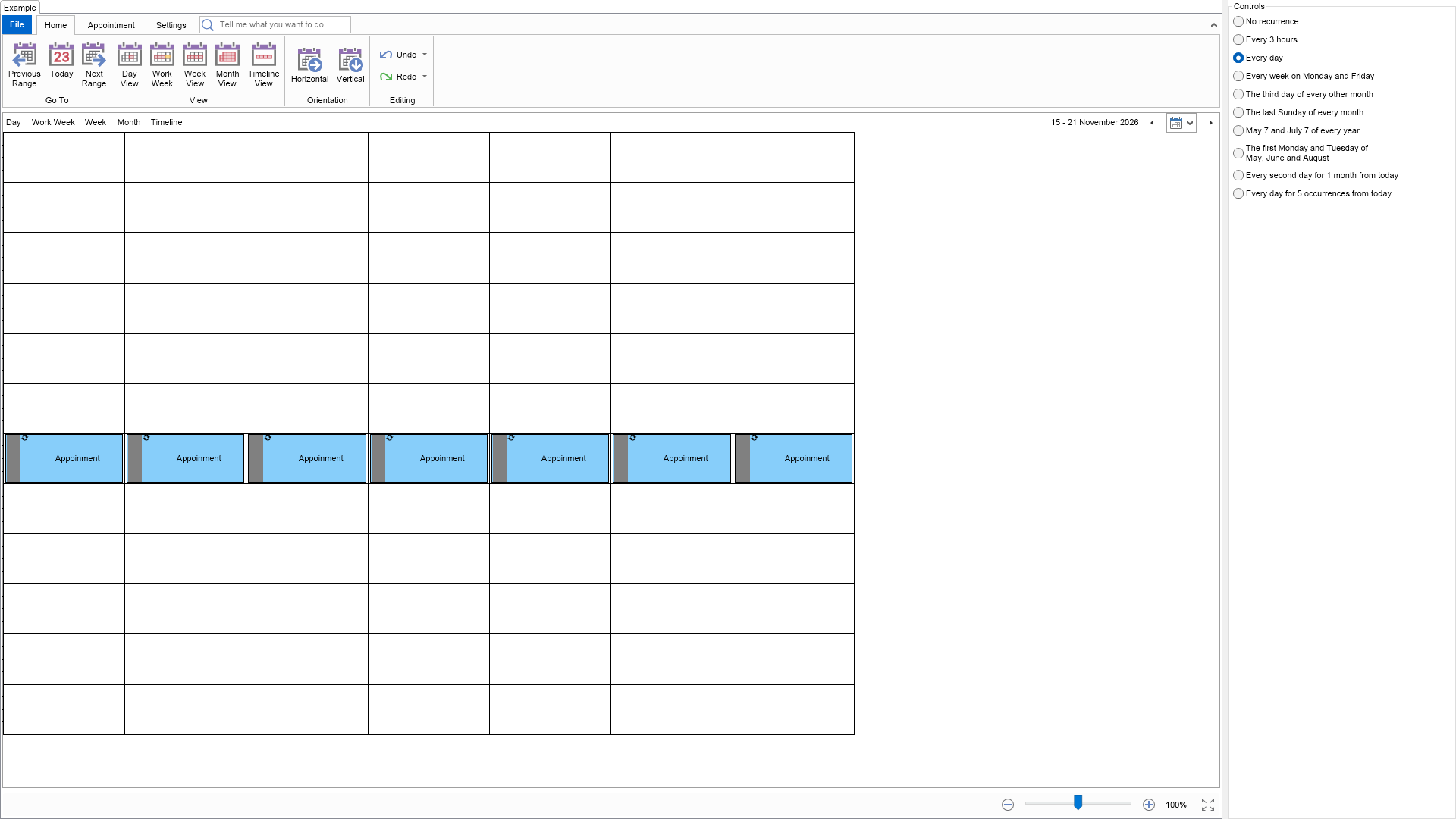
This example demonstrates how to create recurring appointments, i.e. appointments, which occur multiple times. Recurring appointments are created in the same way as ordinary appointments with the only difference that they have a recurrence rule assigned to their RecurrenceRule property. This recurring rule defines when the appointment occurs. Recurring appointments can be easily recognized by the circular arrows symbol at their top left corner.


Recurrence Rules Example

C# Recurrence Rules Example Code for Nevron Schedule for WPF
Language: C#

using Nevron.Nov;
using Nevron.Nov.Dom;
using Nevron.Nov.Graphics;
using Nevron.Nov.Layout;
using Nevron.Nov.Schedule;
using Nevron.Nov.UI;
using Nevron.Nov.Windows.Forms;
using System;
using System.Windows.Forms;

namespace NovWinFormsProject
{
	public partial class Form1 : Form
	{
		#region Constructors

		public Form1()
		{
			InitializeComponent();

			// Set form title
			Text = "NOV WinForms - NRecurrenceRulesExample";

			// Create the NOV example and its controls
			NWidget exampleContent = CreateExampleContent();
			NWidget exampleControls = CreateExampleControls();
			if (exampleControls != null)
			{
				exampleControls.PreferredWidth = 300;
			}

			// Place the example and its controls in a pair box
			NPairBox pairBox = new NPairBox(exampleContent, exampleControls);
			pairBox.FillMode = ENStackFillMode.First;
			pairBox.FitMode = ENStackFitMode.First;
			pairBox.Margins = new NMargins(NDesign.HorizontalSpacing, NDesign.VerticalSpacing);

			// Host the example in the form
			NNovWidgetHost host = new NNovWidgetHost(pairBox);
			host.Dock = DockStyle.Fill;
			Controls.Add(host);
		}

		#endregion

		#region Example

		public NWidget CreateExampleContent()
		{
			// Create a simple schedule
			NScheduleViewWithRibbon scheduleViewWithRibbon = new NScheduleViewWithRibbon();
			m_ScheduleView = scheduleViewWithRibbon.View;

			m_ScheduleView.Document.PauseHistoryService();
			try
			{
				InitSchedule(m_ScheduleView.Content);
			}
			finally
			{
				m_ScheduleView.Document.ResumeHistoryService();
			}

			// Return the commanding widget
			return scheduleViewWithRibbon;
		}
		public NWidget CreateExampleControls()
		{
			NStackPanel stack = new NStackPanel();

			stack.Add(new NRadioButton("No recurrence"));
			stack.Add(new NRadioButton("Every 3 hours"));
			stack.Add(new NRadioButton("Every day"));
			stack.Add(new NRadioButton("Every week on Monday and Friday"));
			stack.Add(new NRadioButton("The third day of every other month"));
			stack.Add(new NRadioButton("The last Sunday of every month"));
			stack.Add(new NRadioButton("May 7 and July 7 of every year"));
			stack.Add(new NRadioButton("The first Monday and Tuesday of\nMay, June and August"));
			stack.Add(new NRadioButton("Every second day for 1 month from today"));
			stack.Add(new NRadioButton("Every day for 5 occurrences from today"));

			NRadioButtonGroup group = new NRadioButtonGroup(stack);
			group.SelectedIndex = 2;
			group.SelectedIndexChanged += OnRadioGroupSelectedIndexChanged;
			return group;
		}
		public string GetExampleDescription()
		{
			return @"

This example demonstrates how to create recurring appointments, i.e. appointments, which occur multiple times. Recurring appointments are created in the same way as ordinary appointments with the only difference that they have a recurrence rule assigned to their RecurrenceRule property. This recurring rule defines when the appointment occurs. Recurring appointments can be easily recognized by the circular arrows symbol at their top left corner.

"; } /// /// Gets the relevant documentation links for the example /// /// public (string Name, string Url)[] GetDocumentationUrls() { return new[] { ("Schedule Recurring Appointments", "https://www.nevron.com/docs/openvision/schedule-recurring-appointments.html"), ("Schedule Appointments", "https://www.nevron.com/docs/openvision/schedule-appointments.html"), ("Schedule", "https://www.nevron.com/docs/openvision/schedule.html"), ("Schedule View", "https://www.nevron.com/docs/openvision/schedule-view.html"), }; } #endregion #region Implementation private void InitSchedule(NSchedule schedule) { DateTime today = DateTime.Today; NAppointment appointment = new NAppointment("Appoinment", today.AddHours(12), today.AddHours(14)); appointment.RecurrenceRule = CreateDailyRule(); schedule.Appointments.Add(appointment); } private NRecurrenceHourlyRule CreateHourlyRule() { // Create a rule, which occurs every 3 hours NRecurrenceHourlyRule rule = new NRecurrenceHourlyRule(); rule.StartDate = RuleStart; rule.Interval = 3; return rule; } private NRecurrenceDailyRule CreateDailyRule() { // Create a rule, which occurs every day NRecurrenceDailyRule rule = new NRecurrenceDailyRule(); rule.StartDate = RuleStart; return rule; } private NRecurrenceWeeklyRule CreateWeeklyRule() { // Create a rule, which occurs every week on Monday and Friday NRecurrenceWeeklyRule rule = new NRecurrenceWeeklyRule(ENDayOfWeek.Monday | ENDayOfWeek.Friday); rule.StartDate = RuleStart; return rule; } private NRecurrenceMonthlyRule CreateAbsoluteMonthlyRule() { // Create a rule, which occurs on the third day of every other month // Use negative values for the last days of the month, for example -1 refers to the last day of the month NRecurrenceMonthlyRule rule = new NRecurrenceMonthlyRule(3); rule.StartDate = RuleStart; rule.Interval = 2; return rule; } private NRecurrenceMonthlyRule CreateRelativeMonthlyRule() { // Create a rule, which occurs on the last Sunday of every month NRecurrenceMonthlyRule rule = new NRecurrenceMonthlyRule(ENDayOrdinal.Last, ENDayOfWeek.Sunday); rule.StartDate = RuleStart; return rule; } private NRecurrenceYearlyRule CreateAbsoluteYearlyRule() { // Create a rule, which occurs on every May 7 and July 7, every year NRecurrenceYearlyRule rule = new NRecurrenceYearlyRule(7, ENMonth.May | ENMonth.July); rule.StartDate = RuleStart; return rule; } private NRecurrenceYearlyRule CreateRelativeYearlyRule() { // Create a rule, which occurs on the first Monday and Tuesday of May, June and August NRecurrenceYearlyRule rule = new NRecurrenceYearlyRule( ENDayOrdinal.First, ENDayOfWeek.Monday | ENDayOfWeek.Tuesday, ENMonth.May | ENMonth.June | ENMonth.August); rule.StartDate = RuleStart; return rule; } private NRecurrenceDailyRule CreateDailyRuleForOneMonth() { NRecurrenceDailyRule rule = new NRecurrenceDailyRule(); rule.EndMode = ENRecurrenceEndMode.ByDate; rule.EndDate = DateTime.Today.AddMonths(1); rule.Interval = 2; return rule; } private NRecurrenceDailyRule CreateDailyRuleForFiveOccurrences() { NRecurrenceDailyRule rule = new NRecurrenceDailyRule(); rule.EndMode = ENRecurrenceEndMode.AfterOccurrences; rule.MaxOccurrences = 5; return rule; } #endregion #region Event Handlers private void OnRadioGroupSelectedIndexChanged(NValueChangeEventArgs arg) { NSchedule schedule = m_ScheduleView.Content; NAppointment appointment = (NAppointment)schedule.Appointments[0]; int selectedIndex = (int)arg.NewValue; switch (selectedIndex) { case 0: appointment.RecurrenceRule = null; schedule.ViewMode = ENScheduleViewMode.Week; break; case 1: appointment.RecurrenceRule = CreateHourlyRule(); schedule.ViewMode = ENScheduleViewMode.Week; break; case 2: appointment.RecurrenceRule = CreateDailyRule(); schedule.ViewMode = ENScheduleViewMode.Week; break; case 3: appointment.RecurrenceRule = CreateWeeklyRule(); schedule.ViewMode = ENScheduleViewMode.Week; break; case 4: appointment.RecurrenceRule = CreateAbsoluteMonthlyRule(); schedule.ViewMode = ENScheduleViewMode.Month; break; case 5: appointment.RecurrenceRule = CreateRelativeMonthlyRule(); schedule.ViewMode = ENScheduleViewMode.Month; break; case 6: appointment.RecurrenceRule = CreateAbsoluteYearlyRule(); schedule.ViewMode = ENScheduleViewMode.Month; break; case 7: appointment.RecurrenceRule = CreateRelativeYearlyRule(); schedule.ViewMode = ENScheduleViewMode.Month; break; case 8: appointment.RecurrenceRule = CreateDailyRuleForOneMonth(); schedule.ViewMode = ENScheduleViewMode.Month; break; case 9: appointment.RecurrenceRule = CreateDailyRuleForFiveOccurrences(); schedule.ViewMode = ENScheduleViewMode.Month; break; } } #endregion #region Fields private NScheduleView m_ScheduleView; #endregion #region Static Methods #endregion #region Constants // The start date of the recurrence rules. By default rules start from the current day (today), // so if you want to change that, you should set their Start property to another date. private static readonly DateTime RuleStart = new DateTime(2015, 1, 1); #endregion #region Nested Types #endregion } }

Download a fully functional C# (.cs) Recurrence Rules Example for WPF Solution

VB.NET Recurrence Rules Example Code for Nevron Schedule for WPF
Language: VB.NET

Imports Nevron.Nov
Imports Nevron.Nov.Dom
Imports Nevron.Nov.Graphics
Imports Nevron.Nov.Layout
Imports Nevron.Nov.Schedule
Imports Nevron.Nov.UI
Imports Nevron.Nov.Windows.Wpf
Imports System

Class MainWindow

#Region "Constructors"

	Public Sub New()
		' This call is required by the designer.
		InitializeComponent()

		' Add any initialization after the InitializeComponent() call.

		' Set form title
		Title = "NOV WPF - NRecurrenceRulesExample"

		' Create the NOV example and its controls
		Dim exampleContent As NWidget = CreateExampleContent()
		Dim exampleControls As NWidget = CreateExampleControls()
		If Not exampleControls Is Nothing Then
			exampleControls.PreferredWidth = 300
		End If

		' Place the example and its controls in a pair box
		Dim pairBox As NPairBox = New NPairBox(exampleContent, exampleControls)
		pairBox.FillMode = ENStackFillMode.First
		pairBox.FitMode = ENStackFitMode.First
		pairBox.Margins = New NMargins(NDesign.HorizontalSpacing, NDesign.VerticalSpacing)

		' Host the example in the form
		Dim host As NNovWidgetHost(Of NWidget) = New NNovWidgetHost(Of NWidget)(pairBox)
		Content = host
	End Sub


#End Region

#Region "Example"

        Public Function CreateExampleContent() As NWidget
            ' Create a simple schedule
            Dim scheduleViewWithRibbon As NScheduleViewWithRibbon = New NScheduleViewWithRibbon()
            m_ScheduleView = scheduleViewWithRibbon.View

            m_ScheduleView.Document.PauseHistoryService()
            Try
                InitSchedule(m_ScheduleView.Content)
            Finally
                m_ScheduleView.Document.ResumeHistoryService()
            End Try

            ' Return the commanding widget
            Return scheduleViewWithRibbon
        End Function
        Public Function CreateExampleControls() As NWidget
            Dim stack As NStackPanel = New NStackPanel()

            stack.Add(New NRadioButton("No recurrence"))
            stack.Add(New NRadioButton("Every 3 hours"))
            stack.Add(New NRadioButton("Every day"))
            stack.Add(New NRadioButton("Every week on Monday and Friday"))
            stack.Add(New NRadioButton("The third day of every other month"))
            stack.Add(New NRadioButton("The last Sunday of every month"))
            stack.Add(New NRadioButton("May 7 and July 7 of every year"))
            stack.Add(New NRadioButton("The first Monday and Tuesday of" & vbLf & "May, June and August"))
            stack.Add(New NRadioButton("Every second day for 1 month from today"))
            stack.Add(New NRadioButton("Every day for 5 occurrences from today"))

            Dim group As NRadioButtonGroup = New NRadioButtonGroup(stack)
            group.SelectedIndex = 2
            group.SelectedIndexChanged += AddressOf OnRadioGroupSelectedIndexChanged
            Return group
        End Function
        Public Function GetExampleDescription() As String
            Return "

This example demonstrates how to create recurring appointments, i.e. appointments, which occur multiple times. Recurring appointments are created in the same way as ordinary appointments with the only difference that they have a recurrence rule assigned to their RecurrenceRule property. This recurring rule defines when the appointment occurs. Recurring appointments can be easily recognized by the circular arrows symbol at their top left corner.

" End Function ''' ''' Gets the relevant documentation links for the example ''' ''' Public Function GetDocumentationUrls() As (String, String)() Return {("Schedule Recurring Appointments", "https://www.nevron.com/docs/openvision/schedule-recurring-appointments.html"), ("Schedule Appointments", "https://www.nevron.com/docs/openvision/schedule-appointments.html"), ("Schedule", "https://www.nevron.com/docs/openvision/schedule.html"), ("Schedule View", "https://www.nevron.com/docs/openvision/schedule-view.html")} End Function #End Region #Region "Implementation" Private Sub InitSchedule(schedule As NSchedule) Dim today = Date.Today Dim appointment As NAppointment = New NAppointment("Appoinment", today.AddHours(12), today.AddHours(14)) appointment.RecurrenceRule = CreateDailyRule() schedule.Appointments.Add(appointment) End Sub Private Function CreateHourlyRule() As NRecurrenceHourlyRule ' Create a rule, which occurs every 3 hours Dim rule As NRecurrenceHourlyRule = New NRecurrenceHourlyRule() rule.StartDate = RuleStart rule.Interval = 3 Return rule End Function Private Function CreateDailyRule() As NRecurrenceDailyRule ' Create a rule, which occurs every day Dim rule As NRecurrenceDailyRule = New NRecurrenceDailyRule() rule.StartDate = RuleStart Return rule End Function Private Function CreateWeeklyRule() As NRecurrenceWeeklyRule ' Create a rule, which occurs every week on Monday and Friday Dim rule As NRecurrenceWeeklyRule = New NRecurrenceWeeklyRule(ENDayOfWeek.Monday Or ENDayOfWeek.Friday) rule.StartDate = RuleStart Return rule End Function Private Function CreateAbsoluteMonthlyRule() As NRecurrenceMonthlyRule ' Create a rule, which occurs on the third day of every other month ' Use negative values for the last days of the month, for example -1 refers to the last day of the month Dim rule As NRecurrenceMonthlyRule = New NRecurrenceMonthlyRule(3) rule.StartDate = RuleStart rule.Interval = 2 Return rule End Function Private Function CreateRelativeMonthlyRule() As NRecurrenceMonthlyRule ' Create a rule, which occurs on the last Sunday of every month Dim rule As NRecurrenceMonthlyRule = New NRecurrenceMonthlyRule(ENDayOrdinal.Last, ENDayOfWeek.Sunday) rule.StartDate = RuleStart Return rule End Function Private Function CreateAbsoluteYearlyRule() As NRecurrenceYearlyRule ' Create a rule, which occurs on every May 7 and July 7, every year Dim rule As NRecurrenceYearlyRule = New NRecurrenceYearlyRule(7, ENMonth.May Or ENMonth.July) rule.StartDate = RuleStart Return rule End Function Private Function CreateRelativeYearlyRule() As NRecurrenceYearlyRule ' Create a rule, which occurs on the first Monday and Tuesday of May, June and August Dim rule As NRecurrenceYearlyRule = New NRecurrenceYearlyRule(ENDayOrdinal.First, ENDayOfWeek.Monday Or ENDayOfWeek.Tuesday, ENMonth.May Or ENMonth.June Or ENMonth.August) rule.StartDate = RuleStart Return rule End Function Private Function CreateDailyRuleForOneMonth() As NRecurrenceDailyRule Dim rule As NRecurrenceDailyRule = New NRecurrenceDailyRule() rule.EndMode = ENRecurrenceEndMode.ByDate rule.EndDate = Date.Today.AddMonths(1) rule.Interval = 2 Return rule End Function Private Function CreateDailyRuleForFiveOccurrences() As NRecurrenceDailyRule Dim rule As NRecurrenceDailyRule = New NRecurrenceDailyRule() rule.EndMode = ENRecurrenceEndMode.AfterOccurrences rule.MaxOccurrences = 5 Return rule End Function #End Region #Region "Event Handlers" Private Sub OnRadioGroupSelectedIndexChanged(arg As NValueChangeEventArgs) Dim schedule = m_ScheduleView.Content Dim appointment = CType(schedule.Appointments(0), NAppointment) Dim selectedIndex As Integer = arg.NewValue Select Case selectedIndex Case 0 appointment.RecurrenceRule = Nothing schedule.ViewMode = ENScheduleViewMode.Week Case 1 appointment.RecurrenceRule = CreateHourlyRule() schedule.ViewMode = ENScheduleViewMode.Week Case 2 appointment.RecurrenceRule = CreateDailyRule() schedule.ViewMode = ENScheduleViewMode.Week Case 3 appointment.RecurrenceRule = CreateWeeklyRule() schedule.ViewMode = ENScheduleViewMode.Week Case 4 appointment.RecurrenceRule = CreateAbsoluteMonthlyRule() schedule.ViewMode = ENScheduleViewMode.Month Case 5 appointment.RecurrenceRule = CreateRelativeMonthlyRule() schedule.ViewMode = ENScheduleViewMode.Month Case 6 appointment.RecurrenceRule = CreateAbsoluteYearlyRule() schedule.ViewMode = ENScheduleViewMode.Month Case 7 appointment.RecurrenceRule = CreateRelativeYearlyRule() schedule.ViewMode = ENScheduleViewMode.Month Case 8 appointment.RecurrenceRule = CreateDailyRuleForOneMonth() schedule.ViewMode = ENScheduleViewMode.Month Case 9 appointment.RecurrenceRule = CreateDailyRuleForFiveOccurrences() schedule.ViewMode = ENScheduleViewMode.Month End Select End Sub #End Region #Region "Fields" Private m_ScheduleView As NScheduleView #End Region #Region "Static Methods" #End Region #Region "Constants" ' The start date of the recurrence rules. By default rules start from the current day (today), ' so if you want to change that, you should set their Start property to another date. Private Shared ReadOnly RuleStart As Date = New DateTime(2015, 1, 1) #End Region #Region "Nested Types" #End Region End Class

Download a fully functional VB.NET (.vb) Recurrence Rules Example for WPF Solution