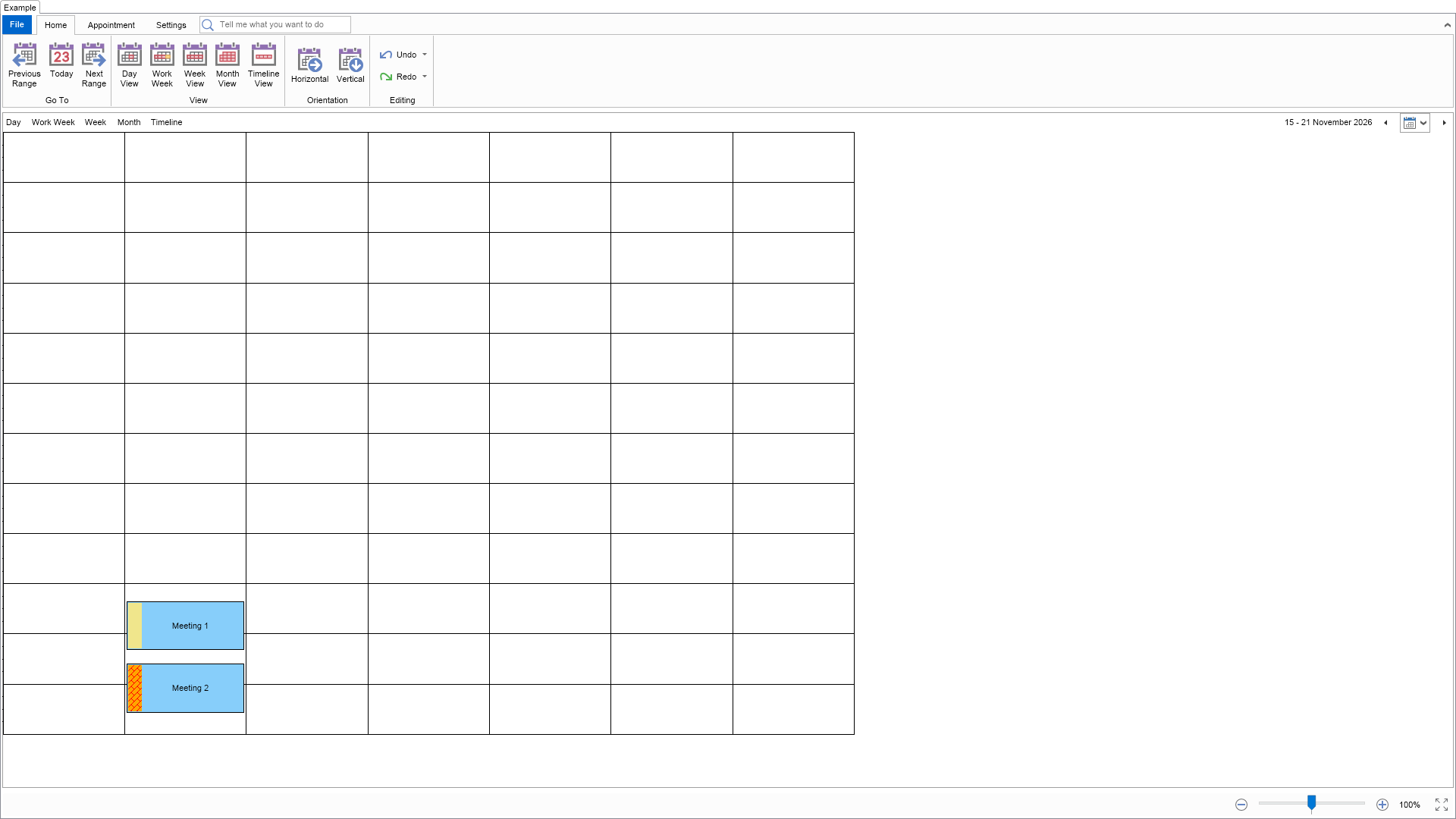
This example demonstrates how to create and use custom time markers. It also shows how to use the NScheduleTheme.AppointmentHeaderThickness static property to change the thickness of time markers.

| Language: C# |
using Nevron.Nov;
using Nevron.Nov.Dom;
using Nevron.Nov.Graphics;
using Nevron.Nov.Layout;
using Nevron.Nov.Schedule;
using Nevron.Nov.UI;
using Nevron.Nov.Windows.Forms;
using System;
using System.Windows.Forms;
namespace NovWinFormsProject
{
public partial class Form1 : Form
{
#region Constructors
public Form1()
{
InitializeComponent();
// Set form title
Text = "NOV WinForms - NCustomTimeMarkersExample";
// Create the NOV example and its controls
NWidget exampleContent = CreateExampleContent();
NWidget exampleControls = CreateExampleControls();
if (exampleControls != null)
{
exampleControls.PreferredWidth = 300;
}
// Place the example and its controls in a pair box
NPairBox pairBox = new NPairBox(exampleContent, exampleControls);
pairBox.FillMode = ENStackFillMode.First;
pairBox.FitMode = ENStackFitMode.First;
pairBox.Margins = new NMargins(NDesign.HorizontalSpacing, NDesign.VerticalSpacing);
// Host the example in the form
NNovWidgetHost host = new NNovWidgetHost(pairBox);
host.Dock = DockStyle.Fill;
Controls.Add(host);
}
#endregion
#region Example
public NWidget CreateExampleContent()
{
m_DefaultAppointmentHeaderThickness = NScheduleTheme.AppointmentHeaderThickness;
// Change the thickness of time markers from the default 5 DIPs to 20 DIPs
NScheduleTheme.AppointmentHeaderThickness = 20;
// Create a simple schedule
NScheduleViewWithRibbon scheduleViewWithRibbon = new NScheduleViewWithRibbon();
m_ScheduleView = scheduleViewWithRibbon.View;
m_ScheduleView.Document.PauseHistoryService();
try
{
InitSchedule(m_ScheduleView.Content);
}
finally
{
m_ScheduleView.Document.ResumeHistoryService();
}
// Return the commanding widget
return scheduleViewWithRibbon;
}
public NWidget CreateExampleControls()
{
return null;
}
public string GetExampleDescription()
{
return @"
This example demonstrates how to create and use custom time markers. It also shows how to use the
NScheduleTheme.AppointmentHeaderThickness static property to change the thickness of time markers.
";
}
///
/// Gets the relevant documentation links for the example
///
///
public (string Name, string Url)[] GetDocumentationUrls()
{
return new[]
{
("Schedule Custom Categories and Time Markers", "https://www.nevron.com/docs/openvision/schedule-custom-categories-and-time-markers.html"),
("Schedule Appointment Categorization", "https://www.nevron.com/docs/openvision/schedule-appointment-categorization.html"),
("Schedule Appointments", "https://www.nevron.com/docs/openvision/schedule-appointments.html"),
};
}
#endregion
#region Implementation
private void InitSchedule(NSchedule schedule)
{
// Rename the first predefined time marker
schedule.TimeMarkers[0].Name = NLoc.Get("Renamed Time Marker");
// Create and add some custom time markers
NTimeMarker timeMarker1 = new NTimeMarker(NLoc.Get("Custom Time Marker 1"), NColor.Khaki);
schedule.TimeMarkers.Add(timeMarker1);
NTimeMarker timeMarker2 = new NTimeMarker(NLoc.Get("Custom Time Marker 2"), new NHatchFill(ENHatchStyle.DiagonalBrick, NColor.Red, NColor.Orange));
schedule.TimeMarkers.Add(timeMarker2);
// Remove the second time marker
schedule.TimeMarkers.RemoveAt(1);
// Remove the time marker called "Busy"
NTimeMarker timeMarkerToRemove = schedule.TimeMarkers.FindByName(NTimeMarker.Type.Busy);
if (timeMarkerToRemove != null)
{
schedule.TimeMarkers.Remove(timeMarkerToRemove);
}
// Create and add some appointments
DateTime start = DateTime.Now;
NAppointment appointment1 = new NAppointment("Meeting 1", start, start.AddHours(2));
appointment1.TimeMarker = timeMarker1.Name;
schedule.Appointments.Add(appointment1);
NAppointment appointment2 = new NAppointment("Meeting 2", appointment1.End.AddHours(0.5), appointment1.End.AddHours(2.5));
appointment2.TimeMarker = timeMarker2.Name;
schedule.Appointments.Add(appointment2);
// Scroll the schedule to the start of the first appointment
schedule.ScrollToTime(start.TimeOfDay);
}
#endregion
#region Event Handlers
#endregion
#region Fields
private NScheduleView m_ScheduleView;
private double m_DefaultAppointmentHeaderThickness;
#endregion
#region Static Methods
#endregion
#region Constants
#endregion
#region Nested Types
#endregion
}
} | Language: VB.NET |
Imports Nevron.Nov
Imports Nevron.Nov.Dom
Imports Nevron.Nov.Graphics
Imports Nevron.Nov.Layout
Imports Nevron.Nov.Schedule
Imports Nevron.Nov.UI
Imports Nevron.Nov.Windows.Wpf
Class MainWindow
#Region "Constructors"
Public Sub New()
' This call is required by the designer.
InitializeComponent()
' Add any initialization after the InitializeComponent() call.
' Set form title
Title = "NOV WPF - NCustomTimeMarkersExample"
' Create the NOV example and its controls
Dim exampleContent As NWidget = CreateExampleContent()
Dim exampleControls As NWidget = CreateExampleControls()
If Not exampleControls Is Nothing Then
exampleControls.PreferredWidth = 300
End If
' Place the example and its controls in a pair box
Dim pairBox As NPairBox = New NPairBox(exampleContent, exampleControls)
pairBox.FillMode = ENStackFillMode.First
pairBox.FitMode = ENStackFitMode.First
pairBox.Margins = New NMargins(NDesign.HorizontalSpacing, NDesign.VerticalSpacing)
' Host the example in the form
Dim host As NNovWidgetHost(Of NWidget) = New NNovWidgetHost(Of NWidget)(pairBox)
Content = host
End Sub
#End Region
#Region "Example"
Public Function CreateExampleContent() As NWidget
m_DefaultAppointmentHeaderThickness = NScheduleTheme.AppointmentHeaderThickness
' Change the thickness of time markers from the default 5 DIPs to 20 DIPs
NScheduleTheme.AppointmentHeaderThickness = 20
' Create a simple schedule
Dim scheduleViewWithRibbon As NScheduleViewWithRibbon = New NScheduleViewWithRibbon()
m_ScheduleView = scheduleViewWithRibbon.View
m_ScheduleView.Document.PauseHistoryService()
Try
InitSchedule(m_ScheduleView.Content)
Finally
m_ScheduleView.Document.ResumeHistoryService()
End Try
' Return the commanding widget
Return scheduleViewWithRibbon
End Function
Public Function CreateExampleControls() As NWidget
Return Nothing
End Function
Public Function GetExampleDescription() As String
Return "
This example demonstrates how to create and use custom time markers. It also shows how to use the
NScheduleTheme.AppointmentHeaderThickness static property to change the thickness of time markers.
"
End Function
'''
''' Gets the relevant documentation links for the example
'''
'''
Public Function GetDocumentationUrls() As (String, String)()
Return {("Schedule Custom Categories and Time Markers", "https://www.nevron.com/docs/openvision/schedule-custom-categories-and-time-markers.html"), ("Schedule Appointment Categorization", "https://www.nevron.com/docs/openvision/schedule-appointment-categorization.html"), ("Schedule Appointments", "https://www.nevron.com/docs/openvision/schedule-appointments.html")}
End Function
#End Region
#Region "Implementation"
Private Sub InitSchedule(schedule As NSchedule)
' Rename the first predefined time marker
schedule.TimeMarkers(0).Name = NLoc.Get("Renamed Time Marker")
' Create and add some custom time markers
Dim timeMarker1 As NTimeMarker = New NTimeMarker(NLoc.Get("Custom Time Marker 1"), NColor.Khaki)
schedule.TimeMarkers.Add(timeMarker1)
Dim timeMarker2 As NTimeMarker = New NTimeMarker(NLoc.Get("Custom Time Marker 2"), New NHatchFill(ENHatchStyle.DiagonalBrick, NColor.Red, NColor.Orange))
schedule.TimeMarkers.Add(timeMarker2)
' Remove the second time marker
schedule.TimeMarkers.RemoveAt(1)
' Remove the time marker called "Busy"
Dim timeMarkerToRemove = schedule.TimeMarkers.FindByName(NTimeMarker.Type.Busy)
If timeMarkerToRemove IsNot Nothing Then
schedule.TimeMarkers.Remove(timeMarkerToRemove)
End If
' Create and add some appointments
Dim start = Date.Now
Dim appointment1 As NAppointment = New NAppointment("Meeting 1", start, start.AddHours(2))
appointment1.TimeMarker = timeMarker1.Name
schedule.Appointments.Add(appointment1)
Dim appointment2 As NAppointment = New NAppointment("Meeting 2", appointment1.End.AddHours(0.5), appointment1.End.AddHours(2.5))
appointment2.TimeMarker = timeMarker2.Name
schedule.Appointments.Add(appointment2)
' Scroll the schedule to the start of the first appointment
schedule.ScrollToTime(start.TimeOfDay)
End Sub
#End Region
#Region "Event Handlers"
#End Region
#Region "Fields"
Private m_ScheduleView As NScheduleView
Private m_DefaultAppointmentHeaderThickness As Double
#End Region
#Region "Static Methods"
#End Region
#Region "Constants"
#End Region
#Region "Nested Types"
#End Region
End Class