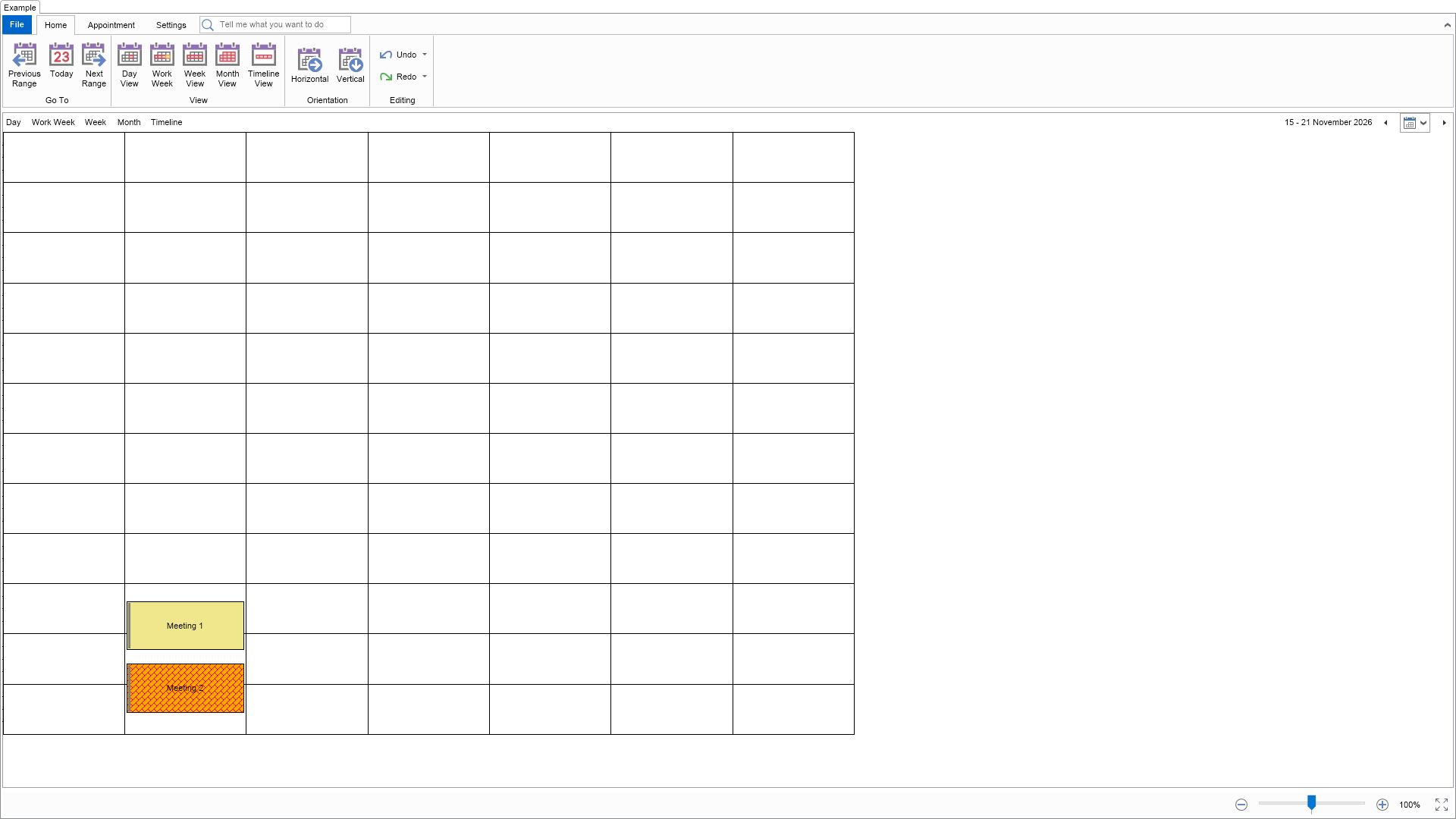
This example demonstrates how to create and use custom categories.

| Language: C# |
using Nevron.Nov;
using Nevron.Nov.Dom;
using Nevron.Nov.Graphics;
using Nevron.Nov.Layout;
using Nevron.Nov.Schedule;
using Nevron.Nov.UI;
using Nevron.Nov.Windows.Forms;
using System;
using System.Windows.Forms;
namespace NovWinFormsProject
{
public partial class Form1 : Form
{
#region Constructors
public Form1()
{
InitializeComponent();
// Set form title
Text = "NOV WinForms - NCustomCategoriesExample";
// Create the NOV example and its controls
NWidget exampleContent = CreateExampleContent();
NWidget exampleControls = CreateExampleControls();
if (exampleControls != null)
{
exampleControls.PreferredWidth = 300;
}
// Place the example and its controls in a pair box
NPairBox pairBox = new NPairBox(exampleContent, exampleControls);
pairBox.FillMode = ENStackFillMode.First;
pairBox.FitMode = ENStackFitMode.First;
pairBox.Margins = new NMargins(NDesign.HorizontalSpacing, NDesign.VerticalSpacing);
// Host the example in the form
NNovWidgetHost host = new NNovWidgetHost(pairBox);
host.Dock = DockStyle.Fill;
Controls.Add(host);
}
#endregion
#region Example
public NWidget CreateExampleContent()
{
// Create a simple schedule
NScheduleViewWithRibbon scheduleViewWithRibbon = new NScheduleViewWithRibbon();
m_ScheduleView = scheduleViewWithRibbon.View;
m_ScheduleView.Document.PauseHistoryService();
try
{
InitSchedule(m_ScheduleView.Content);
}
finally
{
m_ScheduleView.Document.ResumeHistoryService();
}
// Return the commanding widget
return scheduleViewWithRibbon;
}
public NWidget CreateExampleControls()
{
return null;
}
public string GetExampleDescription()
{
return @"This example demonstrates how to create and use custom categories.
";
}
///
/// Gets the relevant documentation links for the example
///
///
public (string Name, string Url)[] GetDocumentationUrls()
{
return new[]
{
("Schedule Custom Categories and Time Markers", "https://www.nevron.com/docs/openvision/schedule-custom-categories-and-time-markers.html"),
("Schedule Appointment Categorization", "https://www.nevron.com/docs/openvision/schedule-appointment-categorization.html"),
("Schedule Appointments", "https://www.nevron.com/docs/openvision/schedule-appointments.html"),
};
}
#endregion
#region Implementation
private void InitSchedule(NSchedule schedule)
{
// Rename the first predefined category
schedule.Categories[0].Name = NLoc.Get("Renamed Category");
// Create and add some custom categories
NCategory category1 = new NCategory(NLoc.Get("Custom Category 1"), NColor.Khaki);
schedule.Categories.Add(category1);
NCategory category2 = new NCategory(NLoc.Get("Custom Category 2"), new NHatchFill(ENHatchStyle.DiagonalBrick, NColor.Red, NColor.Orange));
schedule.Categories.Add(category2);
// Remove the second category
schedule.Categories.RemoveAt(1);
// Remove the category called "Green"
NCategory categoryToRemove = schedule.Categories.FindByName(NLoc.Get("Green"));
if (categoryToRemove != null)
{
schedule.Categories.Remove(categoryToRemove);
}
// Create and add some appointments
DateTime start = DateTime.Now;
NAppointment appointment1 = new NAppointment("Meeting 1", start, start.AddHours(2));
appointment1.Category = category1.Name;
schedule.Appointments.Add(appointment1);
NAppointment appointment2 = new NAppointment("Meeting 2", appointment1.End.AddHours(0.5), appointment1.End.AddHours(2.5));
appointment2.Category = category2.Name;
schedule.Appointments.Add(appointment2);
// Scroll the schedule to the start of the first appointment
schedule.ScrollToTime(start.TimeOfDay);
}
#endregion
#region Event Handlers
#endregion
#region Fields
private NScheduleView m_ScheduleView;
#endregion
#region Static Methods
#endregion
#region Constants
#endregion
#region Nested Types
#endregion
}
} | Language: VB.NET |
Imports Nevron.Nov
Imports Nevron.Nov.Dom
Imports Nevron.Nov.Graphics
Imports Nevron.Nov.Layout
Imports Nevron.Nov.Schedule
Imports Nevron.Nov.UI
Imports Nevron.Nov.Windows.Wpf
Class MainWindow
#Region "Constructors"
Public Sub New()
' This call is required by the designer.
InitializeComponent()
' Add any initialization after the InitializeComponent() call.
' Set form title
Title = "NOV WPF - NCustomCategoriesExample"
' Create the NOV example and its controls
Dim exampleContent As NWidget = CreateExampleContent()
Dim exampleControls As NWidget = CreateExampleControls()
If Not exampleControls Is Nothing Then
exampleControls.PreferredWidth = 300
End If
' Place the example and its controls in a pair box
Dim pairBox As NPairBox = New NPairBox(exampleContent, exampleControls)
pairBox.FillMode = ENStackFillMode.First
pairBox.FitMode = ENStackFitMode.First
pairBox.Margins = New NMargins(NDesign.HorizontalSpacing, NDesign.VerticalSpacing)
' Host the example in the form
Dim host As NNovWidgetHost(Of NWidget) = New NNovWidgetHost(Of NWidget)(pairBox)
Content = host
End Sub
#End Region
#Region "Example"
Public Function CreateExampleContent() As NWidget
' Create a simple schedule
Dim scheduleViewWithRibbon As NScheduleViewWithRibbon = New NScheduleViewWithRibbon()
m_ScheduleView = scheduleViewWithRibbon.View
m_ScheduleView.Document.PauseHistoryService()
Try
InitSchedule(m_ScheduleView.Content)
Finally
m_ScheduleView.Document.ResumeHistoryService()
End Try
' Return the commanding widget
Return scheduleViewWithRibbon
End Function
Public Function CreateExampleControls() As NWidget
Return Nothing
End Function
Public Function GetExampleDescription() As String
Return "This example demonstrates how to create and use custom categories.
"
End Function
'''
''' Gets the relevant documentation links for the example
'''
'''
Public Function GetDocumentationUrls() As (String, String)()
Return {("Schedule Custom Categories and Time Markers", "https://www.nevron.com/docs/openvision/schedule-custom-categories-and-time-markers.html"), ("Schedule Appointment Categorization", "https://www.nevron.com/docs/openvision/schedule-appointment-categorization.html"), ("Schedule Appointments", "https://www.nevron.com/docs/openvision/schedule-appointments.html")}
End Function
#End Region
#Region "Implementation"
Private Sub InitSchedule(schedule As NSchedule)
' Rename the first predefined category
schedule.Categories(0).Name = NLoc.Get("Renamed Category")
' Create and add some custom categories
Dim category1 As NCategory = New NCategory(NLoc.Get("Custom Category 1"), NColor.Khaki)
schedule.Categories.Add(category1)
Dim category2 As NCategory = New NCategory(NLoc.Get("Custom Category 2"), New NHatchFill(ENHatchStyle.DiagonalBrick, NColor.Red, NColor.Orange))
schedule.Categories.Add(category2)
' Remove the second category
schedule.Categories.RemoveAt(1)
' Remove the category called "Green"
Dim categoryToRemove = schedule.Categories.FindByName(NLoc.Get("Green"))
If categoryToRemove IsNot Nothing Then
schedule.Categories.Remove(categoryToRemove)
End If
' Create and add some appointments
Dim start = Date.Now
Dim appointment1 As NAppointment = New NAppointment("Meeting 1", start, start.AddHours(2))
appointment1.Category = category1.Name
schedule.Appointments.Add(appointment1)
Dim appointment2 As NAppointment = New NAppointment("Meeting 2", appointment1.End.AddHours(0.5), appointment1.End.AddHours(2.5))
appointment2.Category = category2.Name
schedule.Appointments.Add(appointment2)
' Scroll the schedule to the start of the first appointment
schedule.ScrollToTime(start.TimeOfDay)
End Sub
#End Region
#Region "Event Handlers"
#End Region
#Region "Fields"
Private m_ScheduleView As NScheduleView
#End Region
#Region "Static Methods"
#End Region
#Region "Constants"
#End Region
#Region "Nested Types"
#End Region
End Class