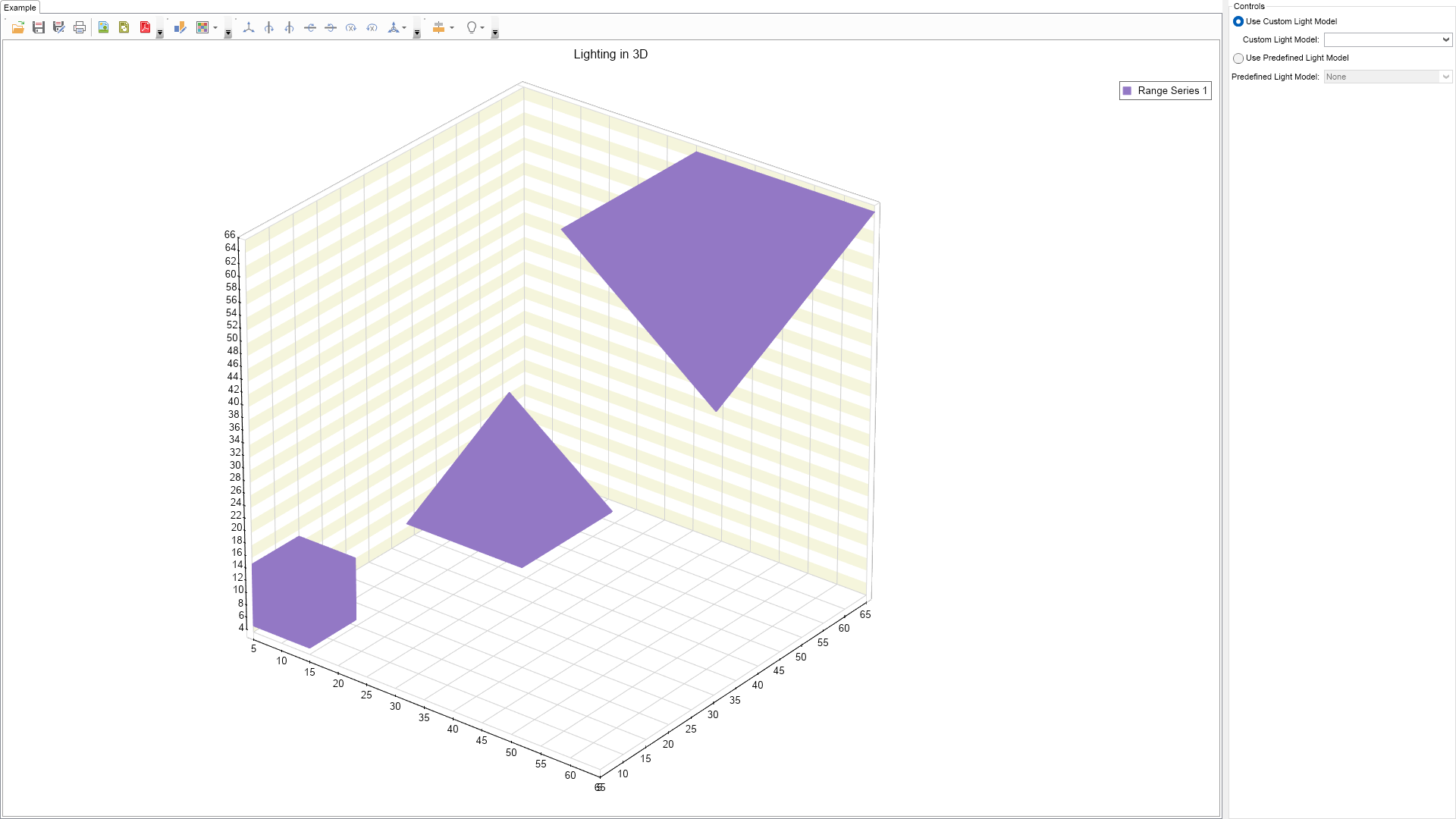
Light Model Example for WinForms

Nevron NOV Chart for WinForms ships with hundreds of examples with full source code, as part of the Nevron Open Vision Suite. All WinForms Chart examples are also available as a stand-alone Visual Studio solution in C# and VB.NET, which you can download from the links below.

Light Model Example for WinForms Description

This example demonstrates the chart lighting model. The lighting model is a collection of light sources, each of which can emit light with different ambient, diffuse and specular color. There are three types of light sources:
  • Directional - directional light sources are treated as if they are located infinitely far away from the scene. A directional light source has only a direction vector, but no location. The effect of an infinite location is that the rays of light can be considered parallel by the time they reach an object. An example of a real-world directional light source is the sun. Directional lights are rendered faster than point lights and spot lights.
  • Point - point light sources have position but no direction, so they emit light equally in all directions. Light intensity can attenuate with distance, so that objects located near a point light source get more illuminated than distant objects.
  • Spot - spot light sources have both position and direction vectors. They illuminate a part of the 3D scene that is enclosed by a cone. A real world example of a spot light is a desk lamp.
NOV Chart for .NET also features a large selection of predefined lighting sources, which are also demonstrated by this example.
Light Model Example

C# Light Model Example Code for Nevron Chart for WinForms
Language: C#

using Nevron.Nov;
using Nevron.Nov.Chart;
using Nevron.Nov.Chart.Tools;
using Nevron.Nov.Dom;
using Nevron.Nov.Graphics;
using Nevron.Nov.Layout;
using Nevron.Nov.UI;
using Nevron.Nov.Windows.Forms;
using System;
using System.Windows.Forms;

namespace NovWinFormsProject
{
	public partial class Form1 : Form
	{
		#region Constructors

		public Form1()
		{
			InitializeComponent();

			// Set form title
			Text = "NOV WinForms - NLightModelExample";

			// Create the NOV example and its controls
			NWidget exampleContent = CreateExampleContent();
			NWidget exampleControls = CreateExampleControls();
			if (exampleControls != null)
			{
				exampleControls.PreferredWidth = 300;
			}

			// Place the example and its controls in a pair box
			NPairBox pairBox = new NPairBox(exampleContent, exampleControls);
			pairBox.FillMode = ENStackFillMode.First;
			pairBox.FitMode = ENStackFitMode.First;
			pairBox.Margins = new NMargins(NDesign.HorizontalSpacing, NDesign.VerticalSpacing);

			// Host the example in the form
			NNovWidgetHost host = new NNovWidgetHost(pairBox);
			host.Dock = DockStyle.Fill;
			Controls.Add(host);
		}

		#endregion

        #region Example

        public NWidget CreateExampleContent()
        {
			NChartViewWithCommandBars chartViewWithCommandBars = new NChartViewWithCommandBars();
			NChartView chartView = chartViewWithCommandBars.View;
			chartView.Surface.CreatePredefinedChart(ENPredefinedChartType.Cartesian);

            // configure title
            chartView.Surface.Titles[0].Text = "Lighting in 3D";

            // configure chart
            m_Chart = (NCartesianChart)chartView.Surface.Charts[0];

            m_Chart.Enable3D = true;
            m_Chart.Projection.SetPredefinedProjection(ENPredefinedProjection.PerspectiveTilted);
            m_Chart.SetPredefinedCartesianAxes(ENPredefinedCartesianAxis.XYZLinear);
            m_Chart.Interactor = new NInteractor(new NTrackballTool());

            // setup chart
            m_Chart.ModelWidth = 50;
            m_Chart.ModelHeight = 50;
            m_Chart.ModelDepth = 50;

            // setup X axis
            NCartesianAxis axisX = m_Chart.Axes[ENCartesianAxis.PrimaryX];
            NLinearScale scaleX = new NLinearScale();
            scaleX.ViewRangeInflateMode = ENScaleViewRangeInflateMode.MajorTick;
            axisX.Scale = scaleX;

            // setup Y axis
            NCartesianAxis axisY = m_Chart.Axes[ENCartesianAxis.PrimaryY];
            NLinearScale scaleY = new NLinearScale();
            scaleY.MajorGridLines.ShowAtWalls = ENChartWall.NoneMask;
            scaleY.ViewRangeInflateMode = ENScaleViewRangeInflateMode.MajorTick;
            scaleY.MinTickDistance = 15;

            // add interlaced stripe for Y axis
            NScaleStrip strip = new NScaleStrip(new NColorFill(NColor.Beige), null, true, 0, 0, 1, 1);
            strip.Interlaced = true;
            scaleY.Strips.Add(strip);

            axisY.Scale = scaleY;

			// setup Z axis
			NCartesianAxis axisZ = m_Chart.Axes[ENCartesianAxis.Depth];
            NLinearScale scaleZ = new NLinearScale();
            scaleZ.ViewRangeInflateMode = ENScaleViewRangeInflateMode.MajorTick;
            axisZ.Scale = scaleZ;

            // create chart series
            CreateBoxes(m_Chart);

            chartView.Document.StyleSheets.ApplyTheme(new NChartTheme(ENChartPalette.Bright, ENChartPaletteTarget.Series));

            return chartViewWithCommandBars;
        }
        private void CreateBoxes(NCartesianChart chart)
        {
            NRangeSeries rangeSeries = new NRangeSeries();
            chart.Series.Add(rangeSeries);
            rangeSeries.DataLabelStyle = new NDataLabelStyle(false);
            rangeSeries.Shape = ENBarShape.Rectangle;
            rangeSeries.InflateMargins = true;
            rangeSeries.UseXValues = true;
            rangeSeries.UseZValues = true;

            NColor color = NColor.FromRGB(147, 120, 197);
            rangeSeries.Fill = new NColorFill(color);
            rangeSeries.Stroke = new NStroke(1, color);

            Array barShapes = Enum.GetValues(typeof(ENBarShape));
            for (int i = 0; i < barShapes.Length; i++)
            {
                double size = i * 5 + 5;
                double center = i * 20 + 10;

                NRangeDataPoint dataPoint = new NRangeDataPoint(center - size, center - size, center - size, center + size, center + size, center + size);
                dataPoint.Shape = (ENBarShape)barShapes.GetValue(i);
                rangeSeries.DataPoints.Add(dataPoint);
            }
        }

        public NWidget CreateExampleControls()
        {
            NStackPanel stack = new NStackPanel();
            NUniSizeBoxGroup boxGroup = new NUniSizeBoxGroup(stack);

            NRadioButtonGroup radioButtonGroup = new NRadioButtonGroup();
            radioButtonGroup.Content = boxGroup;

            // Custom light model group
            NRadioButton useCustomLightModelRadioButton = new NRadioButton("Use Custom Light Model");
            stack.Add(useCustomLightModelRadioButton);
            m_CustomLightModelComboBox = new NComboBox();
            m_CustomLightModelComboBox.Items.Fill(new string[] {
                                                                "Directional Light",
                                                                "Point Light",
                                                                "Point Light in Camera Space",
                                                                "Spot Light",
                                                                "Multiple Light Sources" });
            stack.Add(NPairBox.Create("Custom Light Model:", m_CustomLightModelComboBox));

            // predefined light model group
            NRadioButton usePredefinedLightModelRadioButton = new NRadioButton("Use Predefined Light Model");
            stack.Add(usePredefinedLightModelRadioButton);

            m_PredefinedLightModelComboBox = new NComboBox();
            m_PredefinedLightModelComboBox.Items.FillFromEnum();
            stack.Add(NPairBox.Create("Predefined Light Model:", m_PredefinedLightModelComboBox));

            m_CustomLightModelComboBox.SelectedIndexChanged += OnCustomLightModelComboBoxSelectedIndexChanged;
            m_PredefinedLightModelComboBox.SelectedIndexChanged += OnPredefinedLightModelComboBoxSelectedIndexChanged;
            useCustomLightModelRadioButton.CheckedChanged += UseCustomLightModelRadioButton_CheckedChanged;
            usePredefinedLightModelRadioButton.CheckedChanged += UsePredefinedLightModelRadioButton_CheckedChanged;

            m_PredefinedLightModelComboBox.SelectedIndex = (int)ENPredefinedLightModel.None;
            useCustomLightModelRadioButton.Checked = true;
            OnCustomLightModelComboBoxSelectedIndexChanged(null);

            return radioButtonGroup;
        }

        public string GetExampleDescription()
        {
            return @"This example demonstrates the chart lighting model. 
            The lighting model is a collection of light sources, each of which can emit light with different ambient, diffuse and specular color.
            There are three types of light sources:

            
  • Directional - directional light sources are treated as if they are located infinitely far away from the scene. A directional light source has only a direction vector, but no location. The effect of an infinite location is that the rays of light can be considered parallel by the time they reach an object. An example of a real-world directional light source is the sun. Directional lights are rendered faster than point lights and spot lights.
  • Point - point light sources have position but no direction, so they emit light equally in all directions. Light intensity can attenuate with distance, so that objects located near a point light source get more illuminated than distant objects.
  • Spot - spot light sources have both position and direction vectors. They illuminate a part of the 3D scene that is enclosed by a cone. A real world example of a spot light is a desk lamp.
NOV Chart for .NET also features a large selection of predefined lighting sources, which are also demonstrated by this example."; } /// /// Gets the relevant documentation links for the example /// /// public (string Name, string Url)[] GetDocumentationUrls() { return new[] { ("3D Charts", "https://www.nevron.com/docs/openvision/3d-charts.html"), ("Cartesian Chart", "https://www.nevron.com/docs/openvision/cartesian-chart.html"), }; } #endregion #region Implementation private void ConfigureDirectionalLight() { NDirectionalLightSource light = new NDirectionalLightSource(); light.CoordinateMode = ENLightSourceCoordinateMode.Model; light.Direction = new NVector3DF(-2, -4, -3); light.AmbientColor = NColor.FromRGB(60, 60, 60); light.DiffuseColor = NColor.FromRGB(230, 230, 230); light.SpecularColor = NColor.FromRGB(50, 50, 50); m_Chart.LightModel.LightSources.Clear(); m_Chart.LightModel.LightSources.Add(light); m_Chart.LightModel.EnableLighting = true; m_Chart.LightModel.LocalViewpointLighting = true; m_Chart.LightModel.GlobalAmbientColor = NColor.FromRGB(60, 60, 60); } private void ConfigurePointLight() { NPointLightSource light = new NPointLightSource(); light.CoordinateMode = ENLightSourceCoordinateMode.Model; light.Position = new NVector3DF(9, 36, 14); light.AmbientColor = NColor.FromRGB(100, 100, 100); light.DiffuseColor = NColor.FromRGB(210, 210, 210); light.SpecularColor = NColor.FromRGB(70, 70, 70); light.ConstantAttenuation = 0.6f; light.LinearAttenuation = 0.004f; light.QuadraticAttenuation = 0.0002f; m_Chart.LightModel.LightSources.Clear(); m_Chart.LightModel.LightSources.Add(light); m_Chart.LightModel.EnableLighting = true; m_Chart.LightModel.LocalViewpointLighting = true; m_Chart.LightModel.GlobalAmbientColor = NColor.FromRGB(60, 60, 60); } private void ConfigurePointLightInCameraSpace() { NPointLightSource light = new NPointLightSource(); light.CoordinateMode = ENLightSourceCoordinateMode.Camera; light.Position = new NVector3DF(0, 0, 0); light.AmbientColor = NColor.FromRGB(100, 100, 100); light.DiffuseColor = NColor.FromRGB(210, 210, 210); light.SpecularColor = NColor.FromRGB(90, 90, 90); light.ConstantAttenuation = 0.3f; light.LinearAttenuation = 0.0003f; light.QuadraticAttenuation = 0.00003f; m_Chart.LightModel.LightSources.Clear(); m_Chart.LightModel.LightSources.Add(light); m_Chart.LightModel.EnableLighting = true; m_Chart.LightModel.LocalViewpointLighting = true; m_Chart.LightModel.GlobalAmbientColor = NColor.FromRGB(60, 60, 60); } private void ConfigureMultipleLightSources() { NPointLightSource light1 = new NPointLightSource(); light1.CoordinateMode = ENLightSourceCoordinateMode.Model; light1.Position = new NVector3DF(0, 36, 16); light1.AmbientColor = NColor.FromRGB(60, 0, 0); light1.DiffuseColor = NColor.FromRGB(110, 20, 20); light1.SpecularColor = NColor.FromRGB(80, 60, 60); light1.ConstantAttenuation = 0.6f; light1.LinearAttenuation = 0.004f; light1.QuadraticAttenuation = 0.0002f; NPointLightSource light2 = new NPointLightSource(); light2.CoordinateMode = ENLightSourceCoordinateMode.Model; light2.Position = new NVector3DF(13.85f, 36, -8); light2.AmbientColor = NColor.FromRGB(0, 60, 0); light2.DiffuseColor = NColor.FromRGB(20, 110, 20); light2.SpecularColor = NColor.FromRGB(60, 80, 60); light2.ConstantAttenuation = 0.6f; light2.LinearAttenuation = 0.004f; light2.QuadraticAttenuation = 0.0002f; NPointLightSource light3 = new NPointLightSource(); light3.CoordinateMode = ENLightSourceCoordinateMode.Model; light3.Position = new NVector3DF(-13.85f, 36, -8); light3.AmbientColor = NColor.FromRGB(0, 0, 60); light3.DiffuseColor = NColor.FromRGB(20, 20, 110); light3.SpecularColor = NColor.FromRGB(60, 60, 80); light3.ConstantAttenuation = 0.6f; light3.LinearAttenuation = 0.004f; light3.QuadraticAttenuation = 0.0002f; NPointLightSource light4 = new NPointLightSource(); light4.CoordinateMode = ENLightSourceCoordinateMode.Camera; light4.Position = new NVector3DF(0, 0, 0); light4.AmbientColor = NColor.FromRGB(0, 0, 0); light4.DiffuseColor = NColor.FromRGB(90, 90, 90); light4.SpecularColor = NColor.FromRGB(80, 80, 80); light4.ConstantAttenuation = 0.9f; light4.LinearAttenuation = 0.0004f; light4.QuadraticAttenuation = 0.0f; m_Chart.LightModel.LightSources.Clear(); m_Chart.LightModel.LightSources.Add(light1); m_Chart.LightModel.LightSources.Add(light2); m_Chart.LightModel.LightSources.Add(light3); m_Chart.LightModel.LightSources.Add(light4); m_Chart.LightModel.EnableLighting = true; m_Chart.LightModel.LocalViewpointLighting = true; m_Chart.LightModel.GlobalAmbientColor = NColor.FromRGB(60, 60, 60); } private void SpotLight(NChart chart) { NSpotLightSource light = new NSpotLightSource(); light.CoordinateMode = ENLightSourceCoordinateMode.Model; light.Position = new NVector3DF(14, 30, 14); light.Direction = new NVector3DF(-0.5f, -1, -0.4f); light.AmbientColor = NColor.FromRGB(50, 50, 50); light.DiffuseColor = NColor.FromRGB(180, 180, 210); light.SpecularColor = NColor.FromRGB(80, 80, 80); light.ConstantAttenuation = 0.3f; light.LinearAttenuation = 0.001f; light.QuadraticAttenuation = 0.0001f; light.SpotCutoff = 45; light.SpotExponent = 15; chart.LightModel.LightSources.Clear(); chart.LightModel.LightSources.Add(light); chart.LightModel.EnableLighting = true; chart.LightModel.LocalViewpointLighting = true; chart.LightModel.GlobalAmbientColor = NColor.FromRGB(100, 100, 100); } #endregion #region Event Handlers private void OnCustomLightModelComboBoxSelectedIndexChanged(NValueChangeEventArgs arg) { switch (m_CustomLightModelComboBox.SelectedIndex) { case 0: ConfigureDirectionalLight(); break; case 1: ConfigurePointLight(); break; case 2: ConfigurePointLightInCameraSpace(); break; case 3: SpotLight(m_Chart); break; case 4: ConfigureMultipleLightSources(); break; } } private void OnPredefinedLightModelComboBoxSelectedIndexChanged(NValueChangeEventArgs arg) { ENPredefinedLightModel lm = (ENPredefinedLightModel)m_PredefinedLightModelComboBox.SelectedIndex; m_Chart.LightModel.SetPredefinedLightModel(lm); } private void UsePredefinedLightModelRadioButton_CheckedChanged(NValueChangeEventArgs arg) { m_CustomLightModelComboBox.Enabled = false; m_PredefinedLightModelComboBox.Enabled = true; OnPredefinedLightModelComboBoxSelectedIndexChanged(null); } private void UseCustomLightModelRadioButton_CheckedChanged(NValueChangeEventArgs arg) { m_CustomLightModelComboBox.Enabled = true; m_PredefinedLightModelComboBox.Enabled = false; OnPredefinedLightModelComboBoxSelectedIndexChanged(null); } #endregion #region Fields private NCartesianChart m_Chart; private NComboBox m_CustomLightModelComboBox; private NComboBox m_PredefinedLightModelComboBox; #endregion #region Static Methods #endregion #region Constants #endregion #region Nested Types #endregion } }

Download a fully functional C# (.cs) Light Model Example for WinForms Solution

VB.NET Light Model Example Code for Nevron Chart for WinForms
Language: VB.NET

Imports Nevron.Nov
Imports Nevron.Nov.Chart
Imports Nevron.Nov.Chart.Tools
Imports Nevron.Nov.Dom
Imports Nevron.Nov.Graphics
Imports Nevron.Nov.Layout
Imports Nevron.Nov.UI
Imports Nevron.Nov.Windows.Forms
Imports System

Public Class Form1

#Region "Constructors"

    Public Sub New()
        ' This call is required by the designer.
        InitializeComponent()

        ' Add any initialization after the InitializeComponent() call.

        ' Set form title
        Text = "NOV WinForms - NLightModelExample"

        ' Create the NOV example and its controls
        Dim exampleContent As NWidget = CreateExampleContent()
        Dim exampleControls As NWidget = CreateExampleControls()
        If Not exampleControls Is Nothing Then
            exampleControls.PreferredWidth = 300
        End If

        ' Place the example and its controls in a pair box
        Dim pairBox As NPairBox = New NPairBox(exampleContent, exampleControls)
        pairBox.FillMode = ENStackFillMode.First
        pairBox.FitMode = ENStackFitMode.First
        pairBox.Margins = New NMargins(NDesign.HorizontalSpacing, NDesign.VerticalSpacing)

        ' Host the example in the form
        Dim host As NNovWidgetHost(Of NWidget) = New NNovWidgetHost(Of NWidget)(pairBox)
        host.Dock = DockStyle.Fill
        Controls.Add(host)
    End Sub


#End Region

#Region "Example"

        Public Function CreateExampleContent() As NWidget
            Dim chartViewWithCommandBars As NChartViewWithCommandBars = New NChartViewWithCommandBars()
            Dim chartView = chartViewWithCommandBars.View
            chartView.Surface.CreatePredefinedChart(ENPredefinedChartType.Cartesian)

            ' configure title
            chartView.Surface.Titles(0).Text = "Lighting in 3D"

            ' configure chart
            m_Chart = CType(chartView.Surface.Charts(0), NCartesianChart)

            m_Chart.Enable3D = True
            m_Chart.Projection.SetPredefinedProjection(ENPredefinedProjection.PerspectiveTilted)
            m_Chart.SetPredefinedCartesianAxes(ENPredefinedCartesianAxis.XYZLinear)
            m_Chart.Interactor = New NInteractor(New NTrackballTool())

            ' setup chart
            m_Chart.ModelWidth = 50
            m_Chart.ModelHeight = 50
            m_Chart.ModelDepth = 50

            ' setup X axis
            Dim axisX = m_Chart.Axes(ENCartesianAxis.PrimaryX)
            Dim scaleX As NLinearScale = New NLinearScale()
            scaleX.ViewRangeInflateMode = ENScaleViewRangeInflateMode.MajorTick
            axisX.Scale = scaleX

            ' setup Y axis
            Dim axisY = m_Chart.Axes(ENCartesianAxis.PrimaryY)
            Dim scaleY As NLinearScale = New NLinearScale()
            scaleY.MajorGridLines.ShowAtWalls = ENChartWall.NoneMask
            scaleY.ViewRangeInflateMode = ENScaleViewRangeInflateMode.MajorTick
            scaleY.MinTickDistance = 15

            ' add interlaced stripe for Y axis
            Dim strip As NScaleStrip = New NScaleStrip(New NColorFill(NColor.Beige), Nothing, True, 0, 0, 1, 1)
            strip.Interlaced = True
            scaleY.Strips.Add(strip)

            axisY.Scale = scaleY

            ' setup Z axis
            Dim axisZ = m_Chart.Axes(ENCartesianAxis.Depth)
            Dim scaleZ As NLinearScale = New NLinearScale()
            scaleZ.ViewRangeInflateMode = ENScaleViewRangeInflateMode.MajorTick
            axisZ.Scale = scaleZ

            ' create chart series
            CreateBoxes(m_Chart)

            chartView.Document.StyleSheets.ApplyTheme(New NChartTheme(ENChartPalette.Bright, ENChartPaletteTarget.Series))

            Return chartViewWithCommandBars
        End Function
        Private Sub CreateBoxes(chart As NCartesianChart)
            Dim rangeSeries As NRangeSeries = New NRangeSeries()
            chart.Series.Add(rangeSeries)
            rangeSeries.DataLabelStyle = New NDataLabelStyle(False)
            rangeSeries.Shape = ENBarShape.Rectangle
            rangeSeries.InflateMargins = True
            rangeSeries.UseXValues = True
            rangeSeries.UseZValues = True

            Dim color = NColor.FromRGB(147, 120, 197)
            rangeSeries.Fill = New NColorFill(color)
            rangeSeries.Stroke = New NStroke(1, color)

            Dim barShapes = [Enum].GetValues(GetType(ENBarShape))
            For i = 0 To barShapes.Length - 1
                Dim size As Double = i * 5 + 5
                Dim center As Double = i * 20 + 10

                Dim dataPoint As NRangeDataPoint = New NRangeDataPoint(center - size, center - size, center - size, center + size, center + size, center + size)
                dataPoint.Shape = CType(barShapes.GetValue(i), ENBarShape)
                rangeSeries.DataPoints.Add(dataPoint)
            Next
        End Sub

        Public Function CreateExampleControls() As NWidget
            Dim stack As NStackPanel = New NStackPanel()
            Dim boxGroup As NUniSizeBoxGroup = New NUniSizeBoxGroup(stack)

            Dim radioButtonGroup As NRadioButtonGroup = New NRadioButtonGroup()
            radioButtonGroup.Content = boxGroup

            ' Custom light model group
            Dim useCustomLightModelRadioButton As NRadioButton = New NRadioButton("Use Custom Light Model")
            stack.Add(useCustomLightModelRadioButton)
            m_CustomLightModelComboBox = New NComboBox()
            m_CustomLightModelComboBox.Items.Fill(New String() {"Directional Light", "Point Light", "Point Light in Camera Space", "Spot Light", "Multiple Light Sources"})
            stack.Add(NPairBox.Create("Custom Light Model:", m_CustomLightModelComboBox))

            ' predefined light model group
            Dim usePredefinedLightModelRadioButton As NRadioButton = New NRadioButton("Use Predefined Light Model")
            stack.Add(usePredefinedLightModelRadioButton)

            m_PredefinedLightModelComboBox = New NComboBox()
            m_PredefinedLightModelComboBox.Items.FillFromEnum(Of ENPredefinedLightModel)()
            stack.Add(NPairBox.Create("Predefined Light Model:", m_PredefinedLightModelComboBox))

            Me.m_CustomLightModelComboBox.SelectedIndexChanged += AddressOf OnCustomLightModelComboBoxSelectedIndexChanged
            Me.m_PredefinedLightModelComboBox.SelectedIndexChanged += AddressOf OnPredefinedLightModelComboBoxSelectedIndexChanged
            useCustomLightModelRadioButton.CheckedChanged += AddressOf UseCustomLightModelRadioButton_CheckedChanged
            usePredefinedLightModelRadioButton.CheckedChanged += AddressOf UsePredefinedLightModelRadioButton_CheckedChanged

            m_PredefinedLightModelComboBox.SelectedIndex = CInt(ENPredefinedLightModel.None)
            useCustomLightModelRadioButton.Checked = True
            OnCustomLightModelComboBoxSelectedIndexChanged(Nothing)

            Return radioButtonGroup
        End Function

        Public Function GetExampleDescription() As String
            Return "This example demonstrates the chart lighting model. 
            The lighting model is a collection of light sources, each of which can emit light with different ambient, diffuse and specular color.
            There are three types of light sources:

            
  • Directional - directional light sources are treated as if they are located infinitely far away from the scene. A directional light source has only a direction vector, but no location. The effect of an infinite location is that the rays of light can be considered parallel by the time they reach an object. An example of a real-world directional light source is the sun. Directional lights are rendered faster than point lights and spot lights.
  • Point - point light sources have position but no direction, so they emit light equally in all directions. Light intensity can attenuate with distance, so that objects located near a point light source get more illuminated than distant objects.
  • Spot - spot light sources have both position and direction vectors. They illuminate a part of the 3D scene that is enclosed by a cone. A real world example of a spot light is a desk lamp.
NOV Chart for .NET also features a large selection of predefined lighting sources, which are also demonstrated by this example." End Function ''' ''' Gets the relevant documentation links for the example ''' ''' Public Function GetDocumentationUrls() As (String, String)() Return {("3D Charts", "https://www.nevron.com/docs/openvision/3d-charts.html"), ("Cartesian Chart", "https://www.nevron.com/docs/openvision/cartesian-chart.html")} End Function #End Region #Region "Implementation" Private Sub ConfigureDirectionalLight() Dim light As NDirectionalLightSource = New NDirectionalLightSource() light.CoordinateMode = ENLightSourceCoordinateMode.Model light.Direction = New NVector3DF(-2, -4, -3) light.AmbientColor = NColor.FromRGB(60, 60, 60) light.DiffuseColor = NColor.FromRGB(230, 230, 230) light.SpecularColor = NColor.FromRGB(50, 50, 50) m_Chart.LightModel.LightSources.Clear() m_Chart.LightModel.LightSources.Add(light) m_Chart.LightModel.EnableLighting = True m_Chart.LightModel.LocalViewpointLighting = True m_Chart.LightModel.GlobalAmbientColor = NColor.FromRGB(60, 60, 60) End Sub Private Sub ConfigurePointLight() Dim light As NPointLightSource = New NPointLightSource() light.CoordinateMode = ENLightSourceCoordinateMode.Model light.Position = New NVector3DF(9, 36, 14) light.AmbientColor = NColor.FromRGB(100, 100, 100) light.DiffuseColor = NColor.FromRGB(210, 210, 210) light.SpecularColor = NColor.FromRGB(70, 70, 70) light.ConstantAttenuation = 0.6F light.LinearAttenuation = 0.004F light.QuadraticAttenuation = 0.0002F m_Chart.LightModel.LightSources.Clear() m_Chart.LightModel.LightSources.Add(light) m_Chart.LightModel.EnableLighting = True m_Chart.LightModel.LocalViewpointLighting = True m_Chart.LightModel.GlobalAmbientColor = NColor.FromRGB(60, 60, 60) End Sub Private Sub ConfigurePointLightInCameraSpace() Dim light As NPointLightSource = New NPointLightSource() light.CoordinateMode = ENLightSourceCoordinateMode.Camera light.Position = New NVector3DF(0, 0, 0) light.AmbientColor = NColor.FromRGB(100, 100, 100) light.DiffuseColor = NColor.FromRGB(210, 210, 210) light.SpecularColor = NColor.FromRGB(90, 90, 90) light.ConstantAttenuation = 0.3F light.LinearAttenuation = 0.0003F light.QuadraticAttenuation = 0.00003F m_Chart.LightModel.LightSources.Clear() m_Chart.LightModel.LightSources.Add(light) m_Chart.LightModel.EnableLighting = True m_Chart.LightModel.LocalViewpointLighting = True m_Chart.LightModel.GlobalAmbientColor = NColor.FromRGB(60, 60, 60) End Sub Private Sub ConfigureMultipleLightSources() Dim light1 As NPointLightSource = New NPointLightSource() light1.CoordinateMode = ENLightSourceCoordinateMode.Model light1.Position = New NVector3DF(0, 36, 16) light1.AmbientColor = NColor.FromRGB(60, 0, 0) light1.DiffuseColor = NColor.FromRGB(110, 20, 20) light1.SpecularColor = NColor.FromRGB(80, 60, 60) light1.ConstantAttenuation = 0.6F light1.LinearAttenuation = 0.004F light1.QuadraticAttenuation = 0.0002F Dim light2 As NPointLightSource = New NPointLightSource() light2.CoordinateMode = ENLightSourceCoordinateMode.Model light2.Position = New NVector3DF(13.85F, 36, -8) light2.AmbientColor = NColor.FromRGB(0, 60, 0) light2.DiffuseColor = NColor.FromRGB(20, 110, 20) light2.SpecularColor = NColor.FromRGB(60, 80, 60) light2.ConstantAttenuation = 0.6F light2.LinearAttenuation = 0.004F light2.QuadraticAttenuation = 0.0002F Dim light3 As NPointLightSource = New NPointLightSource() light3.CoordinateMode = ENLightSourceCoordinateMode.Model light3.Position = New NVector3DF(-13.85F, 36, -8) light3.AmbientColor = NColor.FromRGB(0, 0, 60) light3.DiffuseColor = NColor.FromRGB(20, 20, 110) light3.SpecularColor = NColor.FromRGB(60, 60, 80) light3.ConstantAttenuation = 0.6F light3.LinearAttenuation = 0.004F light3.QuadraticAttenuation = 0.0002F Dim light4 As NPointLightSource = New NPointLightSource() light4.CoordinateMode = ENLightSourceCoordinateMode.Camera light4.Position = New NVector3DF(0, 0, 0) light4.AmbientColor = NColor.FromRGB(0, 0, 0) light4.DiffuseColor = NColor.FromRGB(90, 90, 90) light4.SpecularColor = NColor.FromRGB(80, 80, 80) light4.ConstantAttenuation = 0.9F light4.LinearAttenuation = 0.0004F light4.QuadraticAttenuation = 0.0F m_Chart.LightModel.LightSources.Clear() m_Chart.LightModel.LightSources.Add(light1) m_Chart.LightModel.LightSources.Add(light2) m_Chart.LightModel.LightSources.Add(light3) m_Chart.LightModel.LightSources.Add(light4) m_Chart.LightModel.EnableLighting = True m_Chart.LightModel.LocalViewpointLighting = True m_Chart.LightModel.GlobalAmbientColor = NColor.FromRGB(60, 60, 60) End Sub Private Sub SpotLight(chart As NChart) Dim light As NSpotLightSource = New NSpotLightSource() light.CoordinateMode = ENLightSourceCoordinateMode.Model light.Position = New NVector3DF(14, 30, 14) light.Direction = New NVector3DF(-0.5F, -1, -0.4F) light.AmbientColor = NColor.FromRGB(50, 50, 50) light.DiffuseColor = NColor.FromRGB(180, 180, 210) light.SpecularColor = NColor.FromRGB(80, 80, 80) light.ConstantAttenuation = 0.3F light.LinearAttenuation = 0.001F light.QuadraticAttenuation = 0.0001F light.SpotCutoff = 45 light.SpotExponent = 15 chart.LightModel.LightSources.Clear() chart.LightModel.LightSources.Add(light) chart.LightModel.EnableLighting = True chart.LightModel.LocalViewpointLighting = True chart.LightModel.GlobalAmbientColor = NColor.FromRGB(100, 100, 100) End Sub #End Region #Region "Event Handlers" Private Sub OnCustomLightModelComboBoxSelectedIndexChanged(arg As NValueChangeEventArgs) Select Case m_CustomLightModelComboBox.SelectedIndex Case 0 ConfigureDirectionalLight() Case 1 ConfigurePointLight() Case 2 ConfigurePointLightInCameraSpace() Case 3 SpotLight(m_Chart) Case 4 ConfigureMultipleLightSources() End Select End Sub Private Sub OnPredefinedLightModelComboBoxSelectedIndexChanged(arg As NValueChangeEventArgs) Dim lm As ENPredefinedLightModel = m_PredefinedLightModelComboBox.SelectedIndex m_Chart.LightModel.SetPredefinedLightModel(lm) End Sub Private Sub UsePredefinedLightModelRadioButton_CheckedChanged(arg As NValueChangeEventArgs) m_CustomLightModelComboBox.Enabled = False m_PredefinedLightModelComboBox.Enabled = True OnPredefinedLightModelComboBoxSelectedIndexChanged(Nothing) End Sub Private Sub UseCustomLightModelRadioButton_CheckedChanged(arg As NValueChangeEventArgs) m_CustomLightModelComboBox.Enabled = True m_PredefinedLightModelComboBox.Enabled = False OnPredefinedLightModelComboBoxSelectedIndexChanged(Nothing) End Sub #End Region #Region "Fields" Private m_Chart As NCartesianChart Private m_CustomLightModelComboBox As NComboBox Private m_PredefinedLightModelComboBox As NComboBox #End Region #Region "Static Methods" #End Region #Region "Constants" #End Region #Region "Nested Types" #End Region End Class

Download a fully functional VB.NET (.vb) Light Model Example for WinForms Solution

Related Documentation Links