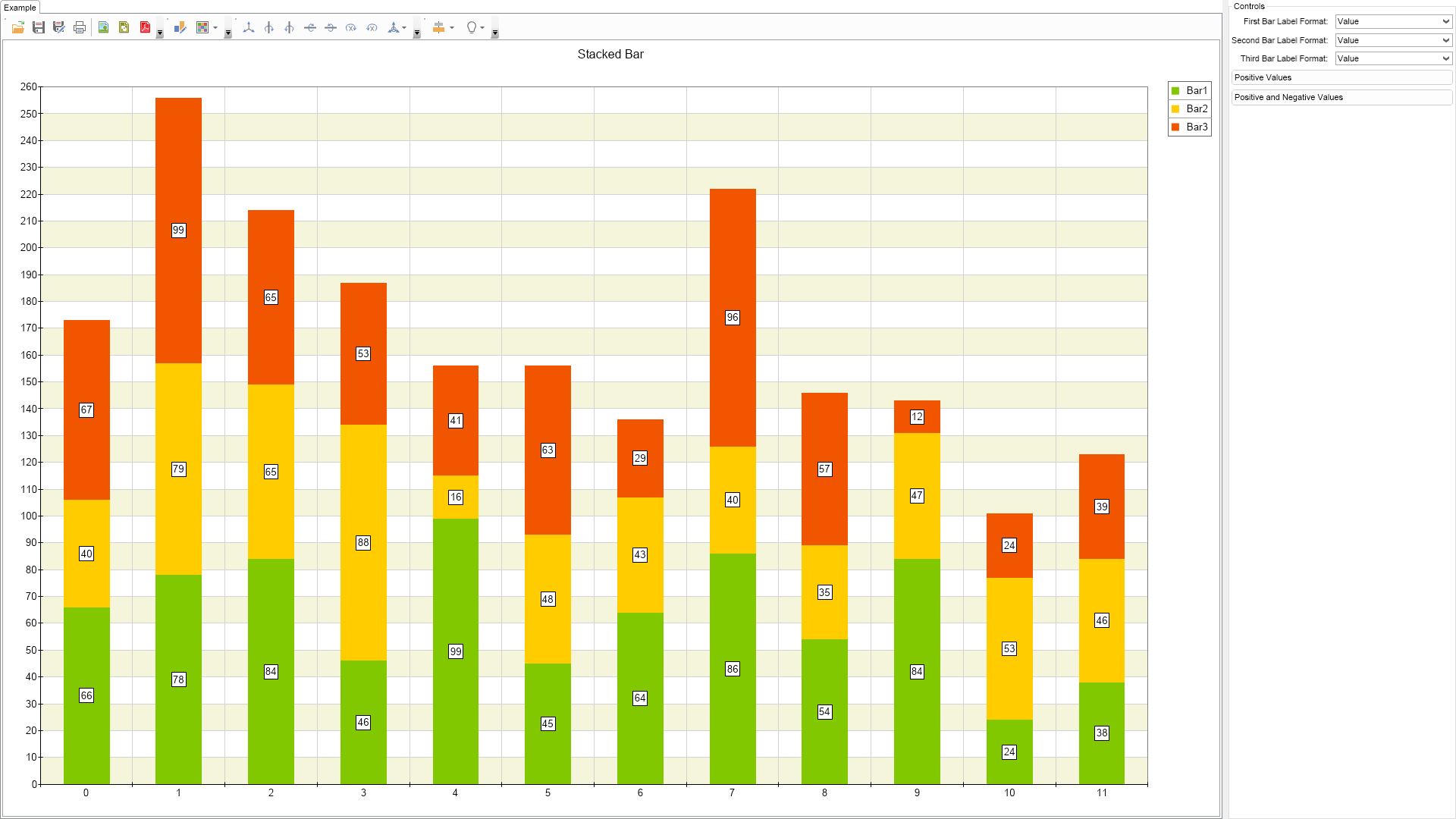
This example demonstrates how to create a stacked bar chart.

| Language: C# |
using Nevron.Nov;
using Nevron.Nov.Chart;
using Nevron.Nov.Dom;
using Nevron.Nov.Graphics;
using Nevron.Nov.Layout;
using Nevron.Nov.UI;
using Nevron.Nov.Windows.Forms;
using System;
using System.Windows.Forms;
namespace NovWinFormsProject
{
public partial class Form1 : Form
{
#region Constructors
public Form1()
{
InitializeComponent();
// Set form title
Text = "NOV WinForms - NStackedBarExample";
// Create the NOV example and its controls
NWidget exampleContent = CreateExampleContent();
NWidget exampleControls = CreateExampleControls();
if (exampleControls != null)
{
exampleControls.PreferredWidth = 300;
}
// Place the example and its controls in a pair box
NPairBox pairBox = new NPairBox(exampleContent, exampleControls);
pairBox.FillMode = ENStackFillMode.First;
pairBox.FitMode = ENStackFitMode.First;
pairBox.Margins = new NMargins(NDesign.HorizontalSpacing, NDesign.VerticalSpacing);
// Host the example in the form
NNovWidgetHost host = new NNovWidgetHost(pairBox);
host.Dock = DockStyle.Fill;
Controls.Add(host);
}
#endregion
#region Example
public NWidget CreateExampleContent()
{
NChartViewWithCommandBars chartViewWithCommandBars = new NChartViewWithCommandBars();
NChartView chartView = chartViewWithCommandBars.View;
chartView.Surface.CreatePredefinedChart(ENPredefinedChartType.Cartesian);
// configure title
chartView.Surface.Titles[0].Text = "Stacked Bar";
// configure chart
NCartesianChart chart = (NCartesianChart)chartView.Surface.Charts[0];
// add interlace stripe
NLinearScale linearScale = (NLinearScale)chart.Axes[ENCartesianAxis.PrimaryY].Scale;
NScaleStrip stripStyle = new NScaleStrip(new NColorFill(NColor.Beige), null, true, 0, 0, 1, 1);
stripStyle.Interlaced = true;
linearScale.Strips.Add(stripStyle);
// add the first bar
m_Bar1 = new NBarSeries();
m_Bar1.Name = "Bar1";
m_Bar1.MultiBarMode = ENMultiBarMode.Series;
chart.Series.Add(m_Bar1);
// add the second bar
m_Bar2 = new NBarSeries();
m_Bar2.Name = "Bar2";
m_Bar2.MultiBarMode = ENMultiBarMode.Stacked;
chart.Series.Add(m_Bar2);
// add the third bar
m_Bar3 = new NBarSeries();
m_Bar3.Name = "Bar3";
m_Bar3.MultiBarMode = ENMultiBarMode.Stacked;
chart.Series.Add(m_Bar3);
// setup value formatting
m_Bar1.ValueFormatter = new NNumericValueFormatter("0.###");
m_Bar2.ValueFormatter = new NNumericValueFormatter("0.###");
m_Bar3.ValueFormatter = new NNumericValueFormatter("0.###");
// position data labels in the center of the bars
m_Bar1.DataLabelStyle = CreateDataLabelStyle();
m_Bar2.DataLabelStyle = CreateDataLabelStyle();
m_Bar3.DataLabelStyle = CreateDataLabelStyle();
chartView.Document.StyleSheets.ApplyTheme(new NChartTheme(ENChartPalette.Bright, ENChartPaletteTarget.Series));
// pass some data
OnPositiveDataButtonClick(null);
return chartViewWithCommandBars;
}
public NWidget CreateExampleControls()
{
NStackPanel stack = new NStackPanel();
NUniSizeBoxGroup boxGroup = new NUniSizeBoxGroup(stack);
NComboBox firstBarLabelFormatComboBox = CreateLabelFormatComboBox();
firstBarLabelFormatComboBox.SelectedIndexChanged += OnFirstBarLabelFormatComboBoxSelectedIndexChanged;
stack.Add(NPairBox.Create("First Bar Label Format: ", firstBarLabelFormatComboBox));
NComboBox secondBarLabelFormatComboBox = CreateLabelFormatComboBox();
secondBarLabelFormatComboBox.SelectedIndexChanged += OnSecondBarLabelFormatComboBoxSelectedIndexChanged;
stack.Add(NPairBox.Create("Second Bar Label Format: ", secondBarLabelFormatComboBox));
NComboBox thirdBarLabelFormatComboBox = CreateLabelFormatComboBox();
thirdBarLabelFormatComboBox.SelectedIndexChanged += OnThirdBarLabelFormatComboBoxSelectedIndexChanged;
stack.Add(NPairBox.Create("Third Bar Label Format: ", thirdBarLabelFormatComboBox));
NButton positiveDataButton = new NButton("Positive Values");
positiveDataButton.Click += OnPositiveDataButtonClick;
stack.Add(positiveDataButton);
NButton positiveAndNegativeDataButton = new NButton("Positive and Negative Values");
positiveAndNegativeDataButton.Click += OnPositiveAndNegativeDataButtonClick;
stack.Add(positiveAndNegativeDataButton);
return boxGroup;
}
public string GetExampleDescription()
{
return @"This example demonstrates how to create a stacked bar chart.
";
}
///
/// Gets the relevant documentation links for the example
///
///
public (string Name, string Url)[] GetDocumentationUrls()
{
return new[]
{
("Bar Series", "https://www.nevron.com/docs/openvision/bar-chart-series.html"),
("Common Series Functionality", "https://www.nevron.com/docs/openvision/chart-common-series-functionality.html"),
("Ordinal Scale", "https://www.nevron.com/docs/openvision/ordinal-scale.html"),
};
}
#endregion
#region Implementation
///
/// Creates a new data label style object
///
///
private NDataLabelStyle CreateDataLabelStyle()
{
NDataLabelStyle dataLabelStyle = new NDataLabelStyle();
dataLabelStyle.VertAlign = ENVerticalAlignment.Center;
dataLabelStyle.ArrowLength = 0;
return dataLabelStyle;
}
///
/// Creates a label format combo box
///
///
private NComboBox CreateLabelFormatComboBox()
{
NComboBox comboBox = new NComboBox();
NComboBoxItem comboBoxItem = new NComboBoxItem("Value");
comboBoxItem.Tag = "";
comboBox.Items.Add(comboBoxItem);
comboBoxItem = new NComboBoxItem("Total");
comboBoxItem.Tag = "";
comboBox.Items.Add(comboBoxItem);
comboBoxItem = new NComboBoxItem("Cumulative");
comboBoxItem.Tag = "";
comboBox.Items.Add(comboBoxItem);
comboBoxItem = new NComboBoxItem("Percent");
comboBoxItem.Tag = "";
comboBox.Items.Add(comboBoxItem);
comboBox.SelectedIndex = 0;
return comboBox;
}
#endregion
#region Event Handlers
void OnFirstBarLabelFormatComboBoxSelectedIndexChanged(NValueChangeEventArgs arg)
{
NComboBox comboBox = (NComboBox)arg.TargetNode;
m_Bar1.DataLabelStyle.Format = (string)comboBox.Items[comboBox.SelectedIndex].Tag;
}
void OnSecondBarLabelFormatComboBoxSelectedIndexChanged(NValueChangeEventArgs arg)
{
NComboBox comboBox = (NComboBox)arg.TargetNode;
m_Bar2.DataLabelStyle.Format = (string)comboBox.Items[comboBox.SelectedIndex].Tag;
}
void OnThirdBarLabelFormatComboBoxSelectedIndexChanged(NValueChangeEventArgs arg)
{
NComboBox comboBox = (NComboBox)arg.TargetNode;
m_Bar3.DataLabelStyle.Format = (string)comboBox.Items[comboBox.SelectedIndex].Tag;
}
void OnPositiveAndNegativeDataButtonClick(NEventArgs arg)
{
m_Bar1.DataPoints.Clear();
m_Bar2.DataPoints.Clear();
m_Bar3.DataPoints.Clear();
Random random = new Random();
for (int i = 0; i < 12; i++)
{
m_Bar1.DataPoints.Add(new NBarDataPoint(random.Next(100) - 50));
m_Bar2.DataPoints.Add(new NBarDataPoint(random.Next(100) - 50));
m_Bar3.DataPoints.Add(new NBarDataPoint(random.Next(100) - 50));
}
}
void OnPositiveDataButtonClick(NEventArgs arg)
{
m_Bar1.DataPoints.Clear();
m_Bar2.DataPoints.Clear();
m_Bar3.DataPoints.Clear();
Random random = new Random();
for (int i = 0; i < 12; i++)
{
m_Bar1.DataPoints.Add(new NBarDataPoint(random.Next(90) + 10));
m_Bar2.DataPoints.Add(new NBarDataPoint(random.Next(90) + 10));
m_Bar3.DataPoints.Add(new NBarDataPoint(random.Next(90) + 10));
}
}
#endregion
#region Fields
NBarSeries m_Bar1;
NBarSeries m_Bar2;
NBarSeries m_Bar3;
#endregion
#region Static Methods
#endregion
#region Constants
#endregion
#region Nested Types
#endregion
}
} | Language: VB.NET |
Imports Nevron.Nov
Imports Nevron.Nov.Chart
Imports Nevron.Nov.Dom
Imports Nevron.Nov.Graphics
Imports Nevron.Nov.Layout
Imports Nevron.Nov.UI
Imports Nevron.Nov.Windows.Forms
Imports System
Public Class Form1
#Region "Constructors"
Public Sub New()
' This call is required by the designer.
InitializeComponent()
' Add any initialization after the InitializeComponent() call.
' Set form title
Text = "NOV WinForms - NStackedBarExample"
' Create the NOV example and its controls
Dim exampleContent As NWidget = CreateExampleContent()
Dim exampleControls As NWidget = CreateExampleControls()
If Not exampleControls Is Nothing Then
exampleControls.PreferredWidth = 300
End If
' Place the example and its controls in a pair box
Dim pairBox As NPairBox = New NPairBox(exampleContent, exampleControls)
pairBox.FillMode = ENStackFillMode.First
pairBox.FitMode = ENStackFitMode.First
pairBox.Margins = New NMargins(NDesign.HorizontalSpacing, NDesign.VerticalSpacing)
' Host the example in the form
Dim host As NNovWidgetHost(Of NWidget) = New NNovWidgetHost(Of NWidget)(pairBox)
host.Dock = DockStyle.Fill
Controls.Add(host)
End Sub
#End Region
#Region "Example"
Public Function CreateExampleContent() As NWidget
Dim chartViewWithCommandBars As NChartViewWithCommandBars = New NChartViewWithCommandBars()
Dim chartView = chartViewWithCommandBars.View
chartView.Surface.CreatePredefinedChart(ENPredefinedChartType.Cartesian)
' configure title
chartView.Surface.Titles(0).Text = "Stacked Bar"
' configure chart
Dim chart = CType(chartView.Surface.Charts(0), NCartesianChart)
' add interlace stripe
Dim linearScale As NLinearScale = chart.Axes(ENCartesianAxis.PrimaryY).Scale
Dim stripStyle As NScaleStrip = New NScaleStrip(New NColorFill(NColor.Beige), Nothing, True, 0, 0, 1, 1)
stripStyle.Interlaced = True
linearScale.Strips.Add(stripStyle)
' add the first bar
m_Bar1 = New NBarSeries()
m_Bar1.Name = "Bar1"
m_Bar1.MultiBarMode = ENMultiBarMode.Series
chart.Series.Add(m_Bar1)
' add the second bar
m_Bar2 = New NBarSeries()
m_Bar2.Name = "Bar2"
m_Bar2.MultiBarMode = ENMultiBarMode.Stacked
chart.Series.Add(m_Bar2)
' add the third bar
m_Bar3 = New NBarSeries()
m_Bar3.Name = "Bar3"
m_Bar3.MultiBarMode = ENMultiBarMode.Stacked
chart.Series.Add(m_Bar3)
' setup value formatting
m_Bar1.ValueFormatter = New NNumericValueFormatter("0.###")
m_Bar2.ValueFormatter = New NNumericValueFormatter("0.###")
m_Bar3.ValueFormatter = New NNumericValueFormatter("0.###")
' position data labels in the center of the bars
m_Bar1.DataLabelStyle = CreateDataLabelStyle()
m_Bar2.DataLabelStyle = CreateDataLabelStyle()
m_Bar3.DataLabelStyle = CreateDataLabelStyle()
chartView.Document.StyleSheets.ApplyTheme(New NChartTheme(ENChartPalette.Bright, ENChartPaletteTarget.Series))
' pass some data
OnPositiveDataButtonClick(Nothing)
Return chartViewWithCommandBars
End Function
Public Function CreateExampleControls() As NWidget
Dim stack As NStackPanel = New NStackPanel()
Dim boxGroup As NUniSizeBoxGroup = New NUniSizeBoxGroup(stack)
Dim firstBarLabelFormatComboBox As NComboBox = CreateLabelFormatComboBox()
firstBarLabelFormatComboBox.SelectedIndexChanged += AddressOf OnFirstBarLabelFormatComboBoxSelectedIndexChanged
stack.Add(NPairBox.Create("First Bar Label Format: ", firstBarLabelFormatComboBox))
Dim secondBarLabelFormatComboBox As NComboBox = CreateLabelFormatComboBox()
secondBarLabelFormatComboBox.SelectedIndexChanged += AddressOf OnSecondBarLabelFormatComboBoxSelectedIndexChanged
stack.Add(NPairBox.Create("Second Bar Label Format: ", secondBarLabelFormatComboBox))
Dim thirdBarLabelFormatComboBox As NComboBox = CreateLabelFormatComboBox()
thirdBarLabelFormatComboBox.SelectedIndexChanged += AddressOf OnThirdBarLabelFormatComboBoxSelectedIndexChanged
stack.Add(NPairBox.Create("Third Bar Label Format: ", thirdBarLabelFormatComboBox))
Dim positiveDataButton As NButton = New NButton("Positive Values")
positiveDataButton.Click += AddressOf OnPositiveDataButtonClick
stack.Add(positiveDataButton)
Dim positiveAndNegativeDataButton As NButton = New NButton("Positive and Negative Values")
positiveAndNegativeDataButton.Click += AddressOf OnPositiveAndNegativeDataButtonClick
stack.Add(positiveAndNegativeDataButton)
Return boxGroup
End Function
Public Function GetExampleDescription() As String
Return "This example demonstrates how to create a stacked bar chart.
"
End Function
'''
''' Gets the relevant documentation links for the example
'''
'''
Public Function GetDocumentationUrls() As (String, String)()
Return {("Bar Series", "https://www.nevron.com/docs/openvision/bar-chart-series.html"), ("Common Series Functionality", "https://www.nevron.com/docs/openvision/chart-common-series-functionality.html"), ("Ordinal Scale", "https://www.nevron.com/docs/openvision/ordinal-scale.html")}
End Function
#End Region
#Region "Implementation"
'''
''' Creates a new data label style object
'''
'''
Private Function CreateDataLabelStyle() As NDataLabelStyle
Dim dataLabelStyle As NDataLabelStyle = New NDataLabelStyle()
dataLabelStyle.VertAlign = ENVerticalAlignment.Center
dataLabelStyle.ArrowLength = 0
Return dataLabelStyle
End Function
'''
''' Creates a label format combo box
'''
'''
Private Function CreateLabelFormatComboBox() As NComboBox
Dim comboBox As NComboBox = New NComboBox()
Dim comboBoxItem As NComboBoxItem = New NComboBoxItem("Value")
comboBoxItem.Tag = ""
comboBox.Items.Add(comboBoxItem)
comboBoxItem = New NComboBoxItem("Total")
comboBoxItem.Tag = ""
comboBox.Items.Add(comboBoxItem)
comboBoxItem = New NComboBoxItem("Cumulative")
comboBoxItem.Tag = ""
comboBox.Items.Add(comboBoxItem)
comboBoxItem = New NComboBoxItem("Percent")
comboBoxItem.Tag = ""
comboBox.Items.Add(comboBoxItem)
comboBox.SelectedIndex = 0
Return comboBox
End Function
#End Region
#Region "Event Handlers"
Private Sub OnFirstBarLabelFormatComboBoxSelectedIndexChanged(arg As NValueChangeEventArgs)
Dim comboBox = CType(arg.TargetNode, NComboBox)
m_Bar1.DataLabelStyle.Format = CStr(comboBox.Items(comboBox.SelectedIndex).Tag)
End Sub
Private Sub OnSecondBarLabelFormatComboBoxSelectedIndexChanged(arg As NValueChangeEventArgs)
Dim comboBox = CType(arg.TargetNode, NComboBox)
m_Bar2.DataLabelStyle.Format = CStr(comboBox.Items(comboBox.SelectedIndex).Tag)
End Sub
Private Sub OnThirdBarLabelFormatComboBoxSelectedIndexChanged(arg As NValueChangeEventArgs)
Dim comboBox = CType(arg.TargetNode, NComboBox)
m_Bar3.DataLabelStyle.Format = CStr(comboBox.Items(comboBox.SelectedIndex).Tag)
End Sub
Private Sub OnPositiveAndNegativeDataButtonClick(arg As NEventArgs)
m_Bar1.DataPoints.Clear()
m_Bar2.DataPoints.Clear()
m_Bar3.DataPoints.Clear()
Dim random As Random = New Random()
For i = 0 To 11
m_Bar1.DataPoints.Add(New NBarDataPoint(random.Next(100) - 50))
m_Bar2.DataPoints.Add(New NBarDataPoint(random.Next(100) - 50))
m_Bar3.DataPoints.Add(New NBarDataPoint(random.Next(100) - 50))
Next
End Sub
Private Sub OnPositiveDataButtonClick(arg As NEventArgs)
m_Bar1.DataPoints.Clear()
m_Bar2.DataPoints.Clear()
m_Bar3.DataPoints.Clear()
Dim random As Random = New Random()
For i = 0 To 11
m_Bar1.DataPoints.Add(New NBarDataPoint(random.Next(90) + 10))
m_Bar2.DataPoints.Add(New NBarDataPoint(random.Next(90) + 10))
m_Bar3.DataPoints.Add(New NBarDataPoint(random.Next(90) + 10))
Next
End Sub
#End Region
#Region "Fields"
Private m_Bar1 As NBarSeries
Private m_Bar2 As NBarSeries
Private m_Bar3 As NBarSeries
#End Region
#Region "Static Methods"
#End Region
#Region "Constants"
#End Region
#Region "Nested Types"
#End Region
End Class