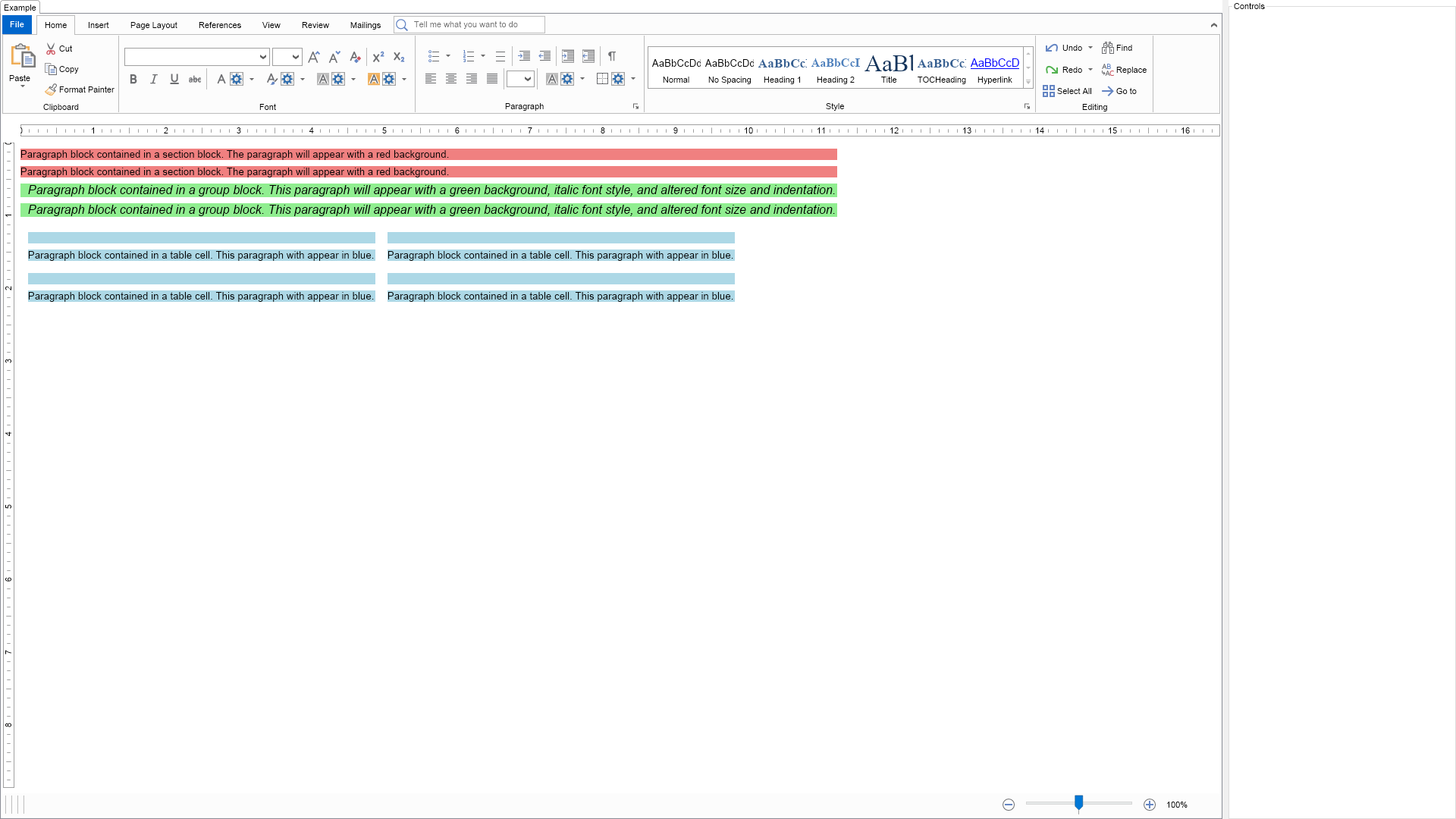
The example demonstrates how to apply css like styles to the text document.

| Language: C# |
using Nevron.Nov;
using Nevron.Nov.Dom;
using Nevron.Nov.Graphics;
using Nevron.Nov.Layout;
using Nevron.Nov.Text;
using Nevron.Nov.UI;
using Nevron.Nov.Windows.Forms;
using System.Windows.Forms;
namespace NovWinFormsProject
{
public partial class Form1 : Form
{
#region Constructors
public Form1()
{
InitializeComponent();
// Set form title
Text = "NOV WinForms - NCssStylingExample";
// Create the NOV example and its controls
NWidget exampleContent = CreateExampleContent();
NWidget exampleControls = CreateExampleControls();
if (exampleControls != null)
{
exampleControls.PreferredWidth = 300;
}
// Place the example and its controls in a pair box
NPairBox pairBox = new NPairBox(exampleContent, exampleControls);
pairBox.FillMode = ENStackFillMode.First;
pairBox.FitMode = ENStackFitMode.First;
pairBox.Margins = new NMargins(NDesign.HorizontalSpacing, NDesign.VerticalSpacing);
// Host the example in the form
NNovWidgetHost host = new NNovWidgetHost(pairBox);
host.Dock = DockStyle.Fill;
Controls.Add(host);
}
#endregion
#region Example
public NWidget CreateExampleContent()
{
// Create the rich text
m_RichTextWithRibbon = new NRichTextViewWithRibbon();
m_RichTextWithRibbon.View.Content.Sections.Clear();
// set the content to web and allow only text copy paste
m_RichTextWithRibbon.View.Content.Layout = ENTextLayout.Web;
// add some content
NSection section = new NSection();
for (int i = 0; i < 2; i++)
{
string text = "Paragraph block contained in a section block. The paragraph will appear with a red background.";
section.Blocks.Add(new NParagraph(text));
}
NGroupBlock groupBlock = new NGroupBlock();
section.Blocks.Add(groupBlock);
for (int i = 0; i < 2; i++)
{
string text = "Paragraph block contained in a group block. This paragraph will appear with a green background, italic font style, and altered font size and indentation.";
groupBlock.Blocks.Add(new NParagraph(text));
}
NTable table = new NTable(2, 2);
table.Border = NBorder.CreateFilledBorder(NColor.Black);
table.BorderThickness = new NMargins(2, 2, 2, 2);
table.AllowSpacingBetweenCells = false;
section.Blocks.Add(table);
for (int rowIndex = 0; rowIndex < table.Rows.Count; rowIndex++)
{
for (int colIndex = 0; colIndex < table.Columns.Count; colIndex++)
{
string text = "Paragraph block contained in a table cell. This paragraph with appear in blue.";
table.Rows[rowIndex].Cells[colIndex].Blocks.Add(new NParagraph(text));
}
}
m_RichTextWithRibbon.View.Content.Sections.Add(section);
// create a CSS style sheet that applies different background and font depending on the parent of the paragraph
NStyleSheet sheet = new NStyleSheet();
m_RichTextWithRibbon.View.Document.StyleSheets.Add(sheet);
// for all paragraphs that are directly contained in a section
{
NRule rule1 = new NRule();
rule1.Declarations.Add(new NValueDeclaration("BackgroundFill", new NColorFill(NColor.LightCoral)));
sheet.Add(rule1);
NSelector selector1 = new NSelector();
rule1.Selectors.Add(selector1);
// select all paragraph
selector1.Conditions.Add(new NTypeCondition(NParagraph.NParagraphSchema));
// that are children of range collection
NChildCombinator childOfBlockCollection = new NChildCombinator();
selector1.Combinators.Add(childOfBlockCollection);
// that are direct descendants of section
NChildCombinator childOfSection = new NChildCombinator();
childOfSection.Conditions.Add(new NTypeCondition(NSection.NSectionSchema));
selector1.Combinators.Add(childOfSection);
}
// then add a rule for blocks contained inside a group block
{
{
NRule rule2 = new NRule();
rule2.Declarations.Add(new NValueDeclaration("BackgroundFill", new NColorFill(NColor.LightGreen)));
rule2.Declarations.Add(new NValueDeclaration("FontSize", 12.0d));
rule2.Declarations.Add(new NValueDeclaration("FirstLineIndent", 10.0d));
rule2.Declarations.Add(new NValueDeclaration("FontStyleItalic", true));
sheet.Add(rule2);
NSelectorBuilder builder = new NSelectorBuilder(rule2);
builder.Start();
builder.Type(NParagraph.NParagraphSchema);
builder.ChildOf();
builder.ChildOf();
builder.Type(NGroupBlock.NGroupBlockSchema);
builder.ChildOf();
builder.ChildOf();
builder.Type(NSection.NSectionSchema);
builder.End();
}
{
NRule rule3 = new NRule();
rule3.Declarations.Add(new NValueDeclaration("BackgroundFill", new NColorFill(NColor.LightBlue)));
sheet.Add(rule3);
NSelectorBuilder builder = new NSelectorBuilder(rule3);
builder.Start();
builder.Type(NParagraph.NParagraphSchema);
builder.ChildOf();
builder.ChildOf();
builder.Type(NGroupBlock.NGroupBlockSchema);
builder.ChildOf();
builder.ChildOf();
builder.Type(NTableRow.NTableRowSchema);
builder.End();
}
}
return m_RichTextWithRibbon;
}
public NWidget CreateExampleControls()
{
NStackPanel stack = new NStackPanel();
return stack;
}
public string GetExampleDescription()
{
return "The example demonstrates how to apply css like styles to the text document.
";
}
///
/// Gets the relevant documentation links for the example
///
///
public (string Name, string Url)[] GetDocumentationUrls()
{
return new[]
{
("Styling and Inheritance", "https://www.nevron.com/docs/openvision/dom-styling-and-inheritance.html"),
("Rich Text View Overview", "https://www.nevron.com/docs/openvision/rich-text-styles-overview.html"),
};
}
#endregion
#region Implementation
#endregion
#region Event Handlers
#endregion
#region Fields
private NRichTextViewWithRibbon m_RichTextWithRibbon;
#endregion
#region Static Methods
#endregion
#region Constants
#endregion
#region Nested Types
#endregion
}
}