using Nevron.Nov;
using Nevron.Nov.Dom;
using Nevron.Nov.Graphics;
using Nevron.Nov.Layout;
using Nevron.Nov.Text;
using Nevron.Nov.UI;
using Nevron.Nov.Windows.Forms;
using System;
using System.Windows.Forms;

namespace NovWinFormsProject
{
	public partial class Form1 : Form
	{
		#region Constructors

		public Form1()
		{
			InitializeComponent();

			// Set form title
			Text = "NOV WinForms - NTableOfContentsExample";

			// Create the NOV example and its controls
			NWidget exampleContent = CreateExampleContent();
			NWidget exampleControls = CreateExampleControls();
			if (exampleControls != null)
			{
				exampleControls.PreferredWidth = 300;
			}

			// Place the example and its controls in a pair box
			NPairBox pairBox = new NPairBox(exampleContent, exampleControls);
			pairBox.FillMode = ENStackFillMode.First;
			pairBox.FitMode = ENStackFitMode.First;
			pairBox.Margins = new NMargins(NDesign.HorizontalSpacing, NDesign.VerticalSpacing);

			// Host the example in the form
			NNovWidgetHost host = new NNovWidgetHost(pairBox);
			host.Dock = DockStyle.Fill;
			Controls.Add(host);
		}

		#endregion

		#region Example

		public NWidget CreateExampleContent()
		{
			// Create the rich text
			NRichTextViewWithRibbon richTextWithRibbon = new NRichTextViewWithRibbon();
			m_RichText = richTextWithRibbon.View;
			m_RichText.AcceptsTab = true;
			m_RichText.Content.Sections.Clear();

			// Populate the rich text
			PopulateRichText();

			return richTextWithRibbon;
		}
		public NWidget CreateExampleControls()
		{
			return null;
		}
		public string GetExampleDescription()
		{
			return @"
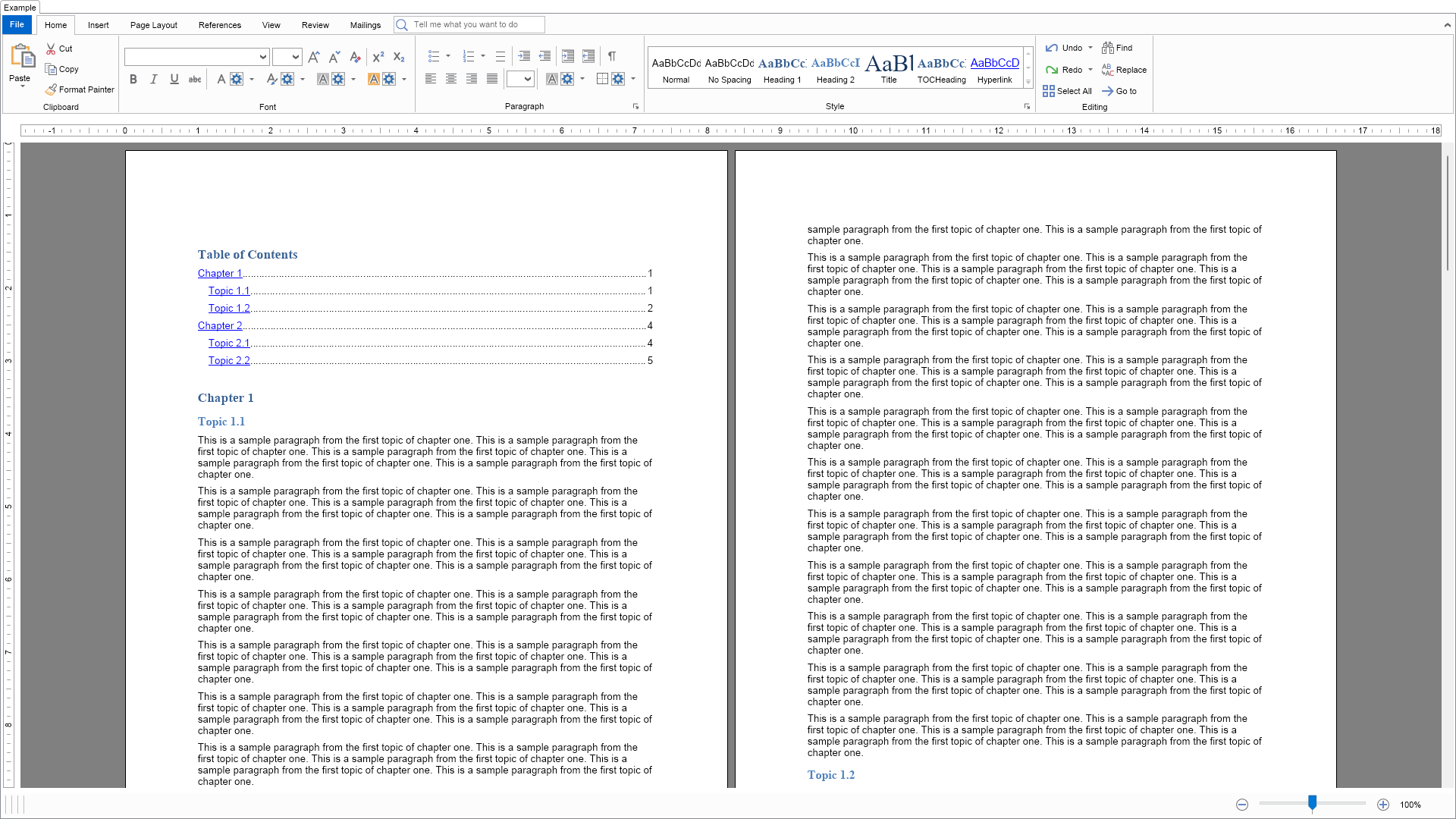
This example demonstrates how to programmatically create and add a table of contents block to a document.
";
		}

		///
		/// Gets the relevant documentation links for the example
		///
		///
		public (string Name, string Url)[] GetDocumentationUrls()
		{
			return new[]
			{
				("Rich Text Table Of Contents", "https://www.nevron.com/docs/openvision/rich-text-table-of-contents.html"),
				("Rich Text Paragraph Styles", "https://www.nevron.com/docs/openvision/rich-text-paragraph-styles.html"),
				("Rich Text Field Inlines", "https://www.nevron.com/docs/openvision/rich-text-field-inlines.html"),
			};
		}

		private void PopulateRichText()
		{
			// Get references to the heading styles
			NDocumentBlock documentBlock = m_RichText.Content;
			NRichTextStyle heading1Style = documentBlock.Styles.FindStyleByTypeAndId(ENRichTextStyleType.Paragraph, "Heading1");
			NRichTextStyle heading2Style = documentBlock.Styles.FindStyleByTypeAndId(ENRichTextStyleType.Paragraph, "Heading2");

			NSection section = new NSection();
			m_RichText.Content.Sections.Add(section);

			// Add a table of contents block
			NTableOfContentsBlock tableOfContents = new NTableOfContentsBlock();
			section.Blocks.Add(tableOfContents);

			// Create chapter 1
			NParagraph paragraph = new NParagraph("Chapter 1");
			section.Blocks.Add(paragraph);
			heading1Style.Apply(paragraph);

			paragraph = new NParagraph("Topic 1.1");
			section.Blocks.Add(paragraph);
			heading2Style.Apply(paragraph);

			AddParagraphs(section, "This is a sample paragraph from the first topic of chapter one.", 20);

			paragraph = new NParagraph("Topic 1.2");
			section.Blocks.Add(paragraph);
			heading2Style.Apply(paragraph);

			AddParagraphs(section, "This is a sample paragraph from the second topic of chapter one.", 20);

			// Create chapter 2
			paragraph = new NParagraph("Chapter 2");
			section.Blocks.Add(paragraph);
			heading1Style.Apply(paragraph);

			paragraph = new NParagraph("Topic 2.1");
			section.Blocks.Add(paragraph);
			heading2Style.Apply(paragraph);

			AddParagraphs(section, "This is a sample paragraph from the first topic of chapter two.", 20);

			paragraph = new NParagraph("Topic 2.2");
			section.Blocks.Add(paragraph);
			heading2Style.Apply(paragraph);

			AddParagraphs(section, "This is a sample paragraph from the second topic of chapter two.", 20);

			// Update the table of contents
			m_RichText.Document.Evaluate();
			tableOfContents.Update();
		}

		#endregion

		#region Implementation

		private void AddParagraphs(NSection section, string text, int count)
		{
			// Duplicate the given text 5 times
			text = String.Join(" ", new string[] { text, text, text, text, text });

			// Create the given number of paragraphs with the text
			for (int i = 0; i < count; i++)
			{
				section.Blocks.Add(new NParagraph(text));
			}
		}

		#endregion

		#region Event Handlers
		#endregion

		#region Fields

		private NRichTextView m_RichText;

		#endregion

		#region Static Methods
		#endregion

		#region Constants
		#endregion

		#region Nested Types
		#endregion
	}
}

 Chart for .NET
 Diagram for .NET
 User Interface for .NET
 Vision for SSRS
 Chart for SSRS
 Gauge for SSRS
 Map for SSRS
 Barcode for SSRS
 Vision for SharePoint
 Chart for SharePoint
 Gauge for SharePoint
 Map for SharePoint
 Barcode for SharePoint
 Open Vision for .NET


 Vision for .NET