Paging Example for Blazor

Nevron NOV RichTextEditor for Blazor ships with hundreds of examples with full source code, as part of the Nevron Open Vision Suite. All Blazor RichTextEditor examples are also available as a stand-alone Visual Studio solution in C#, which you can download from the links below.

Paging Example for Blazor Description

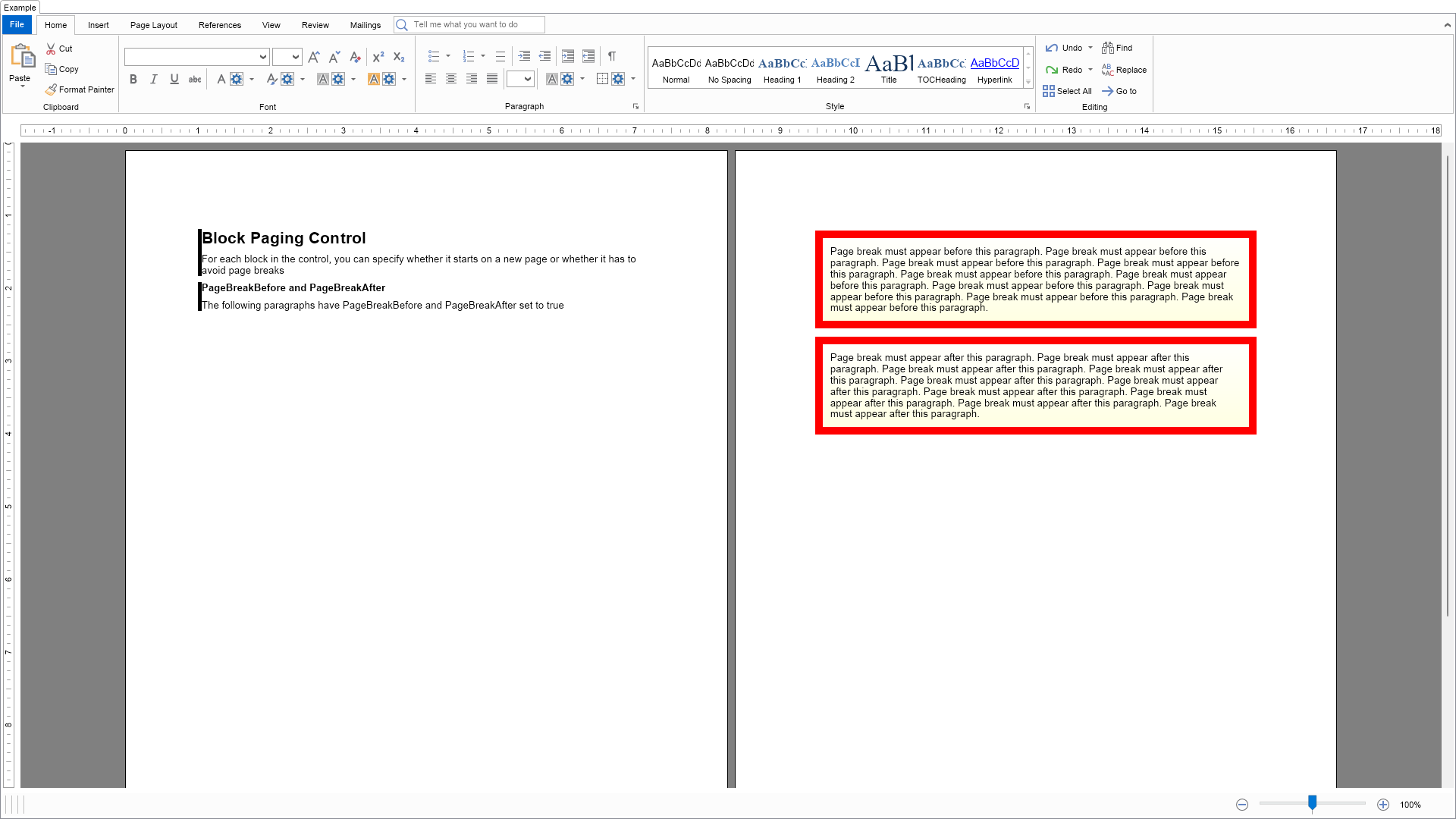
This example demonstrates how to control text paging using the PageBreakBefore and PageBreakAfter properties of text block elements.


Block Paging Example

C# Paging Example Code for Nevron RichTextEditor for Blazor
Language: C#

using Nevron.Nov;
using Nevron.Nov.Dom;
using Nevron.Nov.Graphics;
using Nevron.Nov.Layout;
using Nevron.Nov.Text;
using Nevron.Nov.UI;
using Nevron.Nov.Windows.Forms;
using System.Text;
using System.Windows.Forms;

namespace NovWinFormsProject
{
	public partial class Form1 : Form
	{
		#region Constructors

		public Form1()
		{
			InitializeComponent();

			// Set form title
			Text = "NOV WinForms - NBlockPagingExample";

			// Create the NOV example and its controls
			NWidget exampleContent = CreateExampleContent();
			NWidget exampleControls = CreateExampleControls();
			if (exampleControls != null)
			{
				exampleControls.PreferredWidth = 300;
			}

			// Place the example and its controls in a pair box
			NPairBox pairBox = new NPairBox(exampleContent, exampleControls);
			pairBox.FillMode = ENStackFillMode.First;
			pairBox.FitMode = ENStackFitMode.First;
			pairBox.Margins = new NMargins(NDesign.HorizontalSpacing, NDesign.VerticalSpacing);

			// Host the example in the form
			NNovWidgetHost host = new NNovWidgetHost(pairBox);
			host.Dock = DockStyle.Fill;
			Controls.Add(host);
		}

		#endregion

		#region Example

		public NWidget CreateExampleContent()
		{
			// Create the rich text
			NRichTextViewWithRibbon richTextWithRibbon = new NRichTextViewWithRibbon();
			m_RichText = richTextWithRibbon.View;
			m_RichText.AcceptsTab = true;
			m_RichText.Content.Sections.Clear();

			// Populate the rich text
			PopulateRichText();

			return richTextWithRibbon;
		}
		public NWidget CreateExampleControls()
		{
			return null;
		}
		public string GetExampleDescription()
		{
			return @"

This example demonstrates how to control text paging using the PageBreakBefore and PageBreakAfter properties of text block elements.

"; } /// /// Gets the relevant documentation links for the example /// /// public (string Name, string Url)[] GetDocumentationUrls() { return new[] { ("Rich Text Block Layout", "https://www.nevron.com/docs/openvision/rich-text-block-layout.html"), ("Rich Text Sections", "https://www.nevron.com/docs/openvision/rich-text-sections.html"), }; } private void PopulateRichText() { NSection section = new NSection(); m_RichText.Content.Sections.Add(section); m_RichText.Content.Layout = ENTextLayout.Print; section.Blocks.Add(GetDescriptionBlock("Block Paging Control", "For each block in the control, you can specify whether it starts on a new page or whether it has to avoid page breaks", 1)); section.Blocks.Add(GetDescriptionBlock("PageBreakBefore and PageBreakAfter", "The following paragraphs have PageBreakBefore and PageBreakAfter set to true", 2)); NParagraph paragraph1 = CreateSampleParagraph1("Page break must appear before this paragraph."); paragraph1.PageBreakBefore = true; section.Blocks.Add(paragraph1); NParagraph paragraph2 = CreateSampleParagraph1("Page break must appear after this paragraph."); paragraph2.PageBreakAfter = true; section.Blocks.Add(paragraph2); } #endregion #region Implementation #endregion #region Event Handlers #endregion #region Fields private NRichTextView m_RichText; #endregion #region Static Methods private static NParagraph CreateSampleParagraph1(string text) { NParagraph paragraph = new NParagraph(GetRepeatingText(text, 10)); paragraph.Margins = new NMargins(10); paragraph.BorderThickness = new NMargins(10); paragraph.Padding = new NMargins(10); paragraph.Border = NBorder.CreateFilledBorder(NColor.Red); paragraph.BackgroundFill = new NStockGradientFill(NColor.White, NColor.LightYellow); return paragraph; } private static NParagraph GetDescriptionParagraph(string text) { return new NParagraph(text); } private static NParagraph GetTitleParagraphNoBorder(string text, int level) { double fontSize = 10; ENFontStyle fontStyle = ENFontStyle.Regular; switch (level) { case 1: fontSize = 16; fontStyle = ENFontStyle.Bold; break; case 2: fontSize = 10; fontStyle = ENFontStyle.Bold; break; } NParagraph paragraph = new NParagraph(); paragraph.HorizontalAlignment = ENAlign.Left; paragraph.FontSize = fontSize; paragraph.FontStyle = fontStyle; NTextInline textInline = new NTextInline(text); textInline.FontStyle = fontStyle; textInline.FontSize = fontSize; paragraph.Inlines.Add(textInline); return paragraph; } private static NGroupBlock GetDescriptionBlock(string title, string description, int level) { NColor color = NColor.Black; NParagraph paragraph = GetTitleParagraphNoBorder(title, level); NGroupBlock groupBlock = new NGroupBlock(); groupBlock.ClearMode = ENClearMode.All; groupBlock.Blocks.Add(paragraph); groupBlock.Blocks.Add(GetDescriptionParagraph(description)); groupBlock.Border = CreateLeftTagBorder(color); groupBlock.BorderThickness = defaultBorderThickness; return groupBlock; } /// /// Creates a left tag border with the specified border /// /// /// private static NBorder CreateLeftTagBorder(NColor color) { NBorder border = new NBorder(); border.LeftSide = new NBorderSide(); border.LeftSide.Fill = new NColorFill(color); return border; } /// /// Gets the specified text repeated /// /// /// /// private static string GetRepeatingText(string text, int count) { StringBuilder builder = new StringBuilder(); for (int i = 0; i < count; i++) { if (builder.Length > 0) { builder.Append(" "); } builder.Append(text); } return builder.ToString(); } #endregion #region Constants private static readonly NMargins defaultBorderThickness = new NMargins(5.0, 0.0, 0.0, 0.0); #endregion #region Nested Types #endregion } }

Download a fully functional C# (.cs) Paging Example for Blazor Solution

Related Documentation Links