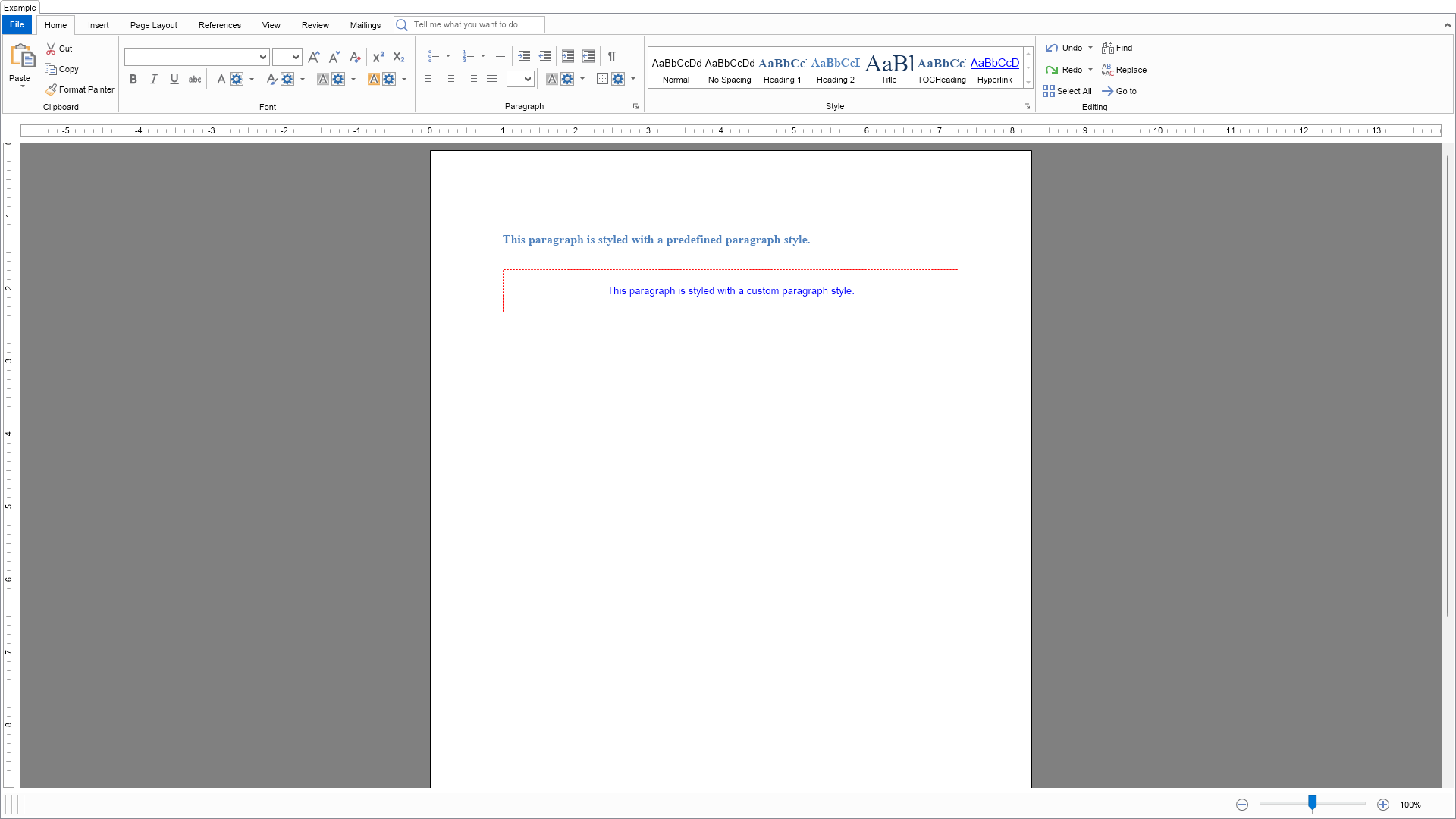
This example demonstrates how to create and apply paragraph styles.

| Language: C# |
using Nevron.Nov;
using Nevron.Nov.Dom;
using Nevron.Nov.Graphics;
using Nevron.Nov.Layout;
using Nevron.Nov.Text;
using Nevron.Nov.UI;
using Nevron.Nov.Windows.Forms;
using System.Windows.Forms;
namespace NovWinFormsProject
{
public partial class Form1 : Form
{
#region Constructors
public Form1()
{
InitializeComponent();
// Set form title
Text = "NOV WinForms - NParagraphStylesExample";
// Create the NOV example and its controls
NWidget exampleContent = CreateExampleContent();
NWidget exampleControls = CreateExampleControls();
if (exampleControls != null)
{
exampleControls.PreferredWidth = 300;
}
// Place the example and its controls in a pair box
NPairBox pairBox = new NPairBox(exampleContent, exampleControls);
pairBox.FillMode = ENStackFillMode.First;
pairBox.FitMode = ENStackFitMode.First;
pairBox.Margins = new NMargins(NDesign.HorizontalSpacing, NDesign.VerticalSpacing);
// Host the example in the form
NNovWidgetHost host = new NNovWidgetHost(pairBox);
host.Dock = DockStyle.Fill;
Controls.Add(host);
}
#endregion
#region Example
public NWidget CreateExampleContent()
{
// Create the rich text
NRichTextViewWithRibbon richTextWithRibbon = new NRichTextViewWithRibbon();
m_RichText = richTextWithRibbon.View;
m_RichText.AcceptsTab = true;
m_RichText.Content.Sections.Clear();
// Populate the rich text
PopulateRichText();
return richTextWithRibbon;
}
public NWidget CreateExampleControls()
{
return null;
}
public string GetExampleDescription()
{
return @"This example demonstrates how to create and apply paragraph styles.
";
}
///
/// Gets the relevant documentation links for the example
///
///
public (string Name, string Url)[] GetDocumentationUrls()
{
return new[]
{
("Rich Text Paragraph Styles", "https://www.nevron.com/docs/openvision/rich-text-paragraph-styles.html"),
("Rich Text Paragraphs", "https://www.nevron.com/docs/openvision/rich-text-paragraphs.html"),
};
}
private void PopulateRichText()
{
NDocumentBlock documentBlock = m_RichText.Content;
NSection section = new NSection();
documentBlock.Sections.Add(section);
// Create the first paragraph
NParagraph paragraph1 = new NParagraph("This paragraph is styled with a predefined paragraph style.");
section.Blocks.Add(paragraph1);
// Apply a predefined paragraph style
NRichTextStyle predefinedStyle = documentBlock.Styles.FindStyleByTypeAndId(ENRichTextStyleType.Paragraph, "Heading2");
predefinedStyle.Apply(paragraph1);
// Create the second paragraph
NParagraph paragraph2 = new NParagraph("This paragraph is styled with a custom paragraph style.");
section.Blocks.Add(paragraph2);
// Create a custom paragraph style and apply it
NParagraphStyle customStyle = new NParagraphStyle("CustomStyle");
customStyle.ParagraphRule = new NParagraphRule();
customStyle.ParagraphRule.BorderRule = new NBorderRule(ENPredefinedBorderStyle.Dash, NColor.Red, new NMargins(1));
customStyle.ParagraphRule.HorizontalAlignment = ENAlign.Center;
customStyle.ParagraphRule.Padding = new NMargins(20);
customStyle.InlineRule = new NInlineRule();
customStyle.InlineRule.Fill = new NColorFill(NColor.Blue);
customStyle.Apply(paragraph2);
paragraph2.MarginTop = 30;
}
#endregion
#region Implementation
#endregion
#region Event Handlers
#endregion
#region Fields
private NRichTextView m_RichText;
#endregion
#region Static Methods
#endregion
#region Constants
#endregion
#region Nested Types
#endregion
}
}