using Nevron.Nov;
using Nevron.Nov.Dom;
using Nevron.Nov.Graphics;
using Nevron.Nov.Layout;
using Nevron.Nov.UI;
using Nevron.Nov.Windows.Forms;
using System.Windows.Forms;

namespace NovWinFormsProject
{
	public partial class Form1 : Form
	{
		#region Constructors

		public Form1()
		{
			InitializeComponent();

			// Set form title
			Text = "NOV WinForms - NBordersExample";

			// Create the NOV example and its controls
			NWidget exampleContent = CreateExampleContent();
			NWidget exampleControls = CreateExampleControls();
			if (exampleControls != null)
			{
				exampleControls.PreferredWidth = 300;
			}

			// Place the example and its controls in a pair box
			NPairBox pairBox = new NPairBox(exampleContent, exampleControls);
			pairBox.FillMode = ENStackFillMode.First;
			pairBox.FitMode = ENStackFitMode.First;
			pairBox.Margins = new NMargins(NDesign.HorizontalSpacing, NDesign.VerticalSpacing);

			// Host the example in the form
			NNovWidgetHost host = new NNovWidgetHost(pairBox);
			host.Dock = DockStyle.Fill;
			Controls.Add(host);
		}

		#endregion

        #region Example

        public NWidget CreateExampleContent()
        {
            // Create a table layout panel
            NTableFlowPanel table = new NTableFlowPanel();
            table.Padding = new NMargins(10);
            table.BackgroundFill = new NColorFill(NColor.White);
            table.MaxOrdinal = 3;
            table.HorizontalSpacing = 10;
            table.VerticalSpacing = 10;
            table.ColFillMode = ENStackFillMode.Equal;
            table.ColFitMode = ENStackFitMode.Equal;
            table.RowFitMode = ENStackFitMode.Equal;
            table.RowFillMode = ENStackFillMode.None;
            table.UniformWidths = ENUniformSize.Max;
            table.UniformHeights = ENUniformSize.Max;

            // add some predefined borders
            // 3D Borders
            NUIThemeColorMap map = new NUIThemeColorMap(ENUIThemeScheme.WindowsClassic);
            table.Add(CreateBorderedWidget("3D Border",
                NBorder.Create3DBorder(NColor.Green.Lighten().Lighten(), NColor.Green.Lighten(), NColor.Green.Darken(), NColor.Green)
            ));
            table.Add(CreateBorderedWidget("Raised Border (using Theme Colors)",
                NBorder.CreateRaised3DBorder(map)
            ));
            table.Add(CreateBorderedWidget("Sunken Border (using Theme Colors)",
                NBorder.CreateSunken3DBorder(map)
            ));

            // Filled Borders
            table.Add(CreateBorderedWidget("Solid Color",
                NBorder.CreateFilledBorder(NColor.Red)
            ));
            table.Add(CreateBorderedWidget("Solid Color With Rounded Corners",
                NBorder.CreateFilledBorder(NColor.Blue, 10, 13)
            ));
            table.Add(CreateBorderedWidget("Gradient Filling With Outline",
                NBorder.CreateFilledBorder(NFill.CreatePredefined(ENPredefinedFillPattern.GradientVertical, NColor.Red, NColor.Blue), new NStroke(1, NColor.Green), new NStroke(1, NColor.Green))
                ));

            // Outer Outline Borders
            table.Add(CreateBorderedWidget("Outer Outline Border",
                NBorder.CreateOuterOutlineBorder(new NStroke(1, NColor.Red, ENDashStyle.Dash))
            ));
            table.Add(CreateBorderedWidget("Outer Outline Border with Rounding",
                NBorder.CreateOuterOutlineBorder(new NStroke(1, NColor.Red, ENDashStyle.Dash), 10)
            ));
            table.Add(CreateBorderedWidget("Outer Outline Border",
                NBorder.CreateOuterOutlineBorder(new NStroke(1, NColor.Red, ENDashStyle.Dash))
            ));
            table.Add(CreateBorderedWidget("Outer Outline Border with Rounding",
                NBorder.CreateOuterOutlineBorder(new NStroke(1, NColor.Red, ENDashStyle.Dash), 10)
            ));

            // Inner Outline Borders
            table.Add(CreateBorderedWidget("Inner Outline Border",
                NBorder.CreateInnerOutlineBorder(new NStroke(1, NColor.Red, ENDashStyle.Dash))
            ));
            table.Add(CreateBorderedWidget("Inner Outline Border with Rounding",
                NBorder.CreateInnerOutlineBorder(new NStroke(1, NColor.Green, ENDashStyle.Dash), 10)
            ));
            table.Add(CreateBorderedWidget("Inner Outline Border",
                NBorder.CreateInnerOutlineBorder(new NStroke(1, NColor.Green, ENDashStyle.Dash))
            ));
            table.Add(CreateBorderedWidget("Inner Outline Border with Rounding",
                NBorder.CreateInnerOutlineBorder(new NStroke(1, NColor.Green, ENDashStyle.Dash), 10)
            ));

            // Double border
            table.Add(CreateBorderedWidget("Double Border",
                NBorder.CreateDoubleBorder(NColor.Blue)
            ));

            table.Add(CreateBorderedWidget("Double Border with Two Colors",
                NBorder.CreateDoubleBorder(NColor.Blue, NColor.Red)
            ));

            table.Add(CreateBorderedWidget("Double Border with Two Colors and Rounding",
                NBorder.CreateDoubleBorder(NColor.Blue, NColor.Red, 10,  12)
            ));

            // Two color borders
            table.Add(CreateBorderedWidget("Two Colors Border",
                NBorder.CreateTwoColorBorder(NColor.Blue, NColor.Red)
            ));

            table.Add(CreateBorderedWidget("Two Colors Border with Rounding",
                NBorder.CreateTwoColorBorder(NColor.Blue, NColor.Red, 10, 12)
            ));

            // Three color borders
            table.Add(CreateBorderedWidget("Three Colors Border",
                NBorder.CreateThreeColorBorder(NColor.Red, NColor.Green, NColor.Blue)
            ));

            table.Add(CreateBorderedWidget("Three Colors Border with Rounding",
                NBorder.CreateThreeColorBorder(NColor.Red, NColor.Green, NColor.Blue, 10, 12)
            ));

            return table;
        }
        public NWidget CreateExampleControls()
        {
            return null;
        }
        public string GetExampleDescription()
        {
            return @"

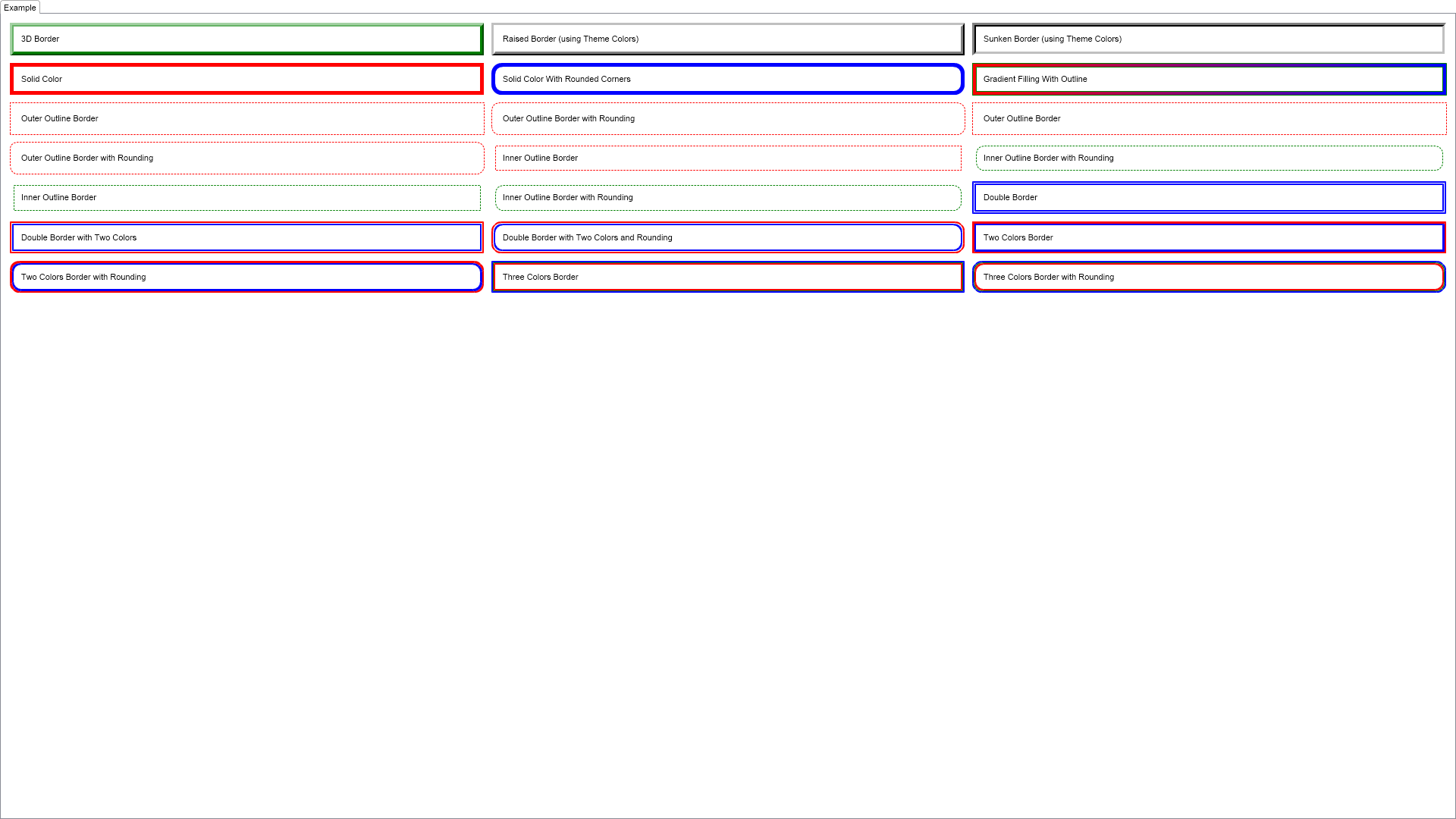
	This example demonstrates some of the static methods of NBorder that help you quickly create commonly used types of borders.

";
        }

        ///
        /// Gets the relevant documentation links for the example
        ///
        ///
        public (string Name, string Url)[] GetDocumentationUrls()
        {
            return new[]
            {
                ("Borders", "https://www.nevron.com/docs/openvision/ui-borders.html"),
                ("Box Elements", "https://www.nevron.com/docs/openvision/ui-box-elements.html"),
            };
        }

        #endregion

        #region Implementation

        ///
        /// Creates a simple label that demonstrates the specified border.
        ///
        ///
        ///
        ///
        private NWidget CreateBorderedWidget(string text, NBorder border)
        {
            NLabel label = new NLabel(text);

            label.HorizontalPlacement = ENHorizontalPlacement.Fit;
            label.VerticalPlacement = ENVerticalPlacement.Fit;
            label.Padding = new NMargins(10);

            label.Border = border;
            label.BorderThickness = new NMargins(5);

            return label;
        }

        #endregion

		#region Event Handlers
		#endregion

		#region Fields
		#endregion

		#region Static Methods
		#endregion

		#region Constants
		#endregion

		#region Nested Types
		#endregion
	}
}

 Chart for .NET
 Diagram for .NET
 User Interface for .NET
 Vision for SSRS
 Chart for SSRS
 Gauge for SSRS
 Map for SSRS
 Barcode for SSRS
 Vision for SharePoint
 Chart for SharePoint
 Gauge for SharePoint
 Map for SharePoint
 Barcode for SharePoint
 Open Vision for .NET


 Vision for .NET