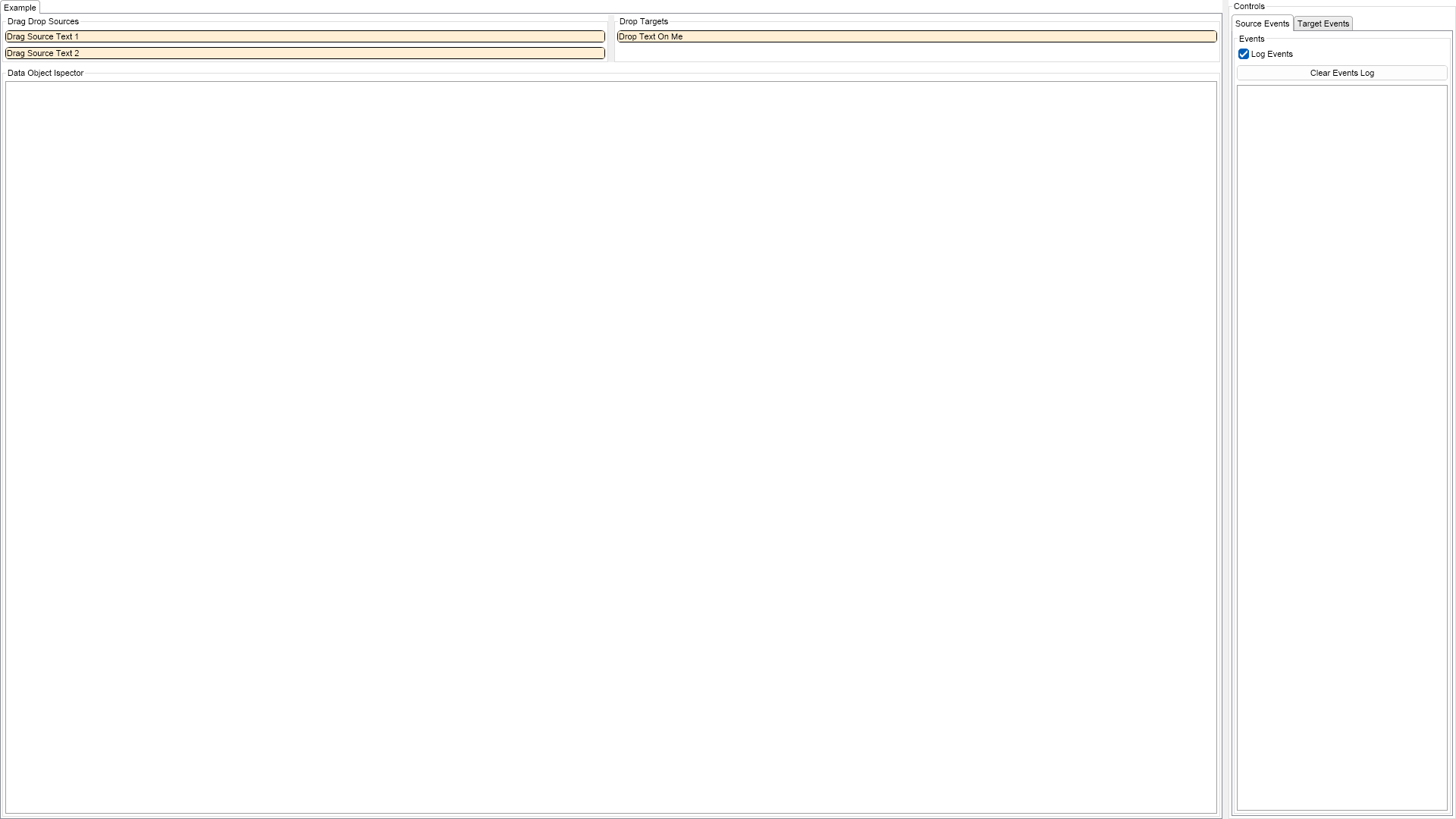
Drag And Drop Example for WPF

Nevron NOV UserInterface for WPF ships with hundreds of examples with full source code, as part of the Nevron Open Vision Suite. All WPF UserInterface examples are also available as a stand-alone Visual Studio solution in C# and VB.NET, which you can download from the links below.

Drag And Drop Example for WPF Description

The example demonstrates how to use Drag and Drop in NOV.


Drag and Drop Example

C# Drag And Drop Example Code for Nevron UserInterface for WPF
Language: C#

using Nevron.Nov;
using Nevron.Nov.Dom;
using Nevron.Nov.Graphics;
using Nevron.Nov.Layout;
using Nevron.Nov.UI;
using Nevron.Nov.Windows.Forms;
using System.Windows.Forms;

namespace NovWinFormsProject
{
	public partial class Form1 : Form
	{
		#region Constructors

		public Form1()
		{
			InitializeComponent();

			// Set form title
			Text = "NOV WinForms - NDragAndDropExample";

			// Create the NOV example and its controls
			NWidget exampleContent = CreateExampleContent();
			NWidget exampleControls = CreateExampleControls();
			if (exampleControls != null)
			{
				exampleControls.PreferredWidth = 300;
			}

			// Place the example and its controls in a pair box
			NPairBox pairBox = new NPairBox(exampleContent, exampleControls);
			pairBox.FillMode = ENStackFillMode.First;
			pairBox.FitMode = ENStackFitMode.First;
			pairBox.Margins = new NMargins(NDesign.HorizontalSpacing, NDesign.VerticalSpacing);

			// Host the example in the form
			NNovWidgetHost host = new NNovWidgetHost(pairBox);
			host.Dock = DockStyle.Fill;
			Controls.Add(host);
		}

		#endregion

		#region Example

		public NWidget CreateExampleContent()
		{
			// sources
			NGroupBox sourcesGroup = new NGroupBox("Drag Drop Sources");
			{
				NStackPanel sourcesStack = new NStackPanel();
				sourcesGroup.Content = sourcesStack;

				NContentHolder textSource1 = CreateDemoElement("Drag Source Text 1");
				NDataObject dataObject1 = new NDataObject();
				dataObject1.SetData(NDataFormat.TextFormatString, "Text string 1");
				textSource1.Tag = dataObject1;
				sourcesStack.Add(textSource1);
				textSource1.MouseDown += OnSourceMouseDown;

				NContentHolder textSource2 = CreateDemoElement("Drag Source Text 2");
				NDataObject dataObject2 = new NDataObject();
				dataObject2.SetData(NDataFormat.TextFormatString, "Text string 2");
				textSource2.Tag = dataObject2;
				sourcesStack.Add(textSource2);
				textSource2.MouseDown += OnSourceMouseDown;
			}

			// targets
			NGroupBox targetsGroup = new NGroupBox("Drop Targets");
			{
				NStackPanel targetsStack = new NStackPanel();
				targetsGroup.Content = targetsStack;

				NContentHolder dropTextTarget = CreateDemoElement("Drop Text On Me");
				targetsStack.Add(dropTextTarget);

				dropTextTarget.DragOver += OnDragOverTextTarget;
				dropTextTarget.DragDrop += OnDragDropTextTarget;
			}

			// create the source and targets splitter
			NSplitter splitter = new NSplitter();
			splitter.SplitMode = ENSplitterSplitMode.Proportional;
			splitter.SplitFactor = 0.5d;
			splitter.Pane1.Content = sourcesGroup;
			splitter.Pane2.Content = targetsGroup;

			// create the inspector on the bottom
			NGroupBox inspectorGroup = new NGroupBox("Data Object Ispector");

			NListBox inspector = new NListBox();
			inspectorGroup.Content = inspector;

			inspector.DragEnter += OnInspectorDragEnter;
			inspector.DragLeave += OnInspectorDragLeave;

			NStackPanel stack = new NStackPanel();
			stack.HorizontalPlacement = ENHorizontalPlacement.Fit;
			stack.VerticalPlacement = ENVerticalPlacement.Fit;
			stack.FillMode = ENStackFillMode.Last;
			stack.Add(splitter);
			stack.Add(inspectorGroup);

			return stack;
		}
		public NWidget CreateExampleControls()
		{
			NTab tab = new NTab();

			m_SourceEventsLog = new NExampleEventsLog();
			tab.TabPages.Add(new NTabPage("Source Events", m_SourceEventsLog));

			m_TargetEventsLog = new NExampleEventsLog();
			tab.TabPages.Add(new NTabPage("Target Events", m_TargetEventsLog));

			return tab;
		}

		public string GetExampleDescription()
		{
            return @"

The example demonstrates how to use Drag and Drop in NOV.

"; } /// /// Gets the relevant documentation links for the example /// /// public (string Name, string Url)[] GetDocumentationUrls() { return new[] { ("Drag and Drop", "https://www.nevron.com/docs/openvision/ui-drag-and-drop.html"), ("Data Objects", "https://www.nevron.com/docs/openvision/ui-data-objects.html"), ("Drag and Drop Input", "https://www.nevron.com/docs/openvision/ui-drag-and-drop-input.html"), ("Data Formats", "https://www.nevron.com/docs/openvision/ui-data-formats.html"), }; } #endregion #region Implementation private NWidget CreateTextDragDropSources() { return null; } private NWidget CreateImageDragDropSource() { return null; } private NContentHolder CreateDemoElement(string text) { NContentHolder element = new NContentHolder(text); element.Border = NBorder.CreateFilledBorder(NColor.Black, 2, 5); element.BorderThickness = new NMargins(1); element.BackgroundFill = new NColorFill(NColor.PapayaWhip); element.TextFill = new NColorFill(NColor.Black); element.Padding = new NMargins(1); return element; } #endregion #region Event Handlers private void OnSourceMouseDown(NMouseButtonEventArgs args) { if (NDragDrop.CanRequestDragDrop()) { NDataObject dataObject = (NDataObject)args.CurrentTargetNode.Tag; NDragDropSource dropSource = new NDragDropSource(ENDragDropEffects.All); dropSource.DragStarting += OnDropSourceDragStarting; dropSource.DragEnded += OnDropSourceDragEnded; dropSource.QueryDragAction += OnDropSourceQueryDragAction; NDragDrop.RequestDragDrop(dropSource, dataObject); } } private void OnDragOverTextTarget(NDragActionEventArgs args) { // first you need to check whether the data object is of interest if (args.DataObject.ContainsData(NDataFormat.TextFormatString)) { // if the Ctrl is pressed, you must typically copy the data if you can. if (NKeyboard.DefaultCommandPressed & (args.AllowedEffect & ENDragDropEffects.Copy) == ENDragDropEffects.Copy) { args.Effect = ENDragDropEffects.Copy; return; } // if the Alt is pressed, you must typically link the data if you can. if (NKeyboard.AltPressed & (args.AllowedEffect & ENDragDropEffects.Link) == ENDragDropEffects.Link) { args.Effect = ENDragDropEffects.Link; return; } // by default you need to move data if you can if ((args.AllowedEffect & ENDragDropEffects.Move) != ENDragDropEffects.None) { args.Effect = ENDragDropEffects.Move; return; } } // the source either did not publish a data object with a format we are interested in, // or we cannot perform the action that is standartly performed for the current keyboard modifies state, // or the source did not allow the action that we can perfrom for the current keyboard modifies state. // in all these cases we set the effect to none. args.Effect = ENDragDropEffects.None; return; } private void OnDragDropTextTarget(NDragEventArgs args) { object data = args.DataObject.GetData(NDataFormat.TextFormatString); if (data != null) { NContentHolder contentHolder = args.CurrentTargetNode as NContentHolder; contentHolder.Content = new NLabel("Dropped Text:{" + (string)data + "}. Drop another text..."); } } private void OnInspectorDragEnter(NDragOverChangeEventArgs args) { NDataFormat[] formats = args.DataObject.GetFormats(); NListBox inspector = args.CurrentTargetNode as NListBox; inspector.Items.Clear(); for (int i = 0; i < formats.Length; i++) { inspector.Items.Add(new NListBoxItem(formats[i].ToString())); } } private void OnInspectorDragLeave(NDragOverChangeEventArgs args) { NListBox inspector = args.CurrentTargetNode as NListBox; inspector.Items.Clear(); } private void OnDropSourceQueryDragAction(NQueryDragActionEventArgs args) { m_SourceEventsLog.LogEvent("QueryDragAction " + args.Reason.ToString()); } private void OnDropSourceDragStarting(NDragDropSourceEventArgs args) { m_SourceEventsLog.LogEvent("DragStarting"); } private void OnDropSourceDragEnded(NDragEndedEventArgs args) { m_SourceEventsLog.LogEvent("DragEnded. Final Effect was: " + args.FinalEffect.ToString()); } #endregion #region Fields private NExampleEventsLog m_SourceEventsLog; private NExampleEventsLog m_TargetEventsLog; #endregion #region Static Methods #endregion #region Constants #endregion #region Nested Types #endregion } }

Download a fully functional C# (.cs) Drag And Drop Example for WPF Solution

VB.NET Drag And Drop Example Code for Nevron UserInterface for WPF
Language: VB.NET

Imports Nevron.Nov
Imports Nevron.Nov.Dom
Imports Nevron.Nov.Graphics
Imports Nevron.Nov.Layout
Imports Nevron.Nov.UI
Imports Nevron.Nov.Windows.Wpf

Class MainWindow

#Region "Constructors"

	Public Sub New()
		' This call is required by the designer.
		InitializeComponent()

		' Add any initialization after the InitializeComponent() call.

		' Set form title
		Title = "NOV WPF - NDragAndDropExample"

		' Create the NOV example and its controls
		Dim exampleContent As NWidget = CreateExampleContent()
		Dim exampleControls As NWidget = CreateExampleControls()
		If Not exampleControls Is Nothing Then
			exampleControls.PreferredWidth = 300
		End If

		' Place the example and its controls in a pair box
		Dim pairBox As NPairBox = New NPairBox(exampleContent, exampleControls)
		pairBox.FillMode = ENStackFillMode.First
		pairBox.FitMode = ENStackFitMode.First
		pairBox.Margins = New NMargins(NDesign.HorizontalSpacing, NDesign.VerticalSpacing)

		' Host the example in the form
		Dim host As NNovWidgetHost(Of NWidget) = New NNovWidgetHost(Of NWidget)(pairBox)
		Content = host
	End Sub


#End Region

#Region "Example"

        Public Function CreateExampleContent() As NWidget
            ' sources
            Dim sourcesGroup As NGroupBox = New NGroupBox("Drag Drop Sources")
            If True Then
                Dim sourcesStack As NStackPanel = New NStackPanel()
                sourcesGroup.Content = sourcesStack

                Dim textSource1 = CreateDemoElement("Drag Source Text 1")
                Dim dataObject1 As NDataObject = New NDataObject()
                dataObject1.SetData(NDataFormat.TextFormatString, "Text string 1")
                textSource1.Tag = dataObject1
                sourcesStack.Add(textSource1)
                textSource1.MouseDown += AddressOf OnSourceMouseDown

                Dim textSource2 = CreateDemoElement("Drag Source Text 2")
                Dim dataObject2 As NDataObject = New NDataObject()
                dataObject2.SetData(NDataFormat.TextFormatString, "Text string 2")
                textSource2.Tag = dataObject2
                sourcesStack.Add(textSource2)
                textSource2.MouseDown += AddressOf OnSourceMouseDown
            End If

            ' targets
            Dim targetsGroup As NGroupBox = New NGroupBox("Drop Targets")
            If True Then
                Dim targetsStack As NStackPanel = New NStackPanel()
                targetsGroup.Content = targetsStack

                Dim dropTextTarget = CreateDemoElement("Drop Text On Me")
                targetsStack.Add(dropTextTarget)

                dropTextTarget.DragOver += AddressOf OnDragOverTextTarget
                dropTextTarget.DragDrop += AddressOf OnDragDropTextTarget
            End If

            ' create the source and targets splitter
            Dim splitter As NSplitter = New NSplitter()
            splitter.SplitMode = ENSplitterSplitMode.Proportional
            splitter.SplitFactor = 0.5R
            splitter.Pane1.Content = sourcesGroup
            splitter.Pane2.Content = targetsGroup

            ' create the inspector on the bottom
            Dim inspectorGroup As NGroupBox = New NGroupBox("Data Object Ispector")

            Dim inspector As NListBox = New NListBox()
            inspectorGroup.Content = inspector

            inspector.DragEnter += AddressOf OnInspectorDragEnter
            inspector.DragLeave += AddressOf OnInspectorDragLeave

            Dim stack As NStackPanel = New NStackPanel()
            stack.HorizontalPlacement = ENHorizontalPlacement.Fit
            stack.VerticalPlacement = ENVerticalPlacement.Fit
            stack.FillMode = ENStackFillMode.Last
            stack.Add(splitter)
            stack.Add(inspectorGroup)

            Return stack
        End Function
        Public Function CreateExampleControls() As NWidget
            Dim tab As NTab = New NTab()

            m_SourceEventsLog = New NExampleEventsLog()
            tab.TabPages.Add(New NTabPage("Source Events", m_SourceEventsLog))

            m_TargetEventsLog = New NExampleEventsLog()
            tab.TabPages.Add(New NTabPage("Target Events", m_TargetEventsLog))

            Return tab
        End Function

        Public Function GetExampleDescription() As String
            Return "

The example demonstrates how to use Drag and Drop in NOV.

" End Function ''' ''' Gets the relevant documentation links for the example ''' ''' Public Function GetDocumentationUrls() As (String, String)() Return {("Drag and Drop", "https://www.nevron.com/docs/openvision/ui-drag-and-drop.html"), ("Data Objects", "https://www.nevron.com/docs/openvision/ui-data-objects.html"), ("Drag and Drop Input", "https://www.nevron.com/docs/openvision/ui-drag-and-drop-input.html"), ("Data Formats", "https://www.nevron.com/docs/openvision/ui-data-formats.html")} End Function #End Region #Region "Implementation" Private Function CreateTextDragDropSources() As NWidget Return Nothing End Function Private Function CreateImageDragDropSource() As NWidget Return Nothing End Function Private Function CreateDemoElement(text As String) As NContentHolder Dim element As NContentHolder = New NContentHolder(text) element.Border = NBorder.CreateFilledBorder(NColor.Black, 2, 5) element.BorderThickness = New NMargins(1) element.BackgroundFill = New NColorFill(NColor.PapayaWhip) element.TextFill = New NColorFill(NColor.Black) element.Padding = New NMargins(1) Return element End Function #End Region #Region "Event Handlers" Private Sub OnSourceMouseDown(args As NMouseButtonEventArgs) If NDragDrop.CanRequestDragDrop() Then Dim dataObject As NDataObject = args.CurrentTargetNode.Tag Dim dropSource As NDragDropSource = New NDragDropSource(ENDragDropEffects.All) dropSource.DragStarting += AddressOf OnDropSourceDragStarting dropSource.DragEnded += AddressOf OnDropSourceDragEnded dropSource.QueryDragAction += AddressOf OnDropSourceQueryDragAction NDragDrop.RequestDragDrop(dropSource, dataObject) End If End Sub Private Sub OnDragOverTextTarget(args As NDragActionEventArgs) ' first you need to check whether the data object is of interest If args.DataObject.ContainsData(NDataFormat.TextFormatString) Then ' if the Ctrl is pressed, you must typically copy the data if you can. If NKeyboard.DefaultCommandPressed And (args.AllowedEffect And ENDragDropEffects.Copy) Is ENDragDropEffects.Copy Then args.Effect = ENDragDropEffects.Copy Return End If ' if the Alt is pressed, you must typically link the data if you can. If NKeyboard.AltPressed And (args.AllowedEffect And ENDragDropEffects.Link) Is ENDragDropEffects.Link Then args.Effect = ENDragDropEffects.Link Return End If ' by default you need to move data if you can If (args.AllowedEffect And ENDragDropEffects.Move) IsNot ENDragDropEffects.None Then args.Effect = ENDragDropEffects.Move Return End If End If ' the source either did not publish a data object with a format we are interested in, ' or we cannot perform the action that is standartly performed for the current keyboard modifies state, ' or the source did not allow the action that we can perfrom for the current keyboard modifies state. ' in all these cases we set the effect to none. args.Effect = ENDragDropEffects.None Return End Sub Private Sub OnDragDropTextTarget(args As NDragEventArgs) Dim data = args.DataObject.GetData(NDataFormat.TextFormatString) If data IsNot Nothing Then Dim contentHolder As NContentHolder = TryCast(args.CurrentTargetNode, NContentHolder) contentHolder.Content = New NLabel("Dropped Text:{" & CStr(data) & "}. Drop another text...") End If End Sub Private Sub OnInspectorDragEnter(args As NDragOverChangeEventArgs) Dim formats As NDataFormat() = args.DataObject.GetFormats() Dim inspector As NListBox = TryCast(args.CurrentTargetNode, NListBox) inspector.Items.Clear() For i = 0 To formats.Length - 1 inspector.Items.Add(New NListBoxItem(formats(i).ToString())) Next End Sub Private Sub OnInspectorDragLeave(args As NDragOverChangeEventArgs) Dim inspector As NListBox = TryCast(args.CurrentTargetNode, NListBox) inspector.Items.Clear() End Sub Private Sub OnDropSourceQueryDragAction(args As NQueryDragActionEventArgs) m_SourceEventsLog.LogEvent("QueryDragAction " & args.Reason.ToString()) End Sub Private Sub OnDropSourceDragStarting(args As NDragDropSourceEventArgs) m_SourceEventsLog.LogEvent("DragStarting") End Sub Private Sub OnDropSourceDragEnded(args As NDragEndedEventArgs) m_SourceEventsLog.LogEvent("DragEnded. Final Effect was: " & args.FinalEffect.ToString()) End Sub #End Region #Region "Fields" Private m_SourceEventsLog As NExampleEventsLog Private m_TargetEventsLog As NExampleEventsLog #End Region #Region "Static Methods" #End Region #Region "Constants" #End Region #Region "Nested Types" #End Region End Class

Download a fully functional VB.NET (.vb) Drag And Drop Example for WPF Solution