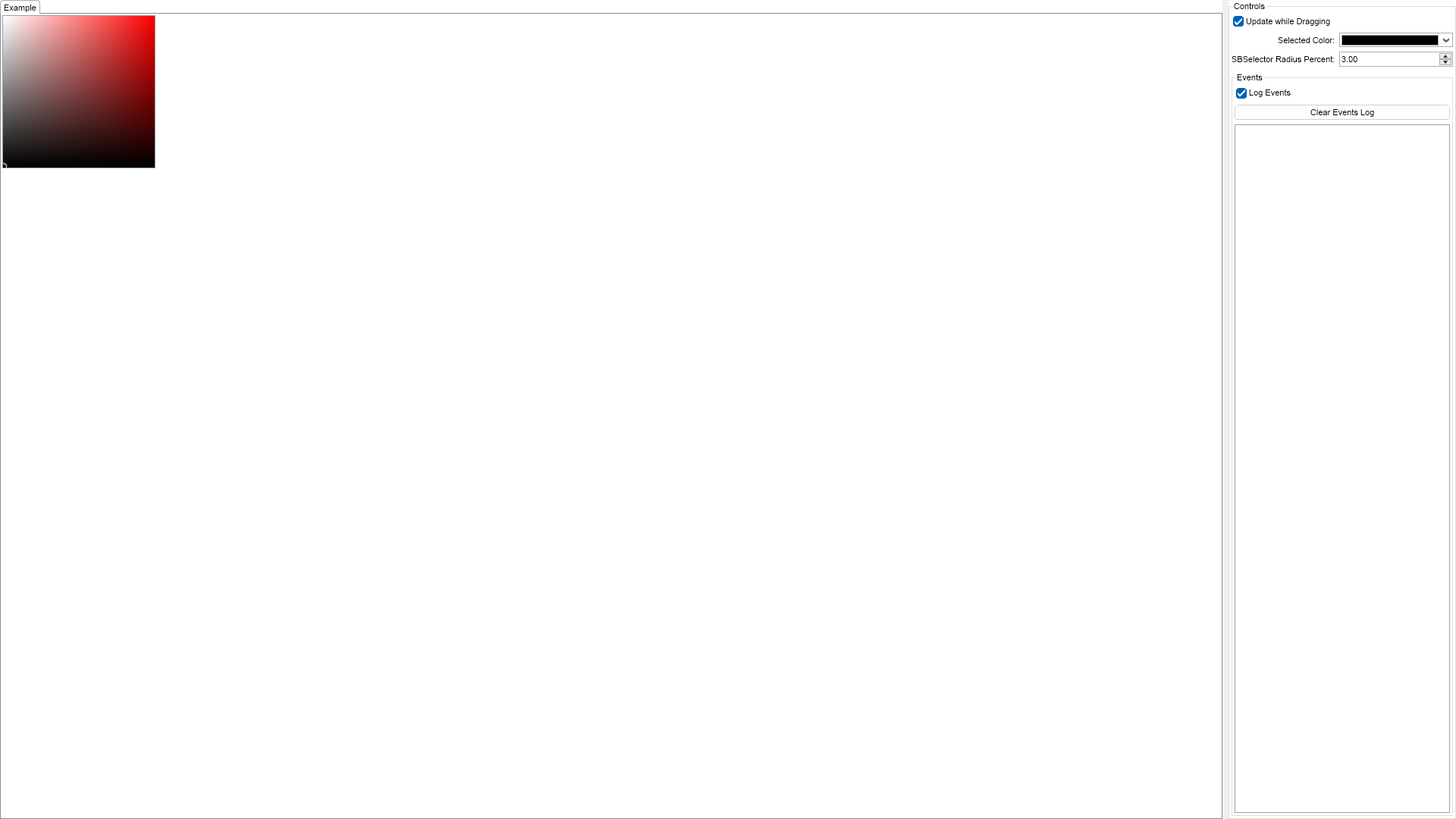
This example demonstrates how to create a Saturation-Brightness color box. The SB color box lets the user modify the saturation and brightness of a color with a specified hue component. The hue component can be controlled through the Hue property and the currently selected color is stored in the SelectedColor property. The SBSelectorRadiusPercent property determines the size of the circular color selector and the UpdateWhileDragging property specifies whether the selected color should be updated while the user drags the color selector or only when the user drops it. You can modify the values of all these properties using the controls on the rights.

| Language: C# |
using Nevron.Nov;
using Nevron.Nov.DataStructures;
using Nevron.Nov.Dom;
using Nevron.Nov.Editors;
using Nevron.Nov.Graphics;
using Nevron.Nov.Layout;
using Nevron.Nov.Presentation;
using Nevron.Nov.UI;
using Nevron.Nov.Windows.Forms;
using System.Windows.Forms;
namespace NovWinFormsProject
{
public partial class Form1 : Form
{
#region Constructors
public Form1()
{
InitializeComponent();
// Set form title
Text = "NOV WinForms - NSBColorPickerExample";
// Create the NOV example and its controls
NWidget exampleContent = CreateExampleContent();
NWidget exampleControls = CreateExampleControls();
if (exampleControls != null)
{
exampleControls.PreferredWidth = 300;
}
// Place the example and its controls in a pair box
NPairBox pairBox = new NPairBox(exampleContent, exampleControls);
pairBox.FillMode = ENStackFillMode.First;
pairBox.FitMode = ENStackFitMode.First;
pairBox.Margins = new NMargins(NDesign.HorizontalSpacing, NDesign.VerticalSpacing);
// Host the example in the form
NNovWidgetHost host = new NNovWidgetHost(pairBox);
host.Dock = DockStyle.Fill;
Controls.Add(host);
}
#endregion
#region Example
public NWidget CreateExampleContent()
{
// Create the SB color box
m_ColorPicker = new NSBColorPicker();
m_ColorPicker.HorizontalPlacement = ENHorizontalPlacement.Left;
m_ColorPicker.VerticalPlacement = ENVerticalPlacement.Top;
m_ColorPicker.SelectedColorChanged += OnSelectedColorChanged;
return m_ColorPicker;
}
public NWidget CreateExampleControls()
{
NList editors = NDesigner.GetDesigner(m_ColorPicker).CreateMemberEditors(
m_ColorPicker,
NSBColorPicker.UpdateWhileDraggingProperty,
NSBColorPicker.SelectedColorProperty,
NSBColorPicker.SBSelectorRadiusPercentProperty);
NStackPanel stack = new NStackPanel();
stack.FillMode = ENStackFillMode.Last;
stack.FitMode = ENStackFitMode.Last;
for (int i = 0; i < editors.Count; i++)
{
stack.Add(editors[i]);
}
m_EventsLog = new NExampleEventsLog();
stack.Add(m_EventsLog);
return new NUniSizeBoxGroup(stack);
}
public string GetExampleDescription()
{
return @"
This example demonstrates how to create a Saturation-Brightness color box. The SB color box lets the user modify
the saturation and brightness of a color with a specified hue component. The hue component can be controlled through
the Hue property and the currently selected color is stored in the SelectedColor property.
The SBSelectorRadiusPercent property determines the size of the circular color selector and the
UpdateWhileDragging property specifies whether the selected color should be updated while the user drags
the color selector or only when the user drops it. You can modify the values of all these properties using the controls
on the rights.
";
}
///
/// Gets the relevant documentation links for the example
///
///
public (string Name, string Url)[] GetDocumentationUrls()
{
return new[]
{
("SB Color Picker", "https://www.nevron.com/docs/openvision/ui-sb-color-picker.html"),
("Color Pickers Overview", "https://www.nevron.com/docs/openvision/ui-color-pickers-overview.html"),
};
}
#endregion
#region Implementation
#endregion
#region Event Handlers
private void OnSelectedColorChanged(NValueChangeEventArgs args)
{
NColor selectedColor = (NColor)args.NewValue;
m_EventsLog.LogEvent(NColor.GetNameOrHex(selectedColor));
}
#endregion
#region Fields
private NSBColorPicker m_ColorPicker;
private NExampleEventsLog m_EventsLog;
#endregion
#region Static Methods
#endregion
#region Constants
#endregion
#region Nested Types
#endregion
}
} | Language: VB.NET |
Imports Nevron.Nov
Imports Nevron.Nov.Dom
Imports Nevron.Nov.Editors
Imports Nevron.Nov.Graphics
Imports Nevron.Nov.Layout
Imports Nevron.Nov.UI
Imports Nevron.Nov.Windows.Wpf
Class MainWindow
#Region "Constructors"
Public Sub New()
' This call is required by the designer.
InitializeComponent()
' Add any initialization after the InitializeComponent() call.
' Set form title
Title = "NOV WPF - NSBColorPickerExample"
' Create the NOV example and its controls
Dim exampleContent As NWidget = CreateExampleContent()
Dim exampleControls As NWidget = CreateExampleControls()
If Not exampleControls Is Nothing Then
exampleControls.PreferredWidth = 300
End If
' Place the example and its controls in a pair box
Dim pairBox As NPairBox = New NPairBox(exampleContent, exampleControls)
pairBox.FillMode = ENStackFillMode.First
pairBox.FitMode = ENStackFitMode.First
pairBox.Margins = New NMargins(NDesign.HorizontalSpacing, NDesign.VerticalSpacing)
' Host the example in the form
Dim host As NNovWidgetHost(Of NWidget) = New NNovWidgetHost(Of NWidget)(pairBox)
Content = host
End Sub
#End Region
#Region "Example"
Public Function CreateExampleContent() As NWidget
' Create the SB color box
m_ColorPicker = New NSBColorPicker()
m_ColorPicker.HorizontalPlacement = ENHorizontalPlacement.Left
m_ColorPicker.VerticalPlacement = ENVerticalPlacement.Top
Me.m_ColorPicker.SelectedColorChanged += AddressOf OnSelectedColorChanged
Return m_ColorPicker
End Function
Public Function CreateExampleControls() As NWidget
Dim editors = NDesigner.GetDesigner(m_ColorPicker).CreateMemberEditors(m_ColorPicker, NSBColorPicker.UpdateWhileDraggingProperty, NSBColorPicker.SelectedColorProperty, NSBColorPicker.SBSelectorRadiusPercentProperty)
Dim stack As NStackPanel = New NStackPanel()
stack.FillMode = ENStackFillMode.Last
stack.FitMode = ENStackFitMode.Last
For i = 0 To editors.Count - 1
stack.Add(editors(i))
Next
m_EventsLog = New NExampleEventsLog()
stack.Add(m_EventsLog)
Return New NUniSizeBoxGroup(stack)
End Function
Public Function GetExampleDescription() As String
Return "
This example demonstrates how to create a Saturation-Brightness color box. The SB color box lets the user modify
the saturation and brightness of a color with a specified hue component. The hue component can be controlled through
the Hue property and the currently selected color is stored in the SelectedColor property.
The SBSelectorRadiusPercent property determines the size of the circular color selector and the
UpdateWhileDragging property specifies whether the selected color should be updated while the user drags
the color selector or only when the user drops it. You can modify the values of all these properties using the controls
on the rights.
"
End Function
'''
''' Gets the relevant documentation links for the example
'''
'''
Public Function GetDocumentationUrls() As (String, String)()
Return {("SB Color Picker", "https://www.nevron.com/docs/openvision/ui-sb-color-picker.html"), ("Color Pickers Overview", "https://www.nevron.com/docs/openvision/ui-color-pickers-overview.html")}
End Function
#End Region
#Region "Implementation"
#End Region
#Region "Event Handlers"
Private Sub OnSelectedColorChanged(args As NValueChangeEventArgs)
Dim selectedColor As NColor = args.NewValue
m_EventsLog.LogEvent(NColor.GetNameOrHex(selectedColor))
End Sub
#End Region
#Region "Fields"
Private m_ColorPicker As NSBColorPicker
Private m_EventsLog As NExampleEventsLog
#End Region
#Region "Static Methods"
#End Region
#Region "Constants"
#End Region
#Region "Nested Types"
#End Region
End Class