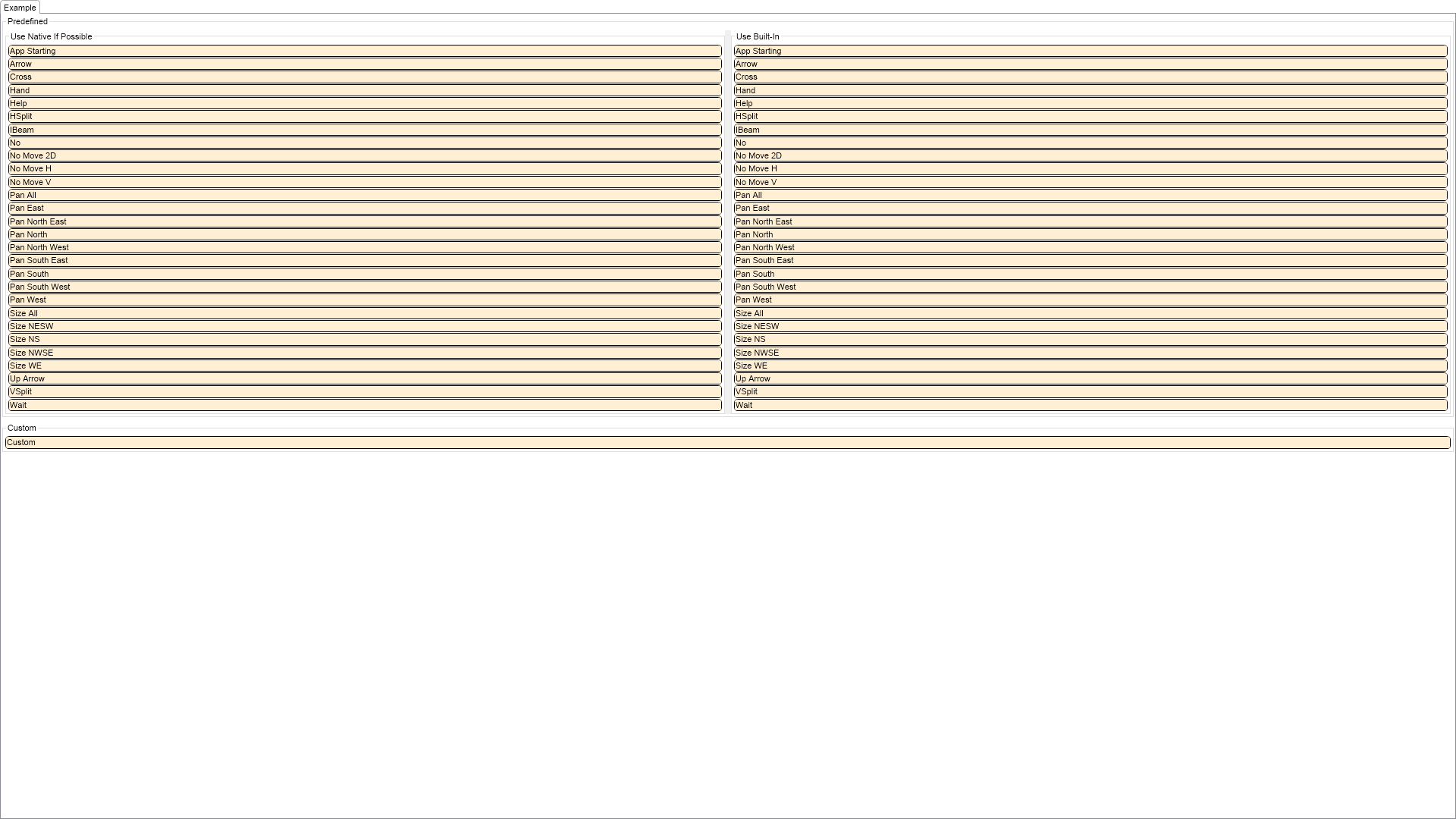
This example shows how to use cursors. NOV supports 2 types of cursors - predefined and custom. Predefined cursors can be native or built-in. A custom cursor can be loaded from a stream or you can manually specify the values of its pixels.

| Language: C# |
using Nevron.Nov;
using Nevron.Nov.Dom;
using Nevron.Nov.Graphics;
using Nevron.Nov.Layout;
using Nevron.Nov.UI;
using Nevron.Nov.Windows.Forms;
using System;
using System.Windows.Forms;
namespace NovWinFormsProject
{
public partial class Form1 : Form
{
#region Constructors
public Form1()
{
InitializeComponent();
// Set form title
Text = "NOV WinForms - NCursorsExample";
// Create the NOV example and its controls
NWidget exampleContent = CreateExampleContent();
NWidget exampleControls = CreateExampleControls();
if (exampleControls != null)
{
exampleControls.PreferredWidth = 300;
}
// Place the example and its controls in a pair box
NPairBox pairBox = new NPairBox(exampleContent, exampleControls);
pairBox.FillMode = ENStackFillMode.First;
pairBox.FitMode = ENStackFitMode.First;
pairBox.Margins = new NMargins(NDesign.HorizontalSpacing, NDesign.VerticalSpacing);
// Host the example in the form
NNovWidgetHost host = new NNovWidgetHost(pairBox);
host.Dock = DockStyle.Fill;
Controls.Add(host);
}
#endregion
#region Example
public NWidget CreateExampleContent()
{
Array predefinedCursors = NEnum.GetValues(typeof(ENPredefinedCursor));
NStackPanel stack = new NStackPanel();
NGroupBox predefinedGroupBox = new NGroupBox("Predefined");
stack.Add(predefinedGroupBox);
NSplitter splitter = new NSplitter();
splitter.SplitMode = ENSplitterSplitMode.Proportional;
splitter.SplitFactor = 0.5d;
predefinedGroupBox.Content = splitter;
for (int i = 0; i < 2; i++)
{
NStackPanel pstack = new NStackPanel();
pstack.VerticalSpacing = 1;
switch (i)
{
case 0:
splitter.Pane1.Content = new NGroupBox("Use Native If Possible", pstack);
break;
case 1:
splitter.Pane2.Content = new NGroupBox("Use Built-In", pstack);
break;
default:
throw new Exception("More cases?");
}
for (int j = 0; j < predefinedCursors.Length; j++)
{
ENPredefinedCursor predefinedCursor = (ENPredefinedCursor)predefinedCursors.GetValue(j);
NWidget element = CreateDemoElement(NStringHelpers.InsertSpacesBeforeUppersAndDigits(predefinedCursor.ToString()));
element.Cursor = new NCursor(predefinedCursor, i == 0);
pstack.Add(element);
}
}
NWidget customElement = CreateDemoElement("Custom");
customElement.Cursor = new Nevron.Nov.UI.NCursor(Nevron.Nov.NConvert.FromBase64String("AAACAAEAICAAAAcABwAwAQAAFgAAACgAAAAgAAAAQAAAAAEAAQAAAAAAgAAAAAAAAAAAAAAAAgAAAAIAAAAAAAAA////AAAAAAAAcAHwAHAD8ABwB/AAcA/wAHAf8ABwP/AAcH/wAHD/8ABx//AAc/7wAHf88AB/+PAAf/DwAH/g8AB/wPAAf4DwAH8A8AB+AOAAfADAAHgAgABwAAAAYAAAAEAAAAAAAAAAAAAAAAAAAAAAAAAAAAAAAAAAAAAAAAAAAAAA/wf+B/8H/Af/J/gH/yfw5/8n4ef/J8Pn/yeHZ/8nDmf/Jhxn/yQ4Z/8gcGf/IOBn/yHCZ/8jhmf/Jw5n/y4eZ/88Pkf/OH4H/zD+D/8h/h//A/4//wf+f/8P/v//H////z////9///////////////////////////////////8="));
NGroupBox customGroupBox = new NGroupBox("Custom", customElement);
stack.Add(customGroupBox);
return stack;
}
public NWidget CreateExampleControls()
{
return null;
}
public string GetExampleDescription()
{
return @"
This example shows how to use cursors. NOV supports 2 types of cursors - predefined and custom. Predefined cursors can
be native or built-in. A custom cursor can be loaded from a stream or you can manually specify the values of its pixels.
";
}
///
/// Gets the relevant documentation links for the example
///
///
public (string Name, string Url)[] GetDocumentationUrls()
{
return new[]
{
("Cursors", "https://www.nevron.com/docs/openvision/ui-cursors.html"),
("User Input", "https://www.nevron.com/docs/openvision/ui-user-input.html"),
};
}
#endregion
#region Implementation
private NWidget CreateDemoElement(string text)
{
NContentHolder element = new NContentHolder(text);
element.Border = NBorder.CreateFilledBorder(NColor.Black, 2, 5);
element.BorderThickness = new NMargins(1);
element.BackgroundFill = new NColorFill(NColor.PapayaWhip);
element.TextFill = new NColorFill(NColor.Black);
element.Padding = new NMargins(1);
return element;
}
#endregion
#region Event Handlers
#endregion
#region Fields
#endregion
#region Static Methods
#endregion
#region Constants
#endregion
#region Nested Types
#endregion
}
} | Language: VB.NET |
Imports Nevron.Nov
Imports Nevron.Nov.Dom
Imports Nevron.Nov.Graphics
Imports Nevron.Nov.Layout
Imports Nevron.Nov.UI
Imports Nevron.Nov.Windows.Wpf
Imports System
Class MainWindow
#Region "Constructors"
Public Sub New()
' This call is required by the designer.
InitializeComponent()
' Add any initialization after the InitializeComponent() call.
' Set form title
Title = "NOV WPF - NCursorsExample"
' Create the NOV example and its controls
Dim exampleContent As NWidget = CreateExampleContent()
Dim exampleControls As NWidget = CreateExampleControls()
If Not exampleControls Is Nothing Then
exampleControls.PreferredWidth = 300
End If
' Place the example and its controls in a pair box
Dim pairBox As NPairBox = New NPairBox(exampleContent, exampleControls)
pairBox.FillMode = ENStackFillMode.First
pairBox.FitMode = ENStackFitMode.First
pairBox.Margins = New NMargins(NDesign.HorizontalSpacing, NDesign.VerticalSpacing)
' Host the example in the form
Dim host As NNovWidgetHost(Of NWidget) = New NNovWidgetHost(Of NWidget)(pairBox)
Content = host
End Sub
#End Region
#Region "Example"
Public Function CreateExampleContent() As NWidget
Dim predefinedCursors As Array = NEnum.GetValues(GetType(ENPredefinedCursor))
Dim stack As NStackPanel = New NStackPanel()
Dim predefinedGroupBox As NGroupBox = New NGroupBox("Predefined")
stack.Add(predefinedGroupBox)
Dim splitter As NSplitter = New NSplitter()
splitter.SplitMode = ENSplitterSplitMode.Proportional
splitter.SplitFactor = 0.5R
predefinedGroupBox.Content = splitter
For i = 0 To 1
Dim pstack As NStackPanel = New NStackPanel()
pstack.VerticalSpacing = 1
Select Case i
Case 0
splitter.Pane1.Content = New NGroupBox("Use Native If Possible", pstack)
Case 1
splitter.Pane2.Content = New NGroupBox("Use Built-In", pstack)
Case Else
Throw New Exception("More cases?")
End Select
For j = 0 To predefinedCursors.Length - 1
Dim predefinedCursor As ENPredefinedCursor = predefinedCursors.GetValue(j)
Dim element As NWidget = Me.CreateDemoElement(NStringHelpers.InsertSpacesBeforeUppersAndDigits(predefinedCursor.ToString()))
element.Cursor = New NCursor(predefinedCursor, i = 0)
pstack.Add(element)
Next
Next
Dim customElement = CreateDemoElement("Custom")
customElement.Cursor = new Nevron.Nov.UI.NCursor(Nevron.Nov.NConvert.FromBase64String("AAACAAEAICAAAAcABwAwAQAAFgAAACgAAAAgAAAAQAAAAAEAAQAAAAAAgAAAAAAAAAAAAAAAAgAAAAIAAAAAAAAA////AAAAAAAAcAHwAHAD8ABwB/AAcA/wAHAf8ABwP/AAcH/wAHD/8ABx//AAc/7wAHf88AB/+PAAf/DwAH/g8AB/wPAAf4DwAH8A8AB+AOAAfADAAHgAgABwAAAAYAAAAEAAAAAAAAAAAAAAAAAAAAAAAAAAAAAAAAAAAAAAAAAAAAAA/wf+B/8H/Af/J/gH/yfw5/8n4ef/J8Pn/yeHZ/8nDmf/Jhxn/yQ4Z/8gcGf/IOBn/yHCZ/8jhmf/Jw5n/y4eZ/88Pkf/OH4H/zD+D/8h/h//A/4//wf+f/8P/v//H////z////9///////////////////////////////////8="))
Dim customGroupBox As NGroupBox = New NGroupBox("Custom", customElement)
stack.Add(customGroupBox)
Return stack
End Function
Public Function CreateExampleControls() As NWidget
Return Nothing
End Function
Public Function GetExampleDescription() As String
Return "
This example shows how to use cursors. NOV supports 2 types of cursors - predefined and custom. Predefined cursors can
be native or built-in. A custom cursor can be loaded from a stream or you can manually specify the values of its pixels.
"
End Function
'''
''' Gets the relevant documentation links for the example
'''
'''
Public Function GetDocumentationUrls() As (String, String)()
Return {("Cursors", "https://www.nevron.com/docs/openvision/ui-cursors.html"), ("User Input", "https://www.nevron.com/docs/openvision/ui-user-input.html")}
End Function
#End Region
#Region "Implementation"
Private Function CreateDemoElement(text As String) As NWidget
Dim element As NContentHolder = New NContentHolder(text)
element.Border = NBorder.CreateFilledBorder(NColor.Black, 2, 5)
element.BorderThickness = New NMargins(1)
element.BackgroundFill = New NColorFill(NColor.PapayaWhip)
element.TextFill = New NColorFill(NColor.Black)
element.Padding = New NMargins(1)
Return element
End Function
#End Region
#Region "Event Handlers"
#End Region
#Region "Fields"
#End Region
#Region "Static Methods"
#End Region
#Region "Constants"
#End Region
#Region "Nested Types"
#End Region
End Class