Items Manipulation Example for WPF

Nevron NOV UserInterface for WPF ships with hundreds of examples with full source code, as part of the Nevron Open Vision Suite. All WPF UserInterface examples are also available as a stand-alone Visual Studio solution in C# and VB.NET, which you can download from the links below.

Items Manipulation Example for WPF Description

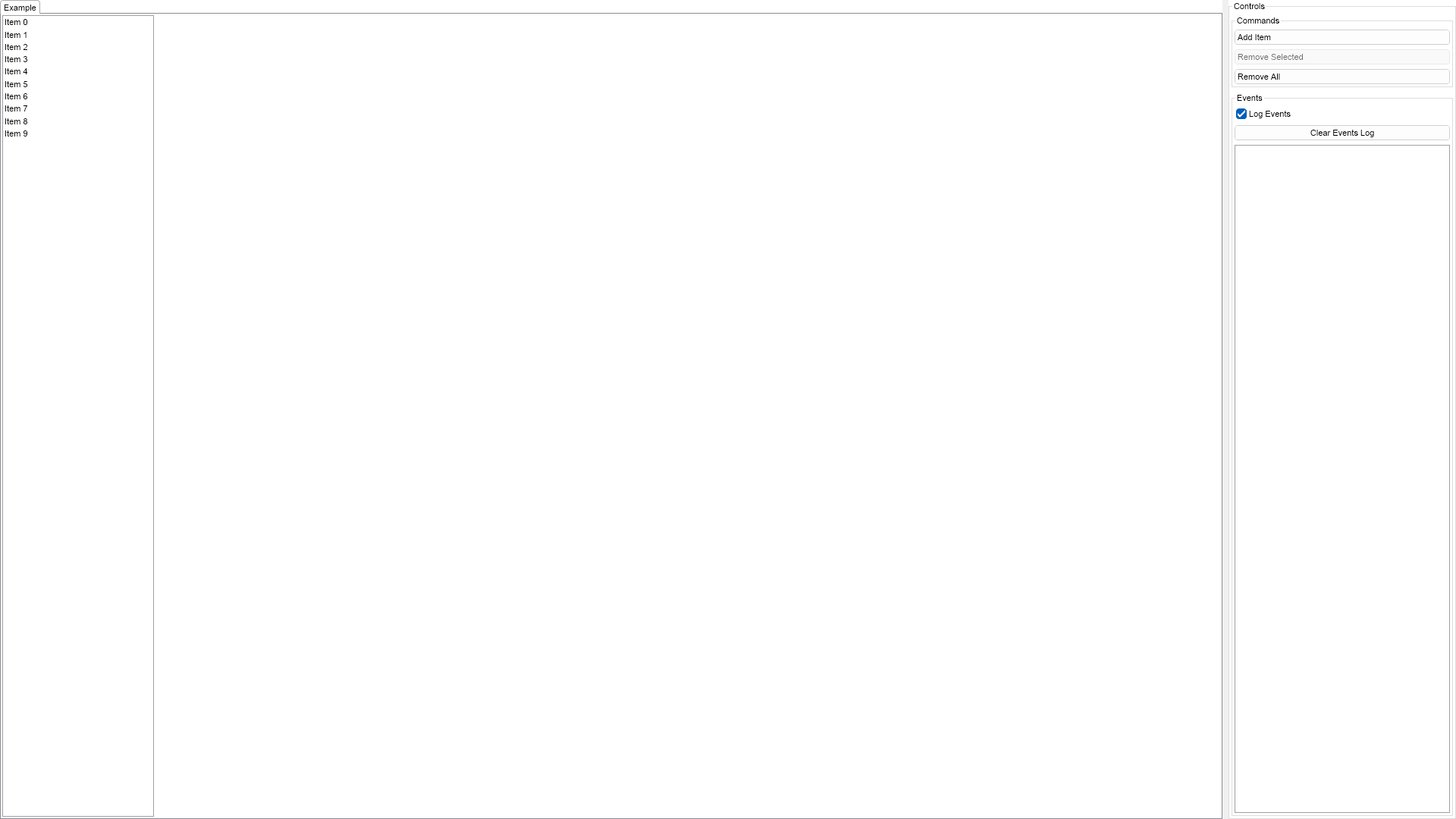
This example demonstrates how to create a simple list box with text only list box items and how to add/remove items. You can use the buttons on the right to add/remove items from the list box's Items collection.


List Box Items Manipulation Example

C# Items Manipulation Example Code for Nevron UserInterface for WPF
Language: C#

using Nevron.Nov;
using Nevron.Nov.DataStructures;
using Nevron.Nov.Dom;
using Nevron.Nov.Editors;
using Nevron.Nov.Graphics;
using Nevron.Nov.Layout;
using Nevron.Nov.UI;
using Nevron.Nov.Windows.Forms;
using System;
using System.Windows.Forms;

namespace NovWinFormsProject
{
	public partial class Form1 : Form
	{
		#region Constructors

		public Form1()
		{
			InitializeComponent();

			// Set form title
			Text = "NOV WinForms - NListBoxItemsManipulationExample";

			// Create the NOV example and its controls
			NWidget exampleContent = CreateExampleContent();
			NWidget exampleControls = CreateExampleControls();
			if (exampleControls != null)
			{
				exampleControls.PreferredWidth = 300;
			}

			// Place the example and its controls in a pair box
			NPairBox pairBox = new NPairBox(exampleContent, exampleControls);
			pairBox.FillMode = ENStackFillMode.First;
			pairBox.FitMode = ENStackFitMode.First;
			pairBox.Margins = new NMargins(NDesign.HorizontalSpacing, NDesign.VerticalSpacing);

			// Host the example in the form
			NNovWidgetHost host = new NNovWidgetHost(pairBox);
			host.Dock = DockStyle.Fill;
			Controls.Add(host);
		}

		#endregion

		#region Example

		public NWidget CreateExampleContent()
		{
			// Create a list box
			m_ListBox = new NListBox();
			m_ListBox.HorizontalPlacement = ENHorizontalPlacement.Left;
			m_ListBox.PreferredSize = new NSize(200, 400);

			// Add some items
			for (int i = 0; i < 10; i++)
			{
				NListBoxItem item = new NListBoxItem("Item " + i.ToString());
				item.Tag = i;
				m_ListBox.Items.Add(item);
			}

			// Hook to list box selection events
			m_ListBox.Selection.Selected += OnListBoxItemSelected;
			m_ListBox.Selection.Deselected += OnListBoxItemDeselected;

			return m_ListBox;
		}
		public NWidget CreateExampleControls()
		{
			NStackPanel stack = new NStackPanel();
			stack.FillMode = ENStackFillMode.Last;
			stack.FitMode = ENStackFitMode.Last;

			// Create the commands group box
			stack.Add(CreateCommandsGroupBox());

			// Create the events log
			m_EventsLog = new NExampleEventsLog();
			stack.Add(m_EventsLog);

			return stack;
		}
		public string GetExampleDescription()
		{
			return @"

This example demonstrates how to create a simple list box with text only list box items and how to add/remove items. You can use the buttons on the right to add/remove items from the list box's Items collection.

"; } /// /// Gets the relevant documentation links for the example /// /// public (string Name, string Url)[] GetDocumentationUrls() { return new[] { ("List Box", "https://www.nevron.com/docs/openvision/ui-list-box.html"), ("Widget Elements", "https://www.nevron.com/docs/openvision/ui-widget-elements.html"), ("User Input", "https://www.nevron.com/docs/openvision/ui-user-input.html"), }; } #endregion #region Implementation private NGroupBox CreateCommandsGroupBox() { NStackPanel commandsStack = new NStackPanel(); // Create the command buttons m_AddButton = new NButton("Add Item"); m_AddButton.Click += OnAddButtonClick; commandsStack.Add(m_AddButton); m_RemoveSelectedButton = new NButton("Remove Selected"); m_RemoveSelectedButton.Enabled = false; m_RemoveSelectedButton.Click += OnRemoveSelectedButtonClick; commandsStack.Add(m_RemoveSelectedButton); m_RemoveAllButton = new NButton("Remove All"); m_RemoveAllButton.Click += OnRemoveAllButtonClick; commandsStack.Add(m_RemoveAllButton); // Create the commands group box NGroupBox commmandsGroupBox = new NGroupBox("Commands"); commmandsGroupBox.Content = commandsStack; return commmandsGroupBox; } #endregion #region Event Handlers private void OnListBoxItemSelected(NItemEventArgs args) { m_RemoveSelectedButton.Enabled = true; NListBoxItem item = args.Item; m_EventsLog.LogEvent("Selected Item: " + item.Tag.ToString()); } private void OnListBoxItemDeselected(NItemEventArgs args) { NListBoxItem item = args.Item; m_EventsLog.LogEvent("Deselected Item: " + item.Tag.ToString()); } private void OnAddButtonClick(NEventArgs args) { int index; string value = "0"; if (m_ListBox.Items.Count > 0) { NListBoxItem lastItem = m_ListBox.Items[m_ListBox.Items.Count - 1]; NLabel label = (NLabel)lastItem.GetDescendants(new NInstanceOfSchemaFilter(NLabel.NLabelSchema))[0]; value = label.Text; value = value.Remove(0, value.LastIndexOf(' ') + 1); } // Add an item with the calculated index index = Int32.Parse(value) + 1; NListBoxItem item = new NListBoxItem("Item " + index); item.Tag = index; m_ListBox.Items.Add(item); if (m_ListBox.Items.Count == 1) { m_RemoveAllButton.Enabled = true; } } private void OnRemoveSelectedButtonClick(NEventArgs args) { NList selected = m_ListBox.Selection.SelectedItems; for (int i = 0; i < selected.Count; i++) { m_ListBox.Items.Remove(selected[i]); } if (m_ListBox.Items.Count == 0) { m_RemoveAllButton.Enabled = false; m_RemoveSelectedButton.Enabled = false; } } private void OnRemoveAllButtonClick(NEventArgs args) { m_ListBox.Items.Clear(); m_RemoveAllButton.Enabled = false; m_RemoveSelectedButton.Enabled = false; } #endregion #region Fields private NListBox m_ListBox; private NExampleEventsLog m_EventsLog; private NButton m_AddButton; private NButton m_RemoveSelectedButton; private NButton m_RemoveAllButton; #endregion #region Static Methods #endregion #region Constants #endregion #region Nested Types #endregion } }

Download a fully functional C# (.cs) Items Manipulation Example for WPF Solution

VB.NET Items Manipulation Example Code for Nevron UserInterface for WPF
Language: VB.NET

Imports Nevron.Nov
Imports Nevron.Nov.Dom
Imports Nevron.Nov.Graphics
Imports Nevron.Nov.Layout
Imports Nevron.Nov.UI
Imports Nevron.Nov.Windows.Wpf

Class MainWindow

#Region "Constructors"

	Public Sub New()
		' This call is required by the designer.
		InitializeComponent()

		' Add any initialization after the InitializeComponent() call.

		' Set form title
		Title = "NOV WPF - NListBoxItemsManipulationExample"

		' Create the NOV example and its controls
		Dim exampleContent As NWidget = CreateExampleContent()
		Dim exampleControls As NWidget = CreateExampleControls()
		If Not exampleControls Is Nothing Then
			exampleControls.PreferredWidth = 300
		End If

		' Place the example and its controls in a pair box
		Dim pairBox As NPairBox = New NPairBox(exampleContent, exampleControls)
		pairBox.FillMode = ENStackFillMode.First
		pairBox.FitMode = ENStackFitMode.First
		pairBox.Margins = New NMargins(NDesign.HorizontalSpacing, NDesign.VerticalSpacing)

		' Host the example in the form
		Dim host As NNovWidgetHost(Of NWidget) = New NNovWidgetHost(Of NWidget)(pairBox)
		Content = host
	End Sub


#End Region

#Region "Example"

        Public Function CreateExampleContent() As NWidget
            ' Create a list box
            m_ListBox = New NListBox()
            m_ListBox.HorizontalPlacement = ENHorizontalPlacement.Left
            m_ListBox.PreferredSize = New NSize(200, 400)

            ' Add some items
            For i = 0 To 9
                Dim item As NListBoxItem = New NListBoxItem("Item " & i.ToString())
                item.Tag = i
                m_ListBox.Items.Add(item)
            Next

            ' Hook to list box selection events
            Me.m_ListBox.Selection.Selected += AddressOf OnListBoxItemSelected
            Me.m_ListBox.Selection.Deselected += AddressOf OnListBoxItemDeselected

            Return m_ListBox
        End Function
        Public Function CreateExampleControls() As NWidget
            Dim stack As NStackPanel = New NStackPanel()
            stack.FillMode = ENStackFillMode.Last
            stack.FitMode = ENStackFitMode.Last

            ' Create the commands group box
            stack.Add(CreateCommandsGroupBox())

            ' Create the events log
            m_EventsLog = New NExampleEventsLog()
            stack.Add(m_EventsLog)

            Return stack
        End Function
        Public Function GetExampleDescription() As String
            Return "

This example demonstrates how to create a simple list box with text only list box items and how to add/remove items. You can use the buttons on the right to add/remove items from the list box's Items collection.

" End Function ''' ''' Gets the relevant documentation links for the example ''' ''' Public Function GetDocumentationUrls() As (String, String)() Return {("List Box", "https://www.nevron.com/docs/openvision/ui-list-box.html"), ("Widget Elements", "https://www.nevron.com/docs/openvision/ui-widget-elements.html"), ("User Input", "https://www.nevron.com/docs/openvision/ui-user-input.html")} End Function #End Region #Region "Implementation" Private Function CreateCommandsGroupBox() As NGroupBox Dim commandsStack As NStackPanel = New NStackPanel() ' Create the command buttons m_AddButton = New NButton("Add Item") Me.m_AddButton.Click += AddressOf OnAddButtonClick commandsStack.Add(m_AddButton) m_RemoveSelectedButton = New NButton("Remove Selected") m_RemoveSelectedButton.Enabled = False Me.m_RemoveSelectedButton.Click += AddressOf OnRemoveSelectedButtonClick commandsStack.Add(m_RemoveSelectedButton) m_RemoveAllButton = New NButton("Remove All") Me.m_RemoveAllButton.Click += AddressOf OnRemoveAllButtonClick commandsStack.Add(m_RemoveAllButton) ' Create the commands group box Dim commmandsGroupBox As NGroupBox = New NGroupBox("Commands") commmandsGroupBox.Content = commandsStack Return commmandsGroupBox End Function #End Region #Region "Event Handlers" Private Sub OnListBoxItemSelected(args As NItemEventArgs(Of NListBoxItem)) m_RemoveSelectedButton.Enabled = True Dim item = args.Item m_EventsLog.LogEvent("Selected Item: " & item.Tag.ToString()) End Sub Private Sub OnListBoxItemDeselected(args As NItemEventArgs(Of NListBoxItem)) Dim item = args.Item m_EventsLog.LogEvent("Deselected Item: " & item.Tag.ToString()) End Sub Private Sub OnAddButtonClick(args As NEventArgs) Dim index As Integer Dim value = "0" If m_ListBox.Items.Count > 0 Then Dim lastItem = m_ListBox.Items(m_ListBox.Items.Count - 1) Dim label As NLabel = CType(lastItem.GetDescendants(New NInstanceOfSchemaFilter(NLabel.NLabelSchema))(0), NLabel) value = label.Text value = value.Remove(0, value.LastIndexOf(" "c) + 1) End If ' Add an item with the calculated index index = Integer.Parse(value) + 1 Dim item As NListBoxItem = New NListBoxItem("Item " & index.ToString()) item.Tag = index m_ListBox.Items.Add(item) If m_ListBox.Items.Count = 1 Then m_RemoveAllButton.Enabled = True End If End Sub Private Sub OnRemoveSelectedButtonClick(args As NEventArgs) Dim selected = m_ListBox.Selection.SelectedItems For i = 0 To selected.Count - 1 m_ListBox.Items.Remove(selected(i)) Next If m_ListBox.Items.Count = 0 Then m_RemoveAllButton.Enabled = False m_RemoveSelectedButton.Enabled = False End If End Sub Private Sub OnRemoveAllButtonClick(args As NEventArgs) m_ListBox.Items.Clear() m_RemoveAllButton.Enabled = False m_RemoveSelectedButton.Enabled = False End Sub #End Region #Region "Fields" Private m_ListBox As NListBox Private m_EventsLog As NExampleEventsLog Private m_AddButton As NButton Private m_RemoveSelectedButton As NButton Private m_RemoveAllButton As NButton #End Region #Region "Static Methods" #End Region #Region "Constants" #End Region #Region "Nested Types" #End Region End Class

Download a fully functional VB.NET (.vb) Items Manipulation Example for WPF Solution

Related Documentation Links