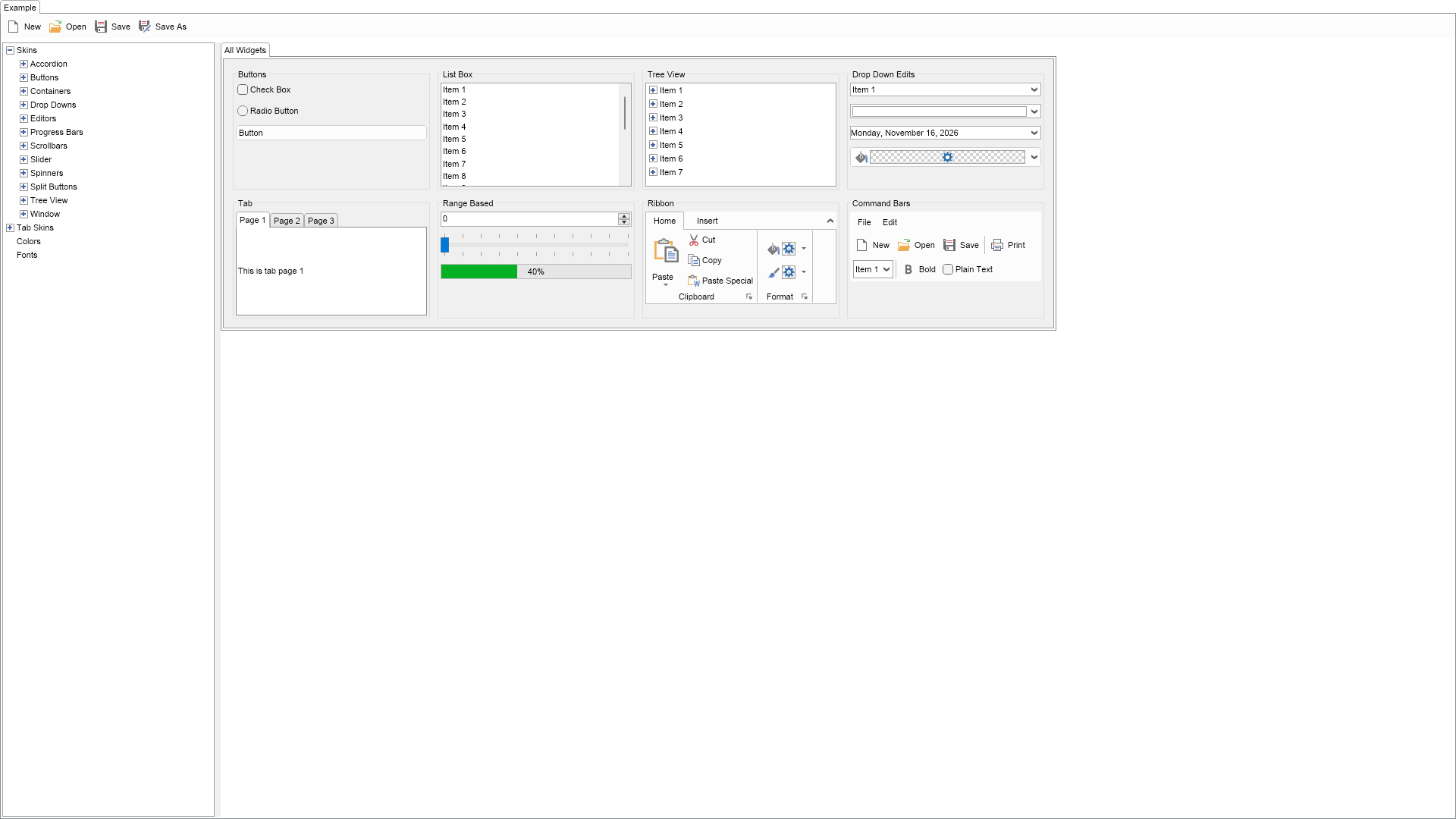
This example demonstrates the Nevron Open Vision (NOV) Theme Builder. It can be used to create UI themes based on one of the existing themes, modify them and save them to a theme file, which can be imported and applied to NOV widgets.

| Language: C# |
using Nevron.Nov;
using Nevron.Nov.Dom;
using Nevron.Nov.Graphics;
using Nevron.Nov.Layout;
using Nevron.Nov.UI;
using Nevron.Nov.UI.ThemeBuilder;
using Nevron.Nov.Windows.Forms;
using System.Windows.Forms;
namespace NovWinFormsProject
{
public partial class Form1 : Form
{
#region Constructors
public Form1()
{
InitializeComponent();
// Set form title
Text = "NOV WinForms - NThemeBuilderExample";
// Create the NOV example and its controls
NWidget exampleContent = CreateExampleContent();
NWidget exampleControls = CreateExampleControls();
if (exampleControls != null)
{
exampleControls.PreferredWidth = 300;
}
// Place the example and its controls in a pair box
NPairBox pairBox = new NPairBox(exampleContent, exampleControls);
pairBox.FillMode = ENStackFillMode.First;
pairBox.FitMode = ENStackFitMode.First;
pairBox.Margins = new NMargins(NDesign.HorizontalSpacing, NDesign.VerticalSpacing);
// Host the example in the form
NNovWidgetHost host = new NNovWidgetHost(pairBox);
host.Dock = DockStyle.Fill;
Controls.Add(host);
}
#endregion
#region Example
public NWidget CreateExampleContent()
{
NThemeBuilderWidget themeBuilderWidget = new NThemeBuilderWidget();
themeBuilderWidget.SetEditedTheme(new NWindows11Theme());
return themeBuilderWidget;
}
public NWidget CreateExampleControls()
{
return null;
}
public string GetExampleDescription()
{
return @"
This example demonstrates the Nevron Open Vision (NOV) Theme Builder. It can be used to create UI themes based on one of the existing themes,
modify them and save them to a theme file, which can be imported and applied to NOV widgets.
";
}
///
/// Gets the relevant documentation links for the example
///
///
public (string Name, string Url)[] GetDocumentationUrls()
{
return new[]
{
("The UI Theme Builder", "https://www.nevron.com/docs/openvision/ui-theme-builder.html"),
("Custom UI Themes", "https://www.nevron.com/docs/openvision/custom-ui-themes.html"),
("Part Based UI Themes", "https://www.nevron.com/docs/openvision/part-based-ui-themes.html"),
("Using UI Themes", "https://www.nevron.com/docs/openvision/using-ui-themes.html"),
};
}
#endregion
#region Implementation
#endregion
#region Event Handlers
#endregion
#region Fields
#endregion
#region Static Methods
#endregion
#region Constants
#endregion
#region Nested Types
#endregion
}
} | Language: VB.NET |
Imports Nevron.Nov
Imports Nevron.Nov.Dom
Imports Nevron.Nov.Graphics
Imports Nevron.Nov.Layout
Imports Nevron.Nov.UI
Imports Nevron.Nov.UI.ThemeBuilder
Imports Nevron.Nov.Windows.Wpf
Class MainWindow
#Region "Constructors"
Public Sub New()
' This call is required by the designer.
InitializeComponent()
' Add any initialization after the InitializeComponent() call.
' Set form title
Title = "NOV WPF - NThemeBuilderExample"
' Create the NOV example and its controls
Dim exampleContent As NWidget = CreateExampleContent()
Dim exampleControls As NWidget = CreateExampleControls()
If Not exampleControls Is Nothing Then
exampleControls.PreferredWidth = 300
End If
' Place the example and its controls in a pair box
Dim pairBox As NPairBox = New NPairBox(exampleContent, exampleControls)
pairBox.FillMode = ENStackFillMode.First
pairBox.FitMode = ENStackFitMode.First
pairBox.Margins = New NMargins(NDesign.HorizontalSpacing, NDesign.VerticalSpacing)
' Host the example in the form
Dim host As NNovWidgetHost(Of NWidget) = New NNovWidgetHost(Of NWidget)(pairBox)
Content = host
End Sub
#End Region
#Region "Example"
Public Function CreateExampleContent() As NWidget
Dim themeBuilderWidget As NThemeBuilderWidget = New NThemeBuilderWidget()
themeBuilderWidget.SetEditedTheme(New NWindows11Theme())
Return themeBuilderWidget
End Function
Public Function CreateExampleControls() As NWidget
Return Nothing
End Function
Public Function GetExampleDescription() As String
Return "
This example demonstrates the Nevron Open Vision (NOV) Theme Builder. It can be used to create UI themes based on one of the existing themes,
modify them and save them to a theme file, which can be imported and applied to NOV widgets.
"
End Function
'''
''' Gets the relevant documentation links for the example
'''
'''
Public Function GetDocumentationUrls() As (String, String)()
Return {("The UI Theme Builder", "https://www.nevron.com/docs/openvision/ui-theme-builder.html"), ("Custom UI Themes", "https://www.nevron.com/docs/openvision/custom-ui-themes.html"), ("Part Based UI Themes", "https://www.nevron.com/docs/openvision/part-based-ui-themes.html"), ("Using UI Themes", "https://www.nevron.com/docs/openvision/using-ui-themes.html")}
End Function
#End Region
#Region "Implementation"
#End Region
#Region "Event Handlers"
#End Region
#Region "Fields"
#End Region
#Region "Static Methods"
#End Region
#Region "Constants"
#End Region
#Region "Nested Types"
#End Region
End Class