Filtering by Column and Field Example for Blazor

Filtering by Column and Field Example for Blazor

Nevron NOV Grid for Blazor ships with hundreds of examples with full source code, as part of the Nevron Open Vision Suite. All Blazor Grid examples are also available as a stand-alone Visual Studio solution in C#, which you can download from the links below.

Filtering by Column and Field Example for Blazor Description

Demonstrates filtering by field or column values as well as multiple filters.

NOV Grid allows you to create filter rules that work on column and field provided row values. This makes it possible to create filter rules that work on calculated columns (i.e. columns that do not have an associated field in the data source) as well as create filter rules that work on data source fields, regardless of whether they are represented by columns in the grid.

In this example we have create two filter rules.
The first filter rule filters records for which the PersonId field is equal to 0. This filter rule is not associated with a column, since the PersonId field is not represented by a column in the grid.
The second filter rule filters records for which the Total calculated column is greater than 150. This filter rule is associated with a column, which is at the same time row value provider for this filter rule row condition. Note that the Total column does not have an associated field in the data source.
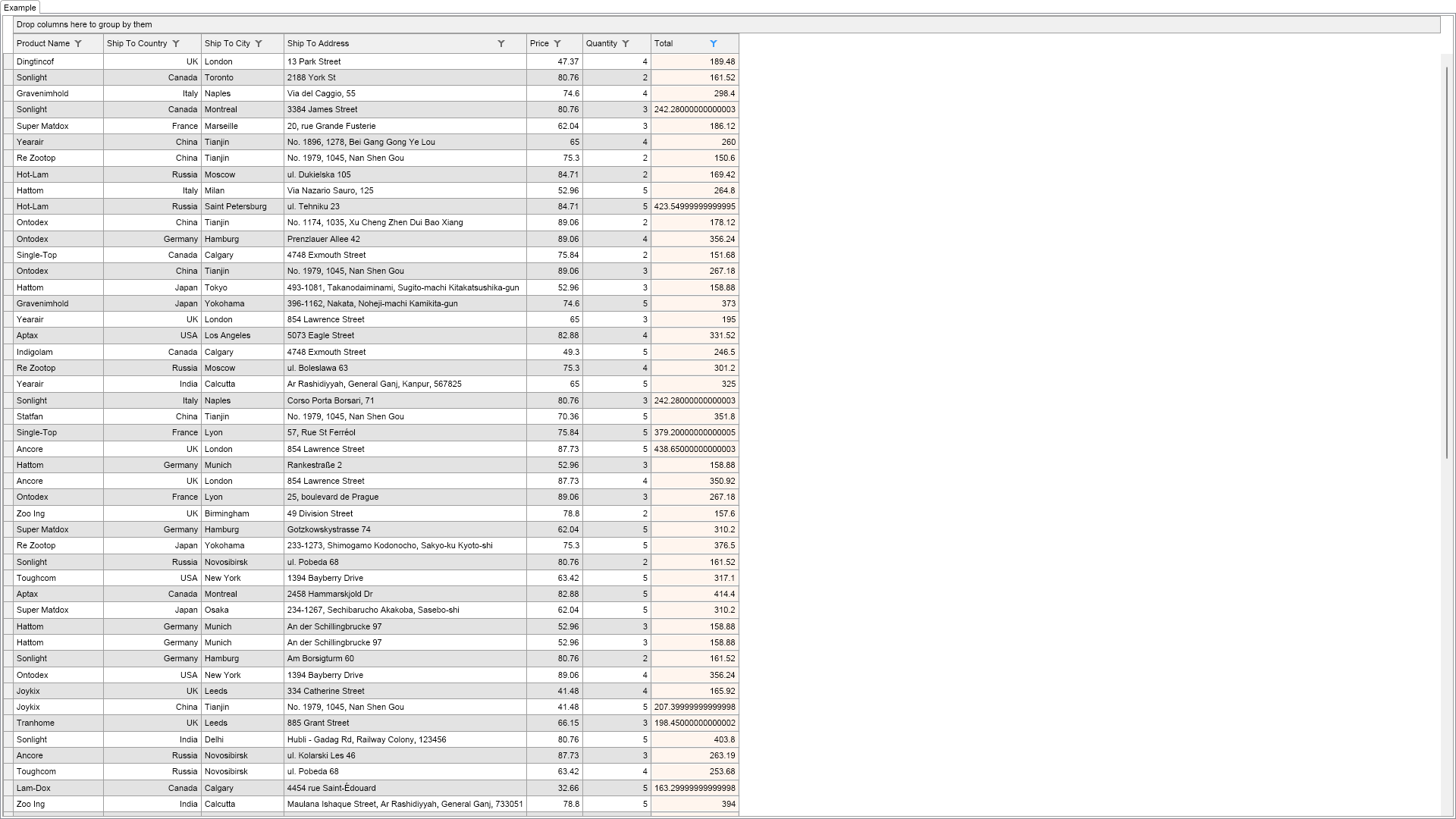

Column and Field Filtering Example

C# Filtering by Column and Field Example Code for Nevron Grid for Blazor
Language: C#

using Nevron.Nov;
using Nevron.Nov.Dom;
using Nevron.Nov.Graphics;
using Nevron.Nov.Grid;
using Nevron.Nov.Layout;
using Nevron.Nov.UI;
using Nevron.Nov.Windows.Forms;
using System;
using System.Windows.Forms;

namespace NovWinFormsProject
{
	public partial class Form1 : Form
	{
		#region Constructors

		public Form1()
		{
			InitializeComponent();

			// Set form title
			Text = "NOV WinForms - NColumnAndFieldFilteringExample";

			// Create the NOV example and its controls
			NWidget exampleContent = CreateExampleContent();
			NWidget exampleControls = CreateExampleControls();
			if (exampleControls != null)
			{
				exampleControls.PreferredWidth = 300;
			}

			// Place the example and its controls in a pair box
			NPairBox pairBox = new NPairBox(exampleContent, exampleControls);
			pairBox.FillMode = ENStackFillMode.First;
			pairBox.FitMode = ENStackFitMode.First;
			pairBox.Margins = new NMargins(NDesign.HorizontalSpacing, NDesign.VerticalSpacing);

			// Host the example in the form
			NNovWidgetHost host = new NNovWidgetHost(pairBox);
			host.Dock = DockStyle.Fill;
			Controls.Add(host);
		}

		#endregion

        #region Example

        public NWidget CreateExampleContent()
        {
            NTableGridView view = new NTableGridView();
            NTableGrid grid = view.Grid;

            // bind the grid to the data source, but exclude the "PersonId" column.
            grid.AutoCreateColumn += delegate(NAutoCreateColumnEventArgs arg)
            {
                if (arg.FieldInfo.Name == "PersonId")
                {
                    arg.DataColumn = null;
                }
            };
            grid.DataSource = NDummyDataSource.CreatePersonsOrdersDataSource();

            // add a custom calculated column of type Double that displays the Total (e.g. Price * Quantity)
            NCustomCalculatedColumn totalColumn = new NCustomCalculatedColumn();
            totalColumn.Title = "Total";
            totalColumn.GetRowValueDelegate += delegate(NCustomCalculatedColumnGetRowValueArgs arg)
            {
                // calculate a RowValue for the RowIndex
                double price = Convert.ToDouble(arg.DataSource.GetValue(arg.RowIndex, "Price"));
                double quantity = Convert.ToDouble(arg.DataSource.GetValue(arg.RowIndex, "Quantity"));
                return (double)(price * quantity);
            };
            totalColumn.Format.BackgroundFill = new NColorFill(NColor.SeaShell);
            grid.Columns.Add(totalColumn);

            // show only records where PersonId = "0"
            // NOTE: when the rule is not associated with a column, you must explicitly specify a row value for the row condition.
            NFilteringRule personIdFilterRule = new NFilteringRule();
            NOperatorRowCondition rowCondition = new NOperatorRowCondition(ENRowConditionOperator.Equals, "0");
            rowCondition.RowValue = new NFieldRowValue("PersonId");
            personIdFilterRule.RowCondition = rowCondition;
            grid.FilteringRules.Add(personIdFilterRule);

            // show only records for which the total column is larger than 150
            // NOTE: when the rule is associated with a column, by default the row condition operates on the column values.
            NFilteringRule companyFilterRule = new NFilteringRule();
            companyFilterRule.Column = totalColumn;
            companyFilterRule.RowCondition = new NOperatorRowCondition(ENRowConditionOperator.GreaterThan, "150");
            grid.FilteringRules.Add(companyFilterRule);
            
            // customize the grid
            grid.AllowSortColumns = true;
            grid.AlternatingRows = true;
            grid.RowHeaders.Visible = true;

            return view;
        }
        public NWidget CreateExampleControls()
        {
            return null;
        }
        public string GetExampleDescription()
        {
            return @"

Demonstrates filtering by field or column values as well as multiple filters.

NOV Grid allows you to create filter rules that work on column and field provided row values. This makes it possible to create filter rules that work on calculated columns (i.e. columns that do not have an associated field in the data source) as well as create filter rules that work on data source fields, regardless of whether they are represented by columns in the grid.

In this example we have create two filter rules.
The first filter rule filters records for which the PersonId field is equal to 0. This filter rule is not associated with a column, since the PersonId field is not represented by a column in the grid.
The second filter rule filters records for which the Total calculated column is greater than 150. This filter rule is associated with a column, which is at the same time row value provider for this filter rule row condition. Note that the Total column does not have an associated field in the data source.

"; } /// /// Gets the relevant documentation links for the example /// /// public (string Name, string Url)[] GetDocumentationUrls() { return new[] { ("Grid Filtering", "https://www.nevron.com/docs/openvision/grid-filtering.html"), ("Grid Row Conditions", "https://www.nevron.com/docs/openvision/grid-row-conditions.html"), }; } #endregion #region Implementation #endregion #region Event Handlers #endregion #region Fields #endregion #region Static Methods #endregion #region Constants #endregion #region Nested Types #endregion } }

Download a fully functional C# (.cs) Filtering by Column and Field Example for Blazor Solution

Related Documentation Links