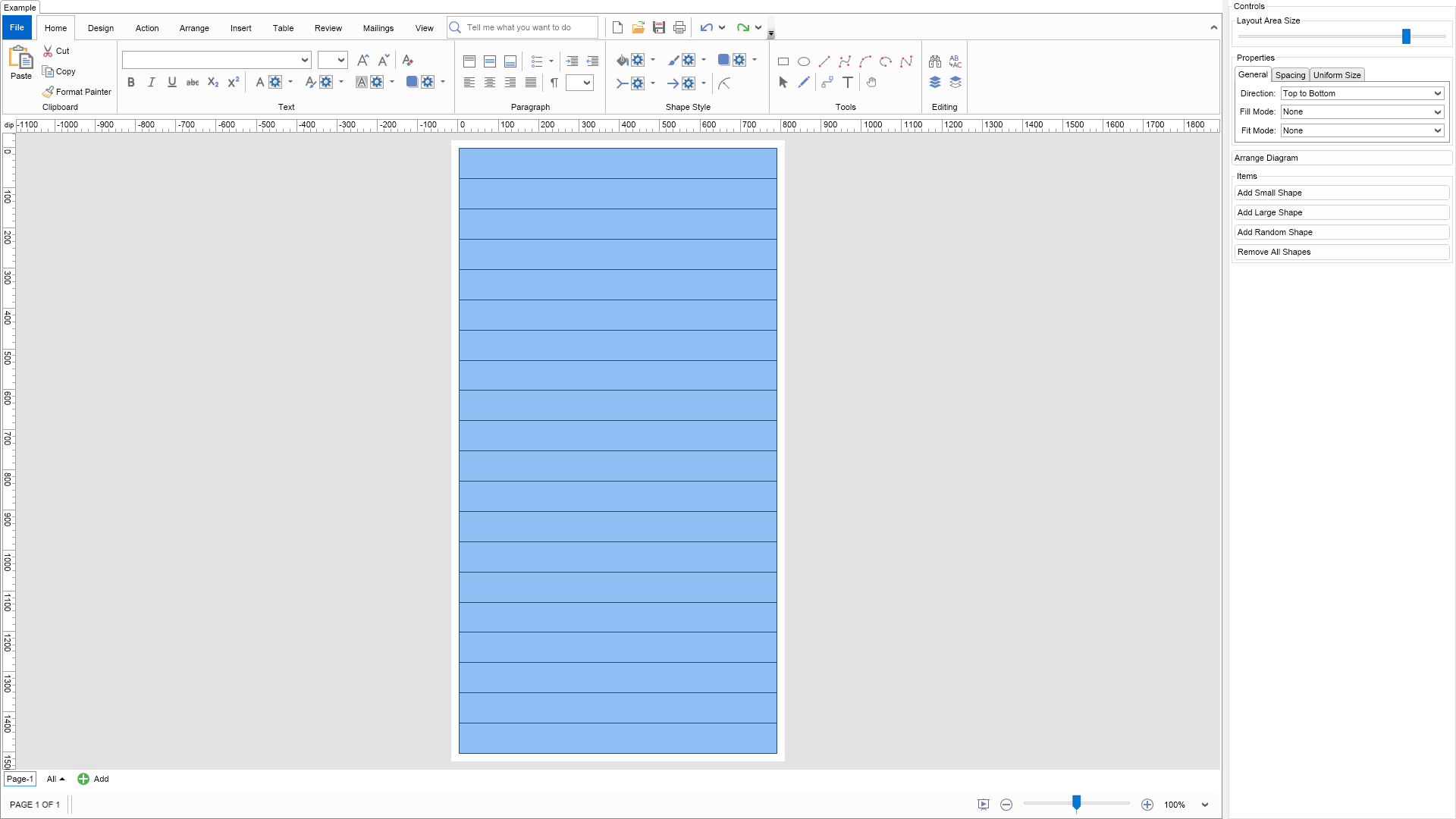
The stack layout is a directed constrained cells layout, which stacks the cells in horizontal or vertical order. Depending on the layout direction the layout is constrained by either width or height.
The most important properties of this layout are:
To experiment with their behavior just change the properties of the layout in the property grid and click the button Layout button.
Change the drawing width and height to see how the layout behaves with a different layout area.
| Language: C# |
using Nevron.Nov;
using Nevron.Nov.DataStructures;
using Nevron.Nov.Diagram;
using Nevron.Nov.Diagram.Layout;
using Nevron.Nov.Diagram.Shapes;
using Nevron.Nov.Dom;
using Nevron.Nov.Editors;
using Nevron.Nov.Graphics;
using Nevron.Nov.Layout;
using Nevron.Nov.UI;
using Nevron.Nov.Windows.Forms;
using System;
using System.Windows.Forms;
namespace NovWinFormsProject
{
public partial class Form1 : Form
{
#region Constructors
public Form1()
{
InitializeComponent();
// Set form title
Text = "NOV WinForms - NStackLayoutExample";
// Create the NOV example and its controls
NWidget exampleContent = CreateExampleContent();
NWidget exampleControls = CreateExampleControls();
if (exampleControls != null)
{
exampleControls.PreferredWidth = 300;
}
// Place the example and its controls in a pair box
NPairBox pairBox = new NPairBox(exampleContent, exampleControls);
pairBox.FillMode = ENStackFillMode.First;
pairBox.FitMode = ENStackFitMode.First;
pairBox.Margins = new NMargins(NDesign.HorizontalSpacing, NDesign.VerticalSpacing);
// Host the example in the form
NNovWidgetHost host = new NNovWidgetHost(pairBox);
host.Dock = DockStyle.Fill;
Controls.Add(host);
}
#endregion
#region Example
public NWidget CreateExampleContent()
{
// Create a simple drawing
NDrawingViewWithRibbon drawingViewWithRibbon = new NDrawingViewWithRibbon();
m_DrawingView = drawingViewWithRibbon.View;
m_DrawingView.Document.HistoryService.Pause();
try
{
InitDiagram(m_DrawingView.Document);
}
finally
{
m_DrawingView.Document.HistoryService.Resume();
}
return drawingViewWithRibbon;
}
public NWidget CreateExampleControls()
{
m_Layout.Changed += OnLayoutChanged;
NStackPanel stack = new NStackPanel();
// layout area size -> controls either page width or height depending on layout direction
NGroupBox layoutAreaGroupBox = new NGroupBox("Layout Area Size");
stack.Add(layoutAreaGroupBox);
NSlider sizeSlider = CreateSlider(m_DrawingView.ActivePage.Width, 100, 1000, (args) =>
{
SetPageSize((double)args.NewValue);
});
layoutAreaGroupBox.Content = sizeSlider;
m_Layout.AddValueChangedEventHandler(NStackLayout.DirectionProperty, (args) =>
{
SetPageSize(sizeSlider.Value);
});
// property editor
NEditor editor = NDesigner.GetDesigner(m_Layout).CreateStandaloneEditor(m_Layout);
stack.Add(new NGroupBox("Properties", editor));
NButton arrangeButton = new NButton("Arrange Diagram");
arrangeButton.Click += OnArrangeButtonClick;
stack.Add(arrangeButton);
// items stack
NStackPanel itemsStack = new NStackPanel();
// NOTE: For Cells layout we provide the user with the ability to add shapes with different sizes so that he/she can test the layouts
NButton addSmallItemButton = new NButton("Add Small Shape");
addSmallItemButton.Click += OnAddSmallItemButtonClick;
itemsStack.Add(addSmallItemButton);
NButton addLargeItemButton = new NButton("Add Large Shape");
addLargeItemButton.Click += OnAddLargeItemButtonClick;
itemsStack.Add(addLargeItemButton);
NButton addRandomItemButton = new NButton("Add Random Shape");
addRandomItemButton.Click += OnAddRandomItemButtonClick;
itemsStack.Add(addRandomItemButton);
NButton removeAllItemsButton = new NButton("Remove All Shapes");
removeAllItemsButton.Click += OnRemoveAllItemsButtonClick;
itemsStack.Add(removeAllItemsButton);
stack.Add(new NGroupBox("Items", itemsStack));
return stack;
}
public string GetExampleDescription()
{
return @"
The stack layout is a directed constrained cells layout, which stacks the cells in horizontal or vertical order.
Depending on the layout direction the layout is constrained by either width or height.
The most important properties of this layout are:
-
Direction - determines the direction in which the layout arranges adjacent cells.
-
HorizontalContentPlacement and VerticalContentPlacement - determine the default placement
of the cell content in regards to the X or the Y dimension of the cell bounds.
-
HorizontalSpacing and VerticalSpacing - determine the minimal spacing between 2 cells in
horizontal and vertical direction respectively.
-
FillMode - when the size of the content is smaller than the container size
the FillMode property is taken into account. Possible values are:
- None - no filling is performed
- Equal - all shapes are equally inflated
- Proportional - shapes are inflated proportionally to their size
- First - shapes are inflated in forward order until content fills the area
- Last - shapes are inflated in reverse order until content fills the area
In all cases the maximal size constraints of each shape are not broken.
-
FitMode - when the size of the content is larger than the container size
the FitMode property is taken into account. Possible values are:
- None - no fitting is performed
- Equal - all shapes are equally deflated
- Proportional - shapes are deflated proportionally to their size
- First - shapes are deflated in forward order until content fits the area
- Last - shapes are deflated in reverse order until content fits the area
In all cases the minimal size constraints of each shape are not broken.
To experiment with their behavior just change the properties of the layout in the property
grid and click the button Layout button.
Change the drawing width and height to see how the layout behaves with a different layout area.
";
}
///
/// Gets the relevant documentation links for the example
///
///
public (string Name, string Url)[] GetDocumentationUrls()
{
return new[]
{
("Stack Layout", "https://www.nevron.com/docs/openvision/stack-layout.html"),
("Layouts Overview", "https://www.nevron.com/docs/openvision/diagram-drawing-layouts-overview.html"),
("Graph Regions and Regions Layouts", "https://www.nevron.com/docs/openvision/diagram-graph-regions-and-region-layouts.html"),
("Layouts Overview", "https://www.nevron.com/docs/openvision/layouts-overview.html"),
};
}
private void InitDiagram(NDrawingDocument drawingDocument)
{
m_Factory = new NBasicShapeFactory();
// Hide ports
drawingDocument.Content.ScreenVisibility.ShowPorts = false;
// Create some shapes
NPage activePage = drawingDocument.Content.ActivePage;
NBasicShapeFactory basicShapes = new NBasicShapeFactory();
for (int i = 0; i < 20; i++)
{
NShape shape = basicShapes.CreateShape(ENBasicShape.Rectangle);
activePage.Items.Add(shape);
}
// Arrange diagram
ArrangeDiagram(drawingDocument);
// Fit page
drawingDocument.Content.ActivePage.ZoomMode = ENZoomMode.Fit;
}
private NSlider CreateSlider(double value, double min, double max, DNFunction valueChanged)
{
NSlider slider = new NSlider(value, min, max);
slider.TicksPlacement = ENTicksPlacement.None;
slider.ValueChanged += valueChanged;
return slider;
}
private void SetPageSize(double size)
{
if (m_Layout.Direction == ENHVDirection.LeftToRight ||
m_Layout.Direction == ENHVDirection.RightToLeft)
{
m_DrawingView.ActivePage.Height = size;
}
else
{
m_DrawingView.ActivePage.Width = size;
}
ArrangeDiagram(m_DrawingView.Document);
}
#endregion
#region Implementation
///
/// Arranges the shapes in the active page.
///
///
private void ArrangeDiagram(NDrawingDocument drawingDocument)
{
// get all top-level shapes that reside in the active page
NPage activePage = drawingDocument.Content.ActivePage;
NList shapes = activePage.GetShapes(false);
// create a layout context and use it to arrange the shapes using the current layout
NDrawingLayoutContext layoutContext = new NDrawingLayoutContext(drawingDocument, activePage);
m_Layout.Arrange(shapes.CastAll | Language: VB.NET |
Imports Nevron.Nov
Imports Nevron.Nov.Diagram
Imports Nevron.Nov.Diagram.Layout
Imports Nevron.Nov.Diagram.Shapes
Imports Nevron.Nov.Dom
Imports Nevron.Nov.Editors
Imports Nevron.Nov.Graphics
Imports Nevron.Nov.Layout
Imports Nevron.Nov.UI
Imports Nevron.Nov.Windows.Forms
Imports System
Public Class Form1
#Region "Constructors"
Public Sub New()
' This call is required by the designer.
InitializeComponent()
' Add any initialization after the InitializeComponent() call.
' Set form title
Text = "NOV WinForms - NStackLayoutExample"
' Create the NOV example and its controls
Dim exampleContent As NWidget = CreateExampleContent()
Dim exampleControls As NWidget = CreateExampleControls()
If Not exampleControls Is Nothing Then
exampleControls.PreferredWidth = 300
End If
' Place the example and its controls in a pair box
Dim pairBox As NPairBox = New NPairBox(exampleContent, exampleControls)
pairBox.FillMode = ENStackFillMode.First
pairBox.FitMode = ENStackFitMode.First
pairBox.Margins = New NMargins(NDesign.HorizontalSpacing, NDesign.VerticalSpacing)
' Host the example in the form
Dim host As NNovWidgetHost(Of NWidget) = New NNovWidgetHost(Of NWidget)(pairBox)
host.Dock = DockStyle.Fill
Controls.Add(host)
End Sub
#End Region
#Region "Example"
Public Function CreateExampleContent() As NWidget
' Create a simple drawing
Dim drawingViewWithRibbon As NDrawingViewWithRibbon = New NDrawingViewWithRibbon()
m_DrawingView = drawingViewWithRibbon.View
m_DrawingView.Document.HistoryService.Pause()
Try
InitDiagram(m_DrawingView.Document)
Finally
m_DrawingView.Document.HistoryService.Resume()
End Try
Return drawingViewWithRibbon
End Function
Public Function CreateExampleControls() As NWidget
Me.m_Layout.Changed += AddressOf OnLayoutChanged
Dim stack As NStackPanel = New NStackPanel()
' layout area size -> controls either page width or height depending on layout direction
Dim layoutAreaGroupBox As NGroupBox = New NGroupBox("Layout Area Size")
stack.Add(layoutAreaGroupBox)
Dim sizeSlider = CreateSlider(m_DrawingView.ActivePage.Width, 100, 1000, Sub(args) SetPageSize(CDbl(args.NewValue)))
layoutAreaGroupBox.Content = sizeSlider
m_Layout.AddValueChangedEventHandler(NDirectedBoxLayout.DirectionProperty, Sub(args) SetPageSize(sizeSlider.Value))
' property editor
Dim editor As NEditor = NDesigner.GetDesigner(m_Layout).CreateStandaloneEditor(m_Layout)
stack.Add(New NGroupBox("Properties", editor))
Dim arrangeButton As NButton = New NButton("Arrange Diagram")
arrangeButton.Click += AddressOf OnArrangeButtonClick
stack.Add(arrangeButton)
' items stack
Dim itemsStack As NStackPanel = New NStackPanel()
' NOTE: For Cells layout we provide the user with the ability to add shapes with different sizes so that he/she can test the layouts
Dim addSmallItemButton As NButton = New NButton("Add Small Shape")
addSmallItemButton.Click += AddressOf OnAddSmallItemButtonClick
itemsStack.Add(addSmallItemButton)
Dim addLargeItemButton As NButton = New NButton("Add Large Shape")
addLargeItemButton.Click += AddressOf OnAddLargeItemButtonClick
itemsStack.Add(addLargeItemButton)
Dim addRandomItemButton As NButton = New NButton("Add Random Shape")
addRandomItemButton.Click += AddressOf OnAddRandomItemButtonClick
itemsStack.Add(addRandomItemButton)
Dim removeAllItemsButton As NButton = New NButton("Remove All Shapes")
removeAllItemsButton.Click += AddressOf OnRemoveAllItemsButtonClick
itemsStack.Add(removeAllItemsButton)
stack.Add(New NGroupBox("Items", itemsStack))
Return stack
End Function
Public Function GetExampleDescription() As String
Return "
The stack layout is a directed constrained cells layout, which stacks the cells in horizontal or vertical order.
Depending on the layout direction the layout is constrained by either width or height.
The most important properties of this layout are:
-
Direction - determines the direction in which the layout arranges adjacent cells.
-
HorizontalContentPlacement and VerticalContentPlacement - determine the default placement
of the cell content in regards to the X or the Y dimension of the cell bounds.
-
HorizontalSpacing and VerticalSpacing - determine the minimal spacing between 2 cells in
horizontal and vertical direction respectively.
-
FillMode - when the size of the content is smaller than the container size
the FillMode property is taken into account. Possible values are:
- None - no filling is performed
- Equal - all shapes are equally inflated
- Proportional - shapes are inflated proportionally to their size
- First - shapes are inflated in forward order until content fills the area
- Last - shapes are inflated in reverse order until content fills the area
In all cases the maximal size constraints of each shape are not broken.
-
FitMode - when the size of the content is larger than the container size
the FitMode property is taken into account. Possible values are:
- None - no fitting is performed
- Equal - all shapes are equally deflated
- Proportional - shapes are deflated proportionally to their size
- First - shapes are deflated in forward order until content fits the area
- Last - shapes are deflated in reverse order until content fits the area
In all cases the minimal size constraints of each shape are not broken.
To experiment with their behavior just change the properties of the layout in the property
grid and click the button Layout button.
Change the drawing width and height to see how the layout behaves with a different layout area.
"
End Function
'''
''' Gets the relevant documentation links for the example
'''
'''
Public Function GetDocumentationUrls() As (String, String)()
Return {("Stack Layout", "https://www.nevron.com/docs/openvision/stack-layout.html"), ("Layouts Overview", "https://www.nevron.com/docs/openvision/diagram-drawing-layouts-overview.html"), ("Graph Regions and Regions Layouts", "https://www.nevron.com/docs/openvision/diagram-graph-regions-and-region-layouts.html"), ("Layouts Overview", "https://www.nevron.com/docs/openvision/layouts-overview.html")}
End Function
Private Sub InitDiagram(drawingDocument As NDrawingDocument)
m_Factory = New NBasicShapeFactory()
' Hide ports
drawingDocument.Content.ScreenVisibility.ShowPorts = False
' Create some shapes
Dim activePage = drawingDocument.Content.ActivePage
Dim basicShapes As NBasicShapeFactory = New NBasicShapeFactory()
For i = 0 To 19
Dim shape = basicShapes.CreateShape(ENBasicShape.Rectangle)
activePage.Items.Add(shape)
Next
' Arrange diagram
ArrangeDiagram(drawingDocument)
' Fit page
drawingDocument.Content.ActivePage.ZoomMode = ENZoomMode.Fit
End Sub
Private Function CreateSlider(value As Double, min As Double, max As Double, valueChanged As DNFunction(Of NValueChangeEventArgs)) As NSlider
Dim slider As NSlider = New NSlider(value, min, max)
slider.TicksPlacement = ENTicksPlacement.None
slider.ValueChanged += valueChanged
Return slider
End Function
Private Sub SetPageSize(size As Double)
If m_Layout.Direction Is ENHVDirection.LeftToRight OrElse m_Layout.Direction Is ENHVDirection.RightToLeft Then
m_DrawingView.ActivePage.Height = size
Else
m_DrawingView.ActivePage.Width = size
End If
ArrangeDiagram(m_DrawingView.Document)
End Sub
#End Region
#Region "Implementation"
'''
''' Arranges the shapes in the active page.
'''
'''
Private Sub ArrangeDiagram(drawingDocument As NDrawingDocument)
' get all top-level shapes that reside in the active page
Dim activePage = drawingDocument.Content.ActivePage
Dim shapes = activePage.GetShapes(False)
' create a layout context and use it to arrange the shapes using the current layout
Dim layoutContext As NDrawingLayoutContext = New NDrawingLayoutContext(drawingDocument, activePage)
m_Layout.Arrange(shapes.CastAll(Of Object)(), layoutContext)
' size the page to the content size
activePage.SizeToContent()
End Sub
Private Function CreateShape() As NShape
Return m_Factory.CreateShape(ENBasicShape.Rectangle)
End Function
Private Sub OnAddSmallItemButtonClick(args As NEventArgs)
Dim shape As NShape = CreateShape()
shape.Width = 25
shape.Height = 25
m_DrawingView.ActivePage.Items.Add(shape)
ArrangeDiagram(m_DrawingView.Document)
End Sub
Private Sub OnAddLargeItemButtonClick(args As NEventArgs)
Dim shape As NShape = CreateShape()
shape.Width = 60
shape.Height = 60
m_DrawingView.ActivePage.Items.Add(shape)
ArrangeDiagram(m_DrawingView.Document)
End Sub
Private Sub OnAddRandomItemButtonClick(args As NEventArgs)
Dim range = 30
Dim rnd As Random = New Random()
Dim shape As NShape = CreateShape()
shape.Width = rnd.Next(range) + range
shape.Height = rnd.Next(range) + range
m_DrawingView.ActivePage.Items.Add(shape)
ArrangeDiagram(m_DrawingView.Document)
End Sub
Private Sub OnRemoveAllItemsButtonClick(args As NEventArgs)
m_DrawingView.Document.StartHistoryTransaction("Remove All Items")
Try
m_DrawingView.Document.Content.ActivePage.Items.Clear()
Finally
m_DrawingView.Document.CommitHistoryTransaction()
End Try
End Sub
#End Region
#Region "Event Handlers"
Private Sub OnLayoutChanged(arg As NEventArgs)
ArrangeDiagram(m_DrawingView.Document)
End Sub
Protected Overridable Sub OnArrangeButtonClick(arg As NEventArgs)
ArrangeDiagram(m_DrawingView.Document)
End Sub
#End Region
#Region "Fields"
Private m_DrawingView As NDrawingView
Private m_Layout As NStackLayout = New NStackLayout()
Private m_Factory As NBasicShapeFactory
#End Region
#Region "Static Methods"
#End Region
#Region "Constants"
#End Region
#Region "Nested Types"
#End Region
End Class