Cause and Effect Shapes Example for WinForms

Nevron NOV Diagram for WinForms ships with hundreds of examples with full source code, as part of the Nevron Open Vision Suite. All WinForms Diagram examples are also available as a stand-alone Visual Studio solution in C# and VB.NET, which you can download from the links below.

Cause and Effect Shapes Example for WinForms Description

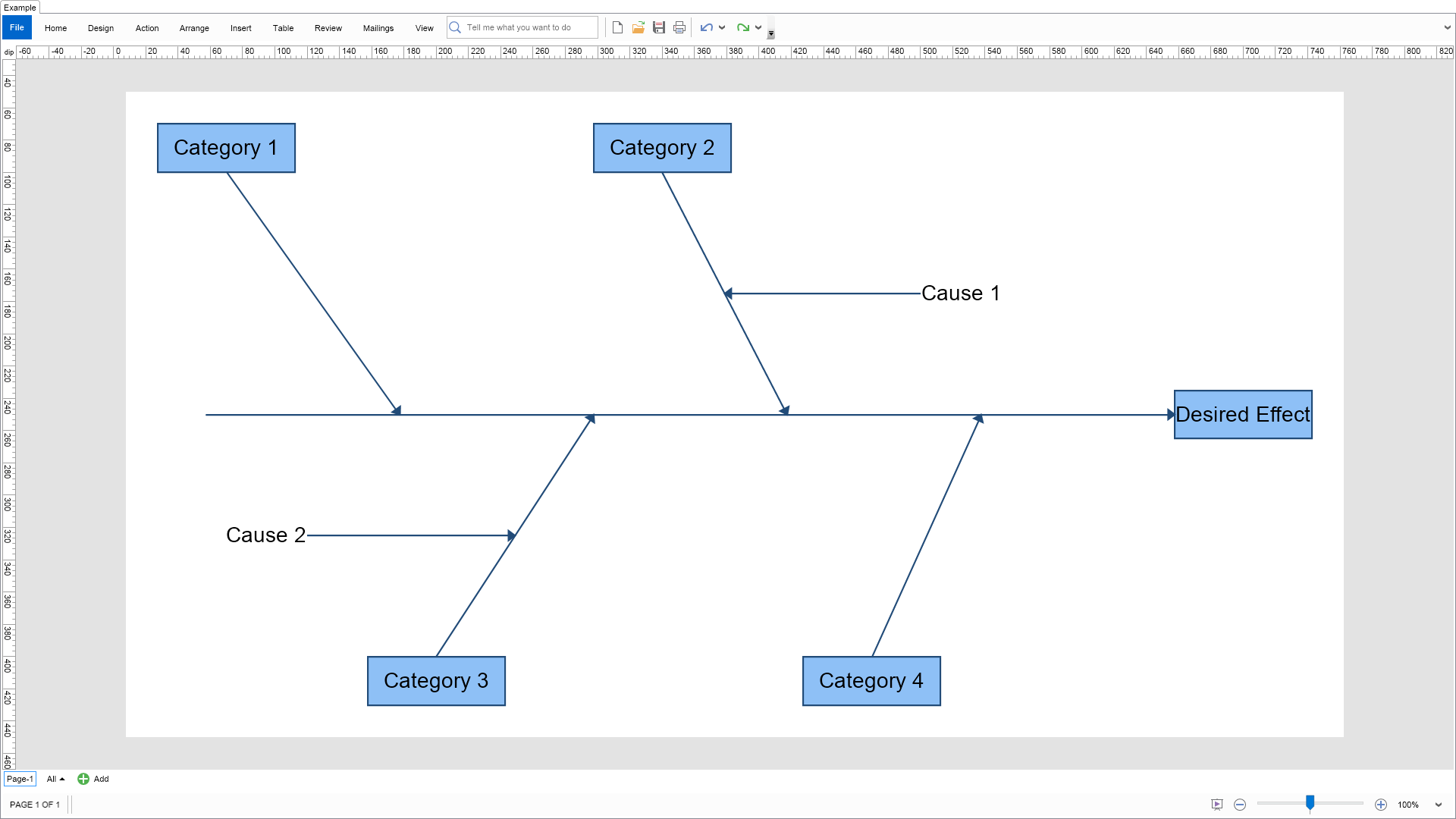
This example shows the cause and effect shapes created by the NCauseAndEffectShapeFactory in the Nevron.Nov.Diagram.Shapes assembly.


Cause and Effect Shapes Example

C# Cause and Effect Shapes Example Code for Nevron Diagram for WinForms
Language: C#

using Nevron.Nov;
using Nevron.Nov.Diagram;
using Nevron.Nov.Diagram.Shapes;
using Nevron.Nov.Diagram.Shapes.CauseAndEffect;
using Nevron.Nov.Dom;
using Nevron.Nov.Graphics;
using Nevron.Nov.Layout;
using Nevron.Nov.UI;
using Nevron.Nov.Windows.Forms;
using System.Windows.Forms;

namespace NovWinFormsProject
{
	public partial class Form1 : Form
	{
		#region Constructors

		public Form1()
		{
			InitializeComponent();

			// Set form title
			Text = "NOV WinForms - NCauseAndEffectShapesExample";

			// Create the NOV example and its controls
			NWidget exampleContent = CreateExampleContent();
			NWidget exampleControls = CreateExampleControls();
			if (exampleControls != null)
			{
				exampleControls.PreferredWidth = 300;
			}

			// Place the example and its controls in a pair box
			NPairBox pairBox = new NPairBox(exampleContent, exampleControls);
			pairBox.FillMode = ENStackFillMode.First;
			pairBox.FitMode = ENStackFitMode.First;
			pairBox.Margins = new NMargins(NDesign.HorizontalSpacing, NDesign.VerticalSpacing);

			// Host the example in the form
			NNovWidgetHost host = new NNovWidgetHost(pairBox);
			host.Dock = DockStyle.Fill;
			Controls.Add(host);
		}

		#endregion

        #region Example

        public NWidget CreateExampleContent()
        {
			// Create a simple drawing
			NDrawingViewWithRibbon drawingViewWithRibbon = new NDrawingViewWithRibbon();
			drawingViewWithRibbon.GetRibbon().Tab.Expanded = false;
			m_DrawingView = drawingViewWithRibbon.View;

			m_DrawingView.Document.HistoryService.Pause();
			try
			{
				InitDiagram(m_DrawingView.Document);
			}
			finally
			{
				m_DrawingView.Document.HistoryService.Resume();
			}

			return drawingViewWithRibbon;
		}
		public NWidget CreateExampleControls()
        {
            return null;
        }
        public string GetExampleDescription()
        {
            return @"

This example shows the cause and effect shapes created by the NCauseAndEffectShapeFactory in the Nevron.Nov.Diagram.Shapes assembly.

"; } /// /// Gets the relevant documentation links for the example /// /// public (string Name, string Url)[] GetDocumentationUrls() { return new[] { ("Predefined Libraries", "https://www.nevron.com/docs/openvision/diagram-predefined-libraries.html"), ("Libraries", "https://www.nevron.com/docs/openvision/diagram-libraries.html"), ("Shapes", "https://www.nevron.com/docs/openvision/diagram-shapes.html"), ("Library Browser", "https://www.nevron.com/docs/openvision/diagram-library-browser.html"), }; } #endregion #region Implementation private void InitDiagram(NDrawingDocument drawingDocument) { NPage page = drawingDocument.Content.ActivePage; page.ZoomMode = ENZoomMode.Fit; // Create some Cause and Effect shapes, setting the number of desired ports of each shape to its "Tag" property. // Ports will be created when the code-behind of the shapes has been compiled. // Create an Effect shape m_EffectShape = m_ShapeFactory.CreateShape(ENCauseAndEffectShape.Effect); m_EffectShape.Text = "Desired Effect"; m_EffectShape.PinX = 700; m_EffectShape.PinY = 250; m_EffectShape.Controls[0].X = -600; CreatePorts(m_EffectShape, 4); page.Items.Add(m_EffectShape); // Craete 4 Category shapes m_CategoryShape1 = m_ShapeFactory.CreateShape(ENCauseAndEffectShape.Category1); m_CategoryShape1.Text = "Category 1"; m_CategoryShape1.PinX = 70; m_CategoryShape1.PinY = 100; page.Items.Add(m_CategoryShape1); m_CategoryShape2 = m_ShapeFactory.CreateShape(ENCauseAndEffectShape.Category1); m_CategoryShape2.Text = "Category 2"; m_CategoryShape2.PinX = 340; m_CategoryShape2.PinY = 100; CreatePorts(m_CategoryShape2, 1); page.Items.Add(m_CategoryShape2); m_CategoryShape3 = m_ShapeFactory.CreateShape(ENCauseAndEffectShape.Category2); m_CategoryShape3.Text = "Category 3"; m_CategoryShape3.PinX = 200; m_CategoryShape3.PinY = 400; CreatePorts(m_CategoryShape3, 1); page.Items.Add(m_CategoryShape3); m_CategoryShape4 = m_ShapeFactory.CreateShape(ENCauseAndEffectShape.Category2); m_CategoryShape4.Text = "Category 4"; m_CategoryShape4.PinX = 470; m_CategoryShape4.PinY = 400; page.Items.Add(m_CategoryShape4); // Create 2 Cause shapes m_CauseShape1 = m_ShapeFactory.CreateShape(ENCauseAndEffectShape.PrimaryCause2); m_CauseShape1.Text = "Cause 1"; m_CauseShape1.PinX = 500; m_CauseShape1.PinY = 175; page.Items.Add(m_CauseShape1); m_CauseShape2 = m_ShapeFactory.CreateShape(ENCauseAndEffectShape.PrimaryCause1); m_CauseShape2.Text = "Cause 2"; m_CauseShape2.PinX = 120; m_CauseShape2.PinY = 325; page.Items.Add(m_CauseShape2); ConnectShapes(); page.SizeToContent(); } private void CreatePorts(NShape shape, int numberOfPortsToCreate) { NFishboneBaseShapeCodeBehind codeBehind = (NFishboneBaseShapeCodeBehind)shape.CodeBehind; for (int i = 0; i < numberOfPortsToCreate; i++) { codeBehind.AddPort(); } } private void ConnectShapes() { m_CategoryShape1.Controls[0].GlueToPort(m_EffectShape.Ports[3]); m_CategoryShape2.Controls[0].GlueToPort(m_EffectShape.Ports[1]); m_CategoryShape3.Controls[0].GlueToPort(m_EffectShape.Ports[2]); m_CategoryShape4.Controls[0].GlueToPort(m_EffectShape.Ports[0]); m_CauseShape1.Controls[0].GlueToPort(m_CategoryShape2.Ports[0]); m_CauseShape2.Controls[0].GlueToPort(m_CategoryShape3.Ports[0]); } #endregion #region Event Handlers #endregion #region Fields private NCauseAndEffectShapeFactory m_ShapeFactory; private NDrawingView m_DrawingView; // Shapes private NShape m_EffectShape; private NShape m_CategoryShape1; private NShape m_CategoryShape2; private NShape m_CategoryShape3; private NShape m_CategoryShape4; private NShape m_CauseShape1; private NShape m_CauseShape2; #endregion #region Static Methods #endregion #region Constants #endregion #region Nested Types #endregion } }

Download a fully functional C# (.cs) Cause and Effect Shapes Example for WinForms Solution

VB.NET Cause and Effect Shapes Example Code for Nevron Diagram for WinForms
Language: VB.NET

Imports Nevron.Nov
Imports Nevron.Nov.Diagram
Imports Nevron.Nov.Diagram.Shapes.CauseAndEffect
Imports Nevron.Nov.Dom
Imports Nevron.Nov.Graphics
Imports Nevron.Nov.Layout
Imports Nevron.Nov.UI
Imports Nevron.Nov.Windows.Forms

Public Class Form1

#Region "Constructors"

    Public Sub New()
        ' This call is required by the designer.
        InitializeComponent()

        ' Add any initialization after the InitializeComponent() call.

        ' Set form title
        Text = "NOV WinForms - NCauseAndEffectShapesExample"

        ' Create the NOV example and its controls
        Dim exampleContent As NWidget = CreateExampleContent()
        Dim exampleControls As NWidget = CreateExampleControls()
        If Not exampleControls Is Nothing Then
            exampleControls.PreferredWidth = 300
        End If

        ' Place the example and its controls in a pair box
        Dim pairBox As NPairBox = New NPairBox(exampleContent, exampleControls)
        pairBox.FillMode = ENStackFillMode.First
        pairBox.FitMode = ENStackFitMode.First
        pairBox.Margins = New NMargins(NDesign.HorizontalSpacing, NDesign.VerticalSpacing)

        ' Host the example in the form
        Dim host As NNovWidgetHost(Of NWidget) = New NNovWidgetHost(Of NWidget)(pairBox)
        host.Dock = DockStyle.Fill
        Controls.Add(host)
    End Sub


#End Region

#Region "Example"

        Public Function CreateExampleContent() As NWidget
            ' Create a simple drawing
            Dim drawingViewWithRibbon As NDrawingViewWithRibbon = New NDrawingViewWithRibbon()
            drawingViewWithRibbon.GetRibbon().Tab.Expanded = False
            m_DrawingView = drawingViewWithRibbon.View

            m_DrawingView.Document.HistoryService.Pause()
            Try
                InitDiagram(m_DrawingView.Document)
            Finally
                m_DrawingView.Document.HistoryService.Resume()
            End Try

            Return drawingViewWithRibbon
        End Function
        Public Function CreateExampleControls() As NWidget
            Return Nothing
        End Function
        Public Function GetExampleDescription() As String
            Return "

This example shows the cause and effect shapes created by the NCauseAndEffectShapeFactory in the Nevron.Nov.Diagram.Shapes assembly.

" End Function ''' ''' Gets the relevant documentation links for the example ''' ''' Public Function GetDocumentationUrls() As (String, String)() Return {("Predefined Libraries", "https://www.nevron.com/docs/openvision/diagram-predefined-libraries.html"), ("Libraries", "https://www.nevron.com/docs/openvision/diagram-libraries.html"), ("Shapes", "https://www.nevron.com/docs/openvision/diagram-shapes.html"), ("Library Browser", "https://www.nevron.com/docs/openvision/diagram-library-browser.html")} End Function #End Region #Region "Implementation" Private Sub InitDiagram(drawingDocument As NDrawingDocument) Dim page = drawingDocument.Content.ActivePage page.ZoomMode = ENZoomMode.Fit ' Create some Cause and Effect shapes, setting the number of desired ports of each shape to its "Tag" property. ' Ports will be created when the code-behind of the shapes has been compiled. ' Create an Effect shape m_EffectShape = m_ShapeFactory.CreateShape(ENCauseAndEffectShape.Effect) m_EffectShape.Text = "Desired Effect" m_EffectShape.PinX = 700 m_EffectShape.PinY = 250 m_EffectShape.Controls(0).X = -600 CreatePorts(m_EffectShape, 4) page.Items.Add(m_EffectShape) ' Craete 4 Category shapes m_CategoryShape1 = m_ShapeFactory.CreateShape(ENCauseAndEffectShape.Category1) m_CategoryShape1.Text = "Category 1" m_CategoryShape1.PinX = 70 m_CategoryShape1.PinY = 100 page.Items.Add(m_CategoryShape1) m_CategoryShape2 = m_ShapeFactory.CreateShape(ENCauseAndEffectShape.Category1) m_CategoryShape2.Text = "Category 2" m_CategoryShape2.PinX = 340 m_CategoryShape2.PinY = 100 CreatePorts(m_CategoryShape2, 1) page.Items.Add(m_CategoryShape2) m_CategoryShape3 = m_ShapeFactory.CreateShape(ENCauseAndEffectShape.Category2) m_CategoryShape3.Text = "Category 3" m_CategoryShape3.PinX = 200 m_CategoryShape3.PinY = 400 CreatePorts(m_CategoryShape3, 1) page.Items.Add(m_CategoryShape3) m_CategoryShape4 = m_ShapeFactory.CreateShape(ENCauseAndEffectShape.Category2) m_CategoryShape4.Text = "Category 4" m_CategoryShape4.PinX = 470 m_CategoryShape4.PinY = 400 page.Items.Add(m_CategoryShape4) ' Create 2 Cause shapes m_CauseShape1 = m_ShapeFactory.CreateShape(ENCauseAndEffectShape.PrimaryCause2) m_CauseShape1.Text = "Cause 1" m_CauseShape1.PinX = 500 m_CauseShape1.PinY = 175 page.Items.Add(m_CauseShape1) m_CauseShape2 = m_ShapeFactory.CreateShape(ENCauseAndEffectShape.PrimaryCause1) m_CauseShape2.Text = "Cause 2" m_CauseShape2.PinX = 120 m_CauseShape2.PinY = 325 page.Items.Add(m_CauseShape2) ConnectShapes() page.SizeToContent() End Sub Private Sub CreatePorts(shape As NShape, numberOfPortsToCreate As Integer) Dim codeBehind As NFishboneBaseShapeCodeBehind = CType(shape.CodeBehind, NFishboneBaseShapeCodeBehind) For i = 0 To numberOfPortsToCreate - 1 codeBehind.AddPort() Next End Sub Private Sub ConnectShapes() m_CategoryShape1.Controls(0).GlueToPort(m_EffectShape.Ports(3)) m_CategoryShape2.Controls(0).GlueToPort(m_EffectShape.Ports(1)) m_CategoryShape3.Controls(0).GlueToPort(m_EffectShape.Ports(2)) m_CategoryShape4.Controls(0).GlueToPort(m_EffectShape.Ports(0)) m_CauseShape1.Controls(0).GlueToPort(m_CategoryShape2.Ports(0)) m_CauseShape2.Controls(0).GlueToPort(m_CategoryShape3.Ports(0)) End Sub #End Region #Region "Event Handlers" #End Region #Region "Fields" Private m_ShapeFactory As NCauseAndEffectShapeFactory Private m_DrawingView As NDrawingView ' Shapes Private m_EffectShape As NShape Private m_CategoryShape1 As NShape Private m_CategoryShape2 As NShape Private m_CategoryShape3 As NShape Private m_CategoryShape4 As NShape Private m_CauseShape1 As NShape Private m_CauseShape2 As NShape #End Region #Region "Static Methods" #End Region #Region "Constants" #End Region #Region "Nested Types" #End Region End Class

Download a fully functional VB.NET (.vb) Cause and Effect Shapes Example for WinForms Solution