Demonstrates the ports glue. Move the rectangle close to the Connector or the Line to test the port direction that is syncrhonized with the geometry tangenta at this point.
In NOV Diagram each port GlueMode can be set to Inward, Outward or InwardAndOutward.
Inward ports can accept connections with Begin and End points of 1D shapes as well as other shapes Outward ports. Most of the ports are only Inward ports.
Outward ports can be connected only to other shapes Inward ports. When a shape with outward ports is moved closed a shape with inward ports. The two shapes are glued in master-slave relation. The shape to which the outward port belongs is rotated and translated so that its outward port location matches the inward port location and so that the ports directions form a line.
InwardAndOutward ports behave as both inward and outward.
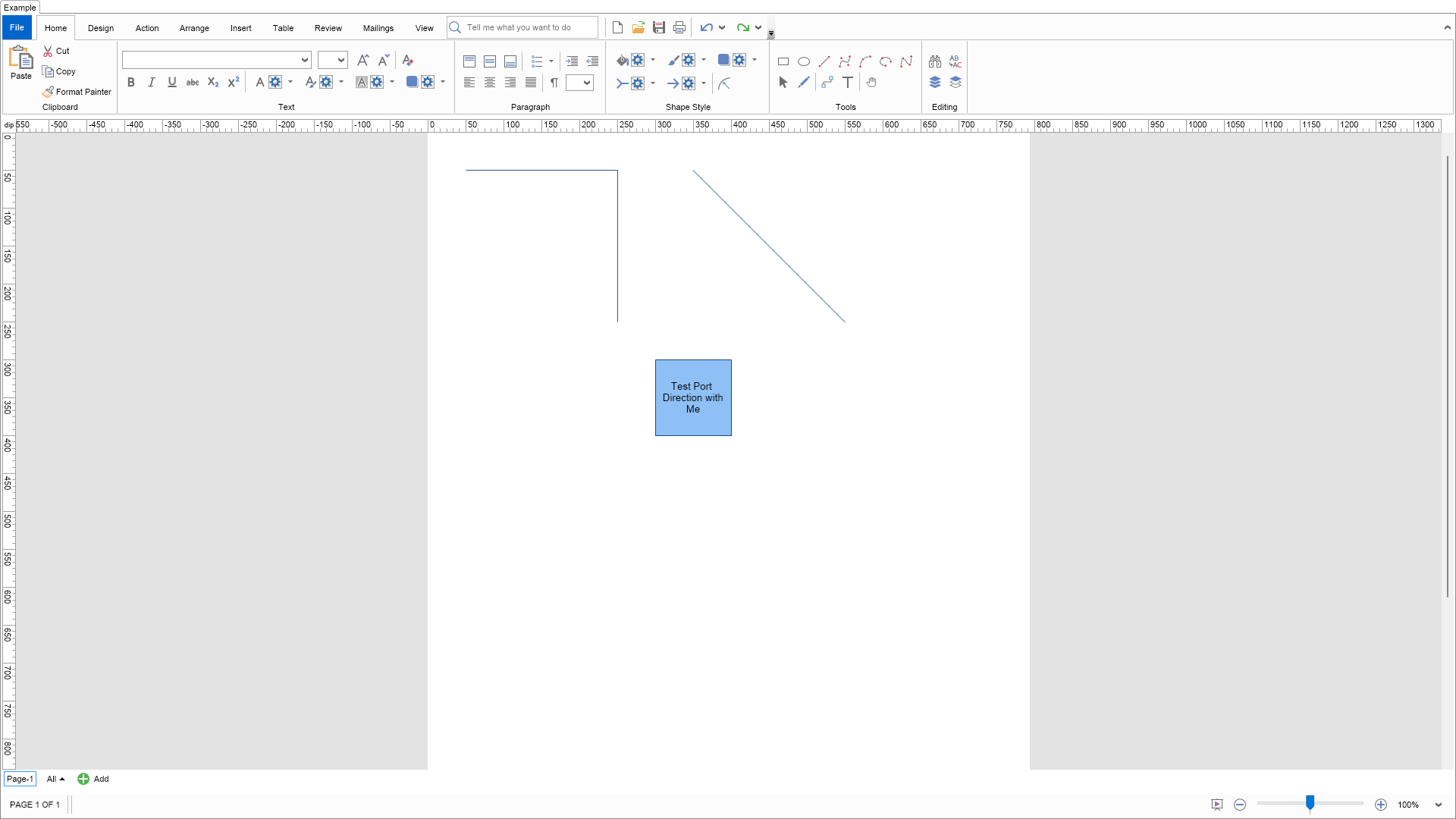
| Language: C# |
using Nevron.Nov;
using Nevron.Nov.Diagram;
using Nevron.Nov.Diagram.Shapes;
using Nevron.Nov.Dom;
using Nevron.Nov.Graphics;
using Nevron.Nov.Layout;
using Nevron.Nov.UI;
using Nevron.Nov.Windows.Forms;
using System.Windows.Forms;
namespace NovWinFormsProject
{
public partial class Form1 : Form
{
#region Constructors
public Form1()
{
InitializeComponent();
// Set form title
Text = "NOV WinForms - NPortsGlueExample";
// Create the NOV example and its controls
NWidget exampleContent = CreateExampleContent();
NWidget exampleControls = CreateExampleControls();
if (exampleControls != null)
{
exampleControls.PreferredWidth = 300;
}
// Place the example and its controls in a pair box
NPairBox pairBox = new NPairBox(exampleContent, exampleControls);
pairBox.FillMode = ENStackFillMode.First;
pairBox.FitMode = ENStackFitMode.First;
pairBox.Margins = new NMargins(NDesign.HorizontalSpacing, NDesign.VerticalSpacing);
// Host the example in the form
NNovWidgetHost host = new NNovWidgetHost(pairBox);
host.Dock = DockStyle.Fill;
Controls.Add(host);
}
#endregion
#region Example
public NWidget CreateExampleContent()
{
// Create a simple drawing
NDrawingViewWithRibbon drawingViewWithRibbon = new NDrawingViewWithRibbon();
m_DrawingView = drawingViewWithRibbon.View;
m_DrawingView.Document.HistoryService.Pause();
try
{
InitDiagram(m_DrawingView.Document);
}
finally
{
m_DrawingView.Document.HistoryService.Resume();
}
return drawingViewWithRibbon;
}
public NWidget CreateExampleControls()
{
return null;
}
public string GetExampleDescription()
{
return @"
Demonstrates the ports glue. Move the rectangle close to the Connector or the Line to test the port direction that is syncrhonized with the geometry tangenta at this point.
In NOV Diagram each port GlueMode can be set to Inward, Outward or InwardAndOutward.
Inward ports can accept connections with Begin and End points of 1D shapes as well as other shapes Outward ports.
Most of the ports are only Inward ports.
Outward ports can be connected only to other shapes Inward ports. When a shape with outward ports
is moved closed a shape with inward ports. The two shapes are glued in master-slave relation. The shape
to which the outward port belongs is rotated and translated so that its outward port location matches
the inward port location and so that the ports directions form a line.
InwardAndOutward ports behave as both inward and outward.
";
}
///
/// Gets the relevant documentation links for the example
///
///
public (string Name, string Url)[] GetDocumentationUrls()
{
return new[]
{
("Ports", "https://www.nevron.com/docs/openvision/diagram-ports.html"),
("Snap and Glue", "https://www.nevron.com/docs/openvision/diagram-snap-and-glue.html"),
("Shapes", "https://www.nevron.com/docs/openvision/diagram-shapes.html"),
("Routable Connectors", "https://www.nevron.com/docs/openvision/diagram-routable-connectors.html"),
};
}
private void InitDiagram(NDrawingDocument drawingDocument)
{
NDrawing drawing = drawingDocument.Content;
NPage activePage = drawing.ActivePage;
activePage.Interaction.Enable1DShapeSplitting = false;
activePage.Interaction.AutoConnectToBeginPoints = false;
activePage.Interaction.AutoConnectToEndPoints = false;
// hide the grid
drawing.ScreenVisibility.ShowGrid = false;
// Port Glue To Geometry Contour
{
// create a connector with begin, end and middle ports
// start and end ports are offset with absolute values
NRoutableConnector connector = new NRoutableConnector();
activePage.Items.Add(connector);
connector.SetBeginPoint(new NPoint(50, 50));
connector.SetEndPoint(new NPoint(250, 250));
NPort beginPort = new NPort();
connector.Ports.Add(beginPort);
beginPort.GlueToGeometryContour(0, 10, true, NAngle.Zero);
NPort endPort = new NPort();
connector.Ports.Add(endPort);
endPort.GlueToGeometryContour(1, -10, true, NAngle.Zero);
NPort middlePort = new NPort();
connector.Ports.Add(middlePort);
middlePort.GlueToGeometryContour(0.5, 0, true, NAngle.Zero);
}
// Port Glue To Shape Line
{
NShape lineShape = NShape.CreateLineShape();
activePage.Items.Add(lineShape);
lineShape.SetBeginPoint(new NPoint(350, 50));
lineShape.SetEndPoint(new NPoint(550, 250));
NPort middlePort = new NPort();
lineShape.Ports.Add(middlePort);
middlePort.GlueToGeometryContour(0.5, 0, true, NAngle.Zero);
}
// create a rectangle shape with
{
NShape rectShape = NShape.CreateRectangle();
rectShape.SetBounds(300, 300, 100, 100);
rectShape.Text = "Test Port Direction with Me";
NPort port = new NPort(0.5, 0, true);
port.DirectionMode = ENPortDirectionMode.AutoCenter;
port.GlueMode = ENPortGlueMode.Outward;
rectShape.Ports.Add(port);
activePage.Items.Add(rectShape);
}
}
#endregion
#region Implementation
#endregion
#region Event Handlers
#endregion
#region Fields
private NDrawingView m_DrawingView;
#endregion
#region Static Methods
#endregion
#region Constants
#endregion
#region Nested Types
#endregion
}
} | Language: VB.NET |
Imports Nevron.Nov
Imports Nevron.Nov.Diagram
Imports Nevron.Nov.Dom
Imports Nevron.Nov.Graphics
Imports Nevron.Nov.Layout
Imports Nevron.Nov.UI
Imports Nevron.Nov.Windows.Forms
Public Class Form1
#Region "Constructors"
Public Sub New()
' This call is required by the designer.
InitializeComponent()
' Add any initialization after the InitializeComponent() call.
' Set form title
Text = "NOV WinForms - NPortsGlueExample"
' Create the NOV example and its controls
Dim exampleContent As NWidget = CreateExampleContent()
Dim exampleControls As NWidget = CreateExampleControls()
If Not exampleControls Is Nothing Then
exampleControls.PreferredWidth = 300
End If
' Place the example and its controls in a pair box
Dim pairBox As NPairBox = New NPairBox(exampleContent, exampleControls)
pairBox.FillMode = ENStackFillMode.First
pairBox.FitMode = ENStackFitMode.First
pairBox.Margins = New NMargins(NDesign.HorizontalSpacing, NDesign.VerticalSpacing)
' Host the example in the form
Dim host As NNovWidgetHost(Of NWidget) = New NNovWidgetHost(Of NWidget)(pairBox)
host.Dock = DockStyle.Fill
Controls.Add(host)
End Sub
#End Region
#Region "Example"
Public Function CreateExampleContent() As NWidget
' Create a simple drawing
Dim drawingViewWithRibbon As NDrawingViewWithRibbon = New NDrawingViewWithRibbon()
m_DrawingView = drawingViewWithRibbon.View
m_DrawingView.Document.HistoryService.Pause()
Try
InitDiagram(m_DrawingView.Document)
Finally
m_DrawingView.Document.HistoryService.Resume()
End Try
Return drawingViewWithRibbon
End Function
Public Function CreateExampleControls() As NWidget
Return Nothing
End Function
Public Function GetExampleDescription() As String
Return "
Demonstrates the ports glue. Move the rectangle close to the Connector or the Line to test the port direction that is syncrhonized with the geometry tangenta at this point.
In NOV Diagram each port GlueMode can be set to Inward, Outward or InwardAndOutward.
Inward ports can accept connections with Begin and End points of 1D shapes as well as other shapes Outward ports.
Most of the ports are only Inward ports.
Outward ports can be connected only to other shapes Inward ports. When a shape with outward ports
is moved closed a shape with inward ports. The two shapes are glued in master-slave relation. The shape
to which the outward port belongs is rotated and translated so that its outward port location matches
the inward port location and so that the ports directions form a line.
InwardAndOutward ports behave as both inward and outward.
"
End Function
'''
''' Gets the relevant documentation links for the example
'''
'''
Public Function GetDocumentationUrls() As (String, String)()
Return {("Ports", "https://www.nevron.com/docs/openvision/diagram-ports.html"), ("Snap and Glue", "https://www.nevron.com/docs/openvision/diagram-snap-and-glue.html"), ("Shapes", "https://www.nevron.com/docs/openvision/diagram-shapes.html"), ("Routable Connectors", "https://www.nevron.com/docs/openvision/diagram-routable-connectors.html")}
End Function
Private Sub InitDiagram(drawingDocument As NDrawingDocument)
Dim drawing = drawingDocument.Content
Dim activePage = drawing.ActivePage
activePage.Interaction.Enable1DShapeSplitting = False
activePage.Interaction.AutoConnectToBeginPoints = False
activePage.Interaction.AutoConnectToEndPoints = False
' hide the grid
drawing.ScreenVisibility.ShowGrid = False
' Port Glue To Geometry Contour
If True Then
' create a connector with begin, end and middle ports
' start and end ports are offset with absolute values
Dim connector As NRoutableConnector = New NRoutableConnector()
activePage.Items.Add(connector)
connector.SetBeginPoint(New NPoint(50, 50))
connector.SetEndPoint(New NPoint(250, 250))
Dim beginPort As NPort = New NPort()
connector.Ports.Add(beginPort)
beginPort.GlueToGeometryContour(0, 10, True, NAngle.Zero)
Dim endPort As NPort = New NPort()
connector.Ports.Add(endPort)
endPort.GlueToGeometryContour(1, -10, True, NAngle.Zero)
Dim middlePort As NPort = New NPort()
connector.Ports.Add(middlePort)
middlePort.GlueToGeometryContour(0.5, 0, True, NAngle.Zero)
End If
' Port Glue To Shape Line
If True Then
Dim lineShape As NShape = NShape.CreateLineShape()
activePage.Items.Add(lineShape)
lineShape.SetBeginPoint(New NPoint(350, 50))
lineShape.SetEndPoint(New NPoint(550, 250))
Dim middlePort As NPort = New NPort()
lineShape.Ports.Add(middlePort)
middlePort.GlueToGeometryContour(0.5, 0, True, NAngle.Zero)
End If
' create a rectangle shape with
If True Then
Dim rectShape As NShape = NShape.CreateRectangle()
rectShape.SetBounds(300, 300, 100, 100)
rectShape.Text = "Test Port Direction with Me"
Dim port As NPort = New NPort(0.5, 0, True)
port.DirectionMode = ENPortDirectionMode.AutoCenter
port.GlueMode = ENPortGlueMode.Outward
rectShape.Ports.Add(port)
activePage.Items.Add(rectShape)
End If
End Sub
#End Region
#Region "Implementation"
#End Region
#Region "Event Handlers"
#End Region
#Region "Fields"
Private m_DrawingView As NDrawingView
#End Region
#Region "Static Methods"
#End Region
#Region "Constants"
#End Region
#Region "Nested Types"
#End Region
End Class