Nevron NOV Diagram for WinForms ships with hundreds of examples with full source code, as part of the Nevron Open Vision Suite.
All WinForms Diagram examples are also available as a stand-alone Visual Studio solution
in C# and VB.NET,
which you can download from the links below.
Barycenter Graph Layout Example for WinForms Description
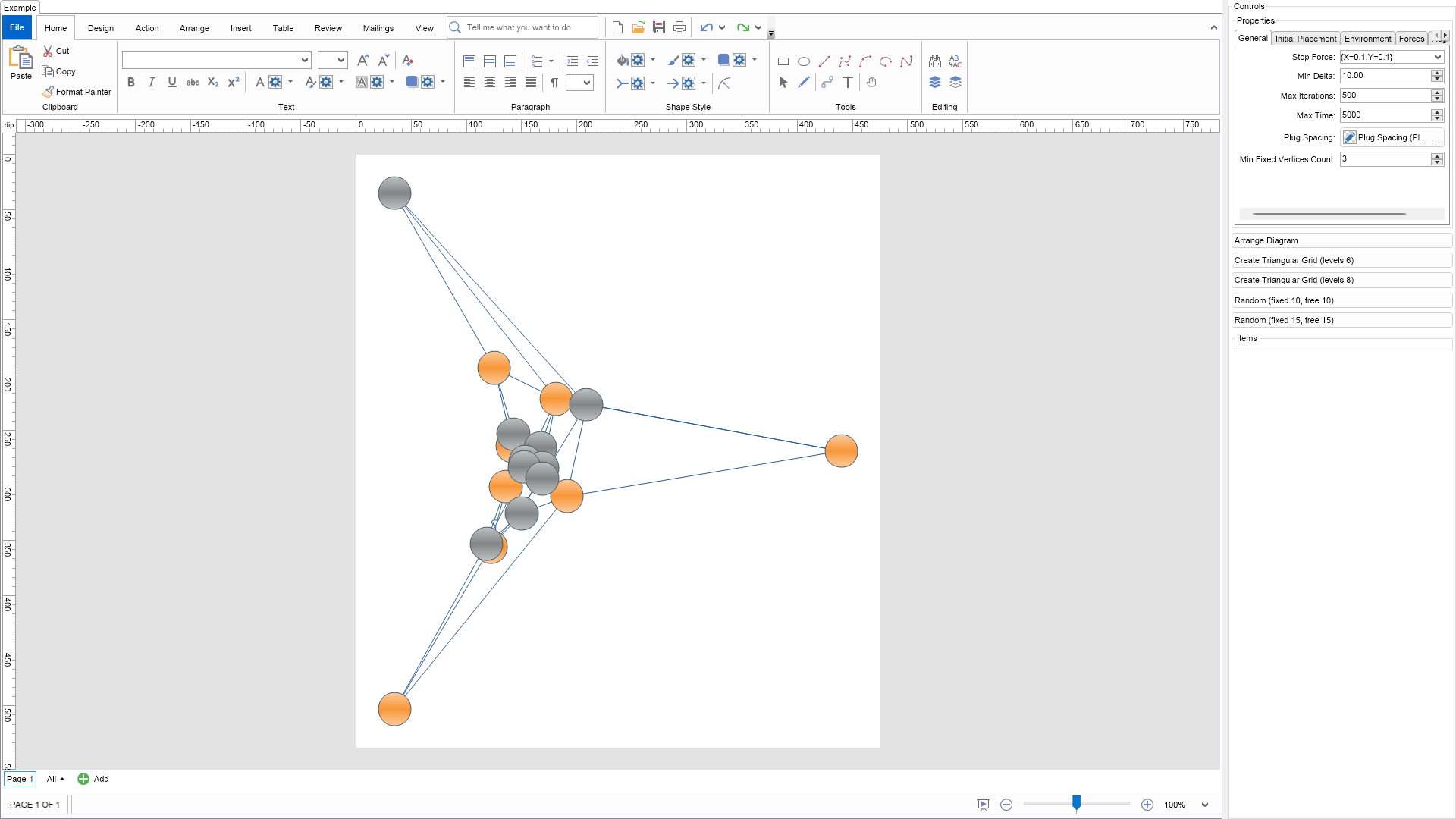
The barycenter layout method splits the input graph into a set of fixed and free vertices.
Fixed vertices are nailed to the corners of a strictly convex polygon,
while free vertices are placed in the barycenter of their neighbors.
The barycenter force accessible from the BarycenterForce property of the layout is
responsible for attracting the vertices to their barycenter.
In case there are no fixed vertices this will place all vertices at a single point,
which is obviously not a good graph drawing. That is why the barycenter layout needs
at least three fixed vertices.
The minimal amount of fixed vertices is specified by the MinFixedVerticesCount property.
If the input graph does not have that many fixed vertices, the layout will automatically
fulfill this requirement. This is done by fixing the vertices with the smallest degree.
In this example the fixed vertices are highlighted in orange.
C# Barycenter Graph Layout Example Code for Nevron Diagram for WinForms
Language: C#
using Nevron.Nov;
using Nevron.Nov.DataStructures;
using Nevron.Nov.Diagram;
using Nevron.Nov.Diagram.Batches;
using Nevron.Nov.Diagram.Layout;
using Nevron.Nov.Diagram.Shapes;
using Nevron.Nov.Dom;
using Nevron.Nov.Editors;
using Nevron.Nov.Graphics;
using Nevron.Nov.Layout;
using Nevron.Nov.Text;
using Nevron.Nov.UI;
using Nevron.Nov.Windows.Forms;
using System;
using System.Windows.Forms;
namespace NovWinFormsProject
{
public partial class Form1 : Form
{
#region Constructors
public Form1()
{
InitializeComponent();
// Set form title
Text = "NOV WinForms - NBarycenterGraphLayoutExample";
// Create the NOV example and its controls
NWidget exampleContent = CreateExampleContent();
NWidget exampleControls = CreateExampleControls();
if (exampleControls != null)
{
exampleControls.PreferredWidth = 300;
}
// Place the example and its controls in a pair box
NPairBox pairBox = new NPairBox(exampleContent, exampleControls);
pairBox.FillMode = ENStackFillMode.First;
pairBox.FitMode = ENStackFitMode.First;
pairBox.Margins = new NMargins(NDesign.HorizontalSpacing, NDesign.VerticalSpacing);
// Host the example in the form
NNovWidgetHost host = new NNovWidgetHost(pairBox);
host.Dock = DockStyle.Fill;
Controls.Add(host);
}
#endregion
#region Example
public string GetExampleDescription()
{
return @"
The barycenter layout method splits the input graph into a set of fixed and free vertices.
Fixed vertices are nailed to the corners of a strictly convex polygon,
while free vertices are placed in the barycenter of their neighbors.
The barycenter force accessible from the BarycenterForce property of the layout is
responsible for attracting the vertices to their barycenter.
In case there are no fixed vertices this will place all vertices at a single point,
which is obviously not a good graph drawing. That is why the barycenter layout needs
at least three fixed vertices.
The minimal amount of fixed vertices is specified by the MinFixedVerticesCount property.
If the input graph does not have that many fixed vertices, the layout will automatically
fulfill this requirement. This is done by fixing the vertices with the smallest degree.
In this example the fixed vertices are highlighted in orange.
";
}
///
/// Gets the relevant documentation links for the example
///
///
public (string Name, string Url)[] GetDocumentationUrls()
{
return new[]
{
("Barycenter Layout", "https://www.nevron.com/docs/openvision/diagram-barycenter-layout.html"),
("Layouts Overview", "https://www.nevron.com/docs/openvision/diagram-drawing-layouts-overview.html"),
("Graph Regions and Regions Layouts", "https://www.nevron.com/docs/openvision/diagram-graph-regions-and-region-layouts.html"),
("Shape Navigation", "https://www.nevron.com/docs/openvision/diagram-shape-navigation.html"),
};
}
public NWidget CreateExampleContent()
{
// Create a simple drawing
NDrawingViewWithRibbon drawingViewWithRibbon = new NDrawingViewWithRibbon();
m_DrawingView = drawingViewWithRibbon.View;
m_DrawingView.Document.HistoryService.Pause();
try
{
InitDiagram(m_DrawingView.Document);
}
finally
{
m_DrawingView.Document.HistoryService.Resume();
}
return drawingViewWithRibbon;
}
public NWidget CreateExampleControls()
{
m_Layout.Changed += OnLayoutChanged;
NStackPanel stack = new NStackPanel();
// property editor
NEditor editor = NDesigner.GetDesigner(m_Layout).CreateStandaloneEditor(m_Layout);
stack.Add(new NGroupBox("Properties", editor));
NButton arrangeButton = new NButton("Arrange Diagram");
arrangeButton.Click += OnArrangeButtonClick;
stack.Add(arrangeButton);
// items stack
NStackPanel itemsStack = new NStackPanel();
NButton triangularGrid6 = new NButton("Create Triangular Grid (levels 6)");
triangularGrid6.Click += delegate(NEventArgs args) { CreateTriangularGridDiagram(6); };
stack.AddChild(triangularGrid6);
NButton triangularGrid8 = new NButton("Create Triangular Grid (levels 8)");
triangularGrid8.Click += delegate(NEventArgs args) { CreateTriangularGridDiagram(8); };
stack.AddChild(triangularGrid8);
NButton random10 = new NButton("Random (fixed 10, free 10)");
random10.Click += delegate(NEventArgs args) { CreateRandomBarycenterDiagram(10, 10); };
stack.AddChild(random10);
NButton random15 = new NButton("Random (fixed 15, free 15)");
random15.Click += delegate(NEventArgs args) { CreateRandomBarycenterDiagram(15, 15); };
stack.AddChild(random15);
stack.Add(new NGroupBox("Items", itemsStack));
return stack;
}
private void InitDiagram(NDrawingDocument drawingDocument)
{
// Hide ports
drawingDocument.Content.ScreenVisibility.ShowPorts = false;
// Create a random diagram
CreateRandomBarycenterDiagram(8, 10);
// Arrange the diagram
ArrangeDiagram(drawingDocument);
// Fit active page
drawingDocument.Content.ActivePage.ZoomMode = ENZoomMode.Fit;
}
#endregion
#region Implementation
///
/// Creates a random barycenter diagram with the specified settings
///
/// number of fixed vertices (must be larger than 3)
/// number of free vertices
private void CreateRandomBarycenterDiagram(int fixedCount, int freeCount)
{
if (fixedCount < 3)
throw new ArgumentException("Needs at least three fixed vertices");
// clean up the active page
NPage activePage = m_DrawingView.ActivePage;
activePage.Items.Clear();
// we will be using basic circle shapes with default size of (30, 30)
NBasicShapeFactory basicShapes = new NBasicShapeFactory();
basicShapes.DefaultSize = new NSize(30, 30);
// create the fixed vertices
NShape[] fixedShapes = new NShape[fixedCount];
for (int i = 0; i < fixedCount; i++)
{
fixedShapes[i] = basicShapes.CreateShape(ENBasicShape.Circle);
//((NDynamicPort)fixedShapes[i].Ports.GetChildByName("Center", -1)).GlueMode = DynamicPortGlueMode.GlueToLocation;
fixedShapes[i].Geometry.Fill = new NStockGradientFill(ENGradientStyle.Horizontal, ENGradientVariant.Variant3, new NColor(251, 203, 156), new NColor(247, 150, 56));
fixedShapes[i].Geometry.Stroke = new NStroke(1, new NColor(68, 90, 108));
// setting the ForceXMoveable and ForceYMoveable properties to false
// specifies that the layout cannot move the shape in both X and Y directions
NForceDirectedGraphLayout.SetXMoveable(fixedShapes[i], false);
NForceDirectedGraphLayout.SetYMoveable(fixedShapes[i], false);
activePage.Items.AddChild(fixedShapes[i]);
}
// create the free vertices
NShape[] freeShapes = new NShape[freeCount];
for (int i = 0; i < freeCount; i++)
{
freeShapes[i] = basicShapes.CreateShape(ENBasicShape.Circle);
freeShapes[i].Geometry.Fill = new NStockGradientFill(ENGradientStyle.Horizontal, ENGradientVariant.Variant3, new NColor(192, 194, 194), new NColor(129, 133, 133));
freeShapes[i].Geometry.Stroke = new NStroke(1, new NColor(68, 90, 108));
activePage.Items.AddChild(freeShapes[i]);
}
// link the fixed shapes in a circle
for (int i = 0; i < fixedCount; i++)
{
NRoutableConnector connector = new NRoutableConnector();
connector.MakeLine();
activePage.Items.AddChild(connector);
if (i == 0)
{
connector.GlueBeginToShape(fixedShapes[fixedCount - 1]);
connector.GlueEndToShape(fixedShapes[0]);
}
else
{
connector.GlueBeginToShape(fixedShapes[i - 1]);
connector.GlueEndToShape(fixedShapes[i]);
}
}
// link each free shape with two different random fixed shapes
Random rnd = new Random();
for (int i = 0; i < freeCount; i++)
{
int firstFixed = rnd.Next(fixedCount);
int secondFixed = (firstFixed + rnd.Next(fixedCount / 3) + 1) % fixedCount;
// link with first fixed
NRoutableConnector lineShape = new NRoutableConnector();
lineShape.MakeLine();
activePage.Items.AddChild(lineShape);
lineShape.GlueBeginToShape(freeShapes[i]);
lineShape.GlueEndToShape(fixedShapes[firstFixed]);
// link with second fixed
lineShape = new NRoutableConnector();
lineShape.MakeLine();
activePage.Items.AddChild(lineShape);
lineShape.GlueBeginToShape(freeShapes[i]);
lineShape.GlueEndToShape(fixedShapes[secondFixed]);
}
// link each free shape with another free shape
for (int i = 1; i < freeCount; i++)
{
NRoutableConnector connector = new NRoutableConnector();
connector.MakeLine();
activePage.Items.AddChild(connector);
connector.GlueBeginToShape(freeShapes[i - 1]);
connector.GlueEndToShape(freeShapes[i]);
}
// send all edges to back
NBatchReorder batchReorder = new NBatchReorder(m_DrawingView.Document);
batchReorder.Build(activePage.GetShapes(false, NDiagramFilters.ShapeType1D).CastAll());
batchReorder.SendToBack(activePage);
// arrange the elements
ArrangeDiagram(m_DrawingView.Document);
}
///
/// Creates a triangular grid diagram with the specified count of levels
///
///
private void CreateTriangularGridDiagram(int levels)
{
// clean up the active page
NPage activePage = m_DrawingView.ActivePage;
activePage.Items.Clear();
// we will be using basic circle shapes with default size of (30, 30)
NBasicShapeFactory basicShapes = new NBasicShapeFactory();
basicShapes.DefaultSize = new NSize(30, 30);
NShape prev = null;
NList prevRowShapes = null;
for (int level = 1; level < levels; level++)
{
NList curRowShapes = new NList();
for (int i = 0; i < level; i++)
{
NShape cur = basicShapes.CreateShape(ENBasicShape.Circle);
cur.Geometry.Fill = new NStockGradientFill(ENGradientStyle.Horizontal, ENGradientVariant.Variant3, new NColor(192, 194, 194), new NColor(129, 133, 133));
cur.Geometry.Stroke = new NStroke(1, new NColor(68, 90, 108));
activePage.Items.Add(cur);
NRoutableConnector edge;
// connect with prev
if (i > 0)
{
edge = new NRoutableConnector();
edge.MakeLine();
activePage.Items.Add(edge);
edge.GlueBeginToShape(prev);
edge.GlueEndToShape(cur);
}
// connect with ancestors
if (level > 1)
{
if (i < prevRowShapes.Count)
{
edge = new NRoutableConnector();
edge.MakeLine();
activePage.Items.Add(edge);
edge.GlueBeginToShape(prevRowShapes[i]);
edge.GlueEndToShape(cur);
}
if (i > 0)
{
edge = new NRoutableConnector();
edge.MakeLine();
activePage.Items.Add(edge);
edge.GlueBeginToShape(prevRowShapes[i - 1]);
edge.GlueEndToShape(cur);
}
}
// fix the three corner vertices
if (level == 1 || (level == levels - 1 && (i == 0 || i == level - 1)))
{
NForceDirectedGraphLayout.SetXMoveable(cur, false);
NForceDirectedGraphLayout.SetYMoveable(cur, false);
cur.Geometry.Fill = new NStockGradientFill(ENGradientStyle.Horizontal, ENGradientVariant.Variant3, new NColor(251, 203, 156), new NColor(247, 150, 56));
cur.Geometry.Stroke = new NStroke(1, new NColor(68, 90, 108));
}
curRowShapes.Add(cur);
prev = cur;
}
prevRowShapes = curRowShapes;
}
// send all edges to back
NBatchReorder batchReorder = new NBatchReorder(m_DrawingView.Document);
batchReorder.Build(activePage.GetShapes(false, NDiagramFilters.ShapeType1D).CastAll());
batchReorder.SendToBack(activePage);
// arrange the elements
ArrangeDiagram(m_DrawingView.Document);
}
///
/// Arranges the shapes in the active page.
///
///
private void ArrangeDiagram(NDrawingDocument drawingDocument)
{
// get all top-level shapes that reside in the active page
NPage activePage = drawingDocument.Content.ActivePage;
NList shapes = activePage.GetShapes(false);
// create a layout context and use it to arrange the shapes using the current layout
NDrawingLayoutContext layoutContext = new NDrawingLayoutContext(drawingDocument, activePage);
m_Layout.Arrange(shapes.CastAll
Download a fully functional C# (.cs) Barycenter Graph Layout Example for WinForms Solution
VB.NET Barycenter Graph Layout Example Code for Nevron Diagram for WinForms
Language: VB.NET
Imports Nevron.Nov
Imports Nevron.Nov.DataStructures
Imports Nevron.Nov.Diagram
Imports Nevron.Nov.Diagram.Batches
Imports Nevron.Nov.Diagram.Layout
Imports Nevron.Nov.Diagram.Shapes
Imports Nevron.Nov.Dom
Imports Nevron.Nov.Editors
Imports Nevron.Nov.Graphics
Imports Nevron.Nov.Layout
Imports Nevron.Nov.UI
Imports Nevron.Nov.Windows.Forms
Imports System

Public Class Form1

#Region "Constructors"

    Public Sub New()
        ' This call is required by the designer.
        InitializeComponent()

        ' Add any initialization after the InitializeComponent() call.

        ' Set form title
        Text = "NOV WinForms - NBarycenterGraphLayoutExample"

        ' Create the NOV example and its controls
        Dim exampleContent As NWidget = CreateExampleContent()
        Dim exampleControls As NWidget = CreateExampleControls()
        If Not exampleControls Is Nothing Then
            exampleControls.PreferredWidth = 300
        End If

        ' Place the example and its controls in a pair box
        Dim pairBox As NPairBox = New NPairBox(exampleContent, exampleControls)
        pairBox.FillMode = ENStackFillMode.First
        pairBox.FitMode = ENStackFitMode.First
        pairBox.Margins = New NMargins(NDesign.HorizontalSpacing, NDesign.VerticalSpacing)

        ' Host the example in the form
        Dim host As NNovWidgetHost(Of NWidget) = New NNovWidgetHost(Of NWidget)(pairBox)
        host.Dock = DockStyle.Fill
        Controls.Add(host)
    End Sub


#End Region

#Region "Example"

        Public Function GetExampleDescription() As String
            Return "

    The barycenter layout method splits the input graph into a set of fixed and free vertices.
    Fixed vertices are nailed to the corners of a strictly convex polygon,
    while free vertices are placed in the barycenter of their neighbors.
    The barycenter force accessible from the BarycenterForce property of the layout is
    responsible for attracting the vertices to their barycenter.


	In case there are no fixed vertices this will place all vertices at a single point,
	which is obviously not a good graph drawing. That is why the barycenter layout needs
	at least three fixed vertices.


	The minimal amount of fixed vertices is specified by the MinFixedVerticesCount property.
	If the input graph does not have that many fixed vertices, the layout will automatically
	fulfill this requirement. This is done by fixing the vertices with the smallest degree.


	In this example the fixed vertices are highlighted in orange.

"
        End Function

        '''
        ''' Gets the relevant documentation links for the example
        '''
        '''
        Public Function GetDocumentationUrls() As (String, String)()
            Return {("Barycenter Layout", "https://www.nevron.com/docs/openvision/diagram-barycenter-layout.html"), ("Layouts Overview", "https://www.nevron.com/docs/openvision/diagram-drawing-layouts-overview.html"), ("Graph Regions and Regions Layouts", "https://www.nevron.com/docs/openvision/diagram-graph-regions-and-region-layouts.html"), ("Shape Navigation", "https://www.nevron.com/docs/openvision/diagram-shape-navigation.html")}
        End Function
        Public Function CreateExampleContent() As NWidget
            ' Create a simple drawing
            Dim drawingViewWithRibbon As NDrawingViewWithRibbon = New NDrawingViewWithRibbon()
            m_DrawingView = drawingViewWithRibbon.View

            m_DrawingView.Document.HistoryService.Pause()
            Try
                InitDiagram(m_DrawingView.Document)
            Finally
                m_DrawingView.Document.HistoryService.Resume()
            End Try

            Return drawingViewWithRibbon
        End Function
        Public Function CreateExampleControls() As NWidget
            Me.m_Layout.Changed += AddressOf OnLayoutChanged

            Dim stack As NStackPanel = New NStackPanel()

            ' property editor
            Dim editor As NEditor = NDesigner.GetDesigner(m_Layout).CreateStandaloneEditor(m_Layout)
            stack.Add(New NGroupBox("Properties", editor))

            Dim arrangeButton As NButton = New NButton("Arrange Diagram")
            arrangeButton.Click += AddressOf OnArrangeButtonClick
            stack.Add(arrangeButton)

            ' items stack
            Dim itemsStack As NStackPanel = New NStackPanel()
            Dim triangularGrid6 As NButton = New NButton("Create Triangular Grid (levels 6)")
            triangularGrid6.Click += Sub(args As NEventArgs) CreateTriangularGridDiagram(6)
            stack.AddChild(triangularGrid6)

            Dim triangularGrid8 As NButton = New NButton("Create Triangular Grid (levels 8)")
            triangularGrid8.Click += Sub(args As NEventArgs) CreateTriangularGridDiagram(8)
            stack.AddChild(triangularGrid8)

            Dim random10 As NButton = New NButton("Random (fixed 10, free 10)")
            random10.Click += Sub(args As NEventArgs) CreateRandomBarycenterDiagram(10, 10)
            stack.AddChild(random10)

            Dim random15 As NButton = New NButton("Random (fixed 15, free 15)")
            random15.Click += Sub(args As NEventArgs) CreateRandomBarycenterDiagram(15, 15)
            stack.AddChild(random15)

            stack.Add(New NGroupBox("Items", itemsStack))

            Return stack
        End Function

        Private Sub InitDiagram(drawingDocument As NDrawingDocument)
            ' Hide ports
            drawingDocument.Content.ScreenVisibility.ShowPorts = False

            ' Create a random diagram
            CreateRandomBarycenterDiagram(8, 10)

            ' Arrange the diagram
            ArrangeDiagram(drawingDocument)

            ' Fit active page
            drawingDocument.Content.ActivePage.ZoomMode = ENZoomMode.Fit
        End Sub

#End Region

#Region "Implementation"

        '''
        ''' Creates a random barycenter diagram with the specified settings
        '''
        ''' number of fixed vertices (must be larger than 3)
        ''' number of free vertices
        Private Sub CreateRandomBarycenterDiagram(fixedCount As Integer, freeCount As Integer)
            If fixedCount < 3 Then Throw New ArgumentException("Needs at least three fixed vertices")

            ' clean up the active page
            Dim activePage = m_DrawingView.ActivePage
            activePage.Items.Clear()

            ' we will be using basic circle shapes with default size of (30, 30)
            Dim basicShapes As NBasicShapeFactory = New NBasicShapeFactory()
            basicShapes.DefaultSize = New NSize(30, 30)

            ' create the fixed vertices
            Dim fixedShapes = New NShape(fixedCount - 1) {}

            For i = 0 To fixedCount - 1
                fixedShapes(i) = basicShapes.CreateShape(ENBasicShape.Circle)

                '((NDynamicPort)fixedShapes[i].Ports.GetChildByName("Center", -1)).GlueMode = DynamicPortGlueMode.GlueToLocation;
                fixedShapes(i).Geometry.Fill = New NStockGradientFill(ENGradientStyle.Horizontal, ENGradientVariant.Variant3, New NColor(251, 203, 156), New NColor(247, 150, 56))
                fixedShapes(i).Geometry.Stroke = New NStroke(1, New NColor(68, 90, 108))

                ' setting the ForceXMoveable and ForceYMoveable properties to false
                ' specifies that the layout cannot move the shape in both X and Y directions
                NForceDirectedGraphLayout.SetXMoveable(fixedShapes(i), False)
                NForceDirectedGraphLayout.SetYMoveable(fixedShapes(i), False)

                activePage.Items.AddChild(fixedShapes(i))
            Next

            ' create the free vertices
            Dim freeShapes = New NShape(freeCount - 1) {}
            For i = 0 To freeCount - 1
                freeShapes(i) = basicShapes.CreateShape(ENBasicShape.Circle)
                freeShapes(i).Geometry.Fill = New NStockGradientFill(ENGradientStyle.Horizontal, ENGradientVariant.Variant3, New NColor(192, 194, 194), New NColor(129, 133, 133))
                freeShapes(i).Geometry.Stroke = New NStroke(1, New NColor(68, 90, 108))
                activePage.Items.AddChild(freeShapes(i))
            Next

            ' link the fixed shapes in a circle
            For i = 0 To fixedCount - 1
                Dim connector As NRoutableConnector = New NRoutableConnector()
                connector.MakeLine()
                activePage.Items.AddChild(connector)

                If i = 0 Then
                    connector.GlueBeginToShape(fixedShapes(fixedCount - 1))
                    connector.GlueEndToShape(fixedShapes(0))
                Else
                    connector.GlueBeginToShape(fixedShapes(i - 1))
                    connector.GlueEndToShape(fixedShapes(i))
                End If
            Next

            ' link each free shape with two different random fixed shapes
            Dim rnd As Random = New Random()
            For i = 0 To freeCount - 1
                Dim firstFixed = rnd.Next(fixedCount)
                Dim secondFixed = (firstFixed + rnd.Next(fixedCount / 3) + 1) Mod fixedCount

                ' link with first fixed
                Dim lineShape As NRoutableConnector = New NRoutableConnector()
                lineShape.MakeLine()
                activePage.Items.AddChild(lineShape)

                lineShape.GlueBeginToShape(freeShapes(i))
                lineShape.GlueEndToShape(fixedShapes(firstFixed))

                ' link with second fixed
                lineShape = New NRoutableConnector()
                lineShape.MakeLine()
                activePage.Items.AddChild(lineShape)

                lineShape.GlueBeginToShape(freeShapes(i))
                lineShape.GlueEndToShape(fixedShapes(secondFixed))
            Next

            ' link each free shape with another free shape
            For i = 1 To freeCount - 1
                Dim connector As NRoutableConnector = New NRoutableConnector()
                connector.MakeLine()
                activePage.Items.AddChild(connector)

                connector.GlueBeginToShape(freeShapes(i - 1))
                connector.GlueEndToShape(freeShapes(i))
            Next

            ' send all edges to back
            Dim batchReorder As NBatchReorder(Of NPageItem) = New NBatchReorder(Of NPageItem)(m_DrawingView.Document)
            batchReorder.Build(activePage.GetShapes(False, NDiagramFilters.ShapeType1D).CastAll(Of NPageItem)())
            batchReorder.SendToBack(activePage)

            ' arrange the elements
            ArrangeDiagram(m_DrawingView.Document)
        End Sub
        '''
        ''' Creates a triangular grid diagram with the specified count of levels
        '''
        '''
        Private Sub CreateTriangularGridDiagram(levels As Integer)
            ' clean up the active page
            Dim activePage = m_DrawingView.ActivePage
            activePage.Items.Clear()

            ' we will be using basic circle shapes with default size of (30, 30)
            Dim basicShapes As NBasicShapeFactory = New NBasicShapeFactory()
            basicShapes.DefaultSize = New NSize(30, 30)

            Dim prev As NShape = Nothing
            Dim prevRowShapes As NList(Of NShape) = Nothing

            For level = 1 To levels - 1
                Dim curRowShapes As NList(Of NShape) = New NList(Of NShape)()

                For i = 0 To level - 1
                    Dim cur = basicShapes.CreateShape(ENBasicShape.Circle)
                    cur.Geometry.Fill = New NStockGradientFill(ENGradientStyle.Horizontal, ENGradientVariant.Variant3, New NColor(192, 194, 194), New NColor(129, 133, 133))
                    cur.Geometry.Stroke = New NStroke(1, New NColor(68, 90, 108))
                    activePage.Items.Add(cur)

                    Dim edge As NRoutableConnector
                    ' connect with prev
                    If i > 0 Then
                        edge = New NRoutableConnector()
                        edge.MakeLine()
                        activePage.Items.Add(edge)

                        edge.GlueBeginToShape(prev)
                        edge.GlueEndToShape(cur)
                    End If

                    ' connect with ancestors
                    If level > 1 Then
                        If i < prevRowShapes.Count Then
                            edge = New NRoutableConnector()
                            edge.MakeLine()
                            activePage.Items.Add(edge)

                            edge.GlueBeginToShape(prevRowShapes(i))
                            edge.GlueEndToShape(cur)
                        End If

                        If i > 0 Then
                            edge = New NRoutableConnector()
                            edge.MakeLine()
                            activePage.Items.Add(edge)

                            edge.GlueBeginToShape(prevRowShapes(i - 1))
                            edge.GlueEndToShape(cur)
                        End If
                    End If

                    ' fix the three corner vertices
                    If level = 1 OrElse level = levels - 1 AndAlso (i = 0 OrElse i = level - 1) Then
                        NForceDirectedGraphLayout.SetXMoveable(cur, False)
                        NForceDirectedGraphLayout.SetYMoveable(cur, False)

                        cur.Geometry.Fill = New NStockGradientFill(ENGradientStyle.Horizontal, ENGradientVariant.Variant3, New NColor(251, 203, 156), New NColor(247, 150, 56))
                        cur.Geometry.Stroke = New NStroke(1, New NColor(68, 90, 108))
                    End If

                    curRowShapes.Add(cur)
                    prev = cur
                Next

                prevRowShapes = curRowShapes
            Next

            ' send all edges to back
            Dim batchReorder As NBatchReorder(Of NPageItem) = New NBatchReorder(Of NPageItem)(m_DrawingView.Document)
            batchReorder.Build(activePage.GetShapes(False, NDiagramFilters.ShapeType1D).CastAll(Of NPageItem)())
            batchReorder.SendToBack(activePage)

            ' arrange the elements
            ArrangeDiagram(m_DrawingView.Document)
        End Sub
        '''
        ''' Arranges the shapes in the active page.
        '''
        '''
        Private Sub ArrangeDiagram(drawingDocument As NDrawingDocument)
            ' get all top-level shapes that reside in the active page
            Dim activePage = drawingDocument.Content.ActivePage
            Dim shapes = activePage.GetShapes(False)

            ' create a layout context and use it to arrange the shapes using the current layout
            Dim layoutContext As NDrawingLayoutContext = New NDrawingLayoutContext(drawingDocument, activePage)
            m_Layout.Arrange(shapes.CastAll(Of Object)(), layoutContext)

            ' size the page to the content size
            activePage.SizeToContent()
        End Sub

#End Region

#Region "Event Handlers"

        Private Sub OnLayoutChanged(arg As NEventArgs)
            ArrangeDiagram(m_DrawingView.Document)
        End Sub
        Protected Overridable Sub OnArrangeButtonClick(arg As NEventArgs)
            ArrangeDiagram(m_DrawingView.Document)
        End Sub

#End Region

#Region "Fields"

        Private m_DrawingView As NDrawingView
        Private m_Layout As NBarycenterGraphLayout = New NBarycenterGraphLayout()

#End Region

#Region "Static Methods"
#End Region

#Region "Constants"
#End Region

#Region "Nested Types"
#End Region

End Class
Download a fully functional VB.NET (.vb) Barycenter Graph Layout Example for WinForms Solution

 Chart for .NET
 Diagram for .NET
 User Interface for .NET
 Vision for SSRS
 Chart for SSRS
 Gauge for SSRS
 Map for SSRS
 Barcode for SSRS
 Vision for SharePoint
 Chart for SharePoint
 Gauge for SharePoint
 Map for SharePoint
 Barcode for SharePoint
 Open Vision for .NET


 Vision for .NET