Imports Nevron.Nov
Imports Nevron.Nov.DataStructures
Imports Nevron.Nov.Diagram
Imports Nevron.Nov.Diagram.DrawingTools
Imports Nevron.Nov.Diagram.Layout
Imports Nevron.Nov.Diagram.Shapes
Imports Nevron.Nov.Dom
Imports Nevron.Nov.Graphics
Imports Nevron.Nov.Layout
Imports Nevron.Nov.UI
Imports Nevron.Nov.Windows.Forms

Public Class Form1

#Region "Constructors"

    Public Sub New()
        ' This call is required by the designer.
        InitializeComponent()

        ' Add any initialization after the InitializeComponent() call.

        ' Set form title
        Text = "NOV WinForms - NCustomDrawingToolsExample"

        ' Create the NOV example and its controls
        Dim exampleContent As NWidget = CreateExampleContent()
        Dim exampleControls As NWidget = CreateExampleControls()
        If Not exampleControls Is Nothing Then
            exampleControls.PreferredWidth = 300
        End If

        ' Place the example and its controls in a pair box
        Dim pairBox As NPairBox = New NPairBox(exampleContent, exampleControls)
        pairBox.FillMode = ENStackFillMode.First
        pairBox.FitMode = ENStackFitMode.First
        pairBox.Margins = New NMargins(NDesign.HorizontalSpacing, NDesign.VerticalSpacing)

        ' Host the example in the form
        Dim host As NNovWidgetHost(Of NWidget) = New NNovWidgetHost(Of NWidget)(pairBox)
        host.Dock = DockStyle.Fill
        Controls.Add(host)
    End Sub


#End Region

#Region "Example"

        Public Function CreateExampleContent() As Nevron.Nov.UI.NWidget
            Dim drawingViewWithRibbon As Nevron.Nov.Diagram.NDrawingViewWithRibbon = New Nevron.Nov.Diagram.NDrawingViewWithRibbon()
            Dim drawingView As Nevron.Nov.Diagram.NDrawingView = drawingViewWithRibbon.View

            ' Configure the selection
            Dim drawingSettings As Nevron.Nov.Diagram.NDrawingSettings = drawingView.Settings
            drawingSettings.ShowSelectionBoxTrackers = False
            drawingSettings.ShowSelectionPinRotationTrackers = False

            ' Change selection outline colors
            drawingSettings.SelectedOutlineStroke = New Nevron.Nov.Graphics.NStroke(3, Nevron.Nov.Graphics.NColor.Firebrick)
            drawingSettings.FormatAnchorOutlineStroke = New Nevron.Nov.Graphics.NStroke(4, Nevron.Nov.Graphics.NColor.Orange)
            drawingSettings.AlignmentAnchorOutlineStroke = CType(drawingSettings.SelectedOutlineStroke.DeepClone(), Nevron.Nov.Graphics.NStroke)

            ' Replace the default pointer tool with the ancestor and descendants pointer tool
            drawingView.Interactor.ReplaceTool(Of Nevron.Nov.Diagram.DrawingTools.NPointerTool, Nevron.Nov.Examples.Diagram.NCustomDrawingToolsExample.AncestorsAndDescendantsPointerTool)()

            drawingView.Document.HistoryService.Pause()
            Try
                Me.InitDiagram(drawingView.Document)

                ' Set selection anchor modes
                drawingView.ActivePage.Selection.FormatAnchorMode = Nevron.Nov.UI.ENSelectionAnchorMode.First
                drawingView.ActivePage.Selection.AlignmentAnchorMode = Nevron.Nov.UI.ENSelectionAnchorMode.First
            Finally
                drawingView.Document.HistoryService.[Resume]()
            End Try

            Return drawingViewWithRibbon
        End Function
        Public Function CreateExampleControls() As Nevron.Nov.UI.NWidget
            Return Nothing
        End Function
        Public Function GetExampleDescription() As String
            Return "

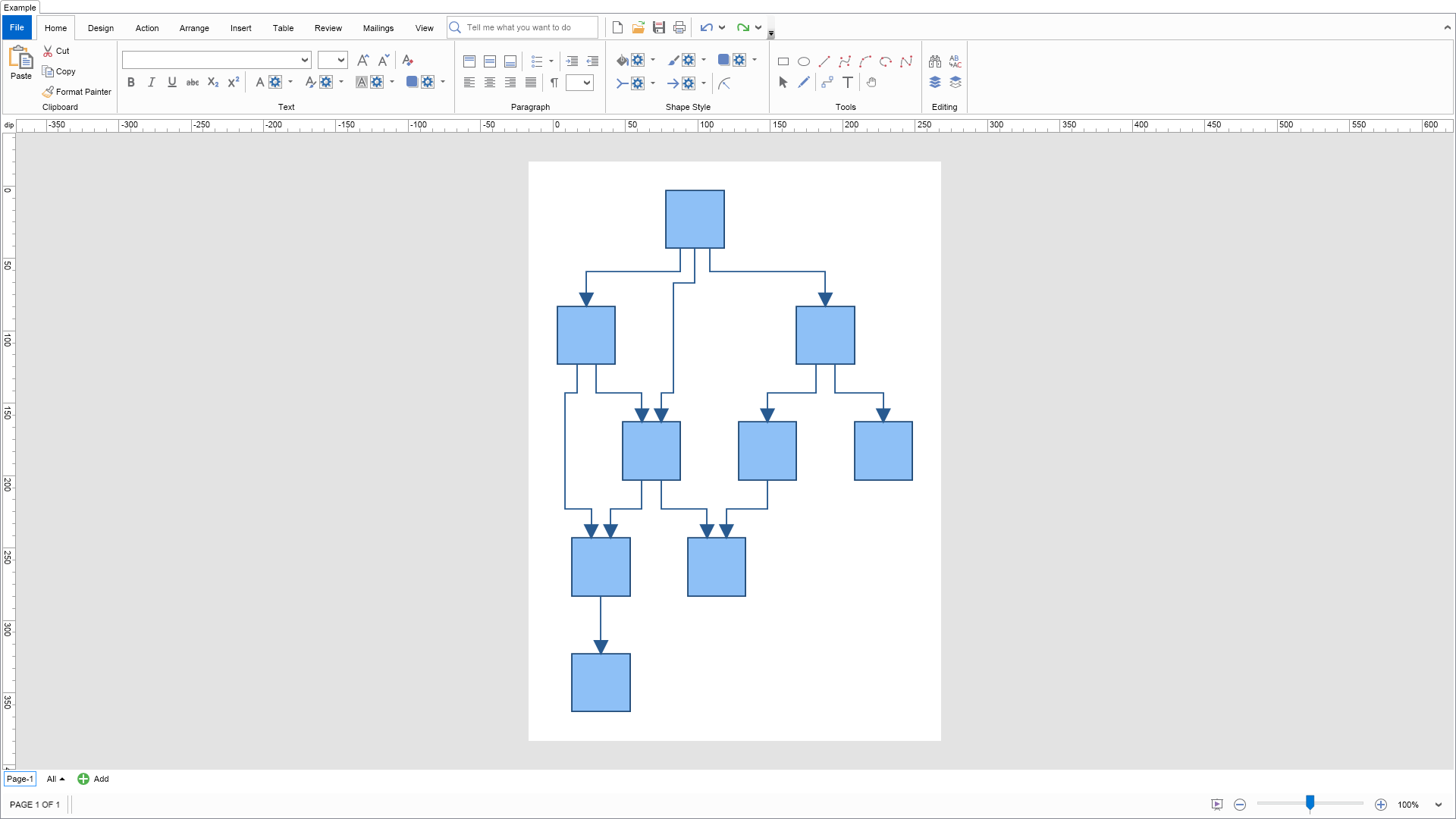
	This example demonstrates how to create custom drawing tools. Click on a shape and the custom click select tool of
	this example will select it together with its ancestor and descendant shapes.
"
        End Function

        '''
        ''' Gets the relevant documentation links for the example
        '''
        '''
        Public Function GetDocumentationUrls() As (String, String)()
            Return {("Drawing View Tools", "https://www.nevron.com/docs/openvision/diagram-drawing-view-tools.html"), ("Interactors", "https://www.nevron.com/docs/openvision/ui-interactors.html")}
        End Function

        Private Sub InitDiagram(drawingDocument As Nevron.Nov.Diagram.NDrawingDocument)
            Const width As Double = 40
            Const height As Double = 40
            Const distance As Double = 80

            ' Hide ports
            drawingDocument.Content.ScreenVisibility.ShowPorts = False

            Dim basicShapes As Nevron.Nov.Diagram.Shapes.NBasicShapeFactory = New Nevron.Nov.Diagram.Shapes.NBasicShapeFactory()
            Dim activePage As Nevron.Nov.Diagram.NPage = drawingDocument.Content.ActivePage

            Dim from As Integer() = New Integer() {1, 1, 1, 2, 2, 3, 3, 4, 4, 5, 6}
            Dim [to] As Integer() = New Integer() {2, 3, 4, 4, 5, 6, 7, 5, 9, 8, 9}
            Dim shapes As Nevron.Nov.Diagram.NShape() = New Nevron.Nov.Diagram.NShape(8) {}
            Dim vertexCount As Integer = shapes.Length, edgeCount As Integer = from.Length
            Dim i, j As Integer, count As Integer = vertexCount + edgeCount

            For i = 0 To count - 1
                If i < vertexCount Then
                    j = If(vertexCount Mod 2 = 0, i, i + 1)
                    shapes(i) = basicShapes.CreateShape(Nevron.Nov.Diagram.Shapes.ENBasicShape.Rectangle)

                    If vertexCount Mod 2 <> 0 AndAlso i = 0 Then
                        shapes(CInt((i))).SetBounds(New Nevron.Nov.Graphics.NRectangle((width + (distance * 1.5)) / 2, distance + (j / 2) * (distance * 1.5), width, height))
                    Else
                        shapes(CInt((i))).SetBounds(New Nevron.Nov.Graphics.NRectangle(width / 2 + (j Mod 2) * (distance * 1.5), height + (j / 2) * (distance * 1.5), width, height))
                    End If

                    activePage.Items.Add(shapes(i))
                Else
                    Dim edge As Nevron.Nov.Diagram.NRoutableConnector = New Nevron.Nov.Diagram.NRoutableConnector()
                    edge.UserClass = Nevron.Nov.Diagram.NDR.StyleSheetNameConnectors
                    activePage.Items.Add(edge)
                    edge.GlueBeginToShape(shapes(from(i - vertexCount) - 1))
                    edge.GlueEndToShape(shapes([to](i - vertexCount) - 1))
                End If
            Next

            ' arrange diagram
            Me.ArrangeDiagram(drawingDocument)

            ' fit active page
            drawingDocument.Content.ActivePage.ZoomMode = Nevron.Nov.UI.ENZoomMode.Fit
        End Sub

        '''
        ''' Arranges the shapes in the active page.
        '''
        '''
        Private Sub ArrangeDiagram(drawingDocument As Nevron.Nov.Diagram.NDrawingDocument)
            ' get all top-level shapes that reside in the active page
            Dim activePage As Nevron.Nov.Diagram.NPage = drawingDocument.Content.ActivePage
            Dim shapes As Nevron.Nov.DataStructures.NList(Of Nevron.Nov.Diagram.NShape) = activePage.GetShapes(False)

            ' create a layout context and use it to arrange the shapes using the current layout
            Dim layoutContext As Nevron.Nov.Diagram.Layout.NDrawingLayoutContext = New Nevron.Nov.Diagram.Layout.NDrawingLayoutContext(drawingDocument, activePage)
            Dim layout As Nevron.Nov.Diagram.Layout.NLayeredGraphLayout = New Nevron.Nov.Diagram.Layout.NLayeredGraphLayout()
            layout.Arrange(shapes.CastAll(Of Object)(), layoutContext)

            ' size the page to the content size
            activePage.SizeToContent()
        End Sub

#End Region

#Region "Implementation"

            '''
            ''' Selects the ancestors and descendants of the given shape.
            '''
            '''
            Private Sub SelectShapeAncestorsAndDescendants(shape As Nevron.Nov.Diagram.NShape)
                If shape.ShapeType Is Nevron.Nov.Diagram.ENShapeType.Shape2D Then
                    Me.SelectShape(shape, True, True)
                Else
                    Me.SelectConnector(shape, True, True)
                End If
            End Sub

            Private Sub SelectShape(shape As Nevron.Nov.Diagram.NShape, selectIncomingConnectors As Boolean, selectOutgoingConnectors As Boolean)
                If shape Is Nothing Then Return

                Dim page As Nevron.Nov.Diagram.NPage = shape.OwnerPage
                Dim selection As Nevron.Nov.Diagram.NPageSelection = page.Selection

                If Not selection.IsSelected(shape) Then
                    selection.MultiSelect(shape)
                End If

                If selectIncomingConnectors Then
                    ' Select incoming connectors
                    Dim incomingConnectors As Nevron.Nov.DataStructures.NList(Of Nevron.Nov.Diagram.NShape) = shape.GetIncomingShapes()
                    For i As Integer = 0 To incomingConnectors.Count - 1
                        Me.SelectConnector(incomingConnectors(i), True, False)
                    Next
                End If

                If selectOutgoingConnectors Then
                    ' Select outgonig connectors
                    Dim outgoingConnectors As Nevron.Nov.DataStructures.NList(Of Nevron.Nov.Diagram.NShape) = shape.GetOutgoingShapes()
                    For i As Integer = 0 To outgoingConnectors.Count - 1
                        Me.SelectConnector(outgoingConnectors(i), False, True)
                    Next
                End If
            End Sub
            Private Sub SelectConnector(connector As Nevron.Nov.Diagram.NShape, selectFromShape As Boolean, selectToShape As Boolean)
                Dim page As Nevron.Nov.Diagram.NPage = connector.OwnerPage
                Dim selection As Nevron.Nov.Diagram.NPageSelection = page.Selection

                If Not selection.IsSelected(connector) Then
                    selection.MultiSelect(connector)
                End If

                If selectFromShape Then
                    Me.SelectShape(connector.FromShape, True, False)
                End If

                If selectToShape Then
                    Me.SelectShape(connector.ToShape, False, True)
                End If
            End Sub

#End Region

#Region "Event Handlers"
#End Region

#Region "Fields"
#End Region

#Region "Static Methods"
#End Region

#Region "Constants"
#End Region

#Region "Nested Types"

        Friend Class AncestorsAndDescendantsPointerTool
            Inherits Nevron.Nov.UI.NCompositeTool
#Region "Constructors"

            '''
            ''' Default constructor.
            '''
            Public Sub New()
                MyBase.AddEnabledTool(New Nevron.Nov.Examples.Diagram.NCustomDrawingToolsExample.AncestorsAndDescendantsClickSelectTool())
            End Sub

            '''
            ''' Static constructor.
            '''
            Shared Sub New()
                Nevron.Nov.Examples.Diagram.NCustomDrawingToolsExample.AncestorsAndDescendantsPointerTool.AncestorsAndDescendantsPointerToolSchema = Nevron.Nov.Dom.NSchema.Create(GetType(Nevron.Nov.Examples.Diagram.NCustomDrawingToolsExample.AncestorsAndDescendantsPointerTool), Nevron.Nov.UI.NCompositeTool.NCompositeToolSchema)
            End Sub

#End Region

#Region "Schema"

            '''
            ''' Schema associated with AncestorsAndDescendantsPointerTool.
            '''
            Public Shared ReadOnly AncestorsAndDescendantsPointerToolSchema As Nevron.Nov.Dom.NSchema

#End Region
        End Class

        Friend Class AncestorsAndDescendantsClickSelectTool
            Inherits Nevron.Nov.Diagram.DrawingTools.NClickSelectTool
#Region "Constructors"

            '''
            ''' Default constructor.
            '''
            Public Sub New()
            End Sub

            '''
            ''' Static constructor.
            '''
            Shared Sub New()
                Nevron.Nov.Examples.Diagram.NCustomDrawingToolsExample.AncestorsAndDescendantsClickSelectTool.AncestorsAndDescendantsClickSelectToolSchema = Nevron.Nov.Dom.NSchema.Create(GetType(Nevron.Nov.Examples.Diagram.NCustomDrawingToolsExample.AncestorsAndDescendantsClickSelectTool), Nevron.Nov.Diagram.DrawingTools.NClickSelectTool.NClickSelectToolSchema)
            End Sub

#End Region

#Region "Protected Overrides"

            Protected Overrides Sub ClickSelect(args As Nevron.Nov.UI.INPointerEventArgs)
                Dim selection As Nevron.Nov.Diagram.NPageSelection = MyBase.OwnerDrawingView?.ActivePage?.Selection
                If selection IsNot Nothing Then
                    selection.DeselectAll()
                End If

                MyBase.ClickSelect(args)

                If args.TargetNode Is Nothing Then Return

                ' Make sure only 1 item is selected
                Dim clickedShape As Nevron.Nov.Diagram.NShape = args.TargetNode.GetFirstAncestor(Of Nevron.Nov.Diagram.NShape)()
                If clickedShape IsNot Nothing Then
                    Me.SelectShapeAncestorsAndDescendants(clickedShape)
                End If
            End Sub
            Protected Overrides Sub DrillDownSelect(args As Nevron.Nov.UI.INPointerEventArgs)
                MyBase.DrillDownSelect(args)

                ' Get the page
                Dim page As Nevron.Nov.Diagram.NPage = MyBase.OwnerDrawingView.ActivePage
                If page Is Nothing Then Return

                ' Get the page selection
                Dim selection As Nevron.Nov.Diagram.NPageSelection = page.Selection
                Dim shape As Nevron.Nov.Diagram.NShape = Nothing

                ' Make sure only 1 shape is selected
                If selection.SelectedCount = 1 AndAlso CSharpImpl.__Assign(shape, TryCast(selection.FirstSelected, Nevron.Nov.Diagram.NShape)) IsNot Nothing Then
                    Me.SelectShapeAncestorsAndDescendants(shape)
                End If
            End Sub

#End Region

#Region "Implementation"

            '''
            ''' Selects the ancestors and descendants of the given shape.
            '''
            '''
            Private Sub SelectShapeAncestorsAndDescendants(shape As Nevron.Nov.Diagram.NShape)
                If shape.ShapeType Is Nevron.Nov.Diagram.ENShapeType.Shape2D Then
                    Me.SelectShape(shape, True, True)
                Else
                    Me.SelectConnector(shape, True, True)
                End If
            End Sub

            Private Sub SelectShape(shape As Nevron.Nov.Diagram.NShape, selectIncomingConnectors As Boolean, selectOutgoingConnectors As Boolean)
                If shape Is Nothing Then Return

                Dim page As Nevron.Nov.Diagram.NPage = shape.OwnerPage
                Dim selection As Nevron.Nov.Diagram.NPageSelection = page.Selection

                If Not selection.IsSelected(shape) Then
                    selection.MultiSelect(shape)
                End If

                If selectIncomingConnectors Then
                    ' Select incoming connectors
                    Dim incomingConnectors As Nevron.Nov.DataStructures.NList(Of Nevron.Nov.Diagram.NShape) = shape.GetIncomingShapes()
                    For i As Integer = 0 To incomingConnectors.Count - 1
                        Me.SelectConnector(incomingConnectors(i), True, False)
                    Next
                End If

                If selectOutgoingConnectors Then
                    ' Select outgonig connectors
                    Dim outgoingConnectors As Nevron.Nov.DataStructures.NList(Of Nevron.Nov.Diagram.NShape) = shape.GetOutgoingShapes()
                    For i As Integer = 0 To outgoingConnectors.Count - 1
                        Me.SelectConnector(outgoingConnectors(i), False, True)
                    Next
                End If
            End Sub
            Private Sub SelectConnector(connector As Nevron.Nov.Diagram.NShape, selectFromShape As Boolean, selectToShape As Boolean)
                Dim page As Nevron.Nov.Diagram.NPage = connector.OwnerPage
                Dim selection As Nevron.Nov.Diagram.NPageSelection = page.Selection

                If Not selection.IsSelected(connector) Then
                    selection.MultiSelect(connector)
                End If

                If selectFromShape Then
                    Me.SelectShape(connector.FromShape, True, False)
                End If

                If selectToShape Then
                    Me.SelectShape(connector.ToShape, False, True)
                End If
            End Sub

#End Region

#Region "Schema"

            '''
            ''' Schema associated with AncestorsAndDescendantsClickSelectTool.
            '''
            Public Shared ReadOnly AncestorsAndDescendantsClickSelectToolSchema As Nevron.Nov.Dom.NSchema

            Private Class CSharpImpl

                Shared Function __Assign(Of T)(ByRef target As T, value As T) As T
                    target = value
                    Return value
                End Function
            End Class

#End Region
        End Class

#End Region

End Class

 Chart for .NET
 Diagram for .NET
 User Interface for .NET
 Vision for SSRS
 Chart for SSRS
 Gauge for SSRS
 Map for SSRS
 Barcode for SSRS
 Vision for SharePoint
 Chart for SharePoint
 Gauge for SharePoint
 Map for SharePoint
 Barcode for SharePoint
 Open Vision for .NET


 Vision for .NET