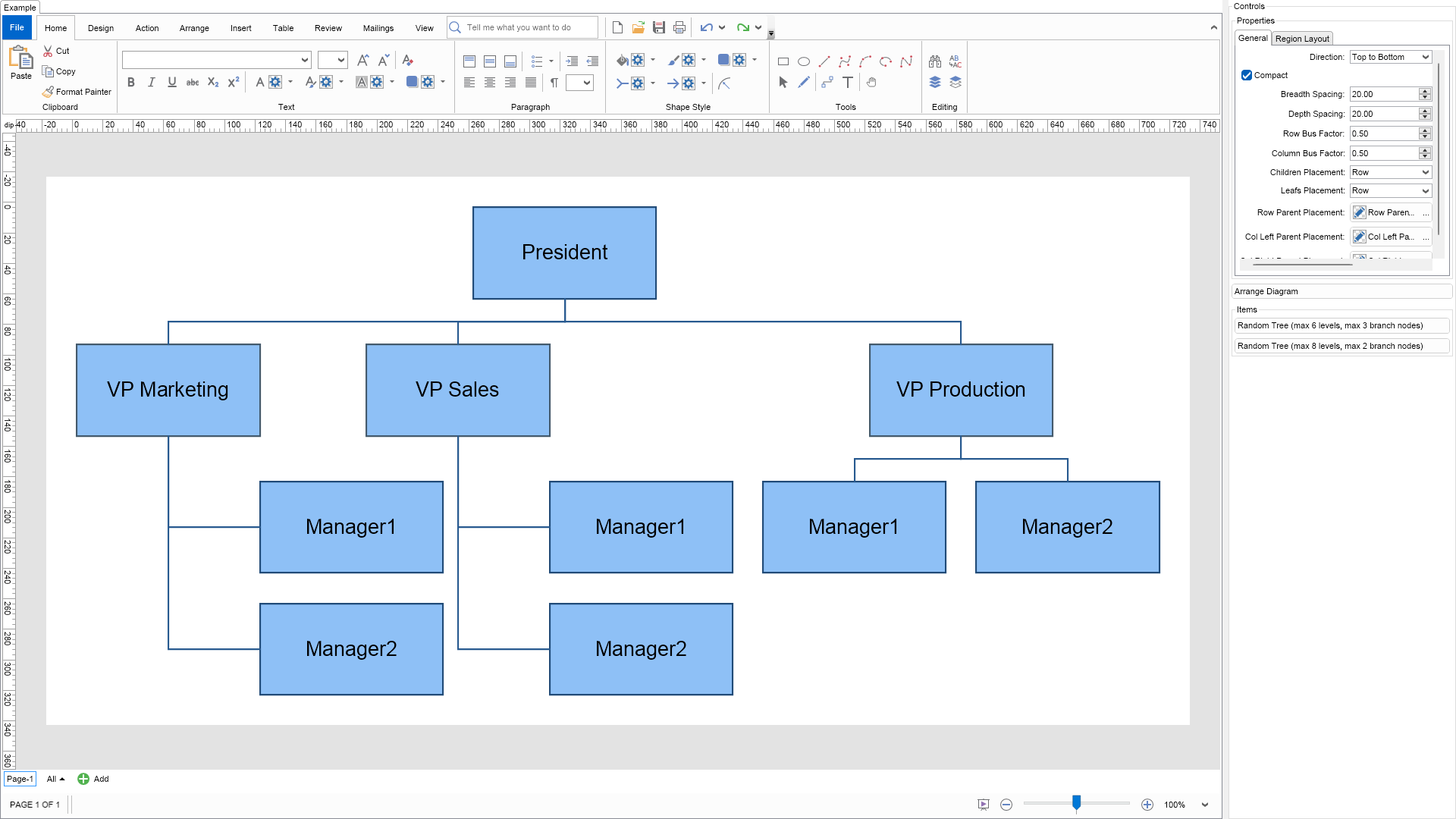
The tip-over tree layout is a tree layout, which uses shapes provided data to determine whether the vertex children should be placed in a row, column or 2 columns. It produces orthogonal tree drawings. The layout satisfies to the following aesthetic criteria:
This type of layout is typically used in Org Charts, but can also be used in all cases where classical tree layouts (e.g. layouts with uniform parent placement) do not produce width/height ratio compact results.
In this example the nodes whose children are arranged in cols are highlighted with orange.
To experiment with the layout just change its properties from the property grid and click the Layout button. To see the layout in action on a different trees, just click the Random Tree button.

| Language: C# |
using Nevron.Nov;
using Nevron.Nov.DataStructures;
using Nevron.Nov.Diagram;
using Nevron.Nov.Diagram.Layout;
using Nevron.Nov.Diagram.Shapes;
using Nevron.Nov.Dom;
using Nevron.Nov.Editors;
using Nevron.Nov.Graphics;
using Nevron.Nov.Layout;
using Nevron.Nov.UI;
using Nevron.Nov.Windows.Forms;
using System;
using System.Windows.Forms;
namespace NovWinFormsProject
{
public partial class Form1 : Form
{
#region Constructors
public Form1()
{
InitializeComponent();
// Set form title
Text = "NOV WinForms - NTipOverTreeLayoutExample";
// Create the NOV example and its controls
NWidget exampleContent = CreateExampleContent();
NWidget exampleControls = CreateExampleControls();
if (exampleControls != null)
{
exampleControls.PreferredWidth = 300;
}
// Place the example and its controls in a pair box
NPairBox pairBox = new NPairBox(exampleContent, exampleControls);
pairBox.FillMode = ENStackFillMode.First;
pairBox.FitMode = ENStackFitMode.First;
pairBox.Margins = new NMargins(NDesign.HorizontalSpacing, NDesign.VerticalSpacing);
// Host the example in the form
NNovWidgetHost host = new NNovWidgetHost(pairBox);
host.Dock = DockStyle.Fill;
Controls.Add(host);
}
#endregion
#region Example
public NWidget CreateExampleContent()
{
// Create a simple drawing
NDrawingViewWithRibbon drawingViewWithRibbon = new NDrawingViewWithRibbon();
m_DrawingView = drawingViewWithRibbon.View;
m_DrawingView.Document.HistoryService.Pause();
try
{
InitDiagram(m_DrawingView.Document);
}
finally
{
m_DrawingView.Document.HistoryService.Resume();
}
return drawingViewWithRibbon;
}
public NWidget CreateExampleControls()
{
m_Layout.Changed += OnLayoutChanged;
NStackPanel stack = new NStackPanel();
// property editor
NEditor editor = NDesigner.GetDesigner(m_Layout).CreateStandaloneEditor(m_Layout);
stack.Add(new NGroupBox("Properties", editor));
NButton arrangeButton = new NButton("Arrange Diagram");
arrangeButton.Click += OnArrangeButtonClick;
stack.Add(arrangeButton);
// items stack
NStackPanel itemsStack = new NStackPanel();
// NOTE: For Tree layouts we provide the user with the ability to generate random tree diagrams so that he/she can test the layouts
NButton randomTree1Button = new NButton("Random Tree (max 6 levels, max 3 branch nodes)");
randomTree1Button.Click += OnRandomTree1ButtonClick;
itemsStack.Add(randomTree1Button);
NButton randomTree2Button = new NButton("Random Tree (max 8 levels, max 2 branch nodes)");
randomTree2Button.Click += OnRandomTree2ButtonClick;
itemsStack.Add(randomTree2Button);
stack.Add(new NGroupBox("Items", itemsStack));
return stack;
}
public string GetExampleDescription()
{
return @"
The tip-over tree layout is a tree layout, which uses shapes provided data to determine
whether the vertex children should be placed in a row, column or 2 columns. It produces
orthogonal tree drawings. The layout satisfies to the following aesthetic criteria:
- No edge crossings - edges do not cross each other.
- No vertex-vertex overlaps - vertices do not overlap each other.
- No vertex-edge overlaps - vertices do not overlap edges.
- Compactness - you can optimize the compactness of the drawing in both
the breadth and depth dimensions of the tree by setting the Compact
property to true.
You can change the way the children and the leafs are placed using the corresponding
properties. You can also set the children placement for the children of each vertex
individually using the TipOverChildrenPlacement property in the LayoutData
collection of the shape.
This type of layout is typically used in Org Charts, but can also be used in all cases
where classical tree layouts (e.g. layouts with uniform parent placement) do not produce
width/height ratio compact results.
In this example the nodes whose children are arranged in cols are highlighted with orange.
To experiment with the layout just change its properties from the property grid and click the Layout button.
To see the layout in action on a different trees, just click the Random Tree button.
";
}
///
/// Gets the relevant documentation links for the example
///
///
public (string Name, string Url)[] GetDocumentationUrls()
{
return new[]
{
("Tip-over Tree Layout", "https://www.nevron.com/docs/openvision/diagram-tip-over-tree-layout.html"),
("Layouts Overview", "https://www.nevron.com/docs/openvision/diagram-drawing-layouts-overview.html"),
("Graph Regions and Regions Layouts", "https://www.nevron.com/docs/openvision/diagram-graph-regions-and-region-layouts.html"),
};
}
private void InitDiagram(NDrawingDocument drawingDocument)
{
const double ShapeWidth = 120;
const double ShapeHeight = 60;
// Hide ports
drawingDocument.Content.ScreenVisibility.ShowPorts = false;
NPage activePage = drawingDocument.Content.ActivePage;
// We will be using basic shapes with default size of 120, 60
NBasicShapeFactory basicShapes = new NBasicShapeFactory();
basicShapes.DefaultSize = new NSize(ShapeWidth, ShapeHeight);
// Create the president
NShape president = basicShapes.CreateShape(ENBasicShape.Rectangle);
president.Text = "President";
activePage.Items.Add(president);
// Create the VPs.
// NOTE: The child nodes of the VPs are layed out in cols
NShape vpMarketing = basicShapes.CreateShape(ENBasicShape.Rectangle);
vpMarketing.Text = "VP Marketing";
vpMarketing.Geometry.Stroke = new NStroke(1, new NColor(68, 90, 108));
vpMarketing.LayoutData.TipOverChildrenPlacement = ENTipOverChildrenPlacement.ColRight;
activePage.Items.Add(vpMarketing);
NShape vpSales = basicShapes.CreateShape(ENBasicShape.Rectangle);
vpSales.Text = "VP Sales";
vpSales.Geometry.Stroke = new NStroke(1, new NColor(68, 90, 108));
vpSales.LayoutData.TipOverChildrenPlacement = ENTipOverChildrenPlacement.ColRight;
activePage.Items.Add(vpSales);
NShape vpProduction = basicShapes.CreateShape(ENBasicShape.Rectangle);
vpProduction.Text = "VP Production";
vpSales.LayoutData.TipOverChildrenPlacement = ENTipOverChildrenPlacement.ColRight;
vpProduction.Geometry.Stroke = new NStroke(1, new NColor(68, 90, 108));
activePage.Items.Add(vpProduction);
// Connect president with VP
NRoutableConnector connector = new NRoutableConnector();
activePage.Items.Add(connector);
connector.GlueBeginToShape(president);
connector.GlueEndToShape(vpMarketing);
connector = new NRoutableConnector();
activePage.Items.Add(connector);
connector.GlueBeginToShape(president);
connector.GlueEndToShape(vpSales);
connector = new NRoutableConnector();
activePage.Items.Add(connector);
connector.GlueBeginToShape(president);
connector.GlueEndToShape(vpProduction);
// Create the marketing managers
NShape marketingManager1 = basicShapes.CreateShape(ENBasicShape.Rectangle);
marketingManager1.Text = "Manager1";
activePage.Items.Add(marketingManager1);
NShape marketingManager2 = basicShapes.CreateShape(ENBasicShape.Rectangle);
marketingManager2.Text = "Manager2";
activePage.Items.Add(marketingManager2);
// Connect the marketing manager with the marketing VP
connector = new NRoutableConnector();
activePage.Items.Add(connector);
connector.GlueBeginToShape(vpMarketing);
connector.GlueEndToShape(marketingManager1);
connector = new NRoutableConnector();
activePage.Items.Add(connector);
connector.GlueBeginToShape(vpMarketing);
connector.GlueEndToShape(marketingManager2);
// Create the sales managers
NShape salesManager1 = basicShapes.CreateShape(ENBasicShape.Rectangle);
salesManager1.Text = "Manager1";
activePage.Items.Add(salesManager1);
NShape salesManager2 = basicShapes.CreateShape(ENBasicShape.Rectangle);
salesManager2.Text = "Manager2";
activePage.Items.Add(salesManager2);
// Connect the sales manager with the sales VP
connector = new NRoutableConnector();
activePage.Items.Add(connector);
connector.GlueBeginToShape(vpSales);
connector.GlueEndToShape(salesManager1);
connector = new NRoutableConnector();
activePage.Items.Add(connector);
connector.GlueBeginToShape(vpSales);
connector.GlueEndToShape(salesManager2);
// Create the production managers
NShape productionManager1 = basicShapes.CreateShape(ENBasicShape.Rectangle);
productionManager1.Text = "Manager1";
activePage.Items.Add(productionManager1);
NShape productionManager2 = basicShapes.CreateShape(ENBasicShape.Rectangle);
productionManager2.Text = "Manager2";
activePage.Items.Add(productionManager2);
// Connect the production manager with the production VP
connector = new NRoutableConnector();
activePage.Items.Add(connector);
connector.GlueBeginToShape(vpProduction);
connector.GlueEndToShape(productionManager1);
connector = new NRoutableConnector();
activePage.Items.Add(connector);
connector.GlueBeginToShape(vpProduction);
connector.GlueEndToShape(productionManager2);
// Arrange diagram
ArrangeDiagram(drawingDocument);
// Fit active page
drawingDocument.Content.ActivePage.ZoomMode = ENZoomMode.Fit;
}
#endregion
#region Implementation
private void CreateTreeDiagram(NDrawingDocument drawingDocument, int levels, int branchNodes)
{
// Create a random tree
NGenericTreeTemplate tree = new NGenericTreeTemplate();
tree.EdgeUserClass = NDR.StyleSheetNameConnectors;
tree.Balanced = false;
tree.Levels = levels;
tree.BranchNodes = branchNodes;
tree.HorizontalSpacing = 10;
tree.VerticalSpacing = 10;
tree.VertexShape = VertexShape;
tree.VertexSize = VertexSize;
tree.VertexSizeDeviation = 1;
tree.Create(drawingDocument);
// Randomly set the children placement of ten shapes to col
NList shapes = drawingDocument.Content.ActivePage.GetShapes(false, NDiagramFilters.ShapeType2D);
Random random = new Random();
for (int i = 0; i < shapes.Count / 2; i++)
{
int index = random.Next(shapes.Count);
NShape shape = shapes[index];
shape.Geometry.Fill = new NColorFill(NColor.Orange);
shape.LayoutData.TipOverChildrenPlacement = ENTipOverChildrenPlacement.ColRight;
}
}
///
/// Arranges the shapes in the active page.
///
///
private void ArrangeDiagram(NDrawingDocument drawingDocument)
{
// get all top-level shapes that reside in the active page
NPage activePage = drawingDocument.Content.ActivePage;
NList shapes = activePage.GetShapes(false);
// create a layout context and use it to arrange the shapes using the current layout
NDrawingLayoutContext layoutContext = new NDrawingLayoutContext(drawingDocument, activePage);
m_Layout.Arrange(shapes.CastAll | Language: VB.NET |
Imports Nevron.Nov
Imports Nevron.Nov.Diagram
Imports Nevron.Nov.Diagram.Layout
Imports Nevron.Nov.Diagram.Shapes
Imports Nevron.Nov.Dom
Imports Nevron.Nov.Editors
Imports Nevron.Nov.Graphics
Imports Nevron.Nov.Layout
Imports Nevron.Nov.UI
Imports Nevron.Nov.Windows.Forms
Imports System
Public Class Form1
#Region "Constructors"
Public Sub New()
' This call is required by the designer.
InitializeComponent()
' Add any initialization after the InitializeComponent() call.
' Set form title
Text = "NOV WinForms - NTipOverTreeLayoutExample"
' Create the NOV example and its controls
Dim exampleContent As NWidget = CreateExampleContent()
Dim exampleControls As NWidget = CreateExampleControls()
If Not exampleControls Is Nothing Then
exampleControls.PreferredWidth = 300
End If
' Place the example and its controls in a pair box
Dim pairBox As NPairBox = New NPairBox(exampleContent, exampleControls)
pairBox.FillMode = ENStackFillMode.First
pairBox.FitMode = ENStackFitMode.First
pairBox.Margins = New NMargins(NDesign.HorizontalSpacing, NDesign.VerticalSpacing)
' Host the example in the form
Dim host As NNovWidgetHost(Of NWidget) = New NNovWidgetHost(Of NWidget)(pairBox)
host.Dock = DockStyle.Fill
Controls.Add(host)
End Sub
#End Region
#Region "Example"
Public Function CreateExampleContent() As NWidget
' Create a simple drawing
Dim drawingViewWithRibbon As NDrawingViewWithRibbon = New NDrawingViewWithRibbon()
m_DrawingView = drawingViewWithRibbon.View
m_DrawingView.Document.HistoryService.Pause()
Try
InitDiagram(m_DrawingView.Document)
Finally
m_DrawingView.Document.HistoryService.Resume()
End Try
Return drawingViewWithRibbon
End Function
Public Function CreateExampleControls() As NWidget
Me.m_Layout.Changed += AddressOf OnLayoutChanged
Dim stack As NStackPanel = New NStackPanel()
' property editor
Dim editor As NEditor = NDesigner.GetDesigner(m_Layout).CreateStandaloneEditor(m_Layout)
stack.Add(New NGroupBox("Properties", editor))
Dim arrangeButton As NButton = New NButton("Arrange Diagram")
arrangeButton.Click += AddressOf OnArrangeButtonClick
stack.Add(arrangeButton)
' items stack
Dim itemsStack As NStackPanel = New NStackPanel()
' NOTE: For Tree layouts we provide the user with the ability to generate random tree diagrams so that he/she can test the layouts
Dim randomTree1Button As NButton = New NButton("Random Tree (max 6 levels, max 3 branch nodes)")
randomTree1Button.Click += AddressOf OnRandomTree1ButtonClick
itemsStack.Add(randomTree1Button)
Dim randomTree2Button As NButton = New NButton("Random Tree (max 8 levels, max 2 branch nodes)")
randomTree2Button.Click += AddressOf OnRandomTree2ButtonClick
itemsStack.Add(randomTree2Button)
stack.Add(New NGroupBox("Items", itemsStack))
Return stack
End Function
Public Function GetExampleDescription() As String
Return "
The tip-over tree layout is a tree layout, which uses shapes provided data to determine
whether the vertex children should be placed in a row, column or 2 columns. It produces
orthogonal tree drawings. The layout satisfies to the following aesthetic criteria:
- No edge crossings - edges do not cross each other.
- No vertex-vertex overlaps - vertices do not overlap each other.
- No vertex-edge overlaps - vertices do not overlap edges.
- Compactness - you can optimize the compactness of the drawing in both
the breadth and depth dimensions of the tree by setting the Compact
property to true.
You can change the way the children and the leafs are placed using the corresponding
properties. You can also set the children placement for the children of each vertex
individually using the TipOverChildrenPlacement property in the LayoutData
collection of the shape.
This type of layout is typically used in Org Charts, but can also be used in all cases
where classical tree layouts (e.g. layouts with uniform parent placement) do not produce
width/height ratio compact results.
In this example the nodes whose children are arranged in cols are highlighted with orange.
To experiment with the layout just change its properties from the property grid and click the Layout button.
To see the layout in action on a different trees, just click the Random Tree button.
"
End Function
'''
''' Gets the relevant documentation links for the example
'''
'''
Public Function GetDocumentationUrls() As (String, String)()
Return {("Tip-over Tree Layout", "https://www.nevron.com/docs/openvision/diagram-tip-over-tree-layout.html"), ("Layouts Overview", "https://www.nevron.com/docs/openvision/diagram-drawing-layouts-overview.html"), ("Graph Regions and Regions Layouts", "https://www.nevron.com/docs/openvision/diagram-graph-regions-and-region-layouts.html")}
End Function
Private Sub InitDiagram(drawingDocument As NDrawingDocument)
Const ShapeWidth As Double = 120
Const ShapeHeight As Double = 60
' Hide ports
drawingDocument.Content.ScreenVisibility.ShowPorts = False
Dim activePage = drawingDocument.Content.ActivePage
' We will be using basic shapes with default size of 120, 60
Dim basicShapes As NBasicShapeFactory = New NBasicShapeFactory()
basicShapes.DefaultSize = New NSize(ShapeWidth, ShapeHeight)
' Create the president
Dim president = basicShapes.CreateShape(ENBasicShape.Rectangle)
president.Text = "President"
activePage.Items.Add(president)
' Create the VPs.
' NOTE: The child nodes of the VPs are layed out in cols
Dim vpMarketing = basicShapes.CreateShape(ENBasicShape.Rectangle)
vpMarketing.Text = "VP Marketing"
vpMarketing.Geometry.Stroke = New NStroke(1, New NColor(68, 90, 108))
vpMarketing.LayoutData.TipOverChildrenPlacement = ENTipOverChildrenPlacement.ColRight
activePage.Items.Add(vpMarketing)
Dim vpSales = basicShapes.CreateShape(ENBasicShape.Rectangle)
vpSales.Text = "VP Sales"
vpSales.Geometry.Stroke = New NStroke(1, New NColor(68, 90, 108))
vpSales.LayoutData.TipOverChildrenPlacement = ENTipOverChildrenPlacement.ColRight
activePage.Items.Add(vpSales)
Dim vpProduction = basicShapes.CreateShape(ENBasicShape.Rectangle)
vpProduction.Text = "VP Production"
vpSales.LayoutData.TipOverChildrenPlacement = ENTipOverChildrenPlacement.ColRight
vpProduction.Geometry.Stroke = New NStroke(1, New NColor(68, 90, 108))
activePage.Items.Add(vpProduction)
' Connect president with VP
Dim connector As NRoutableConnector = New NRoutableConnector()
activePage.Items.Add(connector)
connector.GlueBeginToShape(president)
connector.GlueEndToShape(vpMarketing)
connector = New NRoutableConnector()
activePage.Items.Add(connector)
connector.GlueBeginToShape(president)
connector.GlueEndToShape(vpSales)
connector = New NRoutableConnector()
activePage.Items.Add(connector)
connector.GlueBeginToShape(president)
connector.GlueEndToShape(vpProduction)
' Create the marketing managers
Dim marketingManager1 = basicShapes.CreateShape(ENBasicShape.Rectangle)
marketingManager1.Text = "Manager1"
activePage.Items.Add(marketingManager1)
Dim marketingManager2 = basicShapes.CreateShape(ENBasicShape.Rectangle)
marketingManager2.Text = "Manager2"
activePage.Items.Add(marketingManager2)
' Connect the marketing manager with the marketing VP
connector = New NRoutableConnector()
activePage.Items.Add(connector)
connector.GlueBeginToShape(vpMarketing)
connector.GlueEndToShape(marketingManager1)
connector = New NRoutableConnector()
activePage.Items.Add(connector)
connector.GlueBeginToShape(vpMarketing)
connector.GlueEndToShape(marketingManager2)
' Create the sales managers
Dim salesManager1 = basicShapes.CreateShape(ENBasicShape.Rectangle)
salesManager1.Text = "Manager1"
activePage.Items.Add(salesManager1)
Dim salesManager2 = basicShapes.CreateShape(ENBasicShape.Rectangle)
salesManager2.Text = "Manager2"
activePage.Items.Add(salesManager2)
' Connect the sales manager with the sales VP
connector = New NRoutableConnector()
activePage.Items.Add(connector)
connector.GlueBeginToShape(vpSales)
connector.GlueEndToShape(salesManager1)
connector = New NRoutableConnector()
activePage.Items.Add(connector)
connector.GlueBeginToShape(vpSales)
connector.GlueEndToShape(salesManager2)
' Create the production managers
Dim productionManager1 = basicShapes.CreateShape(ENBasicShape.Rectangle)
productionManager1.Text = "Manager1"
activePage.Items.Add(productionManager1)
Dim productionManager2 = basicShapes.CreateShape(ENBasicShape.Rectangle)
productionManager2.Text = "Manager2"
activePage.Items.Add(productionManager2)
' Connect the production manager with the production VP
connector = New NRoutableConnector()
activePage.Items.Add(connector)
connector.GlueBeginToShape(vpProduction)
connector.GlueEndToShape(productionManager1)
connector = New NRoutableConnector()
activePage.Items.Add(connector)
connector.GlueBeginToShape(vpProduction)
connector.GlueEndToShape(productionManager2)
' Arrange diagram
ArrangeDiagram(drawingDocument)
' Fit active page
drawingDocument.Content.ActivePage.ZoomMode = ENZoomMode.Fit
End Sub
#End Region
#Region "Implementation"
Private Sub CreateTreeDiagram(drawingDocument As NDrawingDocument, levels As Integer, branchNodes As Integer)
' Create a random tree
Dim tree As NGenericTreeTemplate = New NGenericTreeTemplate()
tree.EdgeUserClass = NDR.StyleSheetNameConnectors
tree.Balanced = False
tree.Levels = levels
tree.BranchNodes = branchNodes
tree.HorizontalSpacing = 10
tree.VerticalSpacing = 10
tree.VertexShape = VertexShape
tree.VertexSize = VertexSize
tree.VertexSizeDeviation = 1
tree.Create(drawingDocument)
' Randomly set the children placement of ten shapes to col
Dim shapes = drawingDocument.Content.ActivePage.GetShapes(False, NDiagramFilters.ShapeType2D)
Dim random As Random = New Random()
For i As Integer = 0 To shapes.Count / 2 - 1
Dim index = random.Next(shapes.Count)
Dim shape = shapes(index)
shape.Geometry.Fill = New NColorFill(NColor.Orange)
shape.LayoutData.TipOverChildrenPlacement = ENTipOverChildrenPlacement.ColRight
Next
End Sub
'''
''' Arranges the shapes in the active page.
'''
'''
Private Sub ArrangeDiagram(drawingDocument As NDrawingDocument)
' get all top-level shapes that reside in the active page
Dim activePage = drawingDocument.Content.ActivePage
Dim shapes = activePage.GetShapes(False)
' create a layout context and use it to arrange the shapes using the current layout
Dim layoutContext As NDrawingLayoutContext = New NDrawingLayoutContext(drawingDocument, activePage)
m_Layout.Arrange(shapes.CastAll(Of Object)(), layoutContext)
' size the page to the content size
activePage.SizeToContent()
End Sub
#End Region
#Region "Event Handlers"
Private Sub OnLayoutChanged(arg As NEventArgs)
ArrangeDiagram(m_DrawingView.Document)
End Sub
Private Sub OnArrangeButtonClick(arg As NEventArgs)
ArrangeDiagram(m_DrawingView.Document)
End Sub
Private Sub OnRandomTree1ButtonClick(arg As NEventArgs)
m_DrawingView.ActivePage.Items.Clear()
' create a random tree
CreateTreeDiagram(m_DrawingView.Document, 6, 3)
' layout the tree
ArrangeDiagram(m_DrawingView.Document)
End Sub
Private Sub OnRandomTree2ButtonClick(arg As NEventArgs)
m_DrawingView.ActivePage.Items.Clear()
' create a random tree
CreateTreeDiagram(m_DrawingView.Document, 8, 2)
' layout the tree
ArrangeDiagram(m_DrawingView.Document)
End Sub
#End Region
#Region "Fields"
Private m_DrawingView As NDrawingView
Private m_Layout As NTipOverTreeLayout = New NTipOverTreeLayout()
#End Region
#Region "Static Methods"
#End Region
#Region "Constants"
Private Const VertexShape As ENBasicShape = ENBasicShape.Rectangle
Private Shared ReadOnly VertexSize As NSize = New NSize(60, 60)
#End Region
#Region "Nested Types"
#End Region
End Class