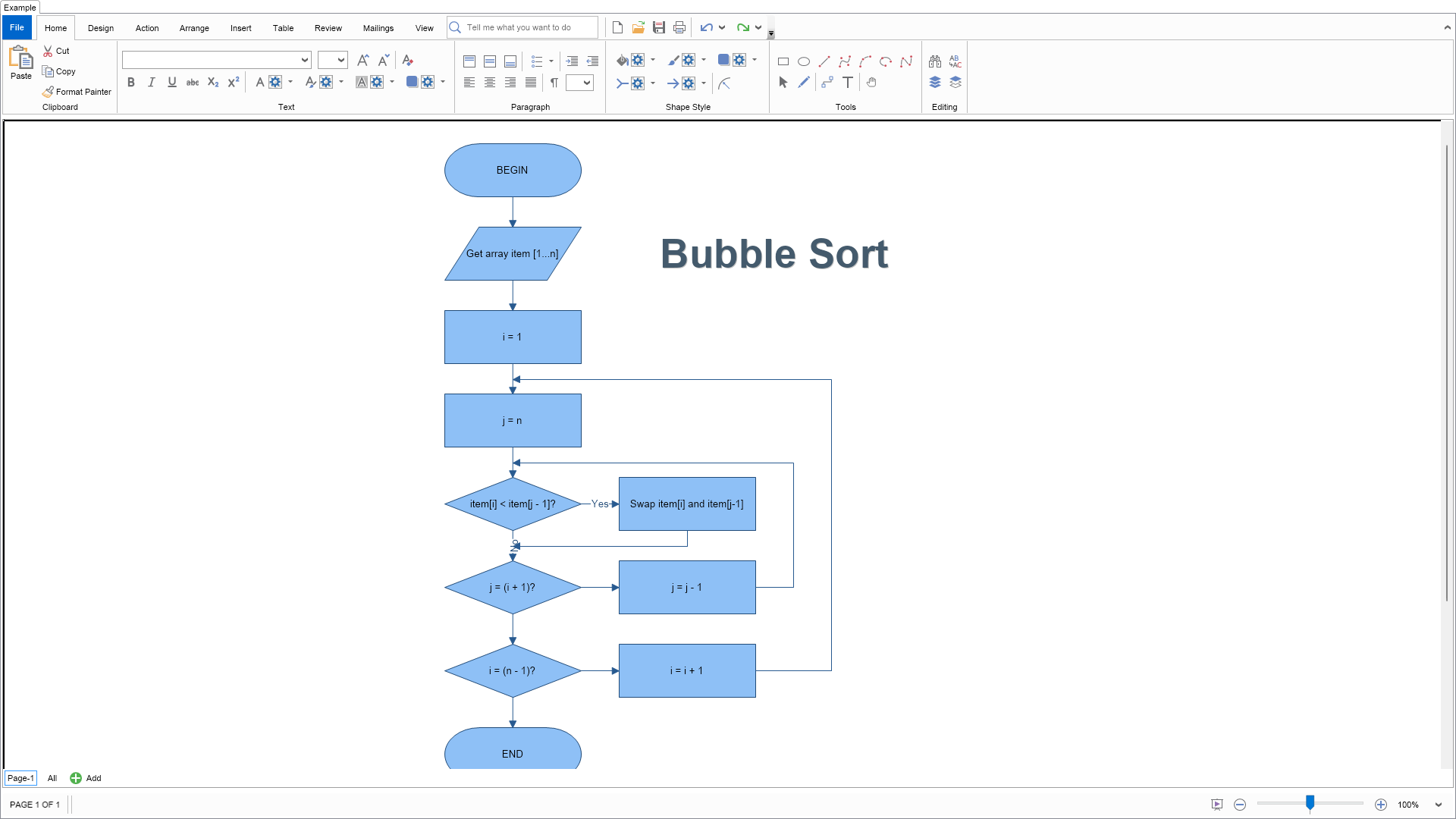
using Nevron.Nov;
using Nevron.Nov.Diagram;
using Nevron.Nov.Diagram.Shapes;
using Nevron.Nov.Dom;
using Nevron.Nov.Graphics;
using Nevron.Nov.Layout;
using Nevron.Nov.UI;
using Nevron.Nov.Windows.Forms;
using System.Windows.Forms;

namespace NovWinFormsProject
{
	public partial class Form1 : Form
	{
		#region Constructors

		public Form1()
		{
			InitializeComponent();

			// Set form title
			Text = "NOV WinForms - NBubbleSortExample";

			// Create the NOV example and its controls
			NWidget exampleContent = CreateExampleContent();
			NWidget exampleControls = CreateExampleControls();
			if (exampleControls != null)
			{
				exampleControls.PreferredWidth = 300;
			}

			// Place the example and its controls in a pair box
			NPairBox pairBox = new NPairBox(exampleContent, exampleControls);
			pairBox.FillMode = ENStackFillMode.First;
			pairBox.FitMode = ENStackFitMode.First;
			pairBox.Margins = new NMargins(NDesign.HorizontalSpacing, NDesign.VerticalSpacing);

			// Host the example in the form
			NNovWidgetHost host = new NNovWidgetHost(pairBox);
			host.Dock = DockStyle.Fill;
			Controls.Add(host);
		}

		#endregion

        #region Example

        public NWidget CreateExampleContent()
        {
            // Create a simple drawing
            NDrawingViewWithRibbon drawingViewWithRibbon = new NDrawingViewWithRibbon();
            m_DrawingView = drawingViewWithRibbon.View;

            m_DrawingView.Document.HistoryService.Pause();
            try
            {
                InitDiagram(m_DrawingView.Document);
            }
            finally
            {
                m_DrawingView.Document.HistoryService.Resume();
            }

            return drawingViewWithRibbon;
        }
		public NWidget CreateExampleControls()
		{
            return null;
		}
		public string GetExampleDescription()
        {
            return @"

	Demonstrates how to create a flowchart that describes the Bubble Sort algorithm.
";
        }

		///
		/// Gets the relevant documentation links for the example
		///
		///
		public (string Name, string Url)[] GetDocumentationUrls()
		{
			return new[]
			{
				("Predefined Libraries", "https://www.nevron.com/docs/openvision/diagram-predefined-libraries.html"),
				("Routable Connectors", "https://www.nevron.com/docs/openvision/diagram-routable-connectors.html"),
				("Layered Graph Layout", "https://www.nevron.com/docs/openvision/diagram-layered-graph-layout.html"),
			};
		}

		private void InitDiagram(NDrawingDocument drawingDocument)
		{
			NStyleSheet sheet = new NStyleSheet();
			drawingDocument.StyleSheets.Add(sheet);

			// create a rule that applies to the TextBlocks of all shapes with user class Connectors
			string connectorClass = NDR.StyleSheetNameConnectors;
			{
				NRule rule2 = new NRule();
				sheet.Add(rule2);

				NSelectorBuilder sb = rule2.GetSelectorBuilder();
				sb.Start();
				sb.Type(NTextBlock.NTextBlockSchema); sb.ChildOf(); sb.UserClass(connectorClass);
				sb.End();

				rule2.Declarations.Add(new NValueDeclaration(NTextBlock.BackgroundFillProperty, new NColorFill(NColor.White)));
			}

			// get drawing and active page
			NDrawing drawing = drawingDocument.Content;
			NPage activePage = drawing.ActivePage;

			// hide ports and grid
			drawing.ScreenVisibility.ShowGrid = false;
			drawing.ScreenVisibility.ShowPorts = false;

			// create title
			NShape titleShape = new NShape();
			titleShape.SetBounds(GetGridCell(0, 1, 2, 1));
			titleShape.Text = "Bubble Sort";
			titleShape.TextBlock.FontName = "Arial";
			titleShape.TextBlock.FontSize = 40;
			titleShape.TextBlock.FontStyle = ENFontStyle.Bold;
			titleShape.TextBlock.Fill = new NColorFill(new NColor(68, 90, 108));
			titleShape.TextBlock.Shadow = new NShadow();
			activePage.Items.AddChild(titleShape);

			NFlowchartShapeFactory flowchartShapes = new NFlowchartShapeFactory();
			NConnectorShapeFactory connectorShapes = new NConnectorShapeFactory();

			// begin shape
			NShape shapeBegin = flowchartShapes.CreateShape(ENFlowchartShape.Termination);
			shapeBegin.SetBounds(GetGridCell(0, 0));
			shapeBegin.Text = "BEGIN";
			activePage.Items.Add(shapeBegin);

			// get array item shape
			NShape shapeGetItem = flowchartShapes.CreateShape(ENFlowchartShape.Data);
			shapeGetItem.SetBounds(GetGridCell(1, 0));
			shapeGetItem.Text = "Get array item [1...n]";
			activePage.Items.Add(shapeGetItem);

			// i = 1 shape
			NShape shapeI1 = flowchartShapes.CreateShape(ENFlowchartShape.Process);
			shapeI1.SetBounds(GetGridCell(2, 0));
			shapeI1.Text = "i = 1";
			activePage.Items.Add(shapeI1);

			// j = n shape
			NShape shapeJEN = flowchartShapes.CreateShape(ENFlowchartShape.Process);
			shapeJEN.SetBounds(GetGridCell(3, 0));
			shapeJEN.Text = "j = n";
			activePage.Items.Add(shapeJEN);

			// less comparison shape
			NShape shapeLess = flowchartShapes.CreateShape(ENFlowchartShape.Decision);
			shapeLess.SetBounds(GetGridCell(4, 0));
			shapeLess.Text = "item[i] < item[j - 1]?";
			activePage.Items.Add(shapeLess);

			// swap shape
			NShape shapeSwap = flowchartShapes.CreateShape(ENFlowchartShape.Process);
			shapeSwap.SetBounds(GetGridCell(4, 1));
			shapeSwap.Text = "Swap item[i] and item[j-1]";
			activePage.Items.Add(shapeSwap);

			// j > i + 1? shape
			NShape shapeJQ = flowchartShapes.CreateShape(ENFlowchartShape.Decision);
			shapeJQ.SetBounds(GetGridCell(5, 0));
			shapeJQ.Text = "j = (i + 1)?";
			activePage.Items.Add(shapeJQ);

			// dec j shape
			NShape shapeDecJ = flowchartShapes.CreateShape(ENFlowchartShape.Process);
			shapeDecJ.SetBounds(GetGridCell(5, 1));
			shapeDecJ.Text = "j = j - 1";
			activePage.Items.Add(shapeDecJ);

			// i > n - 1? shape
			NShape shapeIQ = flowchartShapes.CreateShape(ENFlowchartShape.Decision);
			shapeIQ.SetBounds(GetGridCell(6, 0));
			shapeIQ.Text = "i = (n - 1)?";
			activePage.Items.Add(shapeIQ);

			// inc i shape
			NShape shapeIncI = flowchartShapes.CreateShape(ENFlowchartShape.Process);
			shapeIncI.SetBounds(GetGridCell(6, 1));
			shapeIncI.Text = "i = i + 1";
			activePage.Items.Add(shapeIncI);

			// end shape
			NShape shapeEnd = flowchartShapes.CreateShape(ENFlowchartShape.Termination);
			shapeEnd.SetBounds(GetGridCell(7, 0));
			shapeEnd.Text = "END";
			activePage.Items.Add(shapeEnd);

			// connect begin with get array item
			NShape connector1 = connectorShapes.CreateShape(ENConnectorShape.Line);
			connector1.UserClass = connectorClass;
			activePage.Items.AddChild(connector1);
			connector1.GlueBeginToShape(shapeBegin);
			connector1.GlueEndToShape(shapeGetItem);

			// connect get array item with i = 1
			NShape connector2 = connectorShapes.CreateShape(ENConnectorShape.Line);
			connector2.UserClass = connectorClass;
			activePage.Items.AddChild(connector2);
			connector2.GlueBeginToShape(shapeGetItem);
			connector2.GlueEndToShape(shapeI1);

			// connect i = 1 and j = n
			NShape connector3 = connectorShapes.CreateShape(ENConnectorShape.Line);
			connector3.UserClass = connectorClass;
			activePage.Items.AddChild(connector3);
			connector3.GlueBeginToShape(shapeI1);
			connector3.GlueEndToShape(shapeJEN);

			// connect j = n and item[i] < item[j-1]?
			NShape connector4 = connectorShapes.CreateShape(ENConnectorShape.Line);
			connector4.UserClass = connectorClass;
			activePage.Items.AddChild(connector4);
			connector4.GlueBeginToShape(shapeJEN);
			connector4.GlueEndToShape(shapeLess);

			// connect item[i] < item[j-1]? and j = (i + 1)?
			NShape connector5 = connectorShapes.CreateShape(ENConnectorShape.Line);
			connector5.UserClass = connectorClass;
			connector5.Text = "No";
			activePage.Items.AddChild(connector5);
			connector5.GlueBeginToShape(shapeLess);
			connector5.GlueEndToShape(shapeJQ);

			// connect j = (i + 1)? and i = (n - 1)?
			NShape connector6 = connectorShapes.CreateShape(ENConnectorShape.Line);
			connector6.UserClass = connectorClass;
			activePage.Items.AddChild(connector6);
			connector6.GlueBeginToShape(shapeJQ);
			connector6.GlueEndToShape(shapeIQ);

			// connect i = (n - 1) and END
			NShape connector7 = connectorShapes.CreateShape(ENConnectorShape.Line);
			connector7.UserClass = connectorClass;
			activePage.Items.AddChild(connector7);
			connector7.GlueBeginToShape(shapeIQ);
			connector7.GlueEndToShape(shapeEnd);

			// connect item[i] < item[j-1]? and Swap
			NShape connector8 = connectorShapes.CreateShape(ENConnectorShape.Line);
			connector8.UserClass = connectorClass;
			connector8.Text = "Yes";
			activePage.Items.AddChild(connector8);
			connector8.GlueBeginToShape(shapeLess);
			connector8.GlueEndToShape(shapeSwap);

			// connect j = (i + 1)? and j = (j - 1)
			NShape connector9 = connectorShapes.CreateShape(ENConnectorShape.Line);
			connector9.UserClass = connectorClass;
			activePage.Items.AddChild(connector9);
			connector9.GlueBeginToShape(shapeJQ);
			connector9.GlueEndToShape(shapeDecJ);

			// connect i = (n - 1)? and i = (i + 1)
			NShape connector10 = connectorShapes.CreateShape(ENConnectorShape.Line);
			connector10.UserClass = connectorClass;
			activePage.Items.AddChild(connector10);
			connector10.GlueBeginToShape(shapeIQ);
			connector10.GlueEndToShape(shapeIncI);

			// connect Swap to No connector
			NShape connector11 = connectorShapes.CreateShape(ENConnectorShape.TopBottomToSide);
			connector11.UserClass = connectorClass;
			activePage.Items.AddChild(connector11);
			connector11.GlueBeginToShape(shapeSwap);
			connector11.GlueEndToShape(connector5);

			// connect i = i + 1 to connector3
			NShape connector12 = connectorShapes.CreateSideToSide(m_GridSpacing.Width * 2);
			connector12.UserClass = connectorClass;
			activePage.Items.AddChild(connector12);
			connector12.GlueBeginToPort(shapeIncI.GetPortByName("Right"));
			connector12.GlueEndToGeometryContour(connector3, 0.5f);

			// connect j = j - 1 to connector4
			NShape connector13 = connectorShapes.CreateSideToSide(m_GridSpacing.Width);
			connector13.UserClass = connectorClass;
			activePage.Items.AddChild(connector13);
			connector13.GlueBeginToPort(shapeDecJ.GetPortByName(("Right")));
			connector13.GlueEndToGeometryContour(connector4, 0.5f);
		}

        #endregion

        #region Implementation

        ///
        ///
        ///
        ///
        ///
        ///
        protected NRectangle GetGridCell(int row, int col)
        {
            return GetGridCell(row, col, m_GridOrigin, m_GridCellSize, m_GridSpacing);
        }
        ///
        ///
        ///
        ///
        ///
        ///
        ///
        ///
        protected NRectangle GetGridCell(int row, int col, int rowSpan, int colSpan)
        {
            NRectangle cell1 = GetGridCell(row, col, m_GridOrigin, m_GridCellSize, m_GridSpacing);
            NRectangle cell2 = GetGridCell(row + rowSpan, col + colSpan, m_GridOrigin, m_GridCellSize, m_GridSpacing);
            return NRectangle.Union(cell1, cell2);
        }
        ///
        ///
        ///
        ///
        ///
        ///
        ///
        ///
        ///
        protected NRectangle GetGridCell(int row, int col, NPoint origin, NSize size, NSize spacing)
        {
            return new NRectangle(origin.X + col * (size.Width + spacing.Width),
                                    origin.Y + row * (size.Height + spacing.Height),
                                    size.Width, size.Height);
        }

		#endregion

		#region Event Handlers
		#endregion

		#region Fields

		private NDrawingView m_DrawingView;

        private NPoint m_GridOrigin = new NPoint(30, 30);
        private NSize m_GridCellSize = new NSize(180, 70);
        private NSize m_GridSpacing = new NSize(50, 40);

        #endregion

		#region Static Methods
		#endregion

		#region Constants
		#endregion

		#region Nested Types
		#endregion
	}
}

 Chart for .NET
 Diagram for .NET
 User Interface for .NET
 Vision for SSRS
 Chart for SSRS
 Gauge for SSRS
 Map for SSRS
 Barcode for SSRS
 Vision for SharePoint
 Chart for SharePoint
 Gauge for SharePoint
 Map for SharePoint
 Barcode for SharePoint
 Open Vision for .NET


 Vision for .NET