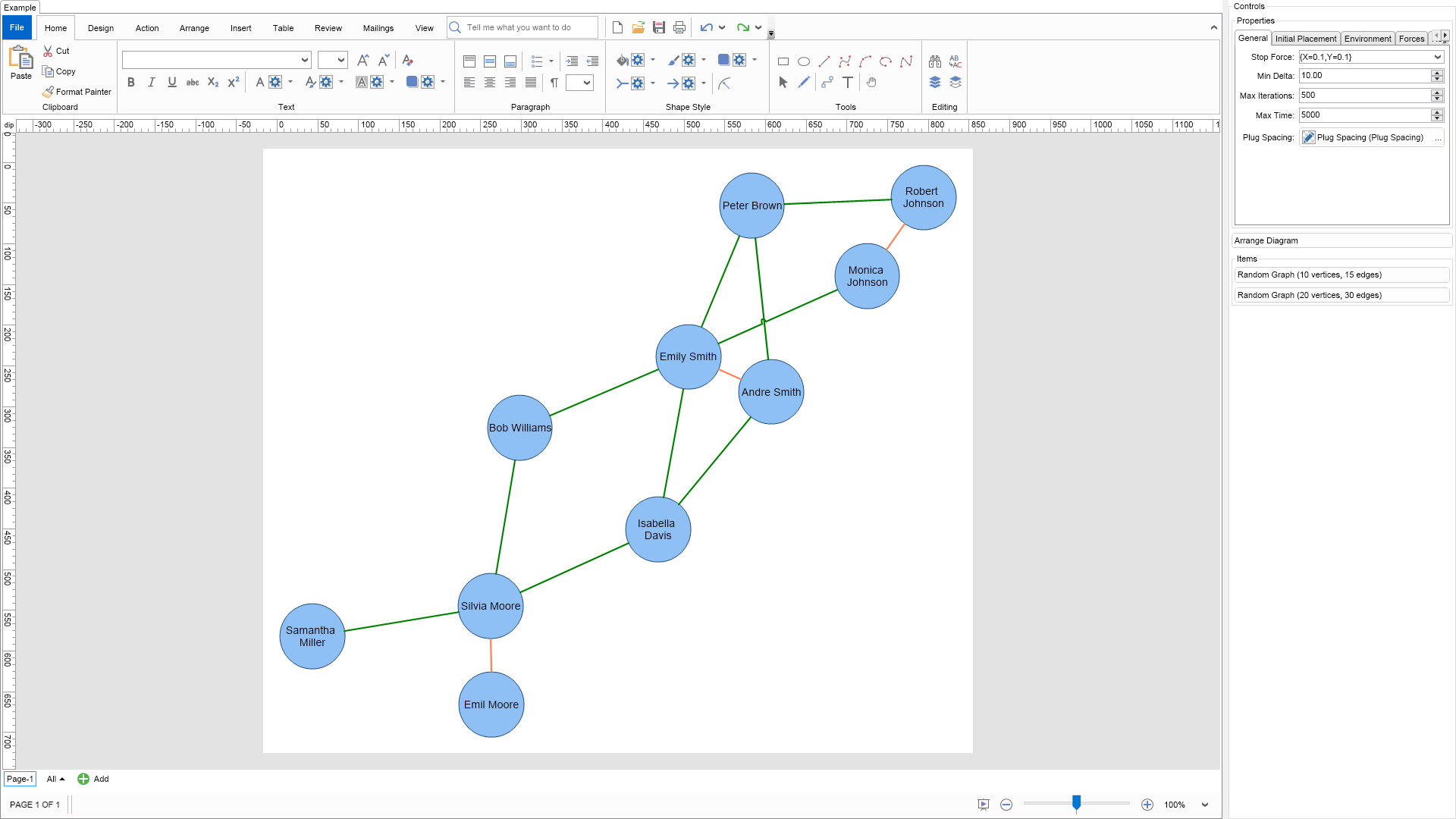
The spring layout method is a classical force directed layout, which uses spring and electrical forces.
Graph edges are treated as springs. Springs aim to ensure that the distance between adjacent vertices is approximately equal to the spring length. The parameters of the spring force are controlled by an instance of the NSpringForce class, accessible from the SpringForce property.
Graph vertices are treated as electrically charged particles, which repel each other. The electrical force aims to ensure that vertices should not be close together. The parameters of the electrical force are controlled by an instance of the NElectricalForce class, accessible from the ElectricalForce property.
The spring force accepts per edge defined spring lengths and spring stiffness. In this example the red connectors are with smaller spring length are with greater stiffness than the blue connectors. Because of that they tend to be displayed closer to each other.
The electrical force accepts per vertex provided electric charges. Thus some vertices may be more repulsive than others.
To experiment with the layout behavior just change the properties of the layout in the property grid and click the Layout button.

| Language: C# |
using Nevron.Nov;
using Nevron.Nov.DataStructures;
using Nevron.Nov.Diagram;
using Nevron.Nov.Diagram.Layout;
using Nevron.Nov.Diagram.Shapes;
using Nevron.Nov.Dom;
using Nevron.Nov.Editors;
using Nevron.Nov.Graphics;
using Nevron.Nov.Layout;
using Nevron.Nov.UI;
using Nevron.Nov.Windows.Forms;
using System.Windows.Forms;
namespace NovWinFormsProject
{
public partial class Form1 : Form
{
#region Constructors
public Form1()
{
InitializeComponent();
// Set form title
Text = "NOV WinForms - NSpringGraphLayoutExample";
// Create the NOV example and its controls
NWidget exampleContent = CreateExampleContent();
NWidget exampleControls = CreateExampleControls();
if (exampleControls != null)
{
exampleControls.PreferredWidth = 300;
}
// Place the example and its controls in a pair box
NPairBox pairBox = new NPairBox(exampleContent, exampleControls);
pairBox.FillMode = ENStackFillMode.First;
pairBox.FitMode = ENStackFitMode.First;
pairBox.Margins = new NMargins(NDesign.HorizontalSpacing, NDesign.VerticalSpacing);
// Host the example in the form
NNovWidgetHost host = new NNovWidgetHost(pairBox);
host.Dock = DockStyle.Fill;
Controls.Add(host);
}
#endregion
#region Example
public NWidget CreateExampleContent()
{
// Create a simple drawing
NDrawingViewWithRibbon drawingViewWithRibbon = new NDrawingViewWithRibbon();
m_DrawingView = drawingViewWithRibbon.View;
m_DrawingView.Document.HistoryService.Pause();
try
{
InitDiagram(m_DrawingView.Document);
}
finally
{
m_DrawingView.Document.HistoryService.Resume();
}
return drawingViewWithRibbon;
}
public NWidget CreateExampleControls()
{
m_Layout.Changed += OnLayoutChanged;
NStackPanel stack = new NStackPanel();
// property editor
NEditor editor = NDesigner.GetDesigner(m_Layout).CreateStandaloneEditor(m_Layout);
stack.Add(new NGroupBox("Properties", editor));
NButton arrangeButton = new NButton("Arrange Diagram");
arrangeButton.Click += OnArrangeButtonClick;
stack.Add(arrangeButton);
// items stack
NStackPanel itemsStack = new NStackPanel();
// NOTE: For Graph layouts we provide the user with the ability to generate random graph diagrams so that he/she can test the layouts
NButton randomGraph1Button = new NButton("Random Graph (10 vertices, 15 edges)");
randomGraph1Button.Click += OnRandomGraph1ButtonClick;
itemsStack.Add(randomGraph1Button);
NButton randomGraph2Button = new NButton("Random Graph (20 vertices, 30 edges)");
randomGraph2Button.Click += OnRandomGraph2ButtonClick;
itemsStack.Add(randomGraph2Button);
stack.Add(new NGroupBox("Items", itemsStack));
return stack;
}
public string GetExampleDescription()
{
return @"
The spring layout method is a classical force directed layout, which uses spring and electrical forces.
Graph edges are treated as springs. Springs aim to ensure that the distance between adjacent vertices is
approximately equal to the spring length. The parameters of the spring force are controlled by an instance
of the NSpringForce class, accessible from the SpringForce property.
Graph vertices are treated as electrically charged particles, which repel each other. The electrical
force aims to ensure that vertices should not be close together. The parameters of the electrical force
are controlled by an instance of the NElectricalForce class, accessible from the ElectricalForce property.
The spring force accepts per edge defined spring lengths and spring stiffness. In this example the red
connectors are with smaller spring length are with greater stiffness than the blue connectors. Because
of that they tend to be displayed closer to each other.
The electrical force accepts per vertex provided electric charges. Thus some vertices may be more repulsive than others.
To experiment with the layout behavior just change the properties of the layout in the property grid and
click the Layout button.
";
}
///
/// Gets the relevant documentation links for the example
///
///
public (string Name, string Url)[] GetDocumentationUrls()
{
return new[]
{
("Spring Layout", "https://www.nevron.com/docs/openvision/diagram-spring-layout.html"),
("Layouts Overview", "https://www.nevron.com/docs/openvision/diagram-drawing-layouts-overview.html"),
("Graph Regions and Regions Layouts", "https://www.nevron.com/docs/openvision/diagram-graph-regions-and-region-layouts.html"),
("Shape Navigation", "https://www.nevron.com/docs/openvision/diagram-shape-navigation.html"),
};
}
private void InitDiagram(NDrawingDocument drawingDocument)
{
// Hide ports
drawingDocument.Content.ScreenVisibility.ShowPorts = false;
NPage activePage = drawingDocument.Content.ActivePage;
// We will be using basic shapes for this example
NBasicShapeFactory basicShapes = new NBasicShapeFactory();
basicShapes.DefaultSize = new NSize(80, 80);
NList persons = new NList();
// Create persons
NPerson personEmil = new NPerson("Emil Moore", basicShapes.CreateShape(ENBasicShape.Circle));
NPerson personAndre = new NPerson("Andre Smith", basicShapes.CreateShape(ENBasicShape.Circle));
NPerson personRobert = new NPerson("Robert Johnson", basicShapes.CreateShape(ENBasicShape.Circle));
NPerson personBob = new NPerson("Bob Williams", basicShapes.CreateShape(ENBasicShape.Circle));
NPerson personPeter = new NPerson("Peter Brown", basicShapes.CreateShape(ENBasicShape.Circle));
NPerson personSilvia = new NPerson("Silvia Moore", basicShapes.CreateShape(ENBasicShape.Circle));
NPerson personEmily = new NPerson("Emily Smith", basicShapes.CreateShape(ENBasicShape.Circle));
NPerson personMonica = new NPerson("Monica Johnson", basicShapes.CreateShape(ENBasicShape.Circle));
NPerson personSamantha = new NPerson("Samantha Miller", basicShapes.CreateShape(ENBasicShape.Circle));
NPerson personIsabella = new NPerson("Isabella Davis", basicShapes.CreateShape(ENBasicShape.Circle));
persons.Add(personEmil);
persons.Add(personAndre);
persons.Add(personRobert);
persons.Add(personBob);
persons.Add(personPeter);
persons.Add(personSilvia);
persons.Add(personEmily);
persons.Add(personMonica);
persons.Add(personSamantha);
persons.Add(personIsabella);
// Create family relashionships
personEmil.m_Family = personSilvia;
personAndre.m_Family = personEmily;
personRobert.m_Family = personMonica;
// Create friend relationships
personEmily.m_Friends.Add(personBob);
personEmily.m_Friends.Add(personMonica);
personAndre.m_Friends.Add(personPeter);
personAndre.m_Friends.Add(personIsabella);
personSilvia.m_Friends.Add(personBob);
personSilvia.m_Friends.Add(personSamantha);
personSilvia.m_Friends.Add(personIsabella);
personEmily.m_Friends.Add(personIsabella);
personEmily.m_Friends.Add(personPeter);
personPeter.m_Friends.Add(personRobert);
// create the person vertices
for (int i = 0; i < persons.Count; i++)
{
activePage.Items.Add(persons[i].m_Shape);
}
// Create the family relations
for (int i = 0; i < persons.Count; i++)
{
NPerson currentPerson = persons[i];
if (currentPerson.m_Family != null)
{
NRoutableConnector connector = new NRoutableConnector();
connector.MakeLine();
activePage.Items.Add(connector);
connector.GlueBeginToShape(currentPerson.m_Shape);
connector.GlueEndToShape(currentPerson.m_Family.m_Shape);
connector.Geometry.Stroke = new NStroke(2, NColor.Coral);
connector.LayoutData.SpringStiffness = 2;
connector.LayoutData.SpringLength = 100;
}
}
for (int i = 0; i < persons.Count; i++)
{
NPerson currentPerson = persons[i];
for (int j = 0; j < currentPerson.m_Friends.Count; j++)
{
NRoutableConnector connector = new NRoutableConnector();
connector.MakeLine();
activePage.Items.Add(connector);
connector.GlueBeginToShape(currentPerson.m_Shape);
connector.GlueEndToShape(currentPerson.m_Friends[j].m_Shape);
connector.Geometry.Stroke = new NStroke(2, NColor.Green);
connector.LayoutData.SpringStiffness = 1;
connector.LayoutData.SpringLength = 200;
}
}
// Arrange diagram
ArrangeDiagram(drawingDocument);
// Fit active page
drawingDocument.Content.ActivePage.ZoomMode = ENZoomMode.Fit;
}
#endregion
#region Implementation
///
/// Arranges the shapes in the active page.
///
///
private void ArrangeDiagram(NDrawingDocument drawingDocument)
{
// get all top-level shapes that reside in the active page
NPage activePage = drawingDocument.Content.ActivePage;
NList shapes = activePage.GetShapes(false);
// create a layout context and use it to arrange the shapes using the current layout
NDrawingLayoutContext layoutContext = new NDrawingLayoutContext(drawingDocument, activePage);
m_Layout.Arrange(shapes.CastAll | Language: VB.NET |
Imports Nevron.Nov
Imports Nevron.Nov.DataStructures
Imports Nevron.Nov.Diagram
Imports Nevron.Nov.Diagram.Layout
Imports Nevron.Nov.Diagram.Shapes
Imports Nevron.Nov.Dom
Imports Nevron.Nov.Editors
Imports Nevron.Nov.Graphics
Imports Nevron.Nov.Layout
Imports Nevron.Nov.UI
Imports Nevron.Nov.Windows.Forms
Public Class Form1
#Region "Constructors"
Public Sub New()
' This call is required by the designer.
InitializeComponent()
' Add any initialization after the InitializeComponent() call.
' Set form title
Text = "NOV WinForms - NSpringGraphLayoutExample"
' Create the NOV example and its controls
Dim exampleContent As NWidget = CreateExampleContent()
Dim exampleControls As NWidget = CreateExampleControls()
If Not exampleControls Is Nothing Then
exampleControls.PreferredWidth = 300
End If
' Place the example and its controls in a pair box
Dim pairBox As NPairBox = New NPairBox(exampleContent, exampleControls)
pairBox.FillMode = ENStackFillMode.First
pairBox.FitMode = ENStackFitMode.First
pairBox.Margins = New NMargins(NDesign.HorizontalSpacing, NDesign.VerticalSpacing)
' Host the example in the form
Dim host As NNovWidgetHost(Of NWidget) = New NNovWidgetHost(Of NWidget)(pairBox)
host.Dock = DockStyle.Fill
Controls.Add(host)
End Sub
#End Region
#Region "Example"
Public Function CreateExampleContent() As NWidget
' Create a simple drawing
Dim drawingViewWithRibbon As NDrawingViewWithRibbon = New NDrawingViewWithRibbon()
m_DrawingView = drawingViewWithRibbon.View
m_DrawingView.Document.HistoryService.Pause()
Try
InitDiagram(m_DrawingView.Document)
Finally
m_DrawingView.Document.HistoryService.Resume()
End Try
Return drawingViewWithRibbon
End Function
Public Function CreateExampleControls() As NWidget
Me.m_Layout.Changed += AddressOf OnLayoutChanged
Dim stack As NStackPanel = New NStackPanel()
' property editor
Dim editor As NEditor = NDesigner.GetDesigner(m_Layout).CreateStandaloneEditor(m_Layout)
stack.Add(New NGroupBox("Properties", editor))
Dim arrangeButton As NButton = New NButton("Arrange Diagram")
arrangeButton.Click += AddressOf OnArrangeButtonClick
stack.Add(arrangeButton)
' items stack
Dim itemsStack As NStackPanel = New NStackPanel()
' NOTE: For Graph layouts we provide the user with the ability to generate random graph diagrams so that he/she can test the layouts
Dim randomGraph1Button As NButton = New NButton("Random Graph (10 vertices, 15 edges)")
randomGraph1Button.Click += AddressOf OnRandomGraph1ButtonClick
itemsStack.Add(randomGraph1Button)
Dim randomGraph2Button As NButton = New NButton("Random Graph (20 vertices, 30 edges)")
randomGraph2Button.Click += AddressOf OnRandomGraph2ButtonClick
itemsStack.Add(randomGraph2Button)
stack.Add(New NGroupBox("Items", itemsStack))
Return stack
End Function
Public Function GetExampleDescription() As String
Return "
The spring layout method is a classical force directed layout, which uses spring and electrical forces.
Graph edges are treated as springs. Springs aim to ensure that the distance between adjacent vertices is
approximately equal to the spring length. The parameters of the spring force are controlled by an instance
of the NSpringForce class, accessible from the SpringForce property.
Graph vertices are treated as electrically charged particles, which repel each other. The electrical
force aims to ensure that vertices should not be close together. The parameters of the electrical force
are controlled by an instance of the NElectricalForce class, accessible from the ElectricalForce property.
The spring force accepts per edge defined spring lengths and spring stiffness. In this example the red
connectors are with smaller spring length are with greater stiffness than the blue connectors. Because
of that they tend to be displayed closer to each other.
The electrical force accepts per vertex provided electric charges. Thus some vertices may be more repulsive than others.
To experiment with the layout behavior just change the properties of the layout in the property grid and
click the Layout button.
"
End Function
'''
''' Gets the relevant documentation links for the example
'''
'''
Public Function GetDocumentationUrls() As (String, String)()
Return {("Spring Layout", "https://www.nevron.com/docs/openvision/diagram-spring-layout.html"), ("Layouts Overview", "https://www.nevron.com/docs/openvision/diagram-drawing-layouts-overview.html"), ("Graph Regions and Regions Layouts", "https://www.nevron.com/docs/openvision/diagram-graph-regions-and-region-layouts.html"), ("Shape Navigation", "https://www.nevron.com/docs/openvision/diagram-shape-navigation.html")}
End Function
Private Sub InitDiagram(drawingDocument As NDrawingDocument)
' Hide ports
drawingDocument.Content.ScreenVisibility.ShowPorts = False
Dim activePage = drawingDocument.Content.ActivePage
' We will be using basic shapes for this example
Dim basicShapes As NBasicShapeFactory = New NBasicShapeFactory()
basicShapes.DefaultSize = New NSize(80, 80)
Dim persons As NList(Of NPerson) = New NList(Of NPerson)()
' Create persons
Dim personEmil As NPerson = New NPerson("Emil Moore", basicShapes.CreateShape(ENBasicShape.Circle))
Dim personAndre As NPerson = New NPerson("Andre Smith", basicShapes.CreateShape(ENBasicShape.Circle))
Dim personRobert As NPerson = New NPerson("Robert Johnson", basicShapes.CreateShape(ENBasicShape.Circle))
Dim personBob As NPerson = New NPerson("Bob Williams", basicShapes.CreateShape(ENBasicShape.Circle))
Dim personPeter As NPerson = New NPerson("Peter Brown", basicShapes.CreateShape(ENBasicShape.Circle))
Dim personSilvia As NPerson = New NPerson("Silvia Moore", basicShapes.CreateShape(ENBasicShape.Circle))
Dim personEmily As NPerson = New NPerson("Emily Smith", basicShapes.CreateShape(ENBasicShape.Circle))
Dim personMonica As NPerson = New NPerson("Monica Johnson", basicShapes.CreateShape(ENBasicShape.Circle))
Dim personSamantha As NPerson = New NPerson("Samantha Miller", basicShapes.CreateShape(ENBasicShape.Circle))
Dim personIsabella As NPerson = New NPerson("Isabella Davis", basicShapes.CreateShape(ENBasicShape.Circle))
persons.Add(personEmil)
persons.Add(personAndre)
persons.Add(personRobert)
persons.Add(personBob)
persons.Add(personPeter)
persons.Add(personSilvia)
persons.Add(personEmily)
persons.Add(personMonica)
persons.Add(personSamantha)
persons.Add(personIsabella)
' Create family relashionships
personEmil.m_Family = personSilvia
personAndre.m_Family = personEmily
personRobert.m_Family = personMonica
' Create friend relationships
personEmily.m_Friends.Add(personBob)
personEmily.m_Friends.Add(personMonica)
personAndre.m_Friends.Add(personPeter)
personAndre.m_Friends.Add(personIsabella)
personSilvia.m_Friends.Add(personBob)
personSilvia.m_Friends.Add(personSamantha)
personSilvia.m_Friends.Add(personIsabella)
personEmily.m_Friends.Add(personIsabella)
personEmily.m_Friends.Add(personPeter)
personPeter.m_Friends.Add(personRobert)
' create the person vertices
For i = 0 To persons.Count - 1
activePage.Items.Add(persons(i).m_Shape)
Next
' Create the family relations
For i = 0 To persons.Count - 1
Dim currentPerson = persons(i)
If currentPerson.m_Family IsNot Nothing Then
Dim connector As NRoutableConnector = New NRoutableConnector()
connector.MakeLine()
activePage.Items.Add(connector)
connector.GlueBeginToShape(currentPerson.m_Shape)
connector.GlueEndToShape(currentPerson.m_Family.m_Shape)
connector.Geometry.Stroke = New NStroke(2, NColor.Coral)
connector.LayoutData.SpringStiffness = 2
connector.LayoutData.SpringLength = 100
End If
Next
For i = 0 To persons.Count - 1
Dim currentPerson = persons(i)
For j = 0 To currentPerson.m_Friends.Count - 1
Dim connector As NRoutableConnector = New NRoutableConnector()
connector.MakeLine()
activePage.Items.Add(connector)
connector.GlueBeginToShape(currentPerson.m_Shape)
connector.GlueEndToShape(currentPerson.m_Friends(j).m_Shape)
connector.Geometry.Stroke = New NStroke(2, NColor.Green)
connector.LayoutData.SpringStiffness = 1
connector.LayoutData.SpringLength = 200
Next
Next
' Arrange diagram
ArrangeDiagram(drawingDocument)
' Fit active page
drawingDocument.Content.ActivePage.ZoomMode = ENZoomMode.Fit
End Sub
#End Region
#Region "Implementation"
'''
''' Arranges the shapes in the active page.
'''
'''
Private Sub ArrangeDiagram(drawingDocument As NDrawingDocument)
' get all top-level shapes that reside in the active page
Dim activePage = drawingDocument.Content.ActivePage
Dim shapes = activePage.GetShapes(False)
' create a layout context and use it to arrange the shapes using the current layout
Dim layoutContext As NDrawingLayoutContext = New NDrawingLayoutContext(drawingDocument, activePage)
m_Layout.Arrange(shapes.CastAll(Of Object)(), layoutContext)
' size the page to the content size
activePage.SizeToContent()
End Sub
#End Region
#Region "Event Handlers"
Private Sub OnRandomGraph1ButtonClick(arg As NEventArgs)
Dim drawingDocument = m_DrawingView.Document
drawingDocument.StartHistoryTransaction("Create Random Graph 1")
Try
m_DrawingView.ActivePage.Items.Clear()
' create a test tree
Dim graph As NRandomGraphTemplate = New NRandomGraphTemplate()
graph.EdgeUserClass = NDR.StyleSheetNameConnectors
graph.VertexCount = 10
graph.EdgeCount = 15
graph.VertexShape = VertexShape
graph.VertexSize = VertexSize
graph.Create(drawingDocument)
' layout the tree
ArrangeDiagram(drawingDocument)
Finally
drawingDocument.CommitHistoryTransaction()
End Try
End Sub
Private Sub OnRandomGraph2ButtonClick(arg As NEventArgs)
Dim drawingDocument = m_DrawingView.Document
drawingDocument.StartHistoryTransaction("Create Random Graph 2")
Try
m_DrawingView.ActivePage.Items.Clear()
' create a test tree
Dim graph As NRandomGraphTemplate = New NRandomGraphTemplate()
graph.EdgeUserClass = NDR.StyleSheetNameConnectors
graph.VertexCount = 20
graph.EdgeCount = 30
graph.VertexShape = VertexShape
graph.VertexSize = VertexSize
graph.Create(drawingDocument)
' layout the tree
ArrangeDiagram(drawingDocument)
Finally
drawingDocument.CommitHistoryTransaction()
End Try
End Sub
Private Sub OnLayoutChanged(arg As NEventArgs)
ArrangeDiagram(m_DrawingView.Document)
End Sub
Protected Overridable Sub OnArrangeButtonClick(arg As NEventArgs)
ArrangeDiagram(m_DrawingView.Document)
End Sub
#End Region
#Region "Fields"
Private m_DrawingView As NDrawingView
Private m_Layout As NSpringGraphLayout = New NSpringGraphLayout()
#End Region
#Region "Static Methods"
#End Region
#Region "Constants"
Private Const VertexShape As ENBasicShape = ENBasicShape.Circle
Private Shared ReadOnly VertexSize As NSize = New NSize(50, 50)
#End Region
#Region "Nested Types"
Public Class NPerson
Public Sub New(name As String, shape As NShape)
m_Shape = shape
m_Shape.Text = name
m_Shape.DefaultShapeGlue = ENDefaultShapeGlue.GlueToGeometryIntersection
m_Name = name
m_Friends = New NList(Of NPerson)()
m_Family = Nothing
End Sub
Public m_Shape As NShape
Public m_Name As String
Public m_Friends As NList(Of NPerson)
Public m_Family As NPerson
End Class
#End Region
End Class